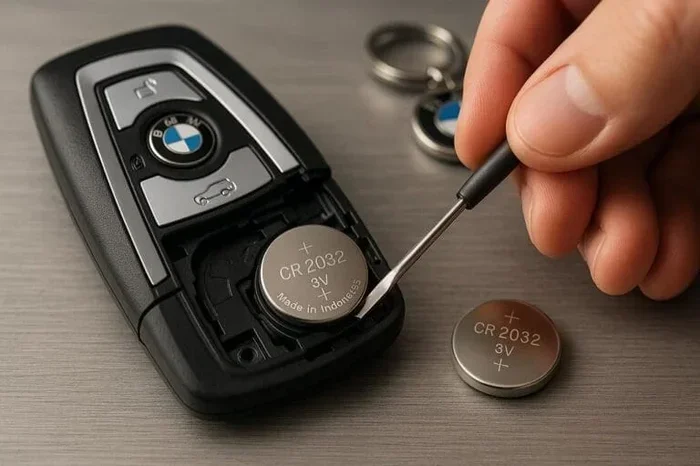
What Is the Difference Between CR2016 and CR2032 Key Fobs
The CR2016 and CR2032 are both coin cell batteries used in car key fobs, but they differ in thickness, capacity, and compatibility. The CR2016 is thinner at 1.6mm while the CR2032 is thicker at 3.2mm, and the CR2032 holds nearly double the energy. Using the wrong battery can damage your key fob remote or cause it to stop working entirely. This guide helps you choose the right battery replacement for your vehicle with clear comparisons and practical tips.
Have you ever stood in front of a shelf of batteries, staring at tiny labels like CR2016 and CR2032, wondering what on earth the difference is? You are not alone. These little coin cell batteries power some of the most important devices in our daily lives, including our car key fob remotes. When your key fob suddenly stops working, the last thing you want is to grab the wrong battery and make the problem worse.
The CR2016 and CR2032 key fob batteries look almost identical at first glance. They are both silver, both round, and both carry the same voltage. But beneath the surface, they are quite different in ways that directly affect how your key fob performs. In this article, we break down every difference in simple terms so you can make the right choice every time.
Whether you are a DIY person who loves fixing things yourself or someone who just wants a quick answer, this guide has you covered. We will walk through size differences, capacity, compatibility, and step-by-step replacement tips. By the end, you will know exactly which battery replacement your car key fob needs.
Key Takeaways
- Different Thickness: The CR2016 is 1.6mm thick while the CR2032 is 3.2mm thick, making them non-interchangeable in most fobs.
- Capacity Gap: The CR2032 offers roughly 220mAh compared to the CR2016’s 90mAh, meaning it lasts much longer.
- Voltage Is the Same: Both batteries deliver 3 volts, so your fob will power on with either one.
- Wrong Battery = Problems: Forcing a CR2032 into a CR2016 slot can crack the fob casing or damage internal electronics.
- Check Your Manual: Always confirm your key fob battery size before purchasing a replacement.
- Replacement Is Easy: Swapping a key fob battery takes under two minutes with no tools in most cases.
- Brand Matters: Trusted brands like Energizer, Duracell, and Panasonic offer reliable coin cell battery options.
📑 Table of Contents
- What Are CR2016 and CR2032 Key Fob Batteries?
- CR2016 vs CR2032: Head-to-Head Comparison
- How to Tell Which Battery Your Key Fob Needs
- Step-by-Step Guide to Replacing Your Key Fob Battery
- Common Mistakes When Replacing Key Fob Batteries
- Expert Tips for Extending Key Fob Battery Life
- Can You Use a CR2032 Instead of a CR2016?
- Where to Buy Quality CR2016 and CR2032 Batteries
- Key Takeaways
- Conclusion
What Are CR2016 and CR2032 Key Fob Batteries?
Both the CR2016 and CR2032 belong to a family of batteries called lithium coin cells. The “CR” stands for lithium manganese dioxide chemistry, which is a reliable and long-lasting power source. The numbers after “CR” tell you the physical dimensions of the battery.
What Does the Number Mean?
Here is a simple way to remember it. The first two digits represent the diameter in millimeters. Both the CR2016 and CR2032 have a 20mm diameter. The last two digits tell you the thickness. So the CR2016 is 1.6mm thick, and the CR2032 is 3.2mm thick. That one-millimeter difference in naming translates to a full millimeter difference in actual thickness, which is huge when it comes to fitting inside a key fob.
These button cell batteries are used in far more than just key fobs. You will find them in watches, calculators, remote controls, and even some medical devices. But for our purposes today, we are focusing on car key fob batteries because that is where most people run into confusion.
CR2016 vs CR2032: Head-to-Head Comparison
Let us get down to the nitty-gritty. How do these two batteries really stack up against each other? The table below gives you a clear side-by-side look at the CR2016 vs CR2032 differences that matter most.
| Feature | CR2016 | CR2032 |
|---|---|---|
| Diameter | 20mm | 20mm |
| Thickness | 1.6mm | 3.2mm |
| Voltage | 3 volts | 3 volts |
| Capacity | 约90mAh | 约220mAh |
| Weight | 约3.0g | 约6.5g |
| Common Uses | Thin key fobs, watches | Car key fobs, remote controls |
| Interchangeable? | Rarely | Rarely |
The most striking difference is capacity. The CR2032 holds more than twice the energy of the CR2016. This means a CR2032 will typically last longer before needing a replacement. For car owners, that translates to fewer battery swaps and less hassle overall.
However, capacity is not the only factor. The thickness of the CR2032 makes it physically too large for fobs designed for the slimmer CR2016. Forcing a thicker battery into a tight space can crack the plastic housing or push against the circuit board inside. That is why matching the right key fob battery size to your specific fob model is so important.
How to Tell Which Battery Your Key Fob Needs
Figuring out which battery your car key fob uses is easier than you might think. You do not need to be a mechanic or a tech expert. A few simple steps will get you the answer in minutes.
Step 1: Check the Owner Manual
Your car owner manual is the first place to look. Most manufacturers list the battery type under the key fob or remote entry section. If you have lost the manual, do not worry. You have other options.
Step 2: Look at the Old Battery
If your key fob is still accessible, pop open the back cover and take out the old battery. The label on the battery will clearly say CR2016 or CR2032. Use a magnifying glass if the text is tiny. This is the most accurate method because you are reading the actual part number.
Step 3: Search Online
A quick search for your car make, model, and year plus the words “key fob battery type” will bring up the answer. Many online retailers also list compatible battery sizes in the product description for replacement key fob batteries.
Step 4: Consult a Dealer or Locksmith
If you are still unsure, visit your car dealer or a local locksmith. They can identify the correct battery in seconds. Some auto parts stores will also help you find the right coin cell battery for your fob.
Quick Tip: Always write down the battery type once you find it. Keep a note in your phone or on a small card in your glove box. This saves time the next time you need a battery replacement.
Step-by-Step Guide to Replacing Your Key Fob Battery
Replacing a key fob battery is one of the easiest car maintenance tasks you can do at home. It takes less than two minutes and costs just a few dollars. Here is how to do it right.
What You Will Need
- The correct replacement battery (CR2016 or CR2032)
- A small flathead screwdriver or a coin
- A clean, dry workspace
Step 1: Open the Key Fob
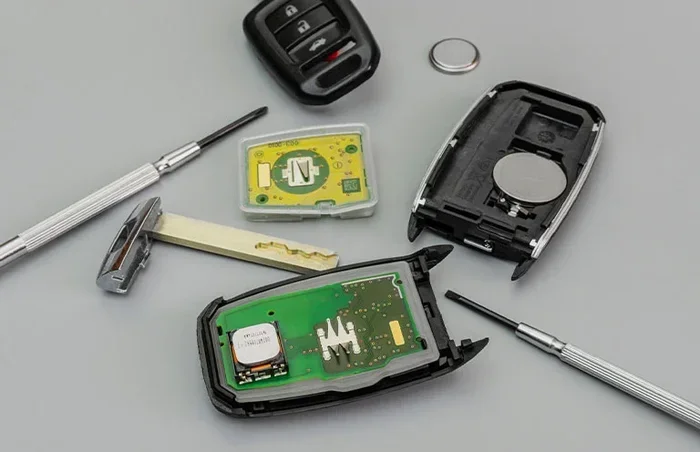
Most key fobs have a small seam running along the edge. Insert your screwdriver or coin into the groove and gently twist. The fob should pop open. Be careful not to use too much force. If it does not open easily, double-check that you are using the right tool and the right spot.
Step 2: Remove the Old Battery
Look at how the old battery sits inside. Note which side faces up. Most fobs have the positive side facing up. Use a non-metallic tool like a plastic spudger to gently pry the battery out. Avoid using metal tools because they can short-circuit the fob’s electronics.
Step 3: Insert the New Battery
Place the new battery in the same orientation as the old one. The positive side should face up in most designs. Push it gently into place until it clicks or sits snugly. Make sure it is not loose or tilted.
Step 4: Test the Fob
Snap the fob back together and stand near your car. Press the lock and unlock buttons. If the doors respond, you are all set. If nothing happens, open the fob again and check the battery orientation. A simple flip can fix the problem.
Expert Insight: Always handle the new battery with clean, dry hands. Oils and moisture from your skin can reduce the life of a lithium battery. If possible, use a tissue or gloves when touching the battery.
Common Mistakes When Replacing Key Fob Batteries
Replacing a key fob battery seems simple, but small mistakes can cause big headaches. Here are the most common errors people make and how to avoid them.
Using the Wrong Battery Type
This is the number one mistake. People grab a CR2032 because it is more common and cheaper, only to find out their fob needs a CR2016. The reverse happens too. Always double-check before you buy. Putting a thicker battery into a slim fob can damage the internal components and void your warranty.
Ignoring Battery Orientation
The positive and negative sides matter. Inserting the battery backward will not damage the fob in most cases, but it will not work either. Always match the orientation of the old battery when installing the new one.
Using Cheap or Counterfeit Batteries
Not all button cell batteries are created equal. Off-brand batteries from unknown sellers may have lower capacity and shorter life spans. Stick with trusted brands like Energizer, Duracell, Panasonic, or Eveready. A quality lithium battery costs only a dollar or two more but lasts significantly longer.
Forcing the Fob Closed
If the fob does not snap shut easily after replacing the battery, something is wrong. The battery may be inserted at the wrong angle, or a small plastic tab may be misaligned. Forcing it closed can crack the casing and expose the electronics to dust and moisture.
Touching the Battery Contacts with Metal Tools
Using a metal screwdriver to pry out the old battery can create a short circuit. This may fry the fob’s circuit board, turning a simple battery swap into an expensive repair. Always use plastic or non-conductive tools.
Expert Tips for Extending Key Fob Battery Life
Once you have replaced your key fob battery, you probably want it to last as long as possible. Here are some practical tips that help extend battery life and keep your remote working smoothly.
Keep the Fob Away from Other Electronics
Storing your key fob near other electronic devices can cause signal interference and drain the battery faster. Keep it in a dedicated pocket or pouch, away from phones, tablets, and laptops.
Avoid Extreme Temperatures
Hot cars in summer and freezing cars in winter are tough on coin cell batteries. Extreme heat can cause the battery to leak, while extreme cold reduces its output. Try to keep your fob in a temperate environment whenever possible.
Do Not Press Buttons Unnecessarily
Every button press uses a small amount of energy. Some people habitually press the lock or unlock button when they do not need to. Being mindful of when you use the fob can add weeks or even months to battery life.
Remove the Battery During Long Storage
If you have a spare key fob that you rarely use, take the battery out. A battery left inside an unused fob can leak over time and cause corrosion. When you need it again, just pop in a fresh one.
Clean the Battery Contacts
Over time, a thin layer of oxidation can build up on the battery contacts inside the fob. Use a dry cotton swab to gently clean the metal contacts before inserting a new battery. This ensures a strong connection and consistent performance.
Quick Tip: When you buy a new pack of CR2032 batteries or CR2016 batteries, write the purchase date on the package with a marker. This helps you track how long each battery lasts and plan replacements ahead of time.
Can You Use a CR2032 Instead of a CR2016?
This is the question we get asked the most, and the answer is not a simple yes or no. In some rare cases, a CR2032 can physically fit into a fob designed for a CR2016 if the fob has extra internal space. However, this is uncommon. Most key fobs are built to exact specifications, and the CR2032 will simply not fit or will press too hard against the circuit board.
Even if the CR2032 somehow fits, the extra thickness can push against sensitive components. Over time, this pressure can cause cracks in the solder joints or damage the battery contacts. The risk is simply not worth taking. Always use the battery size recommended by your car manufacturer.
On the flip side, using a CR2016 in a fob designed for a CR2032 is also a bad idea. The CR2016 is too thin, which means it will not make proper contact with the battery terminals. Your fob will either work intermittently or not at all. The connection will be loose, and the battery may shift around inside the fob casing.
Bottom line: Do not substitute one for the other. Match the exact battery model to your key fob for the best performance and safety.
Where to Buy Quality CR2016 and CR2032 Batteries
You can find both CR2016 and CR2032 batteries at most grocery stores, drugstores, and auto parts shops. But not all retailers carry high-quality options. Here are some reliable places to buy them.
- Amazon: Wide selection and fast shipping. Look for batteries sold by trusted brands with good reviews.
- Walmart and Target: Carry Energizer and Duracell coin cells in the electronics or watch battery aisle.
- Auto Parts Stores: Stores like AutoZone and O’Reilly often carry key fob batteries and can help you find the right fit.
- Online Retailers: Battery specialty websites often sell multi-packs at a lower cost per battery.
When shopping, look for batteries that are fresh and have a long expiration date. Battery freshness matters because old stock may already be partially drained. A quality lithium battery from a reputable brand will give you the best value and performance.
Key Takeaways
- Size Matters: The CR2016 is thinner than the CR2032, and they are not interchangeable in most key fobs.
- Capacity Difference: The CR2032 provides more than double the battery life of the CR2016.
- Same Voltage: Both batteries deliver 3 volts, so your fob will power up with either one if it fits.
- Always Match the Model: Using the wrong battery can damage your fob or cause it to malfunction.
- Replacement Is Simple: Swapping a key fob battery is a quick, easy DIY task anyone can do.
- Brand Quality Counts: Stick with trusted brands to get the best performance from your coin cell battery.
Conclusion
Understanding the difference between a CR2016 and CR2032 key fob battery is one of those small bits of knowledge that saves you time, money, and frustration. The two batteries share the same diameter and voltage, but their thickness and capacity set them apart in meaningful ways. Choosing the right one ensures your car key remote works reliably for months or even years.
Remember to always check your fob model before buying a replacement. Match the exact battery type, use quality brands, and follow the simple replacement steps we outlined. These small habits go a long way in keeping your key fob running smoothly.
The next time your key fob not working situation comes up, you will know exactly what to do. Grab the right battery replacement, swap it out in seconds, and get back on the road with confidence. A little knowledge about CR2016 and CR2032 batteries goes a long way toward keeping your car key fob in top shape.
Frequently Asked Questions
Can I use a CR2032 instead of a CR2016 in my key fob?
No, you should not. The CR2032 is twice as thick as the CR2016 and will likely not fit inside a fob designed for the thinner battery. Forcing it in can damage the fob casing or internal electronics. Always use the battery size specified by your car manufacturer.
How long does a CR2032 battery last in a key fob?
A CR2032 battery typically lasts between two and five years in a car key fob, depending on how often you use the remote. Frequent button presses and extreme temperatures can shorten the lifespan. In contrast, a CR2016 usually lasts one to three years due to its lower capacity.
What happens if I put the battery in backward?
If you insert the battery in the wrong orientation, your key fob will not work. Simply open the fob again, flip the battery over, and reinsert it with the positive side facing up. This will not damage the fob as long as you do not leave it in the wrong position for a long time.
Are CR2016 and CR2032 batteries interchangeable with CR2025?
No, they are not interchangeable. The CR2025 has a thickness of 2.5mm, which is different from both the CR2016 and CR2032. Each battery size is designed for specific devices. Always confirm the exact model number before purchasing a replacement.
Where can I find the battery type for my car key fob?
Check your car owner manual first. If you do not have it, look at the old battery inside the fob, search online for your car make and model, or visit a dealer or locksmith. Most auto parts stores can also help you identify the correct key fob battery size.
What is the difference between CR2016 and CR2032 in terms of voltage?
There is no voltage difference. Both the CR2016 and CR2032 deliver 3 volts. The difference lies in their thickness and capacity. The CR2016 is thinner and has lower capacity, while the CR2032 is thicker and holds more energy. Always match the correct model to your fob for proper fit and performance.
=== CONCLUSION ===
The difference between CR2016 and CR2032 key fobs comes down to thickness, capacity, and physical fit. The CR2016 is a slim 1.6mm battery ideal for compact fobs, while the CR2032 is a thicker 3.2mm battery with nearly double the staying power. Both deliver 3 volts, but they are not interchangeable. Using the correct battery protects your fob and keeps your car remote working reliably.
Take a moment right now to check which battery your key fob uses. Write it down, keep it in your phone, and share it with a family member. This small step can save you from an inconvenient situation when your fob battery dies unexpectedly. With the right CR2016 or CR2032 battery in hand, a quick replacement takes less than two minutes and keeps you connected to your vehicle every day.