What If My Key Fob Dies And I Cannot Start My Car Today
A dead key fob can leave you stranded, but it doesn’t have to ruin your day. When your key fob battery dies, you still have several ways to start your car and get back on the road. This guide covers everything from emergency start methods to replacing the battery yourself, so you’re never stuck wondering what to do next.
This is a comprehensive guide about What If My Key Fob Dies?.
Key Takeaways
- Most cars have a backup start method: Even with a dead key fob, you can usually start your vehicle by pressing the button on the key itself or placing it near the start sensor.
- A key fob battery costs under $5: Replacing the CR2032 or CR2025 battery is cheap and takes just a few minutes at home.
- Watch for early warning signs: Reduced range, weak signal, and flickering lights on the fob tell you the battery is dying before it fully dies.
- Keep a spare key handy: Having a backup key fob or mechanical key in your glove box saves you from a lot of stress.
- Know your car’s specific system: Every make and model handles a dead fob differently, so check your owner’s manual for the exact steps.
- Prevent future problems: Simple habits like replacing the battery every two years and avoiding moisture can keep your key fob working reliably.
[FEATURED_IMAGE_PLACEHOLDER]
There’s nothing more frustrating than standing next to your car, pressing the button on your key fob, and hearing nothing. You’re late for work, running late for an appointment, or just trying to get home, and suddenly your key fob dies right when you need it most. It’s a moment that catches everyone off guard, and it can turn a simple morning into a real headache.
But here’s the good news. A dead key fob doesn’t mean you’re stuck forever. Most modern vehicles have built-in backup systems that let you start the car even when the remote stops working. Whether it’s a hidden mechanical key, a backup start zone, or a simple battery swap, there’s almost always a way forward. This article walks you through every option so you’re never left guessing.
We’ll cover what causes a key fob to die, how to recognize the warning signs, and exactly what to do when it happens. You’ll learn practical steps you can take right now, plus tips to prevent it from happening again. Let’s get into it.
Why Does a Key Fob Battery Die?
Understanding why your key fob battery dies helps you prepare for it. Key fobs use small coin-cell batteries that power the remote signal and the internal electronics. Over time, these batteries lose their charge and eventually stop working completely.
Common Causes of a Dead Key Fob
Several factors can shorten the life of your key fob battery. Here are the most common reasons:
- Age of the battery: Most key fob batteries last between two and four years. After that, the charge naturally weakens.
- Cold weather: Low temperatures drain batteries faster. If you live in a cold climate, you might notice your fob dying more often in winter.
- Frequent use: If you press the lock or unlock button dozens of times a day, the battery wears out quicker.
- Moisture damage: Water or sweat can get inside the fob and corrode the battery contacts, leading to a dead fob even with a new battery.
- Dropping or impact: A hard fall can damage the internal circuit board, which draws more power and kills the battery faster.
- Signal interference: Sometimes the fob isn’t actually dead, but nearby electronics or metal objects block the signal, making it seem like it won’t work.
Knowing these causes helps you take preventive steps. For example, keeping your fob away from other electronic devices and storing it in a dry place can extend battery life significantly.
Warning Signs Your Key Fob Is About to Die
Most key fobs don’t just stop working out of nowhere. They give you hints first. Catching these early warning signs can save you from an unexpected situation.
Reduced Remote Range
One of the first signs is a shorter working distance. You used to unlock your car from 30 feet away, but now you need to be within five feet. This gradual decrease in key fob range usually means the battery is running low.
Delayed Response
When you press the button, does the car take a second or two to respond? A slow reaction from your remote key fob is a red flag. The fob is struggling to send a strong enough signal to the car’s computer.
Intermittent Function
If the fob works sometimes but not others, the battery is on its last legs. You might notice it works fine in the morning but fails by evening. This inconsistent behavior is a classic sign of a dying battery.
Dashboard Warning Light
Some newer vehicles display a warning light on the dashboard when the key fob battery is low. If you see a key-shaped icon or a battery alert, don’t ignore it. This is your car telling you to replace the fob battery soon.
Clicking Sound Without Action
When you press the lock or unlock button, do you hear a faint clicking sound inside the fob but nothing happens? That clicking means the fob is trying to send a signal, but it doesn’t have enough power to reach the car.
Paying attention to these signs gives you time to replace the battery before you’re left stranded. It’s a simple habit that can save you a lot of trouble.
How to Start Your Car When the Key Fob Dies
This is the part everyone wants to know. What do you actually do when you’re standing next to your car and the key fob not working problem hits? The answer depends on your vehicle’s make and model, but there are several reliable methods that work across most cars.
Method 1: Use the Hidden Mechanical Key
Most modern key fobs contain a hidden mechanical key inside them. You can usually find a small button or slider on the side of the fob that releases a thin metal key. This is your emergency backup.
Look for a small lock cylinder on your driver’s side door handle or under a plastic cover near the door handle. Insert the mechanical key and unlock the door manually. Once inside, you can typically start the car by pressing the push-button start while holding the dead fob right against the start button.
Here’s how it works step by step:
- Find the hidden mechanical key inside your fob.
- Use it to unlock the driver’s door manually.
- Sit in the driver’s seat.
- Place the dead key fob directly against the push-button start or the designated fob reader area.
- Press the start button while keeping the fob in contact with the reader.
- The car should recognize the fob’s internal chip and allow the engine to start.
Method 2: The Backup Start Zone
Many cars with push button start systems have a backup start zone. This is a specific spot on the steering column or center console where you can place the dead fob to start the engine.
For example, some Toyota models require you to place the fob on the start button itself. Some Ford models have a specific area on the steering wheel. Check your owner’s manual to find the exact location for your vehicle. The car’s computer can read the fob’s transponder chip even without a working battery in the fob.
Method 3: Replace the Battery Immediately
If you have a spare CR2032 or CR2025 battery in your glove box, this is the quickest fix. Open the fob, swap out the old battery, and you’re back in business in under two minutes.
Here’s a simple guide to replacing the battery:
- Use a small flathead screwdriver or a coin to pry open the fob case.
- Note the position of the old battery before removing it.
- Insert the new battery with the correct orientation.
- Snap the fob case back together.
- Test the fob by standing near your car and pressing a button.
Method 4: Call for Roadside Assistance
If none of the above methods work, or if you don’t have a spare battery on hand, call for help. Most insurance policies and roadside assistance plans cover lockout situations. You can also contact a local locksmith who specializes in automotive key fob replacement and programming.
How to Replace a Key Fob Battery
Replacing the battery in your key fob is one of the easiest car maintenance tasks you can do. You don’t need any special tools or technical skills. A fresh battery costs just a few dollars, and the whole process takes less than five minutes.
Which Battery Does Your Key Fob Use?
The most common batteries used in key fobs are:
- CR2032: This is the most popular battery size, used by Honda, Toyota, Ford, Chevrolet, and many other brands.
- CR2025: Slightly thinner than the CR2032, used by some BMW, Mercedes, and Volkswagen models.
- CR1632: A smaller battery found in some older or compact key fobs.
Check your owner’s manual or look at the old battery to confirm the correct size. Buying a pack of spare batteries is a smart move. That way, you always have a replacement ready when you need it.
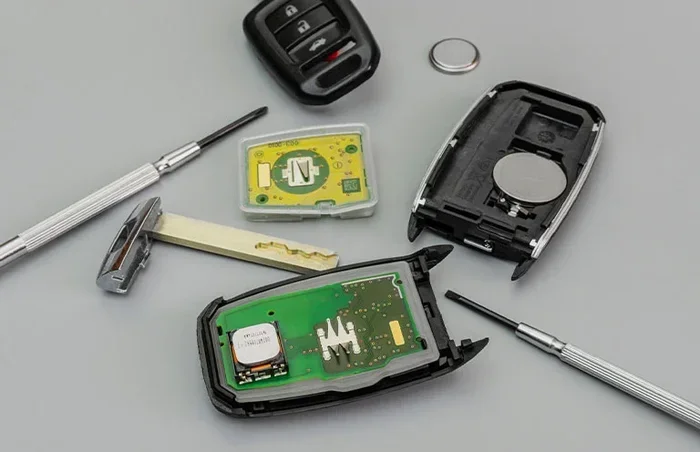
Step-by-Step Battery Replacement
Follow these steps to swap out your dead fob battery with confidence:
- Find the seam: Look for a small crack or line running along the fob casing. This is where the two halves of the fob separate.
- Open the fob: Insert a small flathead screwdriver or a coin into the seam. Gently twist to pop the case open. Be careful not to damage the buttons or circuit board inside.
- Remove the old battery: Use a non-metallic tool like a plastic spudger to push the old battery out. Note which side faces up.
- Insert the new battery: Place the new battery in the same orientation as the old one. The positive side (marked with a +) usually faces up.
- Close the fob: Snap the two halves back together until you hear a click.
- Test it: Stand near your car and press the lock or unlock button to confirm it works.
That’s it. You just saved yourself a trip to the dealership and a potentially expensive service call.
What to Do If the Key Fob Still Won’t Work After Battery Replacement
Sometimes you swap in a brand-new battery, and the fob still doesn’t work. This can be confusing, but it usually has a simple explanation. Let’s look at what to check when the key fob not working problem continues after a battery change.
Check the Battery Orientation
This is the most common mistake. The battery might be inserted upside down. Double-check that the positive and negative sides match the markings inside the fob compartment.
Clean the Battery Contacts
Over time, corrosion can build up on the battery contacts inside the fob. Use a cotton swab dipped in white vinegar or rubbing alcohol to gently clean the metal contacts. Let them dry completely before inserting the new battery.
Reprogram the Key Fob
In rare cases, replacing the battery can reset the fob’s programming. You may need to reprogram it according to your vehicle’s specific steps. Most owner’s manuals include reprogramming instructions. The process usually involves turning the ignition on and off a certain number of times while pressing buttons on the fob.
Check for Water Damage
If the fob has been exposed to moisture, the internal electronics might be damaged. Look for signs of rust or corrosion on the circuit board. If water damage is the issue, you may need a key fob replacement rather than just a new battery.
When to Get a New Key Fob
If the fob is physically damaged, the buttons are worn out, or the internal chip is faulty, it’s time for a replacement. You can order a new fob from your car’s dealership or purchase an aftermarket fob online. Some locksmiths also offer fob programming services at a lower cost than dealerships.
How to Prevent Key Fob Battery Problems
Prevention is always better than dealing with a dead fob at the worst possible moment. A few simple habits can keep your smart key system working reliably for years.
Replace the Battery on a Schedule
Don’t wait for the fob to die. Set a reminder every two years to replace the battery, even if it still seems to work. This proactive approach ensures you never get caught off guard.
Store the Fob Properly
Keep your fob away from strong magnetic fields and electronic devices that might interfere with the signal. Don’t toss it in a drawer with other metal objects. A small pouch or the built-in fob slot in your bag works well for storage.
Avoid Moisture Exposure
Keep your fob dry at all times. Don’t leave it in the bathroom, near the kitchen sink, or anywhere it might get wet. If it does get wet, dry it thoroughly and check the contacts for corrosion.
Carry a Spare Battery
Keep a spare CR2032 battery in your glove box, wallet, or car kit. This tiny precaution can save you from a major inconvenience if the fob dies unexpectedly.
Know Your Car’s Backup System
Take five minutes to read the relevant section of your owner’s manual about what to do when the key fob battery is dead. Knowing the backup start procedure ahead of time means you won’t have to figure it out in a stressful moment.
Expert Insights on Key Fob Reliability
Automotive experts agree that key fob maintenance is one of the most overlooked aspects of car care. A simple battery swap every two years can prevent countless headaches. Industry professionals also recommend keeping your transponder key programming up to date and testing the fob’s signal strength periodically.
According to automotive technicians, the most common mistake drivers make is ignoring early warning signs. By the time the fob completely stops working, many people have already missed several opportunities to replace the battery proactively. Staying ahead of the problem keeps you driving without interruption.
Another expert tip is to always have a physical backup key available. Even in the age of smart key systems, a traditional mechanical key can be a lifesaver. Store it in a safe but accessible location, like a small lockbox in your trunk or a secondary fob in your bag.
Key Takeaways
- A dead key fob doesn’t mean you can’t drive: Most cars have backup start methods like a hidden mechanical key or a fob placement zone on the push-button start.
- Battery replacement is quick and cheap: A CR2032 or CR2025 battery costs just a few dollars and takes minutes to swap.
- Watch for warning signs: Reduced range, delayed response, and intermittent function tell you the battery is dying before it fully fails.
- Keep a spare battery on hand: Storing a spare CR2032 in your glove box eliminates the stress of a dead fob.
- Know your car’s specific system: Every vehicle handles a dead fob differently, so familiarize yourself with your car’s backup procedure.
- Prevent future issues: Regular battery replacement, proper storage, and avoiding moisture exposure keep your key fob working reliably.
Conclusion
A dead key fob is one of those small car problems that can feel like a big deal in the moment. But with the right knowledge, it’s a situation you can handle quickly and confidently. Whether you use the hidden mechanical key, place the fob on the backup start zone, or simply swap in a new battery, you have options.
The key is preparation. When you understand how your key fob system works and know what to do when it fails, you turn a potential crisis into a minor inconvenience. Keep spare batteries handy, learn your car’s backup start procedure, and pay attention to those early warning signs.
Your key fob is a small device that plays a huge role in your daily driving experience. Taking care of it with a simple battery replacement every couple of years keeps everything running smoothly. And if it does die unexpectedly, you now know exactly what to do. Drive safe, stay prepared, and never let a dead fob slow you down.
Frequently Asked Questions
Can I start my car with a completely dead key fob?
Yes, in most cases you can. Modern vehicles with push-button start systems have a backup method that lets you start the car even when the fob battery is dead. You typically need to place the dead fob directly against the start button or a designated reader area. The car’s computer reads the internal transponder chip and allows the engine to start.
How much does it cost to replace a key fob battery?
A key fob battery costs between $1 and $5 for a standard CR2032 or CR2025 battery. You can buy them at any grocery store, pharmacy, or auto parts shop. If you replace the battery yourself, you save the cost of a service visit entirely.
What type of battery does my key fob use?
Most key fobs use a CR2032 battery, but some models use CR2025 or CR1632. Check your owner’s manual or look at the old battery to confirm the correct size before purchasing a replacement.
How often should I replace my key fob battery?
Most key fob batteries last between two and four years. Replacing the battery every two years on a schedule is a good preventive habit. This ensures you never deal with a dead fob at an inconvenient time.
What should I do if my key fob stops working after replacing the battery?
First, check that the battery is inserted with the correct orientation. Clean the battery contacts with a cotton swab and rubbing alcohol. If the fob still doesn’t work, you may need to reprogram it or the fob might have internal water damage or a faulty circuit board that needs replacement.
Can a locksmith help with a dead key fob?
Yes, a locksmith can help with key fob battery replacement, reprogramming, and full fob replacement. Many locksmiths offer mobile services and can come to your location, which is especially helpful if you’re stranded somewhere.