Pioneer Mixtrax Car Stereo The Complete Buying Guide
The Pioneer Mixtrax car stereo is a popular aftermarket audio system known for its sleek design and powerful sound. This complete buying guide covers key features, models, installation steps, and expert tips to help you choose the right unit. Whether you want Bluetooth connectivity, USB playback, or seamless smartphone integration, the Mixtrax line delivers reliable car audio performance at an affordable price.
If you are looking to upgrade your vehicle’s audio system, the Pioneer Mixtrax car stereo should be on your shortlist. These units combine modern technology with user-friendly design, making them a favorite among car audio enthusiasts. But with so many options available, how do you know which one is right for you?
This guide walks you through everything you need to know. From key features and model comparisons to installation tips and common mistakes, we have you covered. By the end, you will feel confident choosing the perfect Pioneer Mixtrax receiver for your ride.
The Pioneer brand has been a leader in car audio for decades. Their Mixtrax line specifically targets drivers who want premium sound without the premium price tag. Whether you drive a compact sedan or a full-size truck, there is a Mixtrax model that fits your needs. Let us dive in and explore what makes these stereos stand out.
Key Takeaways
- Wide Model Range: Pioneer offers multiple Mixtrax models to fit different budgets and vehicle types.
- Bluetooth and Smartphone Integration: Most Mixtrax units support wireless streaming, hands-free calls, and app connectivity.
- Easy Installation: With the right dash kit and wiring harness, most users can install a Pioneer Mixtrax car stereo in under an hour.
- Solid Sound Quality: Built-in amplifiers and customizable EQ settings deliver clear, powerful audio.
- Affordable Pricing: Pioneer Mixtrax stereos offer excellent value compared to competing brands.
- Vehicle Compatibility Matters: Always check your vehicle’s dash size and wiring setup before purchasing.
- Regular Updates Help: Firmware updates and proper maintenance keep your stereo running smoothly for years.
📑 Table of Contents
- What Is a Pioneer Mixtrax Car Stereo?
- Key Features of Pioneer Mixtrax Models
- Popular Pioneer Mixtrax Models Compared
- How to Choose the Right Pioneer Mixtrax for Your Vehicle
- Installation Tips for Your Pioneer Mixtrax Car Stereo
- Common Mistakes to Avoid with Pioneer Mixtrax Stereos
- Expert Tips for Getting the Best Sound from Your Pioneer Mixtrax
- Why Choose a Pioneer Mixtrax Car Stereo?
- Conclusion
What Is a Pioneer Mixtrax Car Stereo?
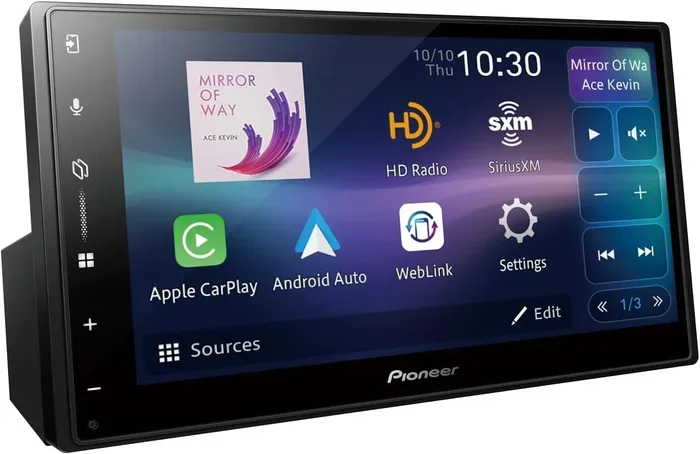
A Pioneer Mixtrax car stereo is an aftermarket receiver designed to replace your factory-installed audio unit. These stereos come packed with modern features like Bluetooth connectivity, USB ports, and auxiliary inputs. They also support smartphone integration through apps like Apple CarPlay and Android Auto on select models.
What sets the Mixtrax line apart is its balance of affordability and functionality. You get many of the same features found in higher-end brands, but at a more accessible price point. Pioneer has built a strong reputation for producing reliable car audio equipment that lasts.
The Mixtrax series includes single-DIN and double-DIN formats. Single-DIN units fit smaller dash spaces, while double-DIN models offer larger screens and more features. Knowing which format your vehicle supports is the first step in your buying journey.
Who Makes Pioneer Stereos?
Pioneer Corporation is a Japanese electronics company founded in 1938. They specialize in audio and video equipment, and their car audio division is one of the most respected in the industry. Pioneer has been manufacturing car stereos since the 1980s, and the Mixtrax line represents their mid-range offering.
Key Features of Pioneer Mixtrax Models
When shopping for a Pioneer Mixtrax car stereo, you will notice several standout features across the lineup. Let us break down the most important ones.
Bluetooth Connectivity
Almost every Mixtrax model includes Bluetooth capability. This lets you stream music wirelessly from your phone. You can also take hands-free calls through the stereo’s built-in microphone. Bluetooth 5.0 offers a more stable connection and better range on newer models.
Some units also support Bluetooth audio streaming for multiple devices. This means passengers can take turns playing their favorite playlists without reconnecting. It is a small feature that makes a big difference on road trips.
USB and Auxiliary Inputs
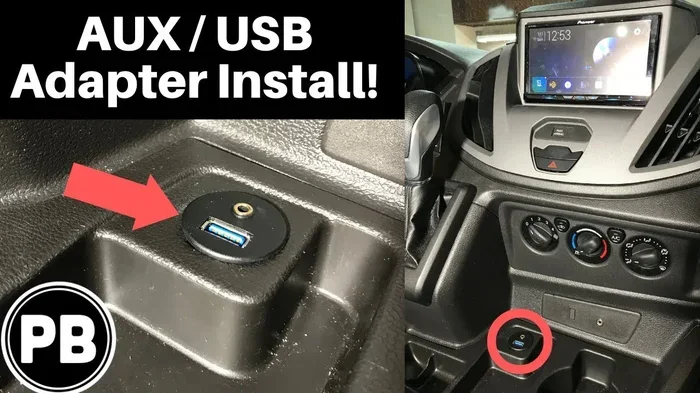
Not everyone wants to go wireless. That is why Pioneer includes USB ports and auxiliary inputs on nearly every Mixtrax unit. You can plug in a flash drive loaded with music or connect an older device with a standard aux cable.
USB ports also allow you to charge your phone while driving. This is especially useful for long commutes or road trips where battery life matters. Look for models with at least one USB port up front and another in the back for maximum convenience.
Built-In Amplifier
Many budget car stereos skimp on amplification. Not the Pioneer Mixtrax. These units come with built-in amplifiers that deliver clean, powerful sound. You do not need to buy a separate amplifier to get good volume and clarity.
The amplifier power varies by model, but most Mixtrax units output between 20 and 50 watts per channel. This is enough to drive a set of quality speakers without straining the system. If you want even more bass, some models include a built-in subwoofer output.
Equalizer and Sound Settings
Pioneer includes a graphic equalizer on most Mixtrax models. This lets you customize the sound to your personal preference. You can boost the bass, sharpen the treble, or adjust the midrange frequencies.
Some models also offer preset sound modes like “Rock,” “Jazz,” and “Pop.” These presets optimize the audio settings for different music genres with a single tap. Taking a few minutes to tweak your EQ settings can make a huge difference in sound quality.
Steering Wheel Controls
One feature that is easy to overlook but incredibly useful is steering wheel control compatibility. Pioneer Mixtrax stereos support steering wheel audio controls on most vehicles. This means you can change tracks or adjust volume without taking your hands off the wheel.
You may need a wiring adapter to enable this feature. Check your vehicle’s compatibility before purchasing. Steering wheel controls add a layer of safety and convenience that factory stereos often lack.
Popular Pioneer Mixtrax Models Compared
The Pioneer Mixtrax lineup includes several models, each with different features and price points. Here is a quick comparison of the most popular options.
| Model | Screen Size | Bluetooth | USB Ports | Power Output | Price Range |
|---|---|---|---|---|---|
| Mixtrax SPH-DA110 | 6.2 inch | Yes | 1 front, 1 back | 50W x 4 | $200 – $250 |
| Mixtrax SPH-DA120 | 6.2 inch | Yes | 1 front, 1 back | 50W x 4 | $250 – $300 |
| Mixtrax SPH-DA210 | 7 inch | Yes | 2 front | 50W x 4 | $300 – $350 |
| Mixtrax SPH-CA10 | 6.2 inch | Yes | 1 front | 20W x 4 | $150 – $180 |
The SPH-DA110 is the most popular entry-level model. It offers solid features at an affordable price. The SPH-DA210 adds a larger screen and extra USB port for users who want more connectivity. Choose the model that best fits your budget and vehicle needs.
How to Choose the Right Pioneer Mixtrax for Your Vehicle
Not all car stereos fit every vehicle. Before you buy a Pioneer Mixtrax car stereo, consider these factors.
Check Your Dash Size
First, determine whether your vehicle uses a single-DIN or double-DIN dash slot. Single-DIN units are smaller and fit compact dash spaces. Double-DIN units are taller and offer larger screens and more features.
You can check your vehicle’s manual or measure the dash opening yourself. A standard single-DIN unit is about 2 inches tall, while a double-DIN unit is about 4 inches tall. Measuring before you buy saves time and frustration during installation.
Consider Your Vehicle’s Wiring
Different vehicles have different wiring configurations. Some cars have factory amplifiers that require a specific wiring harness. Others may need an adapter to keep features like steering wheel controls and backup cameras working.
Pioneer sells vehicle-specific wiring harnesses and dash kits. These make the installation process much smoother. Always check compatibility before ordering your stereo. A quick search online with your vehicle make and model will tell you exactly what you need.
Think About Your Audio Needs
What do you want from your car audio system? If you mostly listen to FM radio and podcasts, a basic Mixtrax model will work great. If you stream music from Spotify or Apple Music, prioritize Bluetooth and USB connectivity.
For audiophiles who want premium sound, look for models with higher wattage output and better DAC converters. Matching your stereo to your listening habits ensures you get the most value for your money.
Installation Tips for Your Pioneer Mixtrax Car Stereo
Installing a Pioneer Mixtrax car stereo is easier than most people think. With the right tools and a little patience, you can do it yourself in about an hour. Here is how to get started.
What You Will Need
- Pioneer Mixtrax stereo unit
- Vehicle-specific dash kit
- Vehicle-specific wiring harness
- Screwdriver set
- Wire stripper and crimping tool
- Trim removal tools
Step-by-Step Installation
Start by disconnecting your vehicle’s battery. This is a safety precaution that prevents electrical shorts. Use a wrench to loosen the negative terminal and set it aside.
Next, remove your factory stereo. Use trim removal tools to carefully pry off the dashboard bezels. Unscrew the mounting brackets that hold the factory unit in place. Gently pull the stereo out and disconnect the wiring.
Now, connect your new Pioneer Mixtrax wiring harness to your vehicle’s wiring. Match the colors and use crimp connectors to secure each wire. Plug in the antenna cable and any other accessories like a backup camera feed.
Slide the new stereo into the dash kit. Secure it with the mounting screws. Reconnect your battery and power on the unit. Test all features including Bluetooth, USB, radio, and steering wheel controls before finishing the installation.
When to Hire a Professional
While DIY installation is doable, some situations call for a professional. If your vehicle has a complex dash layout or factory amplifier integration, a pro can save you headaches. Professional installation typically costs between $50 and $150 depending on your location.
Common Mistakes to Avoid with Pioneer Mixtrax Stereos
Even with a straightforward installation like this, people make mistakes. Here are the most common ones and how to avoid them.
Skipping the Dash Kit
Some buyers skip the dash kit to save money. This is a mistake. Without a proper dash kit, your stereo will not sit flush in the dash. It can rattle while driving and look unsightly. A dash kit costs around $15 to $30 and makes a huge difference in the final look.
Using the Wrong Wiring Harness
Using a generic wiring harness instead of a vehicle-specific one can cause compatibility issues. You may lose steering wheel controls or encounter flickering displays. Always purchase the wiring harness designed for your specific vehicle.
Ignoring Firmware Updates
Pioneer releases firmware updates that improve performance and fix bugs. Many users never update their stereo after installation. Check the Pioneer website periodically for updates. Updating your firmware takes just a few minutes and can resolve many common issues.
Overlooking Speaker Quality
A great stereo cannot fully shine with poor speakers. Many factory speakers are low quality and distort at higher volumes. Consider upgrading your speakers when you install your new Pioneer Mixtrax unit. Good speakers paired with a quality stereo create a truly impressive sound system.
Expert Tips for Getting the Best Sound from Your Pioneer Mixtrax
Once your Pioneer Mixtrax car stereo is installed, you can fine-tune the audio for the best listening experience. Here are some expert tips.
Position Your Speakers Correctly
Speaker placement affects sound quality more than most people realize. Front speakers should aim toward the listeners’ ears. If you have rear speakers, angle them slightly toward the back seat. Proper speaker placement creates a balanced, immersive soundstage inside your vehicle.
Use High-Quality Audio Files
Streaming services compress audio files to save data. This reduces sound quality. Whenever possible, use lossless audio files stored on a USB drive or streamed via a high-quality Bluetooth codec. Your ears will notice the difference, especially on familiar songs.
Set Your EQ to Your Vehicle’s Acoustics
Every car interior has different acoustic properties. Small cars tend to have more bass resonance, while larger vehicles can sound hollow. Adjust your equalizer settings to compensate for your vehicle’s unique sound environment. Take a few drives with different EQ settings to find what sounds best.
Keep Your Software Updated
Pioneer regularly releases software updates that improve Bluetooth connectivity and audio processing. Check the Pioneer app or website for the latest updates. Keeping your stereo’s software current ensures you always have the best performance.
Why Choose a Pioneer Mixtrax Car Stereo?
The Pioneer Mixtrax car stereo offers a compelling combination of features, quality, and value. Here is why so many drivers choose Pioneer for their car audio upgrade.
First, Pioneer has decades of experience in car audio engineering. They understand what makes a stereo sound great and work reliably. The Mixtrax line reflects this expertise in every model.
Second, the price point is hard to beat. You get Bluetooth, USB connectivity, built-in amplification, and customizable sound settings at a cost that fits most budgets. Compared to competing brands like Sony, Kenwood, and Alpine, Pioneer Mixtrax stereos offer excellent value.
Third, the installation process is straightforward. Pioneer provides detailed instructions and vehicle-specific accessories that make DIY installation a realistic option. Even if you hire a professional, the widespread availability of Mixtrax parts means installers can work quickly and efficiently.
Finally, Pioneer stands behind their products with solid warranties and customer support. If you ever run into issues, help is just a phone call or email away. This level of after-sales support gives buyers confidence in their purchase.
Conclusion
The Pioneer Mixtrax car stereo is an excellent choice for anyone looking to upgrade their vehicle’s audio system. With a wide range of models, modern features, and affordable pricing, there is a Mixtrax unit for nearly every driver. From Bluetooth streaming and USB connectivity to built-in amplifiers and customizable EQ settings, these stereos deliver impressive performance.
Remember to check your vehicle’s compatibility before buying. Invest in the right dash kit and wiring harness for a clean installation. And do not forget to fine-tune your sound settings once everything is in place. Taking these steps ensures you get the best possible experience from your new Pioneer Mixtrax stereo.
Whether you are a casual listener or a car audio enthusiast, the Pioneer Mixtrax line has something to offer. Take your time, compare the models, and choose the one that fits your needs best. Your ears will thank you every time you hit the road.
Frequently Asked Questions
What makes the Pioneer Mixtrax car stereo different from other brands?
The Pioneer Mixtrax car stereo stands out for its balance of affordability and feature-rich design. You get Bluetooth connectivity, built-in amplification, and customizable sound settings at a price point that competes well with brands like Sony and Kenwood. Pioneer’s decades of car audio experience also mean reliable build quality and solid customer support.
Can I install a Pioneer Mixtrax car stereo myself?
Yes, most people can install a Pioneer Mixtrax car stereo themselves with basic tools. You will need a vehicle-specific dash kit and wiring harness, which make the process much easier. The installation typically takes about one to two hours for someone with moderate DIY experience.
Does the Pioneer Mixtrax support Apple CarPlay and Android Auto?
Some newer Pioneer Mixtrax models support Apple CarPlay and Android Auto, but not all of them. Check the specific model’s specifications before purchasing if smartphone integration is important to you. Models like the SPH-DA120 and SPH-DA210 offer these features on select versions.
How do I connect my phone to a Pioneer Mixtrax car stereo via Bluetooth?
Connecting your phone via Bluetooth is simple. Go to the Bluetooth settings on your Pioneer Mixtrax car stereo and select “Search for Devices.” On your phone, turn on Bluetooth and look for the stereo’s name in the available devices list. Once paired, you can stream music and make hands-free calls.
What should I do if my Pioneer Mixtrax stereo has no sound?
If your Pioneer Mixtrax car stereo has no sound, first check that the volume is turned up and not muted. Verify that your speakers are properly connected and that the wiring harness is secure. Also check the EQ settings to make sure nothing is set to zero. If the issue persists, consult the user manual or contact Pioneer customer support.
How long does a Pioneer Mixtrax car stereo last?
With proper care and maintenance, a Pioneer Mixtrax car stereo can last 5 to 10 years or more. Keeping the firmware updated, using quality audio sources, and avoiding extreme temperatures all contribute to a longer lifespan. Pioneer’s solid build quality means these stereos are built to withstand daily driving conditions.