Reset the Service Due Light on Your 2017 Toyota Highlander
Resetting the service due light on a 2017 Toyota Highlander is a quick and easy process you can do at home. The service due light reminds you when maintenance is coming up, and clearing it after an oil change or service keeps your dashboard clean. This guide walks you through the exact steps using the steering wheel controls and trip meter.
The service due light on your 2017 Toyota Highlander is one of those dashboard reminders that catches you off guard. It pops up at the worst time, and suddenly you are wondering what it means and how to make it go away. The good news is that resetting this light is something you can handle yourself in just a few minutes.
Whether you just finished an oil change or you are preparing for scheduled maintenance, knowing how to clear the service indicator saves you a trip to the dealer. This guide covers every step in detail. You will learn the exact button sequence, what to do if the light keeps coming back, and how to avoid common mistakes. Let us get into it.
Key Takeaways
- Simple Process: You can reset the service light in under five minutes using the steering wheel buttons and trip meter.
- No Tools Needed: The reset procedure requires no special equipment or dealership visit.
- Post-Service Step: Always reset the light after completing maintenance to keep track of your service intervals.
- Avoid Common Mistakes: Don’t skip the holding step or reset before service is actually completed.
- Same Vehicle Family: The process is similar to other Toyota models, including the Highlander VSC light reset and Camry maintenance procedures.
- Check Your Manual: Refer to the owner’s manual for model-specific details if the steps don’t match.
📑 Table of Contents
- What Is the Service Due Light on a 2017 Toyota Highlander?
- Tools and Preparation You Will Need
- Step-by-Step Guide to Reset the Service Due Light
- What If the Service Light Keeps Coming Back?
- How Often Does the 2017 Toyota Highlander Need Service?
- Common Mistakes to Avoid When Resetting the Service Light
- How This Compares to Other Toyota Models
- When to Visit a Professional
- Final Thoughts
What Is the Service Due Light on a 2017 Toyota Highlander?
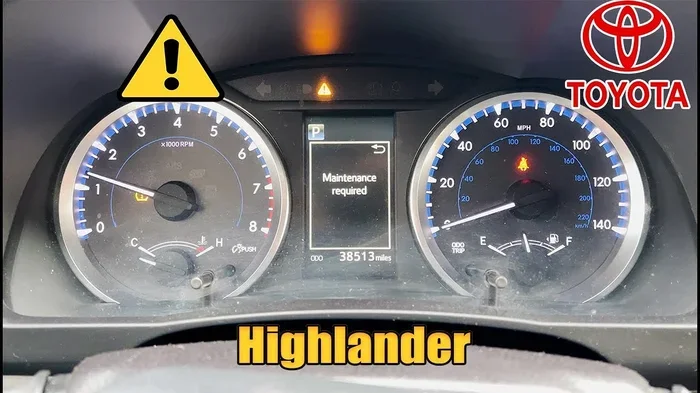
The service due light is a maintenance reminder. It appears on your dashboard display to tell you that your vehicle is due for routine service. This could be an oil change, tire rotation, or another scheduled maintenance task based on mileage or time.
The light is part of the Toyota maintenance system. It tracks your driving habits and mileage to estimate when the next service is needed. When the interval is reached, the system activates the reminder. It is not a warning of a mechanical problem. It is simply a nudge to keep your vehicle in good shape.
Why Does the Service Light Come On?
Several things trigger the service due light on a 2017 Toyota Highlander:
- Mileage interval reached: The system counts miles since the last reset.
- Time interval passed: Some services are time-based, not just mileage-based.
- Oil life depletion: The oil life monitor tracks oil condition and usage.
- Pending maintenance: The system may flag upcoming services before they are due.
Understanding why the light is on helps you know exactly what maintenance your Highlander needs. If you just had service done, the light simply needs to be cleared. If it came on unexpectedly, it may be time to schedule a check-up.
Tools and Preparation You Will Need
Here is the good news. You do not need any special tools to reset the service due light. Everything you need is already in your vehicle. Before you start, make sure you have the following ready:
- Your 2017 Toyota Highlander ignition key or push-start button
- The steering wheel control buttons (up, down, OK, and menu)
- A few minutes of your time
- Your owner’s manual for reference, just in case
It helps to do this reset right after you have completed your service. That way the mileage and service date are fresh. If you are resetting after an oil change, make sure the oil is topped off and the vehicle is parked safely.
Quick Tip
Keep your owner’s manual in the glove box. If you ever run into a reset procedure that does not match what you find online, the manual will have the official step-by-step instructions for your specific model year.
Step-by-Step Guide to Reset the Service Due Light
Follow these steps carefully to reset the maintenance reminder on your 2017 Toyota Highlander. The process uses the steering wheel controls and the trip meter display.
Step 1: Turn the Ignition to ON
Press the start/stop button without pressing the brake pedal. The dashboard lights will come on, but the engine will not start. You only need the electrical system to be active. The display screen should light up and show the main menu or the trip meter.
If your Highlander has a traditional key, turn the ignition to the ON position without starting the engine. Either method puts the vehicle in the right mode for the reset procedure.
Step 2: Press the Trip Button
Locate the trip button on the steering wheel or the dashboard controls. Press it repeatedly until the trip meter display shows the odometer reading. The odometer shows your total mileage, which is what the service system uses to track the maintenance interval.
You may need to cycle through a few display options. Keep pressing until you see the full odometer number. This confirms you are in the right mode.
Step 3: Hold the Reset Button
Now press and hold the trip reset button. Keep holding it for about ten seconds. The display will start to flash. This flashing means the system is ready to accept the reset command.
While still holding the button, release it briefly, then hold it again for another few seconds. The odometer reading should return to zero or show a confirmation message. This clears the maintenance reminder.
Step 4: Turn the Ignition Off and Back On
Turn the ignition off. Wait a few seconds. Then turn it back on to ON mode. Check the dashboard display. The service due light should no longer be visible. If it is gone, you have successfully completed the reset.
If the light is still showing, repeat the process. Sometimes it takes two attempts, especially if the system was showing a pending service notice.
Step 5: Verify the Reset
Drive the vehicle for a few minutes. Watch the dashboard display. If the service due light stays off, the reset was successful. The maintenance reminder has been cleared and the system will begin tracking the next service interval from zero.
If the light comes back on shortly after, there may be an underlying maintenance issue the system detected. In that case, you should visit a service center to address the root cause.
What If the Service Light Keeps Coming Back?
Sometimes the service due light returns even after you reset it. This can be frustrating, but it usually has a simple explanation. Here are the most common reasons the light keeps coming back on your 2017 Toyota Highlander.
You Did Not Complete the Service
If you reset the light before actually performing the maintenance, the system will eventually trigger it again. The Toyota maintenance system tracks oil life and mileage. If the oil has not been changed or the service has not been done, the light will return.
Always complete the maintenance first, then reset the light. This ensures the system starts fresh and the reminder does not pop back up too soon.
There Is a Deeper System Issue
In rare cases, a persistent service light may indicate a deeper issue. The vehicle’s computer may have detected a problem that needs attention. If the light keeps returning after multiple resets, it is worth having a diagnostic scan performed.
A Toyota dealership or qualified mechanic can run a diagnostic check. They will read any error codes stored in the system. This helps identify hidden issues that the dashboard alone cannot show.
The Battery Was Disconnected
If your battery was recently disconnected or died, the service light may not reset properly. The system loses its memory when power is interrupted. After reconnecting the battery, try the reset procedure again. The system should respond normally once it has power.
How Often Does the 2017 Toyota Highlander Need Service?
Understanding your service schedule helps you stay ahead of the maintenance light. The 2017 Toyota Highlander follows Toyota’s recommended maintenance intervals. Here is a general overview of what to expect.
| Service Interval | What Is Done | Typical Mileage |
|---|---|---|
| Oil Change | Engine oil and filter replacement | Every 5,000-10,000 miles |
| Tire Rotation | Tires rotated for even wear | Every 5,000-7,500 miles |
| Brake Inspection | Brake pads, rotors, and fluid checked | Every 15,000-30,000 miles |
| Major Service | Full inspection, fluid flush, filter replacement | Every 30,000-60,000 miles |
| Timing Belt | Inspection or replacement | Every 60,000-100,000 miles |
Your actual service schedule may vary based on driving conditions. Stop-and-go city driving, towing, and extreme temperatures can shorten intervals. Always check your owner’s manual for the specific maintenance plan for your Highlander.
Quick Tip
Keep a service log in your glove box. Write down every oil change, tire rotation, and major service. This makes it easy to track your maintenance history and know exactly when the next service is due. It also helps if you ever sell the vehicle, since a well-documented service history adds value.
Common Mistakes to Avoid When Resetting the Service Light
Resetting the service due light is straightforward, but small mistakes can cause problems. Here are the most common errors people make, and how to avoid them.
- Resetting before service is done: This clears the reminder but does not fix the actual maintenance need. The light will return.
- Not holding the button long enough: The system requires a firm ten-second hold. Releasing too early cancels the reset.
- Starting the engine during the process: Keep the engine off during the reset. Starting it can interrupt the sequence.
- Using the wrong button: Make sure you are pressing the trip reset button, not the cruise control or volume button.
- Ignoring the light after multiple resets: If the light keeps returning, something is wrong. Do not just keep resetting it. Get the vehicle checked.
Avoiding these mistakes saves time and prevents frustration. A clean reset means the light stays off until the next service interval truly arrives.
How This Compares to Other Toyota Models
The reset process for the 2017 Toyota Highlander is very similar to other Toyota models. If you own a Camry, the procedure for resetting the maintenance light follows the same general steps. The steering wheel controls and trip meter method is used across the Toyota lineup.
For example, if you have ever dealt with a check engine light on a Camry, you know how similar the dashboard controls work. The same goes for warning lights like the VSC indicator on a Highlander. Once you learn the reset process for one Toyota, you can apply it to many others.
Toyota designs their vehicles with a consistent user interface. This makes life easier for owners who drive multiple Toyotas or switch models over time. The core reset procedure stays the same even if the menu layout changes slightly between years.
It is also worth noting that if you are dealing with other warning lights, the same general approach applies. Lights like the check engine indicator may sometimes turn off on their own once the underlying issue is resolved. Understanding how these systems work gives you more confidence as a vehicle owner.
When to Visit a Professional
Most of the time, resetting the service due light is a DIY job. But there are situations where professional help is the right call.
Visit a Toyota dealership or certified mechanic if:
- The service light returns immediately after a proper reset
- You see multiple warning lights on the dashboard at once
- The check engine light is also illuminated
- You notice unusual sounds, vibrations, or performance issues
- The reset procedure does not work after two attempts
A professional has access to diagnostic tools that can read error codes and identify hidden problems. They can also perform the service your Highlander needs and clear the light properly. Sometimes what looks like a simple reset issue is actually a signal that maintenance is overdue or a component needs attention.
Regular professional service keeps your 2017 Toyota Highlander running smoothly for years. It also ensures that all maintenance is documented, which protects your warranty and preserves the vehicle’s resale value.
Final Thoughts
Resetting the service due light on your 2017 Toyota Highlander is one of those simple maintenance tasks that every owner should know. It takes just a few minutes, requires no special tools, and keeps your dashboard clean and informative. The key is to follow the steps in order, hold the button long enough, and always reset after the actual service is completed.
Staying on top of your maintenance schedule is the best way to keep your Highlander in excellent condition. The service due light is there to help you stay on track. When it comes on, take it as a friendly reminder to give your vehicle the care it needs. And now that you know exactly how to reset it, you can handle the process with confidence every single time.
Keep this guide handy for the next time the light appears. Share it with fellow Highlander owners who might be wondering the same thing. A well-maintained Toyota Highlander is a reliable Highlander, and knowing how to manage your service reminders is a big part of that.
Frequently Asked Questions
Can I drive my 2017 Toyota Highlander with the service due light on?
Yes, you can safely drive your Highlander with the service due light on. The light is a maintenance reminder, not a safety warning. However, it is best to schedule service soon to keep your vehicle in optimal condition and avoid potential issues down the road.
How often does the service due light reset on a Toyota Highlander?
The service due light resets every time you complete a scheduled service and manually clear the reminder. The system tracks mileage and oil life, so the light will come back when the next maintenance interval is reached, typically every 5,000 to 10,000 miles depending on driving conditions.
What is the difference between the service due light and the check engine light?
The service due light is a routine maintenance reminder for scheduled services like oil changes. The check engine light signals a potential mechanical or electrical issue that needs diagnosis. They serve different purposes, and the reset procedures are also different.
Do I need to visit a dealership to reset the service light?
No, you do not need to visit a dealership. The reset process can be done at home using the steering wheel controls and trip meter. The steps are the same whether you are at home or at a service center. However, if the light keeps returning, a professional diagnostic may be needed.
Will resetting the service light clear any error codes stored in the system?
No, resetting the service due light only clears the maintenance reminder. It does not erase diagnostic error codes. Error codes require a professional scan tool to read and clear. If your check engine light is on, the service light reset will not address that issue.
Can I reset the service light myself or do I need a mechanic?
You can absolutely reset the service light yourself. The process is designed to be user-friendly and does not require any special equipment or mechanical knowledge. Just follow the step-by-step instructions in this guide, and you will have it done in minutes.
=== CONCLUSION ===
Resetting the service due light on your 2017 Toyota Highlander is a simple skill every owner should have. The process is fast, free, and does not require a trip to the dealership. By following the steps outlined in this guide, you can clear the maintenance reminder yourself and keep your dashboard looking clean.
Remember to always reset the light after completing your service. This keeps the system tracking accurately and ensures the next reminder comes at the right time. Avoid the common mistakes we covered, and do not ignore the light if it keeps returning. Your Highlander will reward you with reliable performance for miles to come.