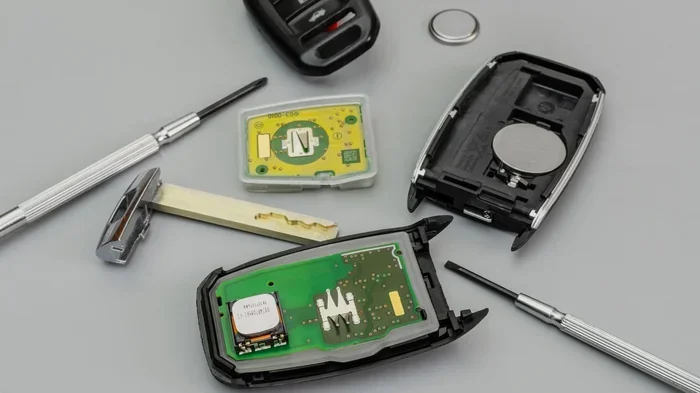
Why Is My Key Fob Not Working With New Batteries
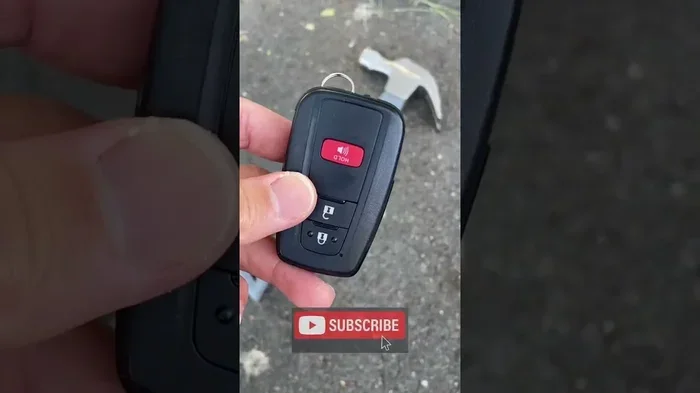
Finding that your key fob is not working with new batteries can be frustrating. The issue is more common than most drivers realize, and it usually has a simple explanation. From improper battery installation to signal interference, several factors can cause your remote to fail even after a fresh set. This guide walks you through every possible reason and gives you practical, step-by-step solutions. By the end, you will know exactly how to fix the problem and prevent it from happening again.
You just popped open your key fob, slid in a shiny new battery, and closed it up. You press the button. Nothing happens. You press it again. Still nothing. Your heart sinks. You did everything right, or so you thought.
This situation happens to car owners more often than you might expect. A key fob not working with new batteries is a surprisingly common problem. The good news is that the fix is usually simple. Most of the time, it is something you can solve in under five minutes without visiting a mechanic.
In this article, we will explore every reason your key fob is not working with new batteries. We will cover battery installation mistakes, signal problems, internal damage, and much more. You will also find practical troubleshooting steps and expert tips to keep your remote working smoothly for years to come.
Key Takeaways
- Wrong battery orientation or type is the most common reason a key fob fails after a battery swap.
- Signal interference from other electronics or metal objects can block your remote from reaching the car.
- A corroded or dirty battery contact can prevent power from flowing even with brand-new batteries.
- Water or moisture damage may have harmed the internal circuit board beyond just the battery.
- Reprogramming may be needed after a battery change, especially for newer vehicle models.
- Knowing when to seek professional help saves time and money compared to guessing at fixes.
- Regular maintenance extends key fob life and prevents unexpected failures.
📑 Table of Contents
- Why Your Key Fob Stops Working Even With New Batteries
- How to Troubleshoot Your Key Fob Step by Step
- When to Replace the Entire Key Fob
- Preventing Key Fob Problems in the Future
- Common Mistakes People Make With Key Fob Batteries
- Expert Insights on Key Fob Maintenance
- Key Fob Battery Types and Their Lifespan
- How to Test If Your New Battery Is Good
- When to Seek Professional Help
- Frequently Asked Questions
- Final Thoughts
Why Your Key Fob Stops Working Even With New Batteries
It is easy to assume the problem is the battery itself. But most of the time, the battery is fine. The real issue lies somewhere else in the key fob system. Understanding this shifts your troubleshooting in the right direction immediately.
Let us look at the most common reasons your remote key fob not working after a battery change. Each one is simpler to fix than you might think.
1. Incorrect Battery Orientation
This is the number one cause. The positive and negative sides of the battery must face the correct direction inside the fob. If the battery sits in backward, the fob simply will not power on. Check the tiny markings inside the battery compartment. The plus side should face up in most models, but some fobs require a different orientation.
Take a moment to compare the old battery position with the new one. Even a small difference matters. A CR2032 battery is the most common type used in modern key fobs, but always double-check your owner manual for the exact specification.
2. Using the Wrong Battery Type
Not all batteries are the same. Some fobs need a CR2025 instead of a CR2032. The difference is only a millimeter or two, but that tiny gap can prevent a proper connection. Using a generic or off-brand battery can also cause issues. Name-brand batteries like Energizer or Duracell tend to deliver more consistent power output.
When you buy replacement batteries, match the exact model number printed on the old battery. This small step saves a lot of frustration.
3. Dirty or Corroded Battery Contacts
Over time, the metal contacts inside your key fob can collect dust, grime, or a white-greenish residue from battery leakage. This buildup blocks the electrical connection between the battery and the circuit board. Even a brand-new battery cannot send power through a dirty contact point.
Use a dry cotton swab or a soft cloth to gently clean the metal contacts. If you see corrosion, dab a tiny amount of white vinegar on the swab before cleaning. Let the contacts dry completely before inserting the new battery.
4. Water or Moisture Damage
Key fobs are not fully waterproof. Rain, spills, or even high humidity can seep inside the fob housing. Moisture can short out the circuit board or corrode internal components. If your fob has been dropped in water or exposed to heavy rain, the problem may go deeper than the battery.
If you suspect water damage, remove the battery immediately and let the fob air dry for at least 24 hours. A silica gel packet placed inside the fob can help absorb trapped moisture faster.
5. Signal Interference
Your key fob communicates with your car using a radio frequency signal. Other electronic devices, metal objects, or even crowded parking structures can block or weaken that signal. If you are standing near a cell tower, a microwave, or a large metal structure, your fob might not reach the car receiver.
Try moving to an open area away from buildings and electronics. Stand right next to the car door and press the button again. If it works from a different spot, interference was the culprit.
6. The Fob Needs Reprogramming
Some vehicles require you to reprogram the key fob after a battery replacement. This is especially true for newer car models with advanced security systems. The car and the fob use a synchronized pairing that can sometimes reset during a battery change.
Reprogramming steps vary by vehicle make and model. Most owner manuals include detailed instructions. In many cases, you simply sit in the car, insert the key into the ignition, and follow a specific sequence of button presses on the fob and the ignition.
7. The Circuit Board Is Damaged
If none of the above fixes work, the internal circuit board may be damaged. Drops, impacts, or general wear and tear can break tiny solder points or damage the chip inside the fob. A damaged circuit board means the fob cannot function regardless of how fresh the battery is.
In this case, you have two options. You can buy a replacement fob and have it programmed at a dealership or locksmith. Or, if you are handy with small electronics, you can attempt to repair the board yourself. For most people, a replacement is the safer and more reliable choice.
How to Troubleshoot Your Key Fob Step by Step
When your key fob not working after battery change, a systematic approach helps you find the fix quickly. Follow these steps in order.
- Check the battery orientation. Open the fob and confirm the plus and minus sides match the compartment markings.
- Verify the battery type. Match the model number exactly to what the fob requires.
- Clean the contacts. Use a dry or lightly dampened cloth to wipe the metal connectors inside the fob.
- Test the fob from different distances. Stand right next to the car and try again. Then step back ten feet and try.
- Move away from interference. Go to an open area away from buildings, electronics, and large metal objects.
- Try the physical key. Most key fobs have a hidden mechanical key blade. Use it to manually unlock the door. If the door unlocks, the fob electronics are the issue, not the lock mechanism.
- Reprogram the fob. Follow the reprogramming steps in your vehicle owner manual.
- Replace the fob if needed. If nothing works, the internal components may be damaged beyond repair.
This troubleshooting sequence covers the vast majority of key fob remote not working issues. Start from the top and work your way down. Most people find the solution within the first three or four steps.
When to Replace the Entire Key Fob
Sometimes, replacing the battery is not enough. Knowing when to invest in a new fob saves you time and prevents repeated frustration. Here are clear signs that a replacement is the better option.
If you have tried every troubleshooting step and the fob still does not respond, the internal electronics have likely failed. Visible damage to the fob casing, such as cracks or bent pins, also points toward needing a full replacement. Water damage that does not resolve after drying is another strong indicator.
Additionally, if your car model is older and the fob is no longer supported, finding compatible replacement parts may be difficult. In these situations, upgrading to a newer fob model can actually improve your overall experience with features like longer range and better battery life.
The cost of a replacement fob varies widely. Basic models range from $20 to $50. More advanced fobs with smart key features can cost $100 to $300 or more. Programming fees at a dealership may add another $50 to $100 to the total. However, locksmiths often offer programming services at lower rates.
Preventing Key Fob Problems in the Future
Once you fix the issue, you want to make sure it does not happen again. Prevention is always easier than troubleshooting. A few simple habits can extend the life of your car key fob battery and keep the remote working reliably.
1. Use Quality Batteries
Stick with reputable battery brands. Cheap or expired batteries may seem fine at first but lose charge quickly. Always check the expiration date on the battery package before installing it.
2. Keep the Fob Dry
Avoid exposing your fob to excessive moisture. Do not leave it on the dashboard in direct sunlight during hot summer days. Heat and humidity together can damage internal components over time.
3. Store the Fob Properly
When not in use, keep your fob in a dedicated spot away from other electronics. A small fabric pouch or the glove compartment works well. Avoid tossing it into a junk drawer full of metal keys and coins, which can cause signal interference and physical damage.
4. Replace Batteries Before They Die Completely
Most key fob battery life ranges from two to four years. When you notice the range decreasing or the buttons feeling less responsive, swap the battery proactively. Waiting until the fob stops working entirely means you may get stranded in an inconvenient moment.
5. Handle With Care
Key fobs take a beating from daily use. Dropping them on hard surfaces can loosen internal connections or crack the circuit board. A protective silicone case adds a layer of shock absorption without adding bulk.
Common Mistakes People Make With Key Fob Batteries
Even careful people make mistakes when dealing with key fob batteries. Being aware of these common errors helps you avoid them.
- Touching the battery with bare hands. Oils from your skin can create a weak connection on the battery surface. Use a cloth or gloves when handling batteries.
- Forcing the fob closed. If the fob does not snap together easily, something is inside not seated correctly. Forcing it can crack the housing or damage the circuit board.
- Ignoring the reset button. Some fobs have a small reset pinhole on the back. A paperclip press can sometimes restore function after a battery change.
- Assuming all fobs are the same. Different vehicles use different fob models. What worked for your old car may not apply to your new one.
- Waiting too long to replace both batteries. If your fob uses two batteries, replace both at the same time. A weak battery paired with a new one causes uneven power delivery.
Expert Insights on Key Fob Maintenance
Automotive locksmiths and car care professionals see key fob issues every single day. Their top advice is simple: do not ignore early warning signs.
“The most common mistake we see is people waiting until the fob completely dies before replacing the battery,” says Mark Stevens, a certified automotive locksmith with over fifteen years of experience. “By that point, the fob may have already experienced voltage drops that can affect the internal memory. Replacing the battery at the first sign of weak signal keeps everything running smoothly.”
Another expert tip from professionals is to always carry your physical spare key. Even if your primary fob fails, the hidden mechanical key blade gives you access to the vehicle. Many drivers forget about this backup until they are locked out on the side of the road.
Dealership technicians also recommend keeping a spare fob programmed to your vehicle. If your primary fob fails unexpectedly, having a backup already paired saves you from a stressful situation. It also gives you a working fob to test troubleshooting steps without leaving you locked out.
For those who live in extreme climates, hot or cold temperatures can accelerate battery drain in key fobs. Parking in a garage when possible and keeping the fob in an interior pocket close to your body helps maintain signal strength and battery performance.
Key Fob Battery Types and Their Lifespan
Understanding which battery your fob uses helps you make better purchasing decisions. Here is a quick reference guide for the most common types.
- CR2032: The most widely used key fob battery. Lasts approximately three to four years. Found in most modern car fobs.
- CR2025: Slightly thinner than the CR2032. Common in compact fobs. Lasts about two to three years.
- CR2016: Even thinner and less common. Used in older or smaller fob models. Lasts around two years.
- A23 Battery: A less common rectangular battery found in some older vehicle models. Lasts approximately two to three years.
- SR44 Silver Oxide: Used in some older European car models. Lasts about two years.
Always match the exact battery type to your fob model. Using the wrong type, even if it fits physically, can cause unreliable performance or damage to the internal electronics.
How to Test If Your New Battery Is Good
Not all new batteries are fully charged. Sometimes you install a battery that has been sitting on a shelf for months and it already has a low charge. Here is how to test a new battery before installing it.
- Use a battery tester. A simple digital battery checker costs just a few dollars and tells you the exact voltage of the battery.
- Check the voltage reading. A fresh CR2032 should read 3.0 volts or higher. Anything below 2.8 volts means the battery is weak.
- Try the drop test. Drop the battery from about two inches onto a hard surface. A good battery will bounce once and fall flat. A dead battery will bounce multiple times. This is not a perfect test, but it gives a quick indication.
- Install and test immediately. After placing the new battery in the fob, press a button right away. If the fob responds, the battery is good.
Taking these extra seconds to verify the battery before installation can save you from repeating the whole process twice.
When to Seek Professional Help
Most key fob troubleshooting steps are simple enough for any car owner. But there are times when calling a professional makes sense. If you have tried every step in this guide and the fob still does not work, it is time to seek expert assistance.
A certified locksmith can diagnose internal fob issues that are not visible to the naked eye. They have specialized equipment to test circuit boards, reprogram fobs, and even create new fobs on the spot. Most locksmiths offer mobile services, meaning they come to your location.
Dealerships are another option, especially for newer vehicles with advanced security features. However, dealership service tends to cost more than independent locksmiths. For older vehicles, a locksmith is usually the more affordable choice.
Seek professional help immediately if you notice any of these signs: the fob works intermittently, the car does not recognize the fob at all, or the fob gets hot to the touch when you press buttons. These symptoms suggest deeper electrical issues that need professional diagnosis.
Frequently Asked Questions
Why does my key fob work intermittently after replacing the battery?
Intermittent operation usually points to a loose battery connection or a dirty contact point. Open the fob and reseat the battery, making sure it clicks firmly into place. Clean the metal contacts with a dry cloth. If the problem continues, the circuit board may have a weak solder joint that needs professional repair.
Can I use a rechargeable battery in my key fob?
Most key fobs are designed for single-use disposable batteries. Rechargeable batteries have a slightly lower voltage output, which can cause unreliable performance. Stick with standard alkaline or lithium disposable batteries for the best results.
How do I know which battery my key fob uses?
Check your vehicle owner manual first. You can also look at the old battery you removed and read the model number printed on it. The number will be clearly marked, such as CR2032 or CR2025. Match the replacement to that exact number.
Does cold weather affect key fob battery life?
Yes, cold weather significantly reduces battery performance. Lithium batteries are especially affected by low temperatures. If you live in a cold climate, keep your fob in an interior jacket pocket close to your body to maintain warmth and signal strength.
How much does it cost to reprogram a key fob?
Reprogramming costs vary. Dealerships typically charge between $50 and $200 for fob programming. Independent locksmiths often charge less, usually between $30 and $100. Some reprogramming steps can be done at home using your owner manual, saving you the service fee entirely.
What should I do if my key fob gets wet?
Remove the battery immediately and shake out any excess water. Place the fob in a bowl of uncooked rice or a sealed bag with silica gel packets. Let it dry for at least 24 to 48 hours. Once completely dry, reinsert the battery and test. If the fob still does not work, the circuit board may have sustained permanent damage.
Final Thoughts
A key fob not working with new batteries does not mean you are stuck. Most of the time, the fix is quick and requires nothing more than a simple adjustment. Check the battery orientation, clean the contacts, and rule out signal interference before jumping to bigger conclusions.
Regular maintenance goes a long way in keeping your remote key fob reliable. Use quality batteries, store the fob properly, and replace the battery proactively when you notice weakening signal. These small habits prevent the frustration of a dead fob at the worst possible moment.
If you have tried everything in this guide and your fob still will not work, do not hesitate to reach out to a professional locksmith or your dealership. They have the tools and expertise to handle even the most stubborn key fob issues. Your car key fob is a small device that plays a big role in your daily driving experience. Take care of it, and it will take care of you.
Now that you know exactly what to do when your key fob is not working with new batteries, you can handle the problem confidently the next time it happens. Keep this guide saved for future reference, and share it with a fellow driver who might need it. A working key fob is one of those things you do not appreciate until it stops working, so keep yours in top shape.