How Long Does a Kia Software Update Take to Complete
A Kia software update typically takes between 30 minutes and 2 hours depending on the update size, your model, and whether you visit a Kia dealership or do it at home. Factors like internet speed, vehicle model year, and update type can significantly affect the total time. This guide covers everything you need to know about the Kia software update process and timeline.
Key Takeaways
- Typical Duration: Most Kia software updates take 30 minutes to 2 hours to complete.
- Update Type Matters: Minor patches are faster, while major infotainment or firmware updates take longer.
- Dealership vs. Home: Updates at a Kia dealership may take longer due to inspection steps, but ensure proper installation.
- Internet Speed: A strong Wi-Fi connection significantly reduces download time during the update process.
- Model Year Differences: Newer Kia models with advanced systems may require more time for updates.
- Preparation Is Key: Charging your battery and closing apps beforehand helps the update go smoothly.
📑 Table of Contents
- How Long Does a Kia Software Update Take to Complete
- Understanding the Kia Software Update Process
- Factors That Affect Update Duration
- Kia Software Update at Home vs. at the Dealership
- How to Prepare for a Kia Software Update
- Common Problems and How to Avoid Them
- How Often Should You Update Your Kia Software
- Expert Tips for a Smooth Kia Software Update
- Frequently Asked Questions
- Final Thoughts
How Long Does a Kia Software Update Take to Complete
If you own a Kia, you have probably wondered about Kia software updates. Maybe your dashboard showed a notification, or a friend told you about a new feature available through an update. Either way, the big question is the same: how long does it actually take?
The short answer is that a Kia software update can take anywhere from 30 minutes to 2 hours. But that range is pretty wide, right? The truth is, many factors play a role. Your specific model matters. The type of update matters. Even your internet connection can make a big difference. In this guide, we will break down everything you need to know about the Kia update process. You will learn what to expect, how to prepare, and why some updates take longer than others.
Let us start with the basics. A software update is simply a way for your Kia to get new features, fix bugs, or improve performance. Think of it like updating your phone. You know how your iPhone or Android sometimes prompts you to download a new version? Your Kia works in a similar way. The difference is that a car software update involves more complex systems. These systems control everything from your infotainment screen to your safety features.
So why does the time vary so much? A small patch might only need a quick download and a short restart. A major firmware update Kia car software could require a full system check and multiple reboots. Either way, it is always better to know what you are getting into before you sit down to wait. Let us dive deeper into the details.
Understanding the Kia Software Update Process
Before we talk about timing, it helps to understand what actually happens during a Kia software update. The process is not just one simple download. It involves several steps, and each step takes time. Let us walk through them.
Step 1: Checking for Available Updates
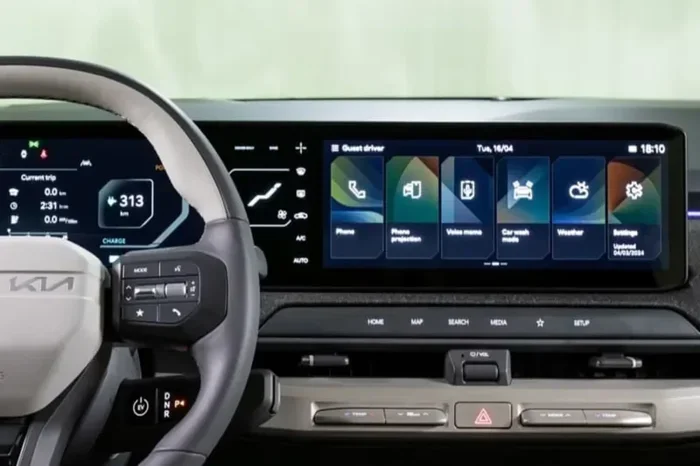
The first step is simple. Your Kia checks for available updates. This usually happens through the infotainment system or a mobile app. Some newer models can even check automatically over Wi-Fi. During this phase, the system scans for any pending Kia firmware update files. This step usually takes just a few minutes.
Step 2: Downloading the Update
Once an update is found, the download begins. This is where internet speed becomes important. If you have a fast Wi-Fi connection, the download can be quick. For larger updates, this step might take 15 to 30 minutes. A Kia infotainment update that includes map data or new media features tends to be larger and takes longer to download.
Step 3: Installing the Update
After the download finishes, the installation begins. This is the most important phase. The system installs the new software files and integrates them into your vehicle’s operating system. During installation, your car will likely restart at least once. You should not interrupt this process. The Kia software installation phase usually takes 10 to 30 minutes.
Step 4: Verification and Final Setup
Once installation is complete, the system verifies that everything is working correctly. It checks for errors and configures new settings. Some updates also download additional content, like updated maps or new apps. This final verification step can add another 5 to 15 minutes to the total time.
Factors That Affect Update Duration
Now that you know the basic steps, let us look at what can make a Kia software update faster or slower. Several key factors come into play.
Type of Update
Not all updates are the same. A minor bug fix might only be a few megabytes. A major Kia electronic update could be several hundred megabytes or even a gigabyte. The bigger the update, the longer it takes to download and install. Here are the common types:
- Minor Patches: These fix small bugs and usually take 15 to 30 minutes total.
- Infotainment Updates: These add new features to your screen and media system. They take 30 to 60 minutes.
- Firmware Updates: These update core vehicle systems. They can take 60 to 120 minutes.
- Map Updates: These refresh your navigation maps. They usually take 20 to 45 minutes.
Your Kia Model and Year
Different Kia models have different systems. A 2024 Kia Sorento with the latest UVO system may process updates differently than a 2019 Kia Optima. Newer models tend to have more advanced software, which can mean longer update times. But they also tend to have faster processors, which can offset that. Here is a quick comparison:
- 2020 and Newer Models: Generally faster update processing due to improved hardware.
- 2015 to 2019 Models: Average update times, may require more manual steps.
- 2014 and Older Models: Some older models may not support over-the-air updates at all.
Internet Connection Speed
Your internet speed directly affects the download phase. A strong Wi-Fi connection at home can make the process much faster. A weak signal at a parking lot or a slow hotspot can drag things out. If you are doing a Kia software download at home, make sure you are connected to a reliable network. If you are at a Kia dealership, their connection is usually fast and stable.
Vehicle Battery Level
This is an important one. Your Kia needs sufficient battery power to complete an update. If the battery drops too low during the process, the update could fail. Most Kia models require at least a 30 to 50 percent charge before starting an update. If your battery is low, the system may pause to charge first, which adds to the total time.
Kia Software Update at Home vs. at the Dealership
You have two main options for getting a Kia software update: at home or at a dealership. Each has its own timeline and benefits. Let us compare them.
Updating at Home
Many newer Kia models support over-the-air updates. This means you can update your car from your driveway. The benefit is convenience. You start the update, go inside, and come back when it is done. The total time depends on your Wi-Fi speed and the update size. For most home updates, plan for about 30 minutes to 2 hours.
One thing to keep in mind: when you update at home, you are responsible for making sure everything goes smoothly. You need a stable connection and enough battery. If something goes wrong, you might need to restart the process.
Updating at the Dealership
When you visit a Kia dealership for a software update, the process is a bit different. The technicians will connect your car to their system and run the update. They also perform a quick inspection of your vehicle while the update is happening. This can add extra time to your visit.
On average, a dealership software update takes 1 to 3 hours total. This includes the time spent waiting, the update itself, and any additional checks the technician performs. If you also need an oil change or other service, you can combine both visits. You might want to check whether dealership warranty covers any labor costs related to the update. Most Kia dealerships handle software updates as part of regular Kia service center visits at no extra charge.
Some owners also ask whether they can take their Kia to any dealership for service. The answer is generally yes for routine updates, but for warranty-related work, it is best to check your specific coverage. You can read more about whether Kia warranty covers different types of service at your local dealer.
How to Prepare for a Kia Software Update
Preparation can make a big difference in how smoothly your Kia software update goes. Follow these simple steps before starting any update on your vehicle.
Charge Your Battery
Make sure your battery is at least 50 percent charged before starting. If possible, plug your car into a charger. This prevents the update from stopping if the battery drops too low. A failed update can cause problems, and you might need to start the whole process over again.
Connect to a Strong Wi-Fi Network
If you are updating at home, use a fast and stable Wi-Fi connection. Avoid public networks or weak signals. A strong connection ensures the Kia software download completes without interruptions. If your home Wi-Fi is slow, consider going to a dealership where they have high-speed connections.
Close Unnecessary Apps and Features
Before starting the update, close any apps running on your infotainment system. Turn off Bluetooth if you are not using it. This frees up system resources and helps the update process run more efficiently. Think of it like closing programs on your computer before installing something new.
Do Not Interrupt the Process
This is critical. Once an update starts, do not turn off the car. Do not disconnect the battery. Do not try to drive away. Interrupting a Kia firmware update can corrupt the software and cause serious issues. If the update takes longer than expected, be patient. Let it finish completely.
Check for Updates Regularly
Do not wait for your car to tell you. Make it a habit to check for updates every few weeks. New updates often include important security patches and performance improvements. Regular updates keep your Kia car software running at its best.
Common Problems and How to Avoid Them
Even with good preparation, sometimes issues come up during a Kia software update. Here are the most common problems and how to handle them.
Update Stuck or Frozen
Sometimes the update screen freezes during installation. This can be scary, but it is not always a serious problem. Wait at least 15 to 20 minutes before taking any action. In most cases, the system just needs more time. If it is still frozen after 30 minutes, you may need to restart the vehicle and try again.
Download Fails Due to Poor Connection
A weak Wi-Fi signal can cause the download to fail. If this happens, move closer to your router or switch to a stronger network. You can also try downloading the update at a dealership where the connection is more reliable.
Insufficient Battery
If your battery is too low, the system will not start the update. Charge your car first and try again. Keeping your battery above 50 percent before any update is a good habit to build.
Update Does Not Appear
Sometimes an update is available but does not show up on your screen. This can happen if your system is not connected to the internet. Check your Wi-Fi settings and make sure your car is online. You can also ask a dealer to check for pending updates using their diagnostic tools.
How Often Should You Update Your Kia Software
There is no single answer to this question. It depends on your driving habits and your model. Most Kia vehicles release updates a few times a year. Some minor patches come out more frequently, while major updates come less often.
As a general rule, check for updates once a month. This keeps your vehicle running smoothly and ensures you have the latest features and security fixes. If you notice any unusual behavior in your car, like slow infotainment response or a warning light, an update might fix the issue. Regular Kia car maintenance includes software updates just like it includes oil changes and tire rotations.
Expert Tips for a Smooth Kia Software Update
Here are some expert-backed tips to make your Kia software update as quick and painless as possible.
- Plan ahead: Start the update when you have plenty of time. Do not begin it 10 minutes before you need to leave the house.
- Overnight updates: Some owners prefer to start updates before bed. This way, the process runs uninterrupted while you sleep.
- Keep your manual handy: Your Kia owner manual has specific instructions for updates. It can help if you run into any issues.
- Talk to your dealer: If you are unsure about anything, call your local Kia dealer. They can walk you through the process step by step.
- Back up your settings: Some infotainment systems allow you to save your preferences before an update. This can save you time reconfiguring things afterward.
Frequently Asked Questions
Can I drive my Kia while a software update is installing?
No, you should not drive your Kia while a software update is installing. The system needs the vehicle to be stationary and powered on to complete the installation safely. Driving during an update can corrupt the software and cause serious problems with your vehicle’s systems. Always wait until the update fully completes and the system confirms it is done.
Is a Kia software update free of charge?
Most Kia software updates are free of charge. Kia typically provides these updates at no cost to the owner, whether you do them at home or at a dealership. However, if you visit a dealership for the update, there may be a service fee depending on your warranty coverage and the type of service performed. It is always a good idea to check with your local dealer beforehand.
What happens if my Kia software update fails?
If a Kia software update fails, do not panic. The system usually prompts you with an error message. You can try restarting the vehicle and attempting the update again. If the problem persists, contact your Kia dealership. Their technicians have specialized tools to diagnose and resolve update failures. In rare cases, the dealership may need to reflash the entire system, but this is uncommon.
Can I skip a Kia software update if I do not need the new features?
Yes, you can skip a software update if you choose to. However, skipping updates means you miss out on important security patches, bug fixes, and performance improvements. Over time, skipped updates can lead to compatibility issues or reduced system performance. It is generally recommended to install updates when they become available to keep your vehicle running at its best.
How do I know if my Kia has a software update available?
Your Kia will typically notify you through the infotainment system when an update is available. You may see a pop-up message or a notification in your settings menu. Some models also send alerts to the Kia mobile app. You can also manually check for updates by going to your settings and selecting the software or system update option. If you are unsure, your Kia dealer can check for you during any service visit.
Does a Kia software update affect my car warranty?
No, a Kia software update does not affect your car warranty. In fact, keeping your software up to date can help maintain your warranty coverage by ensuring all systems are functioning properly. Kia encourages owners to install updates as they become available. If you have concerns about how an update might interact with your warranty, speak with your dealer for specific guidance.
Final Thoughts
A Kia software update is a simple but important part of owning a modern Kia vehicle. Most updates take between 30 minutes and 2 hours, and the exact time depends on the update type, your model, and your internet connection. By following the preparation tips in this guide, you can make the process as smooth as possible.
Remember, keeping your software up to date means better performance, improved safety features, and access to the latest technology. It is one of the easiest ways to care for your car. So the next time your Kia prompts you for an update, do not ignore it. Set aside some time, follow the steps we covered, and enjoy the refreshed experience that comes with a successful Kia software update.
Whether you update at home or visit your local Kia dealership, the key is to be prepared and patient. A little planning goes a long way toward a hassle-free experience. Your Kia will thank you for it.