Learn How To Turn On Forward Collision Avoidance Assist
Forward collision avoidance assist is a life-saving driver assistance feature that helps prevent rear-end crashes. In this guide, you will learn exactly how to turn on forward collision avoidance assist across popular vehicle brands. We cover step-by-step instructions, common issues, and expert tips to help you get the most from your collision warning system and automatic emergency braking setup.
You are driving down the highway. Traffic slows suddenly ahead of you. You are momentarily distracted. But before you even touch the brake pedal, your car begins to slow itself down. That is the power of forward collision avoidance assist at work. This incredible driver assistance system has saved countless lives on roads around the world. Yet many drivers never bother to learn how to activate it. If you have been wondering how to turn on forward collision avoidance assist, you are in the right place.
This guide walks you through everything you need to know. We will cover the basics of what this system does. Then we will give you step-by-step instructions for the most popular car brands. You will also learn about common problems, maintenance tips, and how to get the best results from your active safety features. Whether you drive a Toyota, Honda, Ford, BMW, or another vehicle, this article has you covered. Let us get started.
Key Takeaways
- Easy Activation: Turning on forward collision avoidance assist is usually simple and can be done through your steering wheel controls or infotainment system.
- Brand-Specific Steps: Each car maker has a slightly different process, so we provide instructions for Toyota, Honda, Ford, BMW, and more.
- Sensors Matter: Your radar sensor and camera must be clean and unobstructed for the system to work properly.
- Regular Maintenance: Keeping sensors clean and software updated ensures reliable collision detection performance.
- Safety First: This feature significantly reduces the risk of rear-end accidents and can lower insurance premiums.
- Common Issues Are Fixable: Most problems with forward collision avoidance assist not turning on are easy to diagnose and resolve.
📑 Table of Contents
- What Is Forward Collision Avoidance Assist?
- How to Turn On Forward Collision Avoidance Assist by Vehicle Brand
- The Benefits of Using Forward Collision Avoidance Assist
- Common Issues When Forward Collision Avoidance Assist Won’t Turn On
- Tips for Getting the Most from Forward Collision Avoidance Assist
- Frequently Asked Questions About Forward Collision Avoidance Assist
What Is Forward Collision Avoidance Assist?
Before we dive into the steps, it helps to understand what you are turning on. Forward collision avoidance assist is an advanced safety feature built into modern vehicles. It uses a combination of radar sensors, cameras, and software to monitor the road ahead. When the system detects a potential collision with a vehicle or object in front of you, it warns you. If you do not react in time, it can apply the brakes automatically. This is sometimes called automatic emergency braking or collision mitigation depending on the brand.
The system works in real time. It constantly measures the distance and relative speed between your car and the one ahead. If the gap closes too quickly, the collision detection system kicks in. First, it gives you an audible and visual alert. This is the forward collision warning part. If you still do not brake, the system takes over and applies partial or full braking force. This is the collision avoidance part. Together, these two functions create a powerful layer of road safety protection.
It is important to note that forward collision avoidance assist does not replace safe driving. It is a backup system. It is designed to help you in emergency situations. You should always stay alert and keep your eyes on the road. Think of it as a smart co-pilot that watches the road when you cannot look away for a moment.
How to Turn On Forward Collision Avoidance Assist by Vehicle Brand
Every car maker designs its interface a little differently. The good news is that most vehicles follow a similar pattern. You will usually find the forward collision avoidance assist toggle on the steering wheel or in the dashboard menu. Below, we break down the process for the most popular brands.
Toyota and Lexus
Toyota calls its system Pre-Collision System with Forward Collision Warning. Lexus uses the same technology under a slightly different name. To turn it on in most Toyota and Lexus models:
- Press the SCS (Smart Cruise Control) button on the steering wheel.
- Use the steering wheel arrows to navigate to the Safety Connect or Pre-Collision System menu.
- Select Forward Collision Avoidance Assist and toggle it on.
- You will see a green icon appear on the dashboard display.
Some newer Toyota models let you adjust the sensitivity of the system. You can choose between a low, normal, or high alert level. This is helpful if you find the warnings too frequent or not frequent enough.
Honda and Acura
Honda’s system is called Collision Mitigation Braking System (CMBS). Acura uses the same technology. Here is how to activate it:
- Locate the CMBS button on the steering wheel. It usually has a car icon with lines in front of it.
- Press the button once to toggle the system on.
- Check the instrument cluster for a confirmation message.
- The collision warning indicator light on the dashboard should turn green or white when active.
Honda also allows you to adjust the sensitivity. You can find this setting in the Driver Information Interface under the Vehicle Settings menu. Adjusting the sensitivity can make the system feel more natural for your driving style.
Ford and Lincoln
Ford uses the name Pre-Collision Assist with Automatic Emergency Braking. Lincoln vehicles use a similar system. To turn it on:
- Press the Braking Assist or Pre-Collision button on the steering wheel.
- Navigate through the MyFord Touch or SYNC infotainment screen.
- Go to Driver Assistance settings.
- Toggle Forward Collision Warning and Automatic Emergency Braking to the on position.
Ford vehicles also let you customize the alert timing. You can choose how early the system warns you before applying the brakes. This is a great feature if you want a more gradual or more aggressive response.
BMW and Other Luxury Brands
BMW uses Active Driving Assistance with Forward Collision Warning and Automatic Emergency Braking. Here is the general process:
- Press the Driving Assistance button on the steering wheel.
- Use the iDrive controller or touchscreen to open the Vehicle Settings menu.
- Navigate to Safety and then Forward Collision Avoidance.
- Switch the system from off to on.
- You can also adjust the sensor sensitivity and alert preferences in this menu.
Luxury brands like Mercedes-Benz and Audi follow a similar pattern. Look for the Active Safety or Driver Assistance menu on your infotainment screen. The exact wording may vary, but the general steps remain the same.
The Benefits of Using Forward Collision Avoidance Assist
Now that you know how to turn on forward collision avoidance assist, let us talk about why you should. This feature offers real, measurable benefits for everyday drivers.
Accident Prevention
The most obvious benefit is accident prevention. Studies from the Insurance Institute for Highway Safety show that vehicles equipped with forward collision warning and automatic emergency braking have significantly fewer rear-end crashes. In fact, the collision avoidance system can reduce rear-end accidents by up to 50 percent. That is a staggering number. Every year, rear-end collisions account for a huge percentage of all traffic accidents. By having this system active, you are giving yourself an extra layer of protection that can make all the difference in a split-second situation.
Insurance and Safety Benefits
Many insurance companies now offer discounts for vehicles equipped with active safety features. If you turn on forward collision avoidance assist, you may qualify for a lower premium. Check with your insurance provider to see if your vehicle qualifies. Beyond the financial benefit, these systems give drivers peace of mind. Knowing that your car can help you brake in an emergency makes every drive a little less stressful. This is especially valuable in heavy traffic, bad weather, or when you are feeling tired.
Better Driving Habits
Interestingly, having a collision detection system can actually improve your overall driving habits. The system keeps you more aware of the traffic around you. Over time, you may find yourself maintaining safer following distances and paying closer attention to the road ahead. The driver assistance system acts as a gentle reminder to stay focused. It is a win-win situation for everyone on the road.
Common Issues When Forward Collision Avoidance Assist Won’t Turn On
Sometimes you try to activate the system, and nothing happens. The icon does not show up. The warnings do not come on. This can be frustrating, but it is usually fixable. Let us look at the most common reasons why your forward collision avoidance assist might not be working.
Sensor Problems
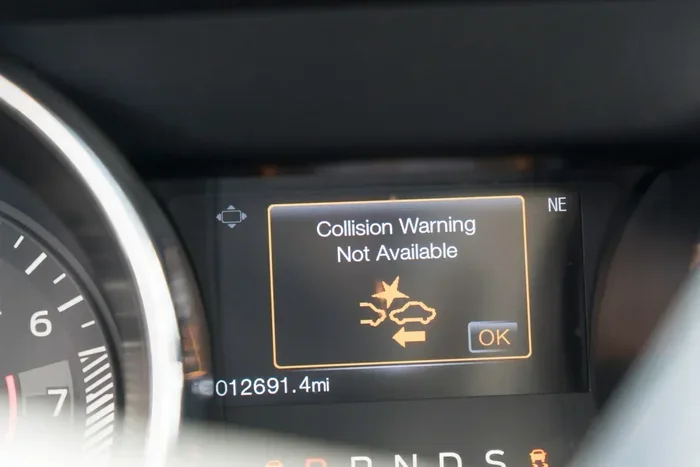
The most common cause is a dirty or obstructed sensor. Your vehicle has a radar sensor typically located behind the front grille or bumper. It also has a camera near the rearview mirror. If either of these is covered in dirt, snow, ice, or debris, the system will not function properly. In most cases, the dashboard will display a warning message telling you that the forward sensing system is unavailable.
Here is a quick fix:
- Clean the front grille and camera area with a soft cloth.
- Remove any snow, ice, or mud from the sensor area.
- Check for any aftermarket accessories that might block the sensor view.
- After cleaning, restart the vehicle and try activating the system again.
Software and Settings Issues
Sometimes the issue is software-related. Your vehicle’s computer may need an update. Or the collision avoidance assist settings may have been accidentally turned off. In some cases, a recent battery disconnect can reset all your driver assistance settings to default (usually off).
If you recently had your battery replaced or jumped, check your driver assistance settings. Go into the infotainment menu and make sure forward collision avoidance assist is toggled on. If the setting is already on and the system still does not work, a visit to the dealership for a software update may be needed.
System Limitations
It is also important to understand that the system has limitations. It does not work at all speeds. Most systems are designed for speeds above 5 mph and below a certain threshold. Extreme weather conditions like heavy rain or fog can also temporarily disable the system. The radar sensor may not perform well in these conditions. This is normal and not necessarily a sign of a malfunction.
Tips for Getting the Most from Forward Collision Avoidance Assist
Once you have successfully turned on forward collision avoidance assist, you want to make sure it works at its best. Here are some practical tips to help you get the most from your safety features.
Maintenance and Care
Keep your sensors clean. Make it a habit to wipe down the front grille and camera area whenever you wash your car. This is a simple step that goes a long way. Also, have your sensors checked during routine maintenance visits. Your mechanic can verify that the radar sensor and camera are aligned correctly and functioning properly.
Driving Habits
Even with the best collision mitigation system, good driving habits matter. Maintain a safe following distance. Avoid sudden stops when possible. Stay alert and avoid distractions. The system is there to help you, not replace your attention. Think of it as a safety net, not a substitute for careful driving.
Software Updates
Keep your vehicle’s software up to date. Car makers regularly release updates that improve the performance of driver assistance systems. These updates can enhance collision detection accuracy, reduce false alerts, and improve overall reliability. Check with your dealership or use your manufacturer’s app to see if updates are available for your vehicle.
Customization
Most vehicles let you customize how the system behaves. You can adjust the alert sensitivity, the braking intensity, and the warning timing. Experiment with these settings to find what works best for you. Some drivers prefer a more sensitive system that warns them earlier. Others prefer a less aggressive setup that only activates in true emergencies. There is no right or wrong answer. It is all about what makes you feel comfortable and safe.
Frequently Asked Questions About Forward Collision Avoidance Assist
Here are answers to some of the most common questions drivers have about this feature.
Can I turn off forward collision avoidance assist if I do not want to use it?
Yes, most vehicles allow you to turn the system off temporarily. However, we strongly recommend keeping it on. The system is designed to help you in emergencies and can significantly reduce the risk of a serious accident. Turning it off removes a layer of protection that could save your life or the life of someone else on the road.
Does forward collision avoidance assist work in all weather conditions?
Not always. Heavy rain, snow, fog, and ice can temporarily affect the sensors. The system may issue a warning that it is unavailable in certain conditions. Once the weather improves, the system should resume normal operation. It is important to drive even more carefully in bad weather, regardless of what safety features your vehicle has.
Will turning on forward collision avoidance assist increase my insurance rates?
No, quite the opposite. Many insurance companies offer discounts for vehicles equipped with active safety features. The collision avoidance system reduces the likelihood of accidents, which is something insurers love. Contact your insurance provider to ask about any available discounts for your vehicle’s safety equipment.
What does it cost to repair the forward collision avoidance assist system?
Repair costs can vary widely depending on the damage and the vehicle. A simple sensor cleaning costs nothing. But replacing a damaged radar sensor or camera can be expensive, sometimes costing several hundred to over a thousand dollars. This is another reason to keep the sensors clean and avoid driving through situations that could damage the front of your vehicle.
Can I add forward collision avoidance assist to an older vehicle?
Some aftermarket solutions exist, but they are not as reliable or integrated as factory-installed systems. If you drive an older vehicle, consider upgrading to a newer model that comes with advanced driver assistance systems built in. The difference in performance and reliability is significant.
Is forward collision avoidance assist the same as adaptive cruise control?
No, they are related but different features. Forward collision avoidance assist focuses on detecting potential collisions and applying brakes. Adaptive cruise control adjusts your vehicle’s speed to maintain a safe following distance. Many modern vehicles offer both features together as part of a comprehensive driver assistance package.
Turning on forward collision avoidance assist is one of the simplest and most impactful things you can do for your safety on the road. Whether you drive a Toyota, Honda, Ford, BMW, or any other modern vehicle, the steps to activate this feature are straightforward. We have covered the brand-specific instructions, the benefits, common issues, and maintenance tips. Now it is your turn to take action. Go to your vehicle, find the forward collision avoidance assist setting, and turn it on. Your future self will thank you. Stay safe, stay alert, and enjoy the peace of mind that comes with knowing your vehicle has your back.