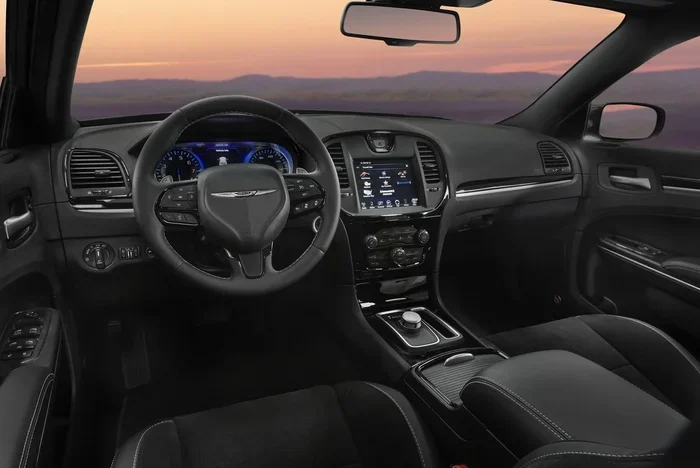
Does the Chrysler 300 Have Apple CarPlay Available
The Chrysler 300 does offer Apple CarPlay on most recent model years, but the availability depends on the trim level and the infotainment system installed. Whether you have a wired or wireless connection depends on the specific package you chose when buying the car. This guide covers everything you need to know about Chrysler 300 Apple CarPlay compatibility, setup, and troubleshooting.
If you own a Chrysler 300 or are thinking about buying one, you probably want to know whether you can use Apple CarPlay. The short answer is yes, but there are some important details you need to understand. Not every Chrysler 300 comes with Apple CarPlay, and the version you get depends on the model year and trim level.
In this guide, we will walk through everything you need to know about Chrysler 300 Apple CarPlay support. We will cover which years have it, how to set it up, what to do if it stops working, and how it compares to other cars in the same class. By the end, you will have a clear picture of what to expect.
Let us start with the basics. Apple CarPlay is a feature that lets you connect your iPhone to your car’s infotainment system. Once connected, you can access your favorite apps, make calls, send messages, and use navigation — all without taking your hands off the wheel. It is a smartphone integration tool designed to keep you safe and connected while driving.
Key Takeaways
- Apple CarPlay is available on the Chrysler 300, but mainly on higher trims with the Uconnect infotainment system.
- Model year matters — older Chrysler 300 models may not support Apple CarPlay at all.
- Wired and wireless options exist depending on the trim level and technology package.
- Setting up Apple CarPlay is straightforward and takes only a few minutes.
- Android Auto is also available on many Chrysler 300 trims, giving you more connectivity options.
- Troubleshooting tips can fix most Apple CarPlay connection issues quickly.
📑 Table of Contents
- What Is Apple CarPlay and Why Does It Matter?
- Which Chrysler 300 Model Years Support Apple CarPlay?
- How to Set Up Apple CarPlay on Your Chrysler 300
- Troubleshooting Common Apple CarPlay Issues
- Apple CarPlay vs. Android Auto on the Chrysler 300
- Does the Chrysler 300 Have Wireless Apple CarPlay?
- Tips for Getting the Most Out of Apple CarPlay in Your Chrysler 300
- Final Thoughts on Chrysler 300 Apple CarPlay
What Is Apple CarPlay and Why Does It Matter?
Apple CarPlay is more than just a fancy name. It is a car connectivity platform that mirrors key functions from your iPhone onto your car’s screen. When you plug in your phone or connect wirelessly, you get access to a simplified, driver-friendly version of your iPhone interface.
How Apple CarPlay Works
Once your phone is connected, the car’s display takes over your iPhone’s interface. You can use Siri for hands-free calling and messaging. You can play music from Spotify, Apple Music, or other supported apps. You can also get directions from Google Maps, Waze, or Apple Maps. The whole point is hands-free car operation that keeps your eyes on the road.
Why Apple CarPlay Is a Big Deal
Most drivers today rely heavily on their smartphones. We use them for navigation, music, and communication every single day. Apple CarPlay bridges the gap between your phone and your car. Instead of fiddling with your device while driving, you can use the car’s built-in screen and controls. This makes driving safer and more convenient.
If you are comparing vehicles, it is worth noting that many competitors now offer Apple CarPlay. For example, the Mitsubishi Outlander and the Mazda CX-30 both offer Apple CarPlay on most trims. The Chrysler 300 holds its own in this area, but the details matter.
Which Chrysler 300 Model Years Support Apple CarPlay?
Not every Chrysler 300 has Apple CarPlay. The feature was introduced to the Chrysler 300 lineup around 2015, but it was not available on every trim. Here is a breakdown of what to expect based on model year.
2015 to 2022 Chrysler 300 Models
The 2015 Chrysler 300 was one of the first years to offer Apple CarPlay, but only on higher trims. The base models came with a basic infotainment system that did not support it. The mid-level and premium trims, especially those with the Uconnect 8.4 system, included Apple CarPlay compatibility. The same applies to the 2016 through 2022 model years.
If you are looking at a used Chrysler 300, you should always check the infotainment system before assuming Apple CarPlay is available. The trim level makes a huge difference. For instance, the base LX trim may not have it, while the 300C or Touring-L trims almost certainly do.
2023 and Newer Chrysler 300 Models
The Chrysler 300 received updates in recent years, and the latest models come with improved tech features. The newer Uconnect systems support both wired Apple CarPlay and wireless Apple CarPlay on select trims. If you are buying a new or recent used Chrysler 300, you can expect Apple CarPlay to be standard on most trims.
It is also worth mentioning that Acura vehicles follow a similar pattern, where Apple CarPlay availability depends on the trim and technology package. The same principle applies to the Chrysler 300.
How to Set Up Apple CarPlay on Your Chrysler 300
Setting up Apple CarPlay on your Chrysler 300 is simple. The process takes less than five minutes, and you do not need any special tools or technical skills. Here is exactly how to do it.
Using a Wired Connection
The wired method is the most common way to connect Apple CarPlay. Follow these steps:
- Locate the USB port in your Chrysler 300. It is usually in the center console or the armrest area.
- Plug one end of a Lightning cable into your iPhone.
- Plug the other end into the USB port.
- The car’s infotainment system should detect your phone automatically.
- Tap the Apple CarPlay icon on the screen to start the connection.
If this is your first time connecting, your iPhone may ask for permission to share data with the car. Tap “Allow” when prompted. After that, the connection should be automatic every time you plug in your phone.
Using a Wireless Connection
Some Chrysler 300 trims support wireless Apple CarPlay, which eliminates the need for cables. Here is how it works:
- Make sure Bluetooth is turned on in your iPhone settings.
- Go to your Chrysler 300’s infotainment system and select the phone or connectivity menu.
- Choose “Add Device” or “Pair New Phone.”
- Select your iPhone from the list of available devices.
- Follow the on-screen prompts to complete the pairing.
Once paired, wireless Apple CarPlay connects automatically whenever you get in the car. It is a huge convenience, especially if you use Apple CarPlay every day.
Quick Tip: If your Chrysler 300 does not support wireless Apple CarPlay, you can buy a wireless CarPlay adapter. These small devices plug into the USB port and create a wireless connection. They are affordable and work well with most cars.
Troubleshooting Common Apple CarPlay Issues
Even though Apple CarPlay is designed to work seamlessly, you may run into problems from time to time. Here are the most common issues and how to fix them.
Apple CarPlay Not Connecting
If your Apple CarPlay will not connect, try these steps:
- Unplug the USB cable and plug it back in firmly.
- Restart your iPhone by turning it off and back on.
- Restart the car’s infotainment system by holding the power button for 10 seconds.
- Make sure your iPhone is running the latest version of iOS.
- Try a different USB cable or USB port.
Apple CarPlay Freezing or Lagging
A slow or freezing Apple CarPlay connection can be frustrating. This usually happens when the phone has too many apps running in the background. Close all unused apps and try again. Also, make sure your cable is not damaged. A worn-out cable can cause connection drops and slow performance.
Siri Not Working with Apple CarPlay
If Siri is not responding through your car’s buttons, check your Siri settings on your iPhone. Go to Settings, then Siri & Search, and make sure “Listen for Hey Siri” is turned on. You should also check that the car’s steering wheel controls are properly paired with your phone.
If you are comparing connectivity features across brands, the Subaru Starlink system also plays a role in Apple CarPlay functionality. Different brands handle connectivity differently, but Apple CarPlay remains a universal standard across most modern vehicles.
Apple CarPlay vs. Android Auto on the Chrysler 300
While this article focuses on Apple CarPlay, it is worth mentioning that many Chrysler 300 trims also support Android Auto. This gives you flexibility whether you use an iPhone or an Android phone. Here is a quick comparison.
| Feature | Apple CarPlay | Android Auto |
|---|---|---|
| Compatible Phone | iPhone | Android Phone |
| Wired Connection | Yes | Yes |
| Wireless Connection | On select trims | On select trims |
| Siri / Google Assistant | Siri | Google Assistant |
| Navigation Apps | Apple Maps, Google Maps, Waze | Google Maps, Waze, Apple Maps |
| Music Apps | Apple Music, Spotify, Pandora | Spotify, Pandora, YouTube Music |
Both systems offer a similar experience. They mirror your phone’s most useful apps onto the car’s screen. The main difference is which phone ecosystem you use. If you have an iPhone, Apple CarPlay is the natural choice. If you have an Android phone, Android Auto is the way to go.
Does the Chrysler 300 Have Wireless Apple CarPlay?
The answer depends on the trim level and model year. Wireless Apple CarPlay is available on some higher trims of the Chrysler 300, particularly those equipped with the Uconnect 8.4 system. The base trims typically only offer wired Apple CarPlay through a USB connection.
If wireless Apple CarPlay is important to you, make sure to check the specific features of the trim you are considering. You can also look at the vehicle’s technology package details. Some Chrysler 300 models came with a technology package that included wireless connectivity features, including wireless Apple CarPlay and wireless Android Auto.
For those who want a deeper dive into the tech features of different vehicles, it is always helpful to compare across models. The Acura lineup offers similar tech features, and checking how they compare can help you understand what the Chrysler 300 brings to the table.
Tips for Getting the Most Out of Apple CarPlay in Your Chrysler 300
Once you have Apple CarPlay set up, there are a few things you can do to enhance your experience. These tips will help you get the most out of the feature every time you drive.
Use a Quality USB Cable
A good USB cable makes a big difference. Cheap cables can cause connection issues, slow charging, and dropped connections. Invest in a certified Lightning cable from Apple or a reputable brand. This ensures a stable connection and reliable Apple CarPlay performance every time.
Keep Your iPhone Updated
Apple regularly updates iOS with improvements to Apple CarPlay. Keeping your iPhone on the latest version ensures you get the best performance and access to new features. Also, make sure your car’s infotainment system is updated if your Chrysler 300 supports software updates.
Customize Your Apple CarPlay Screen
You can rearrange the apps that appear on your Apple CarPlay screen. The apps you use most will appear front and center. You can also choose which apps show notifications on the car’s display. This customization helps you create a driving experience that suits your needs.
Use Siri for Hands-Free Control
Siri is one of the best parts of Apple CarPlay. You can ask Siri to make calls, send texts, play music, or give directions — all without touching your phone. Press the steering wheel voice control button and speak your command. This is one of the biggest safety benefits of using Apple CarPlay in your Chrysler 300.
Final Thoughts on Chrysler 300 Apple CarPlay
The Chrysler 300 is a solid sedan that offers a good amount of technology for its class. Apple CarPlay availability is one of its strong points, especially on mid-level and premium trims. Whether you prefer a wired or wireless connection, the Chrysler 300 has options that can fit your needs.
If you are shopping for a used Chrysler 300, always confirm Apple CarPlay support before making a purchase. Check the infotainment system, the trim level, and the model year. A quick check can save you from disappointment later on.
For owners of other vehicles, it is worth noting that Apple CarPlay compatibility varies widely across brands and models. The Mitsubishi Outlander and the Acura line both offer Apple CarPlay on most trims, but the specifics differ. The Chrysler 300 holds its own in this competitive landscape.
In summary, if you want a reliable sedan with good smartphone integration, the Chrysler 300 delivers. Just make sure you choose the right trim and model year to get the Apple CarPlay experience you want.
Frequently Asked Questions
Does every Chrysler 300 come with Apple CarPlay?
No, not every Chrysler 300 comes with Apple CarPlay. The feature is available mainly on higher trims with the Uconnect infotainment system. Base models may not include Apple CarPlay, so always check the specific trim and model year before purchasing.
Can I add Apple CarPlay to an older Chrysler 300?
If your older Chrysler 300 does not have Apple CarPlay, you may be able to add it through an aftermarket infotainment upgrade. However, this requires professional installation and can be costly. It is usually more practical to choose a model year that already includes the feature.
Is Apple CarPlay free to use in the Chrysler 300?
Yes, Apple CarPlay is free to use. There are no subscription fees or monthly charges. You just need an iPhone and a compatible infotainment system. The only cost might be a quality USB cable if you do not already have one.
Can I use Apple CarPlay and charge my phone at the same time?
Yes, when you use a wired connection, the USB cable charges your iPhone while also providing the Apple CarPlay connection. This is one of the convenient aspects of using a wired setup in the Chrysler 300.
What should I do if Apple CarPlay keeps disconnecting in my Chrysler 300?
If Apple CarPlay keeps disconnecting, try using a different USB cable or a different USB port. Restart both your iPhone and the car’s infotainment system. Also, make sure your iPhone is running the latest version of iOS. If the problem persists, a factory reset of the infotainment system may help.
Does the Chrysler 300 support both Apple CarPlay and Android Auto?
Yes, many Chrysler 300 trims support both Apple CarPlay and Android Auto. This gives you flexibility regardless of which smartphone you use. Check your specific trim and model year to confirm which connectivity features are included.
=== CONCLUSION ===
The Chrysler 300 is a well-rounded sedan that offers Apple CarPlay on most trims from recent model years. Whether you are looking for a wired connection or wireless convenience, the Chrysler 300 has you covered on the right trim. Setting up Apple CarPlay is quick and easy, and the feature works reliably once configured.
If you are experiencing issues, the troubleshooting steps in this guide should help you resolve most problems. And if you are shopping for a used Chrysler 300, always verify Apple CarPlay compatibility before you buy. It is a feature that adds real value to your daily driving experience.
Ultimately, Chrysler 300 Apple CarPlay support is a strong selling point for this sedan. It keeps you connected, entertained, and safe on the road. With the right setup, your Chrysler 300 becomes more than just a car — it becomes a seamless extension of your digital life.