Does Acura Have Apple CarPlay Everything You Should Know
Yes, Acura offers Apple CarPlay across most of its lineup. Whether you drive an Acura TLX, MDX, Integra, RDX, or ZDX, you can connect your iPhone for navigation, music, messaging, and more. This guide covers everything from setup and compatibility to wireless options and troubleshooting.
You just got behind the wheel of your Acura, reached for your iPhone, and wondered — does Acura have Apple CarPlay? The short answer is yes. Most Acura vehicles come with Apple CarPlay built right into their infotainment systems. But the details matter. Not every model year offers the same type of connection. Some Acuras give you wireless CarPlay. Others require a USB cable. And a few older models might need a little extra effort to get it working.
In this guide, we walk through everything you need to know about Acura Apple CarPlay compatibility. We will look at which models support it, how to set it up, what features you get, and how to troubleshoot common issues. Whether you own an Acura TLX, MDX, Integra, RDX, or ZDX, this article has you covered.
Let us dive in and make sure you get the most out of your Acura infotainment system.
Key Takeaways
- Apple CarPlay is available on nearly all modern Acura models, including the TLX, MDX, Integra, RDX, and ZDX.
- Both wired and wireless CarPlay options exist depending on the model year and trim level.
- Setup is simple — just plug in your iPhone or connect wirelessly through the infotainment system.
- Apple CarPlay gives you access to navigation, music, messaging, and Siri hands-free calling while driving.
- Older Acura models may need a software update or aftermarket solution to support CarPlay.
- Android Auto is also available on most Acura models, giving you flexibility regardless of your phone.
- Keeping your iPhone and Acura system updated ensures the best CarPlay experience.
📑 Table of Contents
- Does Every Acura Model Support Apple CarPlay?
- How to Set Up Apple CarPlay in Your Acura
- Wireless vs Wired Apple CarPlay in Acura Vehicles
- Apple CarPlay Features You Get with Acura
- Which Acura Models Offer the Best CarPlay Experience?
- Can You Add Apple CarPlay to an Older Acura?
- Troubleshooting Apple CarPlay Issues in Acura
- Acura Apple CarPlay vs Android Auto: Which Is Better?
- Final Thoughts on Acura and Apple CarPlay
Does Every Acura Model Support Apple CarPlay?
Acura has made Apple CarPlay a standard feature on most of its newer models. But the story is not the same for every vehicle on the road. If you own an older Acura, you might need to check a few things before assuming CarPlay is available.
Acura Models That Come with Apple CarPlay
Here is a quick look at the Acura lineup and their Apple CarPlay support:
- Acura Integra — Available on all trims with the latest infotainment system. Both wired and wireless options exist depending on the trim.
- Acura TLX — Supports Acura Apple CarPlay on models from 2021 onward. Wireless CarPlay is available on higher trims.
- Acura MDX — Most MDX models from 2022 and newer include wireless Apple CarPlay. Earlier models may need a USB connection.
- Acura RDX — CarPlay is standard on recent model years. The 2019 RDX and newer models offer solid support.
- Acura ZDX — This newer electric SUV from Acura includes full Apple CarPlay compatibility with wireless connectivity.
- Acura ILX — Older ILX models may have CarPlay as an optional add-on or require an upgrade package.
- Acura RLX — Some RLX models support CarPlay, but availability depends on the year and technology package installed.
How to Check if Your Acura Has CarPlay
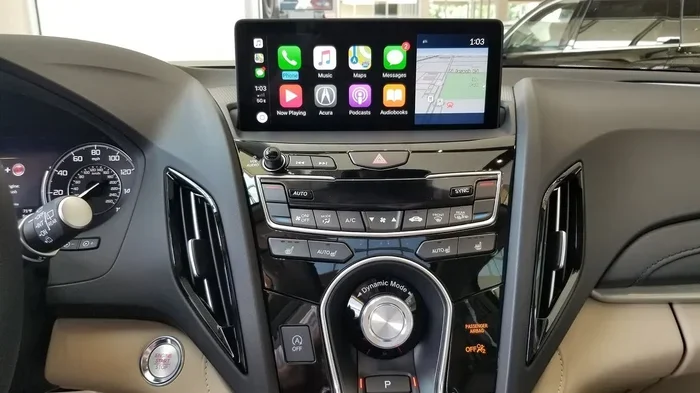
If you are not sure whether your specific Acura supports Apple CarPlay, here is a simple way to check. Look at your center touchscreen. If you see a CarPlay icon — usually a phone silhouette with CarPlay branding — your vehicle supports it. You can also check your owner’s manual or look up your vehicle’s year, trim, and model online. Another quick method is to plug your iPhone into the USB port and see if the CarPlay interface appears on screen.
Pro Tip: Even if your Acura does not natively support CarPlay, some aftermarket head units can add this feature. More on that later in the article.
How to Set Up Apple CarPlay in Your Acura
Setting up Apple CarPlay in your Acura is straightforward. The process differs slightly depending on whether you use a wired or wireless connection. Let us walk through both methods.
Setting Up Wired Apple CarPlay
Wired CarPlay uses a USB cable to connect your iPhone to the Acura infotainment system. Here is how to get started:
- Plug your iPhone into the USB port in your Acura. The port is usually located in the center console or armrest area.
- Unlock your iPhone. You may see a prompt on your screen asking you to trust the vehicle. Tap “Trust” to continue.
- CarPlay should launch automatically on your Acura touchscreen. If it does not, tap the CarPlay icon on the infotainment system.
- Follow the on-screen prompts to set up your preferences, including navigation apps, music, and communication settings.
Wired connections tend to be more stable. You get a reliable data transfer and consistent performance every time you start the car.
Setting Up Wireless Apple CarPlay
Wireless CarPlay removes the need for cables entirely. Here is how to connect:
- Make sure your iPhone and Acura are paired via Bluetooth. This is usually done during initial setup.
- Open Settings on your iPhone and go to General, then CarPlay.
- Select your Acura from the list of available vehicles.
- Follow the prompts to complete the wireless pairing.
- Start your car or wake the infotainment screen. CarPlay should connect automatically without any cables.
Quick Tip: Wireless CarPlay works best when your iPhone is running iOS 13 or later. Make sure your Acura’s infotainment software is also up to date for the smoothest experience.
Setting CarPlay as the Default View
Once CarPlay is connected, you may want to set it as your default view when you start the car. On most Acura models, you can do this by going into the infotainment settings and selecting CarPlay as the home screen. This way, every time you turn the key or press the start button, Apple CarPlay is right there waiting for you.
Wireless vs Wired Apple CarPlay in Acura Vehicles
One of the most common questions Acura owners ask is whether wireless Apple CarPlay is better than wired. The answer depends on your preferences and driving habits. Let us compare both options side by side.
Comparison Table: Wireless vs Wired CarPlay in Acura
| Feature | Wireless CarPlay | Wired CarPlay |
|---|---|---|
| Connection Method | Bluetooth and Wi-Fi | USB cable |
| Convenience | No cables needed | Must plug in cable each time |
| Connection Stability | Good, but can occasionally drop | Very stable and consistent |
| Charging | Phone charges separately | Phone charges while connected |
| Availability in Acura | Higher trims and newer models | Available on most models |
| Setup Time | Quick, automatic after pairing | Plug and play |
| Data Speed | Slightly slower than wired | Faster data transfer |
Both options give you full access to Apple CarPlay features like navigation, music, messaging, and Siri. The main difference comes down to convenience versus consistency. If you hate dealing with cables, wireless CarPlay is a game-changer. If you want the most reliable connection every single time, wired is hard to beat.
Expert Insight: Many Acura owners find that using wireless CarPlay for daily driving and keeping a USB cable handy for long road trips gives them the best of both worlds.
Apple CarPlay Features You Get with Acura
Once you connect your iPhone to your Acura via Apple CarPlay, a whole world of features opens up. Here is what you can expect:
Navigation
Apple Maps is built into CarPlay, giving you turn-by-turn navigation right on your Acura’s touchscreen. You can also use Google Maps, Waze, or other supported navigation apps. This is especially helpful if you prefer a specific mapping app over Apple Maps. Just download your preferred app on your iPhone, and it will appear in CarPlay.
Music and Podcasts
Control Spotify, Apple Music, Pandora, Amazon Music, and all your other audio apps directly from your Acura’s screen. You can also use Siri voice commands to skip tracks, adjust volume, or play a specific playlist — all without taking your eyes off the road.
Messaging and Calls
Hands-free calling and messaging are among the most useful CarPlay features. Siri can read your incoming messages aloud and let you dictate replies. You can make calls through your Acura’s audio system without ever touching your phone. This keeps your focus on the road and stays legal in most states with hands-free driving laws.
Siri Integration
Siri works seamlessly with Acura Apple CarPlay. You can activate Siri by holding down the CarPlay voice button on your steering wheel or by saying “Hey Siri.” From there, you can send messages, make calls, set navigation destinations, and control music — all by voice.
Customizable Home Screen
CarPlay lets you arrange your favorite apps on the home screen. You can choose which apps appear first, making it easy to jump into navigation or music the moment you start driving. The interface is designed to be simple and driver-friendly, with large tap targets and minimal distractions.
Do Not Disturb While Driving
This Apple CarPlay feature automatically silences notifications when you are driving. You can set it to send auto-replies to messages, letting people know you are behind the wheel. It is a great safety tool that works perfectly with the Acura infotainment system.
Which Acura Models Offer the Best CarPlay Experience?
Not all Acura vehicles deliver the same Apple CarPlay experience. Some models have newer infotainment systems with faster processors, larger screens, and better wireless connectivity. Here is a closer look at the top Acura models for CarPlay users.
Acura Integra
The Acura Integra is one of the newest additions to the Acura lineup. It comes with a modern infotainment system that supports both wired and wireless Apple CarPlay. The 10.2-inch touchscreen is crisp and responsive, making CarPlay navigation and media control a smooth experience. The Integra is a great choice if you want the latest technology in a sporty compact sedan.
Acura TLX
The Acura TLX has been a popular sedan for years, and its Apple CarPlay support is solid. The 2021 and newer models offer wireless CarPlay on higher trims. The infotainment system is intuitive, and the screen size is generous enough for easy navigation. If you are shopping for a luxury sedan with strong tech features, the TLX is worth considering.
Acura MDX
The MDX is Acura’s three-row SUV, and it delivers one of the best Acura infotainment experiences in the brand. Recent model years come with wireless CarPlay, a high-resolution touchscreen, and a premium audio system that pairs beautifully with CarPlay audio apps. Families who need both space and technology will appreciate what the MDX offers.
Acura RDX
The RDX is a compact luxury SUV that has offered Apple CarPlay for several model years. The latest versions feature wireless connectivity and a clean, user-friendly interface. It is a well-rounded choice for buyers who want a smaller SUV with strong tech credentials.
Acura ZDX
The ZDX is Acura’s electric SUV, and it includes full Apple CarPlay support with wireless connectivity. As an electric vehicle, the ZDX also benefits from CarPlay’s navigation features, which can help you plan charging stops alongside your route. It is a compelling option for anyone looking at the Acura EV lineup.
Can You Add Apple CarPlay to an Older Acura?
If your Acura was made before Apple CarPlay became widely available, you might be wondering if there is a way to add it. The good news is that several options exist.
Aftermarket Head Units
One of the most popular ways to add CarPlay to an older Acura is by installing an aftermarket head unit. Companies like Pioneer, Kenwood, and Alpine make CarPlay-compatible stereos that can replace your factory unit. These head units offer modern features, larger screens, and full Apple CarPlay support. Installation typically costs between $300 and $800, depending on the brand and features.
Acura Infotainment Software Updates
Some older Acura models can gain CarPlay support through a software update at an Acura dealership. Not all models are eligible, but it is worth checking with your dealer. They can look up your specific vehicle and let you know if a software update is available.
Bluetooth CarPlay Adapters
Another option is a Bluetooth CarPlay adapter. These small devices plug into your Acura’s USB port and create a wireless CarPlay connection. They are relatively affordable, usually ranging from $50 to $150. However, they may not offer the same seamless experience as factory-installed wireless CarPlay.
Common Mistake: Do not buy a cheap, unverified CarPlay adapter online. Some low-quality adapters cause connectivity issues, audio problems, or even damage your infotainment system. Stick with reputable brands and read reviews before purchasing.
Troubleshooting Apple CarPlay Issues in Acura
Even with a compatible Acura and a working iPhone, you may run into Apple CarPlay issues from time to time. Here are the most common problems and how to fix them.
CarPlay Does Not Connect
If Acura Apple CarPlay will not connect, try these steps:
- Unplug and replug the USB cable. Try a different USB port if available.
- Restart your iPhone and your Acura infotainment system.
- Make sure CarPlay is enabled in your iPhone settings under General.
- Check that your iPhone is unlocked and on the home screen when you connect it.
- Update your iPhone to the latest iOS version.
CarPlay Disconnects Frequently
Wireless CarPlay can sometimes disconnect, especially in older Acura models. To fix this:
- Delete your Acura from the CarPlay paired devices list on your iPhone and re-pair it.
- Make sure your Acura’s infotainment software is up to date.
- Restart both your iPhone and your vehicle.
- Check for interference from other Bluetooth devices in the car.
Audio Cuts Out or Sounds Distorted
If your audio quality drops when using Apple CarPlay, try switching from wireless to wired and see if the problem improves. A poor USB cable can also cause audio issues. Use a high-quality, Apple-certified USB cable for the best results.
Screen Freezes or Becomes Unresponsive
A frozen CarPlay screen can be frustrating. The simplest fix is to force restart your infotainment system. On most Acura models, you can do this by holding the power button for about 10 seconds until the screen goes dark and restarts. If the problem persists, check for infotainment software updates at your Acura dealer.
Quick Tip: Keeping both your iPhone and your Acura’s infotainment system updated is the single best way to prevent most CarPlay issues. Software updates often include bug fixes and performance improvements for CarPlay compatibility.
Acura Apple CarPlay vs Android Auto: Which Is Better?
If you have ever compared Acura Apple CarPlay with Android Auto, you know both services offer similar core features. Both give you navigation, music, messaging, and voice assistant access through your car’s screen. So which one is better for Acura owners?
The answer depends entirely on your phone. If you use an iPhone, Apple CarPlay is the natural choice. It integrates deeply with iOS and offers a polished, intuitive interface. If you use an Android phone, Android Auto is your go-to option. Most modern Acura vehicles support both, giving you flexibility regardless of your phone platform.
Some drivers prefer Apple CarPlay for its Siri integration and seamless iPhone connectivity. Others prefer Android Auto for its Google Maps navigation and wider app compatibility. If you switch between phones frequently, having both options available in your Acura is a huge advantage.
Final Thoughts on Acura and Apple CarPlay
So, does Acura have Apple CarPlay? The answer is a resounding yes. Nearly every modern Acura model comes with Apple CarPlay support, and many newer vehicles offer the convenience of wireless connectivity. From the compact Integra to the full-size MDX, Acura has made sure its drivers stay connected, entertained, and safe on the road.
Whether you are setting up CarPlay for the first time or troubleshooting a connection issue, the steps are simple and well-supported. Keep your iPhone updated, maintain your Acura’s infotainment system, and you will enjoy a smooth CarPlay experience for years to come.
If you own an older Acura that does not natively support CarPlay, aftermarket solutions like head unit upgrades and Bluetooth adapters can bring this feature to your vehicle. The investment is well worth it for the convenience and safety benefits that Apple CarPlay provides.
Take a few minutes today to connect your iPhone to your Acura and explore everything CarPlay has to offer. You will wonder how you ever drove without it.