Does a 2003 Toyota Camry Have Bluetooth Capability
The 2003 Toyota Camry does not come with factory Bluetooth as a standard feature. Most trims lacked wireless connectivity back then, but you can easily add Bluetooth today using aftermarket adapters, head units, or transmitter devices. This guide covers everything you need to know about Bluetooth capability in the 2003 Camry, from factory specs to simple add-on solutions.
Do you own a 2003 Toyota Camry and wonder if it has Bluetooth capability? You are not alone. Many people who drive older Toyotas ask this exact question. The short answer is that the 2003 Camry did not come with factory Bluetooth in most trim levels. But the good news is that adding Bluetooth today is simple, affordable, and well worth the effort. Let us walk through everything you need to know about Bluetooth connectivity in this classic sedan.
When Toyota built the 2003 Camry, the car world looked very different. Phones were not smartphones yet. Music players used CDs, not streaming apps. So wireless connectivity was not a priority for automakers back then. But times have changed, and drivers now expect hands-free calling and audio streaming as standard features. If your 2003 Camry does not have Bluetooth built in, do not worry. There are plenty of ways to bring your car into the modern age.
In this article, we will cover exactly what Bluetooth features the 2003 Camry offers out of the box. We will also explore the best ways to add Bluetooth to your car. You will learn about different types of devices, installation tips, and the real benefits of having wireless connectivity in your daily drive. Whether you use your Camry for commuting or road trips, this guide has you covered.
Key Takeaways
- No Factory Bluetooth: The 2003 Toyota Camry did not include Bluetooth as a standard or optional feature in most trim levels.
- Aftermarket Solutions Work Great: You can add Bluetooth using a simple transmitter, a new head unit, or a Bluetooth adapter that plugs into your existing system.
- Hands-Free Calling Is a Game Changer: Adding Bluetooth lets you make and receive calls safely without taking your hands off the wheel.
- Audio Streaming Is Easy: Once Bluetooth is set up, you can stream music, podcasts, and audiobooks directly to your Camry’s speakers.
- Installation Is Simple: Most Bluetooth add-on devices take less than 30 minutes to install and require no wiring expertise.
- Older Camrys Benefit Too: Even if you own a higher-mileage 2003 Camry, Bluetooth upgrades are affordable and widely available.
📑 Table of Contents
- Does a 2003 Toyota Camry Have Bluetooth From the Factory?
- Why Bluetooth Matters in a Daily Driver
- How to Add Bluetooth to a 2003 Toyota Camry
- Comparing Bluetooth Options for the 2003 Camry
- Common Bluetooth Issues and How to Fix Them
- Other Upgrades Worth Considering for a 2003 Camry
- Final Verdict: Should You Add Bluetooth to Your 2003 Camry?
Does a 2003 Toyota Camry Have Bluetooth From the Factory?
The honest answer is no. The 2003 Toyota Camry did not offer factory Bluetooth as a standard or optional feature in most models. Toyota did not make Bluetooth wireless connectivity widely available in most vehicles until a few years later. By the mid-2000s, more models started including it. But in 2003, if you wanted to take a call while driving, you had to use a wired connection or hold your phone in your hand.
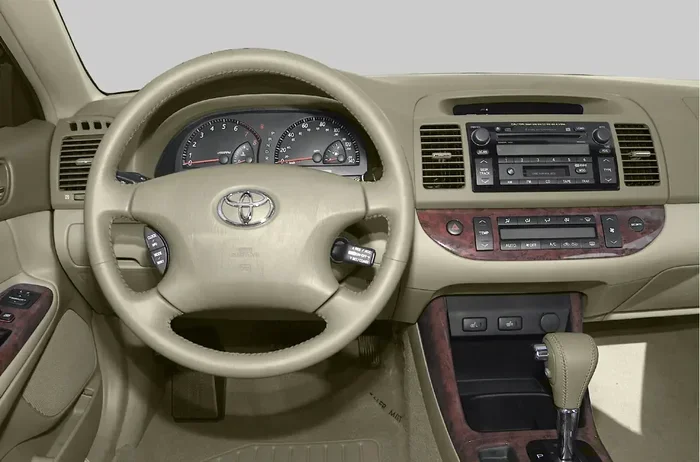
Some higher-end trims might have had limited car phone integration through dealer-installed packages. But these were rare and expensive. Most 2003 Camry owners drove their cars with a basic AM/FM stereo, a CD player, and maybe a cassette deck. There was no infotainment system that supported wireless phone pairing or music streaming.
What Toyota Offered in 2003
Here is a quick look at what the 2003 Camry came with from the factory:
- AM/FM Stereo: The standard radio with basic tuning controls.
- CD Player: Many trims included a single-CD or changer system.
- Cassette Deck: Some models still offered a cassette player for older music formats.
- Basic Speakers: Factory speakers provided decent sound but nothing advanced.
- No Wireless Connectivity: No Bluetooth, no Wi-Fi, no USB ports for audio.
If you check your 2003 Camry’s manual, you will not find any mention of Bluetooth pairing or wireless audio streaming. That is simply because the technology was not part of the package yet. Toyota introduced Bluetooth in later model years, so if you have a 2006 or newer Camry, your odds of having factory Bluetooth are much better.
Why Bluetooth Matters in a Daily Driver
Even though the 2003 Camry came from a time before wireless connectivity, adding Bluetooth capability today makes a huge difference. Here is why it matters for your daily drive.
Hands-Free Calling for Safety
One of the biggest reasons people want Bluetooth hands-free calling is safety. In many states, holding your phone while driving is illegal. A Bluetooth adapter lets you answer calls through your car’s speakers and microphone. You keep your hands on the wheel and your eyes on the road. This is especially helpful during long commutes or when you are running late for work.
Streaming Music and Podcasts
Think about how much music you listen to on your phone. From Spotify playlists to podcast episodes, there is a lot of great audio content. Without wireless streaming, you have to find an old CD or fiddle with an auxiliary cable. A Bluetooth connection lets you play anything from your phone directly through your Camry’s speakers. It is convenient and makes every drive more enjoyable.
Staying Connected Without Distraction
Beyond calls and music, Bluetooth connectivity helps you stay connected in a safer way. You can use voice commands to control your phone. You can hear navigation prompts through your car audio. And you can switch between calls and music with the push of a button. All of this adds up to a much better driving experience in a car that is already a reliable daily driver.
How to Add Bluetooth to a 2003 Toyota Camry
The great news is that you have several options for adding Bluetooth to your 2003 Camry. Each option has its own pros and cons. Let us break them down so you can pick the best one for your needs and budget.
Option 1: Bluetooth FM Transmitter
This is the simplest and most affordable way to get wireless connectivity in your Camry. A Bluetooth FM transmitter plugs into your cigarette lighter or USB port. It broadcasts audio over an empty FM frequency that your car radio can pick up. You pair your phone with the transmitter, and your music and calls play through the speakers.
Pros:
- Very affordable, usually under $30.
- No permanent installation needed.
- Plugs in and plays within minutes.
- Works with any car that has a radio.
Cons:
- Audio quality is not as good as a wired connection.
- You need to find a clear FM frequency.
- It may pick up some static or interference.
If you just want a quick and easy solution, a Bluetooth transmitter is a great starting point. It is perfect for someone who drives their Camry to work every day and wants to stream music without spending a lot of money.
Option 2: Aftermarket Bluetooth Head Unit
If you want a more permanent and higher-quality setup, consider replacing your factory stereo with an aftermarket head unit that has built-in Bluetooth. These modern radios look great in older cars and offer much better sound quality. Many also include USB ports, AUX inputs, and even smartphone integration features.
Pros:
- Excellent audio quality.
- Built-in Bluetooth for calls and streaming.
- Extra features like USB, AUX, and sometimes Apple CarPlay.
- A clean, factory-looking installation.
Cons:
- More expensive than a transmitter.
- Requires some installation effort or a professional installer.
- May need a wiring harness adapter to fit your Camry.
Popular brands like Pioneer, Sony, and Alpine make Bluetooth head units that work well in the 2003 Camry. If you are comfortable with a weekend DIY project or have a local shop handle it, this is the best long-term solution.
Option 3: Bluetooth Adapter for Existing Stereo
Another option is a Bluetooth adapter that connects directly to your existing stereo system. Some adapters plug into the CD changer port or the antenna input. They create a wireless link between your phone and your car audio without replacing the whole unit.
Pros:
- Keeps your factory stereo intact.
- Cleaner look than a transmitter.
- Better audio quality than FM transmitters.
Cons:
- Can be harder to find for older models.
- Installation may require some technical knowledge.
- Price varies widely depending on the brand.
This option is ideal for Camry owners who love their factory stereo and do not want to replace it. You get the benefits of wireless connectivity without sacrificing the original setup.
Comparing Bluetooth Options for the 2003 Camry
Not sure which option is right for you? Here is a quick comparison to help you decide.
| Feature | FM Transmitter | Aftermarket Head Unit | Bluetooth Adapter |
|---|---|---|---|
| Price Range | $15 – $40 | $100 – $300 | $30 – $100 |
| Installation Difficulty | Very Easy | Moderate | Moderate |
| Audio Quality | Fair | Excellent | Good |
| Hands-Free Calling | Yes | Yes | Yes |
| Music Streaming | Yes | Yes | Yes |
| Keeps Factory Stereo | Yes | No | Yes |
| Extra Features | Minimal | Many | Minimal |
As you can see, each option has its place. If budget is your main concern, go with an FM transmitter. If you want the best sound and features, a new head unit is the way to go. And if you want a middle ground, a Bluetooth adapter might be your sweet spot.
Common Bluetooth Issues and How to Fix Them
Once you add Bluetooth capability to your 2003 Camry, you might run into a few common issues. Here are the most frequent problems and simple fixes.
Bluetooth Won’t Pair With Your Phone
This is the most common issue. First, make sure Bluetooth is turned on in your phone settings. Then check if the device is in pairing mode. Sometimes restarting both your phone and the Bluetooth device solves the problem. If your 2003 Camry has an older adapter, the Bluetooth version might not be compatible with newer phones. In that case, updating the adapter firmware or replacing it may help.
Poor Audio Quality or Static
If you are using an FM transmitter, static is often the culprit. Try switching to a different FM frequency. Move the transmitter closer to your radio antenna. For head units or adapters, check the connection cables. A loose wire can cause crackling or dropouts. Also, if you live in a busy area with lots of radio traffic, an FM transmitter may struggle more than a wired adapter.
Bluetooth Keeps Disconnecting
Intermittent disconnections happen when the signal gets weak. Make sure your phone is within range of the Bluetooth device. Most Bluetooth devices work well within 30 feet. If your phone is buried in a bag or tucked under a seat, the connection may drop. Keeping your phone in a cup holder or on the dashboard usually fixes this issue.
For more troubleshooting tips related to your Camry’s electrical system, you might want to check whether driving with the check engine light on could affect other electronic features in your car. If your Camry has warning lights on, it is worth addressing those alongside your Bluetooth setup.
Other Upgrades Worth Considering for a 2003 Camry
While you are upgrading your audio system, there are a few other improvements that pair well with adding Bluetooth. These small changes can make your 2003 Camry feel much more modern and enjoyable to drive.
Upgrading Your Speakers
Factory speakers in a 2003 Camry are decent but not amazing. Pairing a new Bluetooth head unit with upgraded speakers makes a noticeable difference in sound quality. You get clearer highs, richer mids, and deeper bass. Even a simple set of component speakers can transform how your music sounds in the car.
Adding a Backup Camera
Backup cameras are now standard in most new cars, but they were rare in 2003. Adding one to your Camry improves safety and makes parking easier. Many modern backup cameras are wireless and easy to install. They pair well with a new stereo system and add real value to an older car.
Keeping Up With Regular Maintenance
An older car like the 2003 Camry needs regular care to keep running well. If you are putting a lot of miles on your Camry, staying on top of timing belt replacement is important. Checking your oil change schedule and tire condition also helps your Camry stay reliable. When your car runs well, you enjoy all the upgrades you have made even more.
Final Verdict: Should You Add Bluetooth to Your 2003 Camry?
The 2003 Toyota Camry is a fantastic car. It is reliable, comfortable, and easy to maintain. But it was built before Bluetooth wireless connectivity became standard. That means you will need to add it yourself if you want the convenience of hands-free calling and music streaming.
The good news is that adding Bluetooth capability is one of the easiest and most affordable car upgrades you can do. Whether you choose a simple FM transmitter or invest in a full head unit replacement, the results are worth it. You will enjoy safer calls, better music, and a more connected driving experience every time you get behind the wheel.
Your 2003 Camry has already served you well for over 20 years. A Bluetooth upgrade is a small investment that pays off every single day. It is one of those upgrades that makes you wonder why you did not do it sooner. So go ahead, pick the option that fits your budget, and bring your Camry into the wireless age.
And if you ever plan to sell or pass along your Camry, remember that a car with added Bluetooth connectivity is more appealing to buyers. It shows that the car has been cared for and modernized. That alone can help you get a better price when it is time to move on.
Also, if you are curious about other features your Camry might or might not have, it is always fun to explore what your specific model includes. For example, if you have ever wondered about the power under the hood, you might enjoy learning how much horsepower a Hellcat has for comparison. And if you are curious about your Camry’s maintenance schedule, checking when to replace your timing belt is a smart move for long-term reliability.
No matter which Bluetooth solution you choose, the most important thing is that you take action. Your 2003 Camry deserves to keep up with modern driving expectations. And with the right Bluetooth setup, it absolutely can.
Frequently Asked Questions
Can I install Bluetooth in any Toyota Camry?
Yes, you can add Bluetooth to almost any Toyota Camry, including the 2003 model. The method you choose depends on your budget and how much work you want to do. Options range from simple plug-and-play FM transmitters to full head unit replacements. All of these work with the 2003 Camry’s existing stereo system.
How much does it cost to add Bluetooth to a 2003 Toyota Camry?
The cost varies depending on the option you choose. A basic Bluetooth FM transmitter costs between $15 and $40. A Bluetooth adapter ranges from $30 to $100. A new aftermarket head unit with Bluetooth can cost anywhere from $100 to $300 or more. Installation costs may apply if you choose to have a professional handle it.
Does Bluetooth work with all phone types?
Yes, Bluetooth is a universal wireless standard that works with virtually all smartphones. Whether you have an iPhone or an Android device, you can pair it with a Bluetooth adapter or head unit in your 2003 Camry. Just make sure your phone supports Bluetooth, which virtually all phones made in the last 15 years do.
Can I stream music through Bluetooth in my Camry?
Absolutely. Once you set up a Bluetooth connection in your 2003 Camry, you can stream music from any app on your phone. This includes Spotify, Apple Music, YouTube Music, podcasts, and audiobooks. The audio plays through your car’s speakers just like it would with the radio or a CD player.
Is factory Bluetooth better than an aftermarket adapter?
Factory Bluetooth is usually more integrated and seamless. But since the 2003 Camry did not come with factory Bluetooth, aftermarket options are your only choice. Modern aftermarket Bluetooth adapters and head units offer excellent sound quality and reliable connections. Many drivers cannot tell the difference between factory and aftermarket Bluetooth once it is set up.
What other phone features can I add to a 2003 Camry?
Beyond Bluetooth, you can add features like a backup camera, USB charging ports, and even modern infotainment systems. Some head units include GPS navigation and smartphone integration. If you are interested in safety features, you can also explore adding blind spot monitoring or a dash cam to your Camry for extra peace of mind.