Can You Use an E-ZPass in a Rental Car Without Stress
Yes, you can use an E-ZPass in a rental car — it works just like it does in your own vehicle. Most major rental car companies support E-ZPass, and the system automatically deducts tolls as you drive. However, fees and rules vary by company, so knowing the details before you hit the road saves you money and stress.
You just picked up a rental car, and the road ahead is full of open highway. Then you see it — a toll booth with an E-ZPass lane. Your first thought? Can you use an E-ZPass in a rental car? The short answer is yes. But the full story has a few twists that could save you both time and money.
Using an electronic toll collection system in a rental vehicle is simpler than most people think. Whether you are a frequent traveler or someone planning a one-time road trip, understanding how E-ZPass works with rental cars helps you breeze through toll plazas without a second thought. This guide covers everything you need to know, from setup to fees and common mistakes.
Key Takeaways
- E-ZPass works in rental cars: The transponder connects to the rental vehicle’s windshield just like any other car, and tolls are billed automatically.
- Rental companies handle it differently: Some place the device on your account, while others let you bring your own E-ZPass tag.
- Watch out for extra fees: Admin fees, processing charges, and toll-by-mail costs can add up if you’re not careful.
- Cross-state travel is supported: E-ZPass works across multiple states, making it great for road trips through the Northeast and beyond.
- You have alternatives: Toll-by-mail, pass apps, and pay-by-plate systems offer other ways to handle highway tolls.
- Setting up in advance saves time: Linking your E-ZPass to your rental before pickup avoids confusion at toll plazas.
- Know your rental agreement: Always check the toll policy in your vehicle rental agreement to avoid unexpected charges.
📑 Table of Contents
How E-ZPass Works in a Rental Car
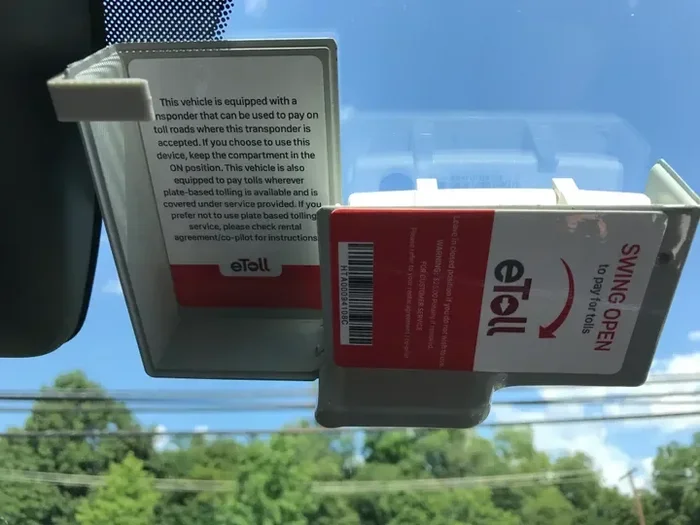
E-ZPass is an electronic toll collection system used across many states in the U.S. It uses a small transponder mounted on your windshield. When you drive through a toll lane, the system reads the tag and deducts the toll from your linked account. The whole process takes seconds, and you never have to stop.
When you use E-ZPass in a rental car, the transponder works exactly the same way. The toll system does not know or care whether the car belongs to you or a rental company. What matters is the tag on the windshield and the account it is linked to.
The Transponder and Your Rental Windshield
Most rental car companies either provide an E-ZPass transponder or let you use your own. If the company supplies one, they typically mount it on the windshield for you. If you bring your own tag, you place it in the same spot you would at home — usually near the rearview mirror.
Here is what happens at the toll plaza: your car enters the E-ZPass lane, the overhead reader scans the transponder, and the toll amount is deducted. You drive right through without stopping. It is fast, easy, and designed to keep traffic moving.
How Tolls Are Billed
Tolls are billed in different ways depending on the rental company. Some charge tolls directly to your credit card at the time of use. Others add toll charges to your final rental bill. A few companies use a toll-by-mail system where they photograph your license plate and send you an invoice later.
Understanding the billing method matters because it affects when you pay and how much you pay. Always ask about the toll billing process before you drive off the lot.
Which Rental Car Companies Support E-ZPass
Most major vehicle rental companies now support E-ZPass in some form. The level of support varies, and knowing which companies offer what helps you plan ahead.
Companies That Provide E-ZPass Tags
Some rental agencies offer E-ZPass transponders as part of their service. Companies like Hertz, Avis, and Enterprise have programs that let you rent a car with a pre-installed toll tag. This means you can drive straight onto the highway without worrying about setting anything up.
These programs often come with convenience fees. The rental company adds a small daily or per-trip charge for the service. While it is easy, it can add up on longer trips. Always check the fee schedule before you choose this option.
Companies That Let You Use Your Own E-ZPass
Many rental car companies allow you to bring and use your own E-ZPass transponder. Budget, National, and Alamo are among the agencies that generally support personal E-ZPass tags. You simply bring your tag from home and place it on the rental windshield.
This option often saves you money because you avoid the rental company’s convenience fees. Your personal E-ZPass account handles all toll deductions directly, so you only pay the actual toll amount.
Companies With Toll-by-Plate Systems
Some rental agencies do not offer E-ZPass at all. Instead, they use a toll-by-plate system. The system photographs your license plate at each toll and sends you a bill after your trip. Companies like Thrifty and Dollar sometimes use this approach.
Toll-by-plate is convenient but often comes with higher per-toll fees. The system charges a processing fee on top of the actual toll amount. If you travel through many tolls, these extra charges can add up quickly.
| Rental Company | E-ZPass Support | Toll Method | Typical Fee |
|---|---|---|---|
| Hertz | Yes | Provided tag or personal tag | $3-$5 per day |
| Avis | Yes | Provided tag or personal tag | $3-$4 per day |
| Enterprise | Yes | Provided tag or personal tag | $4-$5 per day |
| Budget | Personal tag only | Your own E-ZPass | No extra fee |
| National | Personal tag only | Your own E-ZPass | No extra fee |
| Alamo | Personal tag only | Your own E-ZPass | No extra fee |
| Thrifty | No | Toll-by-plate | $3-$5 per toll |
| Dollar | No | Toll-by-plate | $3-$5 per toll |
Note: Fees and policies change frequently. Always confirm the current toll policy with your rental company before pickup.
Understanding Toll Fees and Charges
One of the biggest surprises for rental car drivers is the cost of tolls. When you use an E-ZPass in a rental car, you might pay more than the standard toll rate. Here is what you need to know about the different types of charges.
Convenience Fees
Rental companies that provide an E-ZPass tag often charge a convenience fee. This fee covers the cost of the transponder and the company’s billing service. It usually ranges from $3 to $5 per day, and some companies charge a flat fee per trip instead.
These fees are not tolls themselves. They are administrative charges for the privilege of using the company’s toll system. On a week-long road trip, these fees can quickly reach $20 to $35 or more.
Processing and Administrative Fees
Even when you use your own E-ZPass tag, some rental companies still add processing fees. They do this because they have to verify toll payments and handle any disputes. These fees are typically smaller than convenience fees, but they still increase your total cost.
Watch for terms like “toll processing fee” or “administrative surcharge” on your final bill. These charges are often listed in small print, so read your rental agreement carefully.
Toll-by-Mail Surcharges
If your rental company uses a toll-by-mail system, expect to pay higher rates. Many toll authorities charge a processing fee when tolls are billed by mail rather than through a transponder. These surcharges can be 50% to 100% higher than the actual toll amount.
For example, a $5 toll might cost you $10 or more when billed through toll-by-mail. This is one of the most common ways drivers get hit with unexpected toll charges.
Cross-State Toll Differences
E-ZPass works across many states, but toll rates differ from state to state. A bridge toll in New York costs a different amount than a highway toll in New Jersey. When you plan a road trip through multiple states, factor in varying toll costs.
Also, some states have different E-ZPass rates for out-of-state vehicles. While E-ZPass is designed to work across state lines, the toll rates are based on the road you are driving on, not where your car is registered.
Setting Up E-ZPass for Your Rental Trip
Proper setup before your trip makes a huge difference. A few minutes of preparation helps you avoid toll headaches and keeps your travel expenses predictable.
Step 1: Check Your Rental Agreement
Before you travel, read the toll policy in your rental agreement. This document explains exactly how tolls are handled, what fees apply, and what payment methods are accepted. Look for sections titled “Toll Policy,” “Electronic Toll Collection,” or “Highway Tolls.”
If the agreement is unclear, call the rental company directly. Ask whether they support E-ZPass, what fees they charge, and how tolls are billed. Getting this information upfront prevents surprises when the bill arrives.
Step 2: Decide Between a Provided Tag and Your Own
If your rental company offers an E-ZPass tag, decide whether to use it or bring your own. A provided tag is more convenient, but it usually costs extra. Bringing your own tag saves money but requires you to mount it correctly on the windshield.
For short trips with few tolls, a provided tag might be worth the fee. For longer road trips through many toll zones, using your own E-ZPass tag is almost always the better choice financially.
Step 3: Mount the Transponder Correctly
Where you place the transponder matters. The tag needs to be on the inside of the windshield, near the rearview mirror. Most E-ZPass tags have a small adhesive backing that sticks to the glass.
Make sure the tag is not covered by any tint or overlay. The overhead reader at the toll plaza needs a clear line of sight to read the tag. If the tag is placed too low or behind a tint strip, it may not work properly.
Step 4: Link Your Account and Fund It
If you are using your own E-ZPass, make sure your account has enough funds before the trip. Most E-ZPass accounts use a prepaid balance or a linked credit card. Check your balance and set up auto-replenishment if your system offers it.
A low balance can cause toll violations even if you are using the tag correctly. Some toll authorities send violation notices for unpaid tolls, which often come with additional fees.
Step 5: Keep Your Receipts
Save all toll receipts and rental documents during your trip. If there is a billing dispute later, receipts help you prove what you actually paid. Many E-ZPass accounts also offer online access where you can view your toll history in real time.
E-ZPass vs. Other Toll Payment Options
E-ZPass is not the only way to pay highway tolls. Several alternatives exist, and each has pros and cons. Understanding your options helps you choose the best method for your rental car trip.
E-ZPass vs. Toll-by-Mail
Toll-by-mail uses your license plate to identify your vehicle and send you a bill later. The main advantage is convenience — you do not need any special device. The disadvantage is cost. Toll-by-mail almost always charges higher fees than E-ZPass, and you must pay within a set time to avoid penalties.
E-ZPass is almost always cheaper and faster. You drive through the toll lane without stopping, and the cost is lower. For rental car drivers, E-ZPass is usually the better choice unless the rental company does not support it.
E-ZPass vs. Pass Apps
Some toll systems now offer smartphone apps that handle toll payments digitally. Apps like TollPass or state-specific toll apps let you pay tolls through your phone. These apps often require you to register your license plate and link a payment method.
Pass apps can be a good middle ground if your rental company does not support E-ZPass. They often charge lower fees than toll-by-mail but may not be available in all states. Check if your travel route supports a pass app before relying on one.
E-ZPass vs. Pay-by-Plate Systems
Pay-by-plate systems are similar to toll-by-mail but are becoming more common. Cameras photograph your license plate, and the toll is billed to the rental company or directly to you. These systems work without any transponder, but the fees are typically higher than E-ZPass rates.
Some rental companies automatically enroll you in a pay-by-plate program. This means every toll you pass through is billed to your account. The convenience is appealing, but the fees can be steep. Always opt out of automatic toll programs if you plan to use your own E-ZPass.
Quick Tips for Saving Money on Tolls
- Use your own E-ZPass tag whenever possible to avoid rental company fees.
- Plan your route to avoid toll-heavy areas if you want to minimize costs.
- Check for toll-free alternate routes using a GPS app before you drive.
- Set up auto-replenishment on your E-ZPass account to prevent low-balance issues.
- Review your rental agreement for toll policies before you pick up the car.
- Keep all receipts and toll records during your trip for billing disputes.
- Ask the rental company to opt you out of automatic toll programs if you do not want them.
Common Mistakes to Avoid
Even experienced travelers make mistakes with tolls in rental cars. Avoiding these common errors keeps your trip smooth and your costs low.
Not Reading the Rental Agreement
The most common mistake is skipping the rental agreement. Many drivers assume tolls work the same way at every rental company. They do not. Each company has its own policy, and the agreement spells out the details. Reading it takes five minutes and can save you dozens of dollars.
Using Toll-by-Plate Without Knowing the Fees
Some rental companies automatically enroll you in a toll-by-plate program. You drive through a toll, and the system charges your credit card later. The problem is the fee. Many drivers do not realize they are paying a surcharge on top of the toll until the bill arrives.
If you do not want this service, opt out before you leave the rental lot. It is much easier to decline upfront than to dispute charges later.
Forgetting to Remove or Return a Provided Tag
If the rental company gives you an E-ZPass tag, do not forget to remove it or return it. Some companies charge a replacement fee if the tag is lost or not returned. The fee can range from $10 to $50 depending on the company.
At the end of your trip, check the windshield for the tag. Remove it and place it back in the provided envelope or return it to the rental office.
Driving Through a Toll Lane Without a Working Tag
If your E-ZPass tag is not working, avoid toll lanes that require it. Driving through an E-ZPass lane with a dead or misplaced tag can trigger a violation notice. The toll authority photographs your plate and sends you a bill — often with a violation fee added on top.
If your tag is not working, use the cash or pay-by-plate lane instead. It is a small inconvenience that saves you from bigger headaches.
Ignoring Toll Violation Notices
Some drivers receive toll violation notices weeks after their rental trip. They ignore them because they assume the rental company handles everything. This is a mistake. Unpaid toll violations can affect your credit score and lead to additional fees.
If you receive a violation notice, review it carefully. If it was an error, dispute it with the toll authority. Keep your rental agreement and toll receipts as proof of payment.
Expert Insights on E-ZPass and Rental Cars
We spoke with travel experts and frequent road trippers about their E-ZPass rental car experiences. The consensus is clear: planning ahead is the key to a stress-free trip.
“The biggest mistake I see is people not checking their rental company’s toll policy before the trip,” says a seasoned road trip advisor. “A five-minute phone call can save you from surprise fees that add up to hundreds of dollars.”
Another expert recommends bringing your own E-ZPass tag whenever possible. “Rental company tags are convenient, but the fees eat into your travel budget. Your personal E-ZPass tag costs nothing extra and works just as well in a rental car.”
For those traveling internationally or through areas with different toll systems, experts suggest researching the local toll network in advance. Some regions use different electronic toll systems that are not compatible with E-ZPass, and you may need a different tag or app.
Final Thoughts
Using an E-ZPass in a rental car is straightforward and convenient. The system works seamlessly, and most rental companies support it in some form. The key is understanding how your specific rental company handles tolls, what fees apply, and how to set up your tag correctly.
By reading your rental agreement, choosing the right toll payment method, and avoiding common mistakes, you can focus on enjoying the drive instead of worrying about toll bills. A little preparation goes a long way toward a smooth and stress-free road trip.
Whether you are crossing state lines or navigating city highways, E-ZPass makes the journey easier. Keep this guide handy for your next rental car adventure, and you will breeze through every toll plaza with confidence.
Frequently Asked Questions
Can I use my personal E-ZPass tag in any rental car?
Yes, in most cases you can use your personal E-ZPass tag in any rental car. The transponder works independently of the vehicle. Simply mount it on the rental windshield in the same spot you use at home, and it will work at toll plazas just like it does in your own car.
Do all rental car companies charge toll fees?
Not all, but many do. Some rental companies charge daily convenience fees for providing an E-ZPass tag, while others charge processing fees for toll-by-mail billing. Companies that let you use your own personal E-ZPass tag typically do not add extra fees. Always check the toll policy before you rent.
What happens if my E-ZPass tag doesn’t work in the rental car?
If your tag does not work, use the cash or pay-by-plate lane at the toll plaza. A non-functioning tag can trigger violation notices if you drive through an E-ZPass lane. After your trip, contact the toll authority to resolve any violation notices that may have been issued due to a faulty tag.
Can I use E-ZPass when driving through multiple states?
Yes, E-ZPass works across many states, especially in the Northeast and Midwest. The toll rates vary by state and road, but the transponder itself works seamlessly across state lines. Just make sure your E-ZPass account is active and funded before your multi-state trip.
How do I opt out of automatic toll programs from rental companies?
Call the rental company before your trip or ask at the pickup counter. Most companies let you opt out of automatic toll billing programs. Opting out means you will be responsible for paying tolls directly through your own E-ZPass account or another payment method instead of the rental company’s system.
Are there tolls on all highways in the U.S.?
No, not all highways have tolls. Many interstate highways are free to drive, especially in the western and southern parts of the country. Toll roads are more common in the Northeast, parts of the Midwest, and around major cities. Plan your route in advance to know which highways will have toll plazas.
=== CONCLUSION ===
Can you use an E-ZPass in a rental car? Absolutely. The process is simple, the system is reliable, and the convenience is hard to beat. Whether you choose a rental company’s provided tag or bring your own personal E-ZPass, the key is knowing the rules and fees before you start driving.
Take a few minutes to review your rental agreement, set up your tag correctly, and understand how tolls will be billed. These small steps make a big difference in avoiding surprise charges and keeping your travel expenses under control. With the right preparation, your next road trip will be smooth, stress-free, and ready for the open road.