How Do You Remove the Oil Maintenance Required Message
The oil maintenance required message is a common dashboard alert that reminds drivers it is time for an oil change. This guide walks you through the exact steps to clear the oil maintenance required message on most major vehicle brands. You will also learn what causes the light to appear, how to prevent it from coming back, and when the message actually means something serious.
That little wrench or oil can icon on your dashboard can be incredibly annoying. You know the one. It pops up out of nowhere and just sits there staring at you every time you turn the key. The oil maintenance required message is something nearly every driver encounters at some point. And the good news is that removing it is usually very straightforward.
But here is the thing most people do not realize. That message is not just a random nuisance. It is part of your vehicle’s oil life monitoring system. It tracks your driving habits, engine temperature, mileage, and other factors to tell you exactly when the oil needs changing. So when you see the oil maintenance required message, your car is literally asking for service.
In this guide, we will walk you through every step to remove that stubborn light. Whether you drive a Toyota, Honda, Ford, or something else entirely, we have you covered. We will also explain what triggers the message, why it matters, and how to keep it from coming back. Let us get into it.
Key Takeaways
- Easy Reset Process: Most vehicles let you reset the oil maintenance required message in under 5 minutes using the dashboard buttons or steering wheel controls.
- Different Brands, Different Methods: Toyota, Honda, Ford, Chevrolet, and BMW all have unique reset procedures that we cover in detail.
- It Is Not Just a Reminder: The message is tied to your car’s oil life monitoring system and tracks driving conditions, not just mileage.
- Ignoring It Can Cause Damage: Skipping oil changes when the message appears can lead to engine wear and costly repairs.
- Common Mistakes Happen: Many drivers accidentally skip steps or reset the light without actually changing the oil first.
- Prevention Is Simple: Following your vehicle’s maintenance schedule keeps the message from returning unexpectedly.
📑 Table of Contents
- What Triggers the Oil Maintenance Required Message?
- How to Remove the Oil Maintenance Required Message
- Can You Reset the Message Without Changing the Oil?
- Preventing the Oil Maintenance Required Message From Returning
- Common Mistakes People Make When Dealing With the Oil Maintenance Message
- When the Oil Maintenance Required Message Means Something Serious
- Quick Tips for a Smooth Oil Maintenance Reset
- Conclusion
What Triggers the Oil Maintenance Required Message?
Before you learn how to remove the message, it helps to understand what causes it in the first place. The oil maintenance required message is not random. Your vehicle’s computer system monitors several factors to determine when your oil is due for a change.
How the Oil Life Monitoring System Works
Modern vehicles use an oil life monitoring system instead of simple mileage counters. This system tracks things like engine revolutions, temperature, driving conditions, and time between starts. Based on all of this data, the computer calculates when the oil quality has degraded enough to warrant a change. When the system determines the oil is no longer performing optimally, it triggers the oil maintenance required message.
This is actually a smarter approach than the old mileage-only reminders. Short trips in cold weather, stop-and-go city driving, and towing all stress oil faster. The monitoring system accounts for these conditions and adjusts the reminder accordingly.
Common Reasons the Message Appears
- Scheduled Oil Change Interval: The most common reason is simply reaching your vehicle’s recommended service interval, usually between 5,000 and 10,000 miles depending on the car and oil type.
- Harsh Driving Conditions: Frequent short trips, extreme temperatures, dusty roads, and heavy towing can trigger the message earlier than expected.
- Oil Quality Degradation: Over time, oil breaks down and loses its ability to lubricate and protect engine components effectively.
- Oil Pressure Sensor Alerts: In some cases, a faulty sensor can trigger the message even when the oil level is fine.
- After an Oil Change Was Skipped: If you have been putting off an oil change, the system will eventually remind you with this message.
If you are ever unsure whether your oil level is low, you can check your dipstick or refer to our guide on how to tell if your car is low on oil for a detailed walkthrough.
How to Remove the Oil Maintenance Required Message
Now for the part you have been waiting for. Removing the oil maintenance required message is different depending on your vehicle make and model. Below we cover the most common methods for popular brands. Always refer to your owner’s manual for model-specific instructions.
Resetting the Oil Maintenance Light on Toyota Vehicles
Toyota vehicles are among the most common on the road, and the reset process is fairly simple. Here is how to do it on most Toyota models:
- Turn the ignition to the ON position without starting the engine.
- Press the odometer or trip meter button until you see the maintenance light or oil life indicator.
- Hold the trip reset button for about 10 seconds.
- The light should flash and then turn off.
- Turn the ignition off and then back on to confirm the reset worked.
For newer Toyota models with a touchscreen display, the process may involve navigating through the vehicle settings menu. You will typically find the oil life reset option under the maintenance or vehicle information section.
Resetting the Oil Light on Honda and Acura Vehicles
Honda and Acura vehicles use a similar but slightly different process:
- Turn the ignition to the ON position (do not start the engine).
- Press and hold the trip meter reset button on the instrument panel.
- While holding the button, turn the ignition to the OFF position, then back to ON.
- Continue holding the button for about 10 to 15 seconds.
- The maintenance required light should turn off and the oil life indicator will reset to 100%.
If you own an Acura and are wondering whether you can get your oil changed at a Toyota dealership, check out our article on whether you can get your Lexus oil change at Toyota for related service options.
Resetting the Oil Maintenance Light on Ford Vehicles
Ford vehicles use the steering wheel controls to reset the oil change reminder:
- Use the steering wheel arrows to navigate to the Vehicle Information menu on the instrument cluster.
- Scroll to find the oil change or maintenance menu.
- Press and hold the OK button for several seconds until the message resets.
- Some Ford models require you to access the menu through the MyFord or SYNC system on the touchscreen.
Resetting the Oil Light on Chevrolet and GM Vehicles
For Chevrolet and other GM vehicles, the process typically involves:
- Press the vehicle information button on the steering wheel until you see OIL LIFE.
- Press and hold the set/reset button until the display shows RESET.
- Release the button and then press and hold it again until the display shows 100%.
- The maintenance required message should now be cleared.
Can You Reset the Message Without Changing the Oil?
This is a question we get asked a lot. The short answer is yes, you can reset the oil maintenance required message without changing the oil. The reset button on your vehicle does not know whether you actually changed the oil. It simply clears the reminder on the display.
But here is the thing. You really should not do this. Resetting the light without changing the oil means your engine is running on degraded lubricant. Over time, dirty oil loses its viscosity and ability to protect engine components. This can lead to increased wear, reduced fuel efficiency, and in severe cases, engine damage.
If you are trying to save money by skipping the oil change, consider looking into negotiating the oil change price at your local shop. Many service centers are willing to work with you on pricing, especially if you are a regular customer.
Also, if you are wondering about oil change frequency and whether you can stretch the interval, our article on whether you can go 2 years without changing oil covers this topic in depth.
When Resetting Without Changing Oil Is Acceptable
There is one scenario where resetting the message without an oil change makes sense. If you just had the oil changed at a shop or by yourself and the light did not turn off automatically, you need to manually reset it. In this case, the oil has already been replaced, so clearing the reminder is perfectly fine and expected.
Preventing the Oil Maintenance Required Message From Returning
Once you have successfully cleared the oil maintenance required message, you probably want to keep it from coming back prematurely. Here are some practical tips to help you stay on track with your vehicle’s maintenance schedule.
Follow the Recommended Oil Change Interval
The easiest way to prevent the message from appearing is to change your oil at the recommended interval. Most modern vehicles use synthetic or synthetic blend oil that lasts between 7,500 and 10,000 miles. Check your owner’s manual for the exact interval recommended for your specific model.
Keep Track of Your Driving Conditions
If you frequently drive in severe conditions, your oil will degrade faster. Consider shortening your oil change intervals if you regularly experience any of the following:
- Short trips under 5 miles in cold weather
- Frequent idling in traffic
- Driving in dusty or sandy environments
- Towing trailers or carrying heavy loads
- Extreme heat or extreme cold temperatures
Use Quality Oil and Filters
Not all oil is created equal. Using high-quality synthetic oil and OEM or premium aftermarket oil filters can extend the life of your oil and keep your engine running smoothly. Cheap oil may save you a few dollars upfront but can lead to more frequent service visits and potential engine problems down the road.
Monitor Your Oil Level Regularly
Make it a habit to check your oil level at least once a month. A simple dipstick check takes less than a minute and can catch low oil levels before they cause damage. If you are unsure how to check your oil level, our guide on how to tell if your car is low on oil provides a step-by-step walkthrough that anyone can follow.
Keep Records of Your Maintenance
Maintaining a log of your oil changes and service visits helps you stay organized. Many smartphone apps and even simple spreadsheets can track your mileage and remind you when the next oil change is due. This proactive approach means you will rarely see the oil maintenance required message catch you off guard.
Common Mistakes People Make When Dealing With the Oil Maintenance Message
Even with the best intentions, drivers sometimes make mistakes when handling the oil maintenance required message. Here are the most common ones and how to avoid them.
Ignoring the Message Completely
This is by far the worst mistake. Some drivers see the message and simply ignore it, hoping it will go away on its own. It will not. The message is designed to remind you of a necessary service. Ignoring it for too long can result in engine damage from worn-out oil that no longer provides adequate lubrication.
Resetting the Light Before the Oil Is Actually Changed
We mentioned this earlier, but it bears repeating. Some people reset the light to make the annoying reminder go away without actually getting the oil changed. This defeats the entire purpose of the oil life monitoring system and can lead to premature engine wear.
Using the Wrong Oil for the Vehicle
Not all engines use the same type of oil. Using the wrong viscosity or formulation can cause the oil life system to trigger the message sooner than expected. Always use the oil grade recommended by your vehicle manufacturer. You can find this information in your owner’s manual or on the oil cap under the hood.
Forgetting to Reset After an Oil Change
On the flip side, many people forget to reset the system after changing the oil. This leaves the maintenance light on even though the service has been completed. Always remember to reset the oil life system after every oil change to keep your dashboard clean and accurate.
Assuming All Vehicles Use the Same Reset Process
Every manufacturer has its own reset procedure. What works on a Toyota will not necessarily work on a Ford or a BMW. Always look up the specific procedure for your vehicle make and model before attempting a reset. If you are unsure, your owner’s manual or a quick online search for your specific year and model will give you the correct steps.
When the Oil Maintenance Required Message Means Something Serious
In most cases, the oil maintenance required message is simply a routine reminder. But there are situations where it could indicate a more serious problem that needs immediate attention.
Oil Pressure Warnings Combined With the Maintenance Message
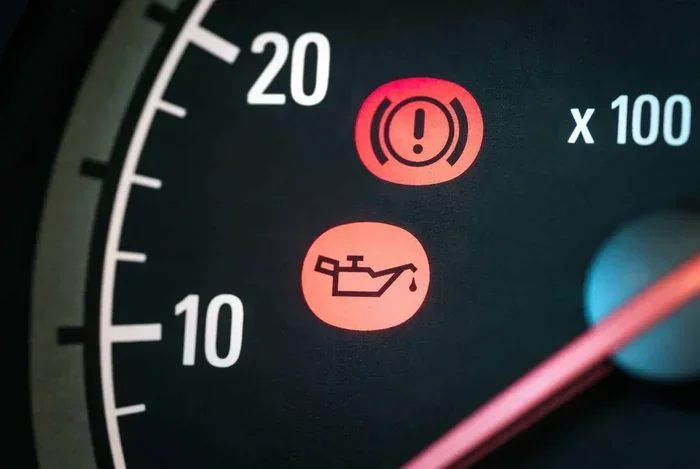
If the oil maintenance required message appears alongside an oil pressure warning light, this is a serious situation. Low oil pressure can mean your engine is running dangerously low on oil. Pull over safely, turn off the engine, and check your oil level immediately. Driving with low oil pressure can cause catastrophic engine failure.
The Message Appears Immediately After an Oil Change
If the oil maintenance required message shows up right after you have had the oil changed, it could indicate a problem with the oil life reset process or a sensor malfunction. In this case, try resetting the system again following the correct procedure for your vehicle. If the message persists, have a mechanic check the oil pressure sensor and oil life monitoring system.
Unusual Engine Noises or Performance Issues
If you notice knocking sounds, reduced engine performance, or unusual vibrations along with the maintenance message, do not ignore these symptoms. They could indicate that the oil is not properly lubricating the engine components, which requires immediate service.
For related dashboard warning lights, you might find our article on how to clear the engine management light helpful if you are dealing with multiple warning messages at once.
Quick Tips for a Smooth Oil Maintenance Reset
- Always change the oil first before resetting the maintenance light.
- Keep your owner’s manual handy for model-specific reset instructions.
- Use the correct oil grade recommended by your vehicle manufacturer.
- Reset the system promptly after every oil change to avoid confusion later.
- Do not ignore the message if it reappears shortly after a reset.
- Keep a maintenance log to track your oil change dates and mileage.
- Visit a trusted mechanic if the message keeps returning despite recent oil changes.
Conclusion
The oil maintenance required message is your vehicle’s way of telling you it is time for an oil change. Removing it is usually a simple process that takes just a few minutes, but the real work happens under the hood. Changing the oil on time and using quality products is what truly keeps your engine healthy and your maintenance light off.
Remember to follow the reset procedure specific to your vehicle make and model. Do not be tempted to simply reset the light without actually getting the oil changed. And if the message keeps coming back despite proper maintenance, have a professional inspect your vehicle for potential sensor issues or other problems.
Taking care of your car’s oil maintenance is one of the simplest and most cost-effective ways to extend your engine’s lifespan. A few minutes of attention now can save you thousands of dollars in repairs later. So the next time that oil maintenance required message pops up on your dashboard, you will know exactly what to do.
Frequently Asked Questions
How do I know if my oil actually needs changing or if it is just the reminder?
The oil maintenance required message is typically a scheduled reminder based on your vehicle’s oil life monitoring system. If you have recently changed your oil and the message still appears, it is simply a reset issue. You can verify your oil condition by checking the dipstick for color and consistency. Dark, gritty oil means it is definitely time for a change.
Can I drive my car with the oil maintenance required message on?
You can technically drive with the message on for a short period, but you should not make a habit of it. The message indicates that your oil has reached the end of its effective life. Continuing to drive without an oil change can lead to increased engine wear and potential damage over time.
How often does the oil maintenance required message come on?
This depends on your driving habits, vehicle make, and the type of oil you use. Most vehicles trigger the message every 5,000 to 10,000 miles. Vehicles using full synthetic oil may go longer intervals, sometimes up to 15,000 miles, before the message appears.
What should I do if the oil maintenance required message keeps coming back after I reset it?
If the message returns shortly after resetting, it likely means your oil has genuinely degraded and needs to be changed. If you have already changed the oil recently, there may be a sensor issue or the oil life system was not properly reset. In this case, consult a qualified mechanic to inspect the oil pressure sensor and monitoring system.
Does the oil maintenance required message mean my oil is low?
Not necessarily. The message is primarily a reminder that the oil change interval has been reached based on the oil life monitoring system. However, if the message is accompanied by a low oil pressure light or a dipstick check shows low levels, you should address the oil level immediately to prevent engine damage.
Is it bad to reset the oil maintenance required message without changing the oil?
Yes, it is not recommended. Resetting the message without changing the oil simply clears the reminder while your engine continues to run on degraded oil. This can lead to reduced engine protection, increased wear, and potentially expensive repairs in the long run. Always change the oil first, then reset the message.