How Do You Fix an Unresponsive Key Fob Step by Step
A dead or unresponsive key fob can leave you stranded, but most problems are easy to fix at home. This guide walks you through every step to diagnose and repair your unresponsive key fob, from simple battery swaps to signal troubleshooting. You will learn how to identify the root cause, replace the battery correctly, reset the fob, and know when to seek professional help.
There is nothing more frustrating than standing by your car, pressing the buttons on your key fob, and getting nothing in return. Your car does not unlock. It does not start. You are left wondering what went wrong and how to fix it. The good news is that an unresponsive key fob is one of the most common car problems, and it is usually easy to solve.
Whether your key fob not working is caused by a simple dead battery or something more complex like signal interference or water damage, this step-by-step guide will help you figure it out and fix it. We cover every possible cause and every practical solution so you can get back on the road quickly. Let us dive in and get your key fob troubleshooting sorted out.
Key Takeaways
- Dead Battery Is the #1 Cause: Most unresponsive key fobs simply need a battery replacement, which you can do in minutes at home.
- Signal Interference Matters: Metal objects, other electronics, and even your phone can block your key fob signal and mimic a broken fob.
- Reprogramming Is Often All It Takes: A lost or reset fob may just need reprogramming to reconnect with your vehicle.
- Water Damage Can Destroy a Fob: If your fob has been exposed to moisture, internal corrosion may require cleaning or replacement.
- Know When to Call a Pro: Circuit board damage or internal wear beyond simple fixes warrants professional diagnosis and repair.
- Preventive Maintenance Extends Fob Life: Regular battery checks and proper storage can keep your key fob working for years.
📑 Table of Contents
- Why Does a Key Fob Become Unresponsive?
- Step-by-Step Fix for an Unresponsive Key Fob
- When to Replace the Key Fob Instead of Repairing It
- How to Prevent Key Fob Problems in the Future
- Can You Still Drive If Your Key Fob Is Unresponsive?
- Common Mistakes People Make When Their Key Fob Stops Working
- Expert Tips for Key Fob Maintenance
- Key Takeaways
Why Does a Key Fob Become Unresponsive?
Before you start fixing anything, it helps to understand what might be causing the problem. A key fob not responding can stem from several different sources. Some are simple and free to fix. Others may require a little more effort or a trip to a shop. Here are the most common reasons your car key fob repair needs attention.
Dead or Weak Battery
The single most common reason for an unresponsive key fob is a dead battery. Key fobs use small coin cell batteries, usually CR2025 or CR2032, that last between two and four years. When the battery drains, the fob loses power and stops sending signals to your car. If you notice the range getting shorter or the buttons feeling weak before they stop working entirely, the battery is almost certainly the culprit.
Replacing the battery is the easiest and cheapest fix. Most people can do it at home with just a small flathead screwdriver. If you are not sure how, check out our guide on how to replace the key fob battery yourself for a detailed walkthrough.
Signal Interference
Sometimes the key fob is actually working fine, but something is blocking the signal. Metal objects, electronic devices, and even certain materials in your pocket or bag can interfere with the key fob signal. If you keep your fob next to your phone, for example, the phone’s electromagnetic fields can disrupt the fob’s ability to communicate with your car.
This type of problem often looks like a broken fob but is really just an environmental issue. Try moving away from electronic devices and metal surfaces and test the fob again. You may be surprised how quickly it starts working.
Water or Moisture Damage
If your key fob has ever fallen in water, been caught in the rain, or been stored in a damp area, moisture may have gotten inside. Water can corrode the circuit board and damage the internal components. A wet fob may work intermittently or stop working entirely depending on the level of damage.
Quick action can save a water-damaged fob. Remove the battery immediately and let the fob dry completely before reassembling it. If corrosion has already set in, you may need to clean the contacts or replace the fob entirely.
Worn-Out Buttons or Internal Components
Over time, the rubber buttons on your key fob can wear down or become stuck. The internal contacts can also degrade with regular use. If only certain buttons work or the fob feels physically different when you press it, the internal mechanism may be wearing out. This is more common with older fobs that have been used daily for several years.
Programming or Sync Issues
Modern key fobs need to be paired or synchronized with your vehicle. If the fob loses its programming due to a power surge, battery change, or system glitch, it will not communicate with the car even if the battery is fresh. Reprogramming the fob is usually straightforward and can often be done without a dealer visit.
Step-by-Step Fix for an Unresponsive Key Fob
Now that you understand the common causes, let us walk through the actual fixes. Follow these steps in order, starting with the simplest solutions and working your way up to more advanced troubleshooting.
Step 1: Check the Battery
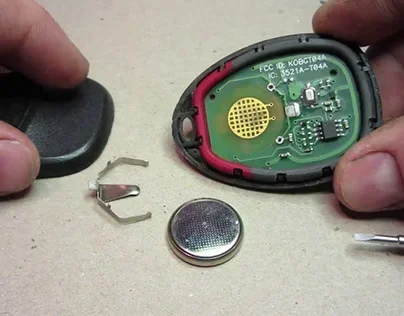
Start with the most obvious fix. If your key fob not working, the battery is the first thing to check. Here is how to do it:
- Look for a small seam or groove on the back of the fob.
- Use a flathead screwdriver or a coin to gently pry open the fob case.
- Remove the old battery and note its orientation.
- Insert a new battery of the same type, matching the positive and negative sides.
- Snap the fob back together and test it.
Make sure you buy the correct battery type. Check your car owner’s manual or look at the old battery for the model number. A bad key fob battery costs only a few dollars and takes less than five minutes to replace.
Step 2: Clean the Contacts
If replacing the battery does not help, the internal contacts may be dirty or corroded. Use a cotton swab dipped in isopropyl alcohol to gently clean the battery contacts and the internal connector points. Let everything dry completely before reassembling the fob and testing it again.
This simple step often resolves issues that seem like major electrical problems. Dirt and oxidation can build up over time, especially if the fob has been exposed to humidity or sweat from being in your pocket.
Step 3: Check for Signal Interference
Move away from other electronic devices and metal objects. Try standing a few feet away from your car and press the fob buttons. If the fob works from a distance but not when it is near your phone or other devices, interference is the problem.
Some drivers store their fobs in the same compartment as their phones or other electronics. This can cause constant low-level interference that weakens the fob signal over time. Keeping the fob in a separate pocket or pouch can prevent this issue.
Step 4: Reprogram the Key Fob
If the fob still does not work after a new battery and cleaning, the programming may have been lost. Reprogramming procedures vary by vehicle make and model, but here is a general approach:
- Sit in the car with all doors closed.
- Turn the ignition to the “On” position without starting the engine.
- Press and hold the lock button on the fob for several seconds.
- Turn the ignition off and repeat the process if needed.
- Consult your vehicle owner’s manual for the exact reprogramming steps.
Some vehicles require a specific sequence of key turns or button presses. If you are unsure, your owner’s manual or a quick online search for your specific vehicle model will have the exact steps. For Toyota owners, check out our article on starting a Prius without the key for related troubleshooting tips.
Step 5: Check for Physical Damage
Inspect the fob carefully for cracks, broken buttons, or signs of impact damage. If the fob has been dropped or sat on, the internal circuit board may be damaged. Physical damage often requires professional repair or a replacement fob.
Try pressing each button individually and listening for a faint click or beep. If some buttons work and others do not, the rubber contact pad underneath those buttons may be worn out. In some cases, you can gently clean or replace the contact pad yourself.
Step 6: Test the Range
Walk away from your car and test the fob at different distances. A healthy key fob should work from at least 30 to 50 feet away. If the fob only works when you are right next to the car, the signal strength has weakened, which could indicate a dying battery, internal damage, or antenna issues in the vehicle itself.
If you find that your fob works at close range but not from a distance, the battery may still have some charge but is too weak to send a strong signal. Replacing it should restore full range.
When to Replace the Key Fob Instead of Repairing It
Not every unresponsive key fob can be fixed. Sometimes the cost and effort of repair do not make sense, and a replacement is the better option. Here is when you should consider replacing your key fob rather than trying to repair it.
- Severe Water Damage: If the circuit board is heavily corroded or burned, replacement is the only reliable option.
- Cracked Circuit Board: A broken circuit board cannot be repaired easily, and even if it could, the repair would not be dependable.
- Multiple Failed Repairs: If you have already replaced the battery, cleaned the contacts, and reprogrammed the fob without success, the internal electronics are likely failing.
- Older Fob Models: Older fobs may no longer be supported by dealers or replacement part suppliers, making repair impractical.
A replacement fob can cost anywhere from $50 to $400 depending on your vehicle make and model. Some dealers can program a new fob for you, while aftermarket fobs are available online at lower prices. If you go the aftermarket route, make sure the fob is compatible with your specific vehicle year and trim.
How to Prevent Key Fob Problems in the Future
The best way to deal with an unresponsive key fob is to prevent the problem from happening in the first place. A few simple habits can extend the life of your key fob and keep it working reliably for years.
- Replace the battery proactively: Do not wait for the fob to stop working. Replace the battery every two to three years as a preventive measure.
- Store the fob properly: Keep it away from extreme heat, cold, and moisture. A small fob pouch or case can protect it from physical damage.
- Avoid electromagnetic interference: Store the fob separately from your phone and other electronic devices when possible.
- Handle the fob gently: Avoid dropping it or pressing the buttons with excessive force. Rough handling can damage the internal components over time.
- Keep spare batteries on hand: Having a replacement battery in your glove box means you can fix the problem immediately when the fob starts acting up.
Taking these simple precautions can save you from the hassle of a dead fob at the worst possible moment. A few minutes of preventive care now can prevent hours of frustration later.
Can You Still Drive If Your Key Fob Is Unresponsive?
This depends on your vehicle type. Many modern cars with push-button start systems have a backup method for starting the engine even when the fob is not working. Typically, you can place the fob directly against the start button or a specific spot on the steering column, and the car will read the fob’s signal through proximity.
If you have a traditional key fob with a physical key hidden inside, you can use that key to manually unlock the door and start the ignition. This is why it is always important to know where the hidden key is in your fob and keep it accessible.
For more information on starting a car without a working key fob, check out our guide on how to start a keyless car without a key. It covers backup methods for several popular vehicle brands and models.
If you suspect your key fob battery is draining your car battery, our article on can a bad key fob drain your car battery explains the relationship between fob health and vehicle battery performance.
Common Mistakes People Make When Their Key Fob Stops Working
When faced with an unresponsive key fob, many people jump to conclusions or make mistakes that waste time and money. Here are the most common errors to avoid:
- Assuming the fob is broken immediately: Most of the time, it is just a dead battery. Always check the battery first before assuming the worst.
- Using the wrong battery type: Not all key fobs use the same battery. Using the wrong size or type can damage the fob or fail to solve the problem.
- Forgetting to reprogram after battery replacement: In some vehicles, replacing the battery resets the fob’s programming. Always test the fob after a battery change and reprogram if needed.
- Ignoring the car’s internal antenna: Sometimes the problem is not the fob but the car’s antenna or receiver. If multiple fobs stop working at the same time, the issue may be in the vehicle itself.
- Trying to open the fob incorrectly: Forcing the fob case open can break the clips and damage the circuit board. Use the right tools and gentle pressure.
Expert Tips for Key Fob Maintenance
Automotive technicians see thousands of key fob issues every year, and they have some valuable insights that can save you time and money. Here are expert tips to keep your fob in top shape:
- Test your fob regularly: Once a month, step outside your car and test all the buttons. Catching weak signal strength early gives you time to replace the battery before you are stranded.
- Keep a spare fob: If your vehicle came with two fobs, store the second one in a safe place at home. A spare fob can be a lifesaver if your primary fob fails unexpectedly.
- Update your fob firmware if available: Some newer vehicles allow fob software updates through the dealer. These updates can improve range, responsiveness, and battery efficiency.
- Use OEM batteries when possible: Aftermarket batteries are cheaper, but OEM batteries tend to have more consistent performance and longer life in key fob applications.
These small habits add up over time and can significantly extend the useful life of your key fob. Most drivers never think about their fob until it stops working, but a little regular attention goes a long way.
Key Takeaways
- A dead battery causes most unresponsive key fob problems: Replacing the CR2025 or CR2032 battery is quick, cheap, and solves the issue in most cases.
- Signal interference can mimic a broken fob: Move away from electronics and metal objects and test the fob again to rule out interference.
- Reprogramming often restores communication between the fob and car: This is especially common after a battery change or if the fob has been disconnected for any reason.
- Water damage requires immediate action: Remove the battery, let the fob dry, and clean any corrosion to maximize the chance of recovery.
- Replacement is sometimes the most practical solution: If the circuit board is damaged or the fob is old, a new fob is more reliable than repeated repairs.
- Preventive maintenance keeps your fob working longer: Regular battery replacement, gentle handling, and proper storage go a long way in avoiding future problems.
Frequently Asked Questions
Why did my key fob stop working suddenly?
The most common reason is a dead battery. Key fob batteries typically last two to four years, and when they die, the fob stops sending signals to your car. Other causes include signal interference from nearby electronics, water damage, or a lost programming connection. Start by replacing the battery and testing the fob again before investigating more complex issues.
Can I replace the key fob battery myself?
Yes, replacing a key fob battery is one of the easiest car maintenance tasks you can do at home. You just need a small flathead screwdriver and the correct replacement battery, usually a CR2025 or CR2032 coin cell. Simply pry open the fob case, swap the old battery for the new one, and snap the case back together. If you are unsure about the process, our guide on replacing a key fob battery yourself has detailed instructions for most fob models.
How much does it cost to replace a key fob?
The cost varies widely depending on your vehicle make and model. Aftermarket key fobs can range from $50 to $150, while OEM fobs from the dealer can cost $200 to $400 or more. Programming fees at a dealer or locksmith typically add another $50 to $100. If your fob is still under warranty, the replacement cost may be covered, so always check with your dealer first.
What should I do if my key fob gets wet?
Act quickly. Remove the battery from the fob immediately to prevent short-circuiting. Let the fob dry completely for at least 24 hours in a warm, dry place. Once dry, clean any visible corrosion from the contacts with a cotton swab and isopropyl alcohol, then reassemble and test. If the fob still does not work after drying, the internal circuit board may be damaged and you will likely need a replacement.
How far should a key fob work from the car?
A healthy key fob should reliably work from at least 30 to 50 feet away from the vehicle, and in some cases even farther. If your fob only works when you are standing right next to the car, the battery may be weak or the fob signal may be degraded. Try replacing the battery first, and if the range does not improve, the fob may need reprogramming or replacement.
Can a key fob problem drain my car battery?
Yes, a faulty or continuously transmitting key fob can slowly drain your car battery over time. If your fob is stuck in a transmitting state or the car’s receiver is constantly searching for the fob signal, it can put a significant drain on the vehicle battery. If you notice your car battery is dying frequently and your fob is acting up, the two issues may be related.
=== CONCLUSION ===
Fixing an unresponsive key fob does not have to be stressful or expensive. Most of the time, a simple battery replacement, a quick cleaning, or a reprogramming session is all it takes to get your fob working again. By following the steps in this guide, you can diagnose the problem yourself and apply the right fix without visiting a mechanic or dealership.
Remember to take preventive measures like replacing the battery every few years, storing the fob properly, and keeping a spare on hand. These small habits will save you from the frustration of a dead fob when you need it most. If the problem persists despite your best efforts, do not hesitate to consult a professional or invest in a replacement fob. Your key fob is a small device that plays a huge role in your daily driving experience, and keeping it in good working order is well worth the effort.