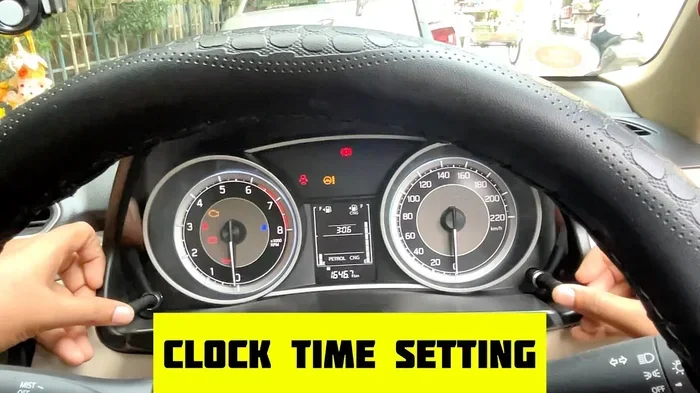
How Do You Fix a Messed-Up Internal Clock Step by Step
A messed-up internal clock in your car can throw off your schedule and confuse your daily routine. This guide walks you through fixing your car clock step by step, whether it lost power, needs a reset, or won’t sync properly. You’ll learn simple clock reset procedures for different car brands and models, plus tips to prevent future issues.
Your car’s internal clock is one of those features you rarely think about until it stops working correctly. You glance at the dashboard and realize the time is completely wrong. Maybe it reset to 12:00 after a battery change, or perhaps it slowly drifted off over several weeks. Whatever the reason, a messed-up internal clock can create small frustrations that pile up over time.
Fixing a car clock is usually straightforward, but the exact steps depend on your vehicle’s make, model, and year. Some cars let you reset the clock with a few button presses, while others require a slightly different approach. This guide covers everything you need to know about resetting your vehicle clock and keeping it accurate going forward.
Whether you drive a Toyota, Honda, Ford, or any other brand, you will find practical steps here. We also share tips on when a clock malfunction signals a bigger problem and how to avoid future issues. Let us walk you through the entire process.
Key Takeaways
- Resetting the clock is often a simple process that takes just a few minutes
- Dead batteries and power loss are the most common causes of clock malfunctions
- Different car brands have unique reset methods you should know
- Preventive maintenance can keep your vehicle clock running accurately
- Professional help may be needed for complex electrical issues
- Syncing with GPS or radio signals can automate clock corrections
- Regular checks ensure your car clock stays reliable year-round
📑 Table of Contents
Understanding Your Car’s Internal Clock
Before you dive into fixing the clock, it helps to understand how it works. Most modern vehicles use a digital clock that draws power from the car’s electrical system. The clock stays connected to the vehicle’s main computer, which manages many electronic functions.
When everything works correctly, the time display on your dashboard stays accurate. But when the power supply dips or the system resets, the clock can lose its settings. This is why many drivers notice the clock is wrong after a battery dies or gets replaced.
The vehicle clock serves more than just a convenience function. It syncs with navigation systems, radio presets, and even some safety features. A messed-up internal clock can sometimes affect these connected systems too. Understanding this connection helps you appreciate why keeping the clock accurate matters.
How the Clock Connects to Other Systems
Your car’s clock settings often link to the infotainment center and the radio system. When the clock resets, you might also lose radio stations or navigation preferences. This connection means a simple clock fix can sometimes restore other settings too.
Some vehicles use GPS signals to automatically adjust the time. These synchronized clocks stay accurate without any driver input. But if the GPS antenna or software has issues, even these smart clocks can go wrong.
Common Reasons Your Internal Clock Goes Wrong
Several factors can cause your car clock to malfunction. Identifying the root cause helps you choose the right fix. Here are the most common reasons drivers deal with a messed-up internal clock.
Battery Death or Replacement
The number one cause of clock problems is a dead or replaced battery. When you disconnect the battery for any reason, the clock loses its stored time settings. This happens because the clock relies on constant power to maintain its memory.
Even a small battery drain can cause the clock to reset overnight. If you notice your clock shows the wrong time every morning, a weak battery might be the culprit. Replacing the battery often solves this, but you will need to reset the clock afterward.
Electrical System Glitches
Sometimes the car electronics simply glitch. A power surge, a blown fuse, or a loose connection can interrupt the clock’s operation. These glitches often happen after installing new accessories or after extreme weather.
Flickering dashboard lights or other electrical issues alongside a wrong clock suggest a bigger problem. In these cases, you may want to check whether dealers charge a diagnostic fee before visiting a service center. A professional diagnosis can rule out serious electrical faults.
Software Updates or System Resets
Modern cars receive software updates that sometimes reset factory settings. After an update, your clock synchronization might break. The system may need a manual restart to restore proper timekeeping.
Some vehicles also reset during routine maintenance visits. Technicians often disconnect the battery to access certain components, which wipes the clock memory. Always double-check your time settings after any service appointment.
Age and Wear
Older vehicles may have analog clocks that simply wear out over time. The internal mechanisms can slow down or stop entirely. If your car is many years old, the clock might need replacement rather than a simple reset.
Even in newer cars, prolonged exposure to heat and humidity can damage the clock’s internal components. Parking in shaded areas and maintaining your vehicle’s climate system helps protect the digital clock and other electronics.
Step-by-Step Clock Reset Guide
Now let us get into the actual fix. Resetting your internal clock follows a general process that works for most vehicles. However, always check your owner’s manual for model-specific instructions first.
Step 1: Locate the Clock Controls
Start by finding the clock on your dashboard. Most vehicles have buttons near the clock itself or on the steering wheel. Some cars place clock controls inside the infotainment screen menu.
Look for buttons labeled “Clock,” “Time,” or “Set.” If you cannot find them, consult the car manual for the exact location. Taking a moment to locate the right controls saves time and frustration.
Step 2: Enter the Clock Setting Mode
Press and hold the clock button until the display starts blinking. This tells you the clock has entered setting mode. On some vehicles, you need to press a separate button to switch between hours and minutes.
Use the arrow or plus/minus buttons to adjust the time. Go slowly and check each change on the display. Once you set the correct time, press the clock button again to save.
Step 3: Choose the Correct Time Format
Many cars let you switch between 12-hour and 24-hour formats. Make sure your time format matches your preference. This setting often sits in the same clock menu.
If you recently moved to a different country or region, this step becomes especially important. A wrong format can make your clock read incorrectly even when the numbers are right.
Step 4: Sync with External Sources
If your vehicle supports GPS or radio-based time sync, use that feature. The navigation clock can pull accurate time from satellite signals. This auto-sync feature keeps your clock correct without any manual input.
For vehicles with a radio clock function, simply tune to a station that broadcasts time signals. The clock will automatically adjust to the correct time. This method works well as a quick clock fix for many models.
Step 5: Verify the Settings
After resetting, wait a few minutes and check the clock again. Make sure it has not reset itself or drifted. If the time stays correct, your fix worked. If not, you may need to repeat the process or investigate further.
Keep in mind that some vehicles need a battery reset after the clock fix. This ensures all systems recognize the new time settings. A full system restart often helps lock in the changes.
Brand-Specific Clock Fix Methods
Different car brands use different approaches for clock reset procedures. Here we cover some of the most common brands and their specific methods.
Toyota Clock Reset
Toyota vehicles often require you to hold the clock button for several seconds. Some models let you adjust the time through the infotainment screen. Toyota also offers GPS-based auto time adjustment on newer models.
If you own a Toyota and need to cut a new key after a clock issue, Toyota can cut a key from a VIN at most dealerships. This is helpful if the clock problem coincides with key fob issues.
Honda Clock Reset
Honda cars usually have a simple two-button process for clock adjustment. Press the hour and minute buttons simultaneously to enter setting mode. Honda’s clock system is straightforward and easy to navigate.
Ford Clock Reset
Ford vehicles often place clock controls in the instrument cluster or on the steering wheel. Some Ford models require you to hold the trip button and press the clock button together. The process varies by model year, so check your manual.
Chevrolet and General Motors
GM vehicles typically let you adjust the clock through the touchscreen infotainment system. Navigate to Settings, then look for the Clock or Time option. The digital interface makes adjusting your car clock simple on most GM models.
Preventing Future Clock Issues
Once you fix your internal clock, you want to keep it working correctly. Prevention is always easier than repair. Here are simple steps to protect your vehicle’s timekeeping.
Maintain Your Battery Health
A healthy battery keeps the clock powered consistently. Have your battery tested regularly, especially before winter. Replace old batteries before they fail completely. This simple habit prevents most clock reset issues.
If you ever need to replace the battery yourself, remember that you can replace a key fob battery yourself for similar electronic components. The same care applies to your vehicle’s main battery.
Avoid Unnecessary Battery Disconnections
Only disconnect the battery when absolutely necessary. Every disconnection risks resetting the clock and other settings. If you must disconnect the battery, write down your clock settings first so you can restore them quickly.
Keep Software Updated
Stay current with your vehicle’s software updates. These updates often include fixes for clock synchronization bugs. Check with your dealer or use the manufacturer’s app for update notifications.
Protect Electronics from Heat
Excessive heat damages electronic components over time. Park in shaded areas when possible. Use a windshield sunshade during hot months. This protects the dashboard clock and all other electronics.
When to Seek Professional Help
Most clock fixes are simple and DIY-friendly. But sometimes the problem goes deeper than a simple reset. Knowing when to call a professional saves time and prevents further damage.
If your clock keeps resetting after you fix it, there may be an underlying electrical issue. Flickering dashboard lights, warning alerts, or other electronic failures alongside a wrong clock all point to a bigger problem. A diagnostic fee at a dealership or mechanic can identify the root cause.
Complex electrical faults require specialized tools and expertise. Do not attempt to open the dashboard or mess with wiring unless you have experience. A professional can safely diagnose and repair the issue while keeping your vehicle warranty intact.
Also consider professional help if your clock problem started after a software update. Sometimes the update needs a dealership visit to complete properly. Technicians have access to manufacturer tools that can fix these issues quickly.
Quick Tips for Common Clock Problems
- Clock shows 12:00 after battery change: Simply reset the time using your dashboard controls
- Clock runs slow or fast: Check for a weak battery or loose electrical connection
- Clock resets every time you turn off the car: This suggests a deeper electrical fault requiring professional diagnosis
- Clock won’t enter setting mode: Try holding the button longer or consult your vehicle manual
- Clock works but radio stations reset: The infotainment system may need a full restart
Conclusion
Fixing a messed-up internal clock does not have to be stressful or complicated. With the right steps, most drivers can reset their car clock in under ten minutes. Start with the simplest method and work your way up if needed. Remember to check your battery health, protect your electronics, and stay on top of software updates.
A working internal clock keeps your daily routine on track and your vehicle systems running smoothly. Take a few minutes today to check your clock and make any needed adjustments. Small maintenance steps like this add up to a better driving experience over time.
If your clock problem persists despite your best efforts, do not hesitate to seek professional help. A qualified technician can diagnose hidden issues and get your vehicle clock back on track. Trust the process, stay patient, and your clock will keep accurate time for years to come.
Frequently Asked Questions
Why does my car clock keep resetting to 12:00?
This usually happens after a battery dies or gets disconnected. The clock loses its stored settings when power is cut. Simply reset the time using your dashboard controls, and the clock should hold the new setting going forward.
Can a messed-up internal clock affect other car systems?
Yes, in some vehicles the clock connects to the infotainment system and navigation features. A clock malfunction can sometimes cause radio presets to reset or navigation preferences to disappear. Fixing the clock often restores these connected settings too.
How long does it take to reset a car clock?
Most clock resets take between two and five minutes. The exact time depends on your vehicle model and how simple the reset process is. Newer cars with touchscreen interfaces often make the process even faster.
Do I need any special tools to fix my car clock?
No special tools are needed for most clock resets. You only need the dashboard buttons or touchscreen controls. If the problem stems from an electrical fault, a mechanic will need diagnostic tools, but a basic clock fix requires nothing more than your hands and the owner’s manual.
Is it safe to drive with a wrong clock time?
Yes, a wrong clock time does not affect your vehicle’s safety or performance. However, it can cause confusion with timing-based features like scheduled maintenance reminders or GPS arrival estimates. It is worth fixing the clock when you have a few spare minutes.
Can I fix my car clock without visiting a dealer?
Absolutely. Most clock issues resolve with a simple reset you can do yourself at home. Only complex electrical problems require a dealership visit. If the clock keeps resetting despite your efforts, then professional diagnosis becomes the next logical step.
=== INTERNAL LINKS ===
If you need to reset other settings on your vehicle, check out our guide on Can You Reset The Mileage On A Car for helpful tips.
When dealing with persistent electrical issues, it is worth understanding whether dealers charge a diagnostic fee before scheduling a service visit.
For DIY electronic repairs, see our article on Can You Replace A Key Fob Battery Yourself to learn more about handling car electronics safely.