How Do I Turn Off the Maintenance Required Light on My Car
The maintenance required light is a common dashboard reminder that tells you it is time for scheduled service. Turning it off is usually simple and can be done in just a few minutes using your steering wheel controls or dashboard buttons. This guide walks you through the exact steps for most car brands so you can reset the light yourself without visiting a dealer.
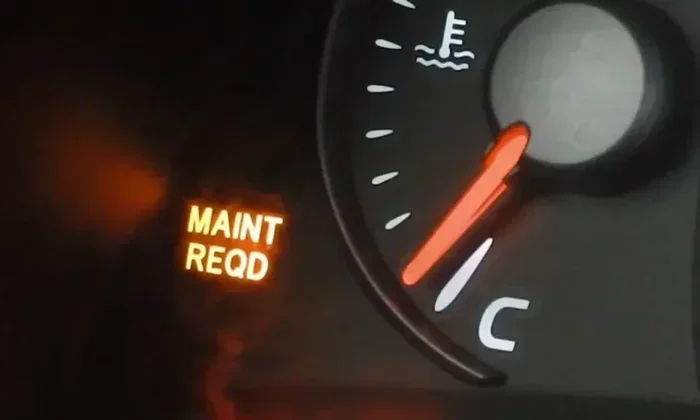
That little wrench or “MAINTENANCE REQUIRED” message on your dashboard can be annoying. You know your car is fine, but the light just keeps staring at you every time you start the engine. The good news is that turning off the maintenance required light is something you can do on your own in just a few minutes.
Whether you drive a Toyota, Honda, or another popular brand, the process is almost always simple. You do not need a mechanic or a fancy tool. In this guide, we will walk you through exactly how to reset the light on different car models. We will also cover what the light means, why it comes on, and how to avoid it popping up again too soon.
Many drivers panic when they see a warning light on the dash. But the maintenance light is not an emergency signal. It is just your car’s way of saying, “Hey, I am due for a service.” Understanding this makes the whole process much less stressful. Let us dive in and get that light off your dashboard for good.
Key Takeaways
- The maintenance required light is not the same as the check engine light. It simply tracks your service intervals based on mileage.
- Most cars let you reset the light yourself using a few button presses on the steering wheel or dashboard.
- Toyota and Honda models have slightly different reset procedures, but they are all easy to follow.
- Ignoring the light too long can lead to missed oil changes and reduced engine performance.
- You can also use an OBD2 scanner to reset the light if the button method does not work.
- Regular maintenance keeps your car running smoothly and prevents costly repairs down the road.
📑 Table of Contents
- What Does the Maintenance Required Light Mean?
- How to Turn Off the Maintenance Required Light
- Common Mistakes When Resetting the Maintenance Light
- When to Visit a Service Center Instead
- Tips to Keep Your Maintenance Light from Coming Back Too Soon
- Quick Tips for a Successful Reset
- How the Maintenance System Works in Modern Cars
- Final Thoughts
What Does the Maintenance Required Light Mean?
The maintenance required light is a service interval indicator. It is built into your car’s onboard computer system. The light tracks your mileage and reminds you when it is time for routine maintenance. This usually means an oil change, but it can also signal other scheduled services.
Here are some key things to know about what this light represents:
- It tracks mileage-based service intervals. Most cars are set to remind you every 5,000 to 7,500 miles.
- It is different from the check engine light. The check engine light signals a problem. The maintenance light just means it is time for scheduled service.
- It does not mean your car is broken. Your car can run perfectly fine with this light on. It is purely a reminder.
- It resets after each service. Once you complete the maintenance, the light should be turned off manually.
Some drivers confuse this light with the engine management light or the oil pressure light. Those are different warnings that need immediate attention. The maintenance required light is much less urgent. Still, you should not ignore it for too long. Regular oil changes and servicing keep your engine healthy and extend the life of your vehicle.
Why Does the Light Come On?
The light comes on based on a mileage counter in your car’s computer. When you reach the preset service interval, the system triggers the reminder. For most Toyota models, this happens every 5,000 miles. For many Honda vehicles, it is also around 5,000 to 7,500 miles. The exact interval depends on your car’s manufacturer and model year.
Sometimes the light comes on prematurely. This can happen if the system gets confused or if you recently filled up with fuel and the computer reset its counter oddly. In rare cases, a loose gas cap or a minor sensor glitch can also trigger the reminder. But most of the time, it simply means your car is due for an oil change or a routine inspection.
How to Turn Off the Maintenance Required Light
Now for the part you have been waiting for. Resetting the maintenance required light is straightforward on most vehicles. The exact steps vary slightly depending on your car brand and model. Below, we cover the most common methods for popular brands.
Resetting the Light on a Toyota
Toyota vehicles are some of the most popular cars on the road, and the process is quite simple. Here is how to do it:
- Turn the ignition to the “ON” position without starting the engine.
- Press the trip meter reset button until the odometer display shows the maintenance interval.
- Turn the ignition to the “OFF” position.
- Press and hold the trip meter reset button.
- While holding the button, turn the ignition back to “ON.”
- Hold the button for about 10 seconds until the light blinks and then turns off.
- Turn the ignition off and then on again to confirm the light is gone.
For newer Toyota models with a touchscreen display, the process is slightly different. You can usually find the maintenance reset option in the vehicle settings menu. Navigate to “Setup,” then “Maintenance,” and select “Reset.” This method works on many 2018 and newer Toyota models.
Resetting the Light on a Honda
Honda vehicles follow a similar but slightly different process. Here are the steps:
- Press the “Select/Reset” knob on the steering wheel or dashboard.
- Navigate to the maintenance menu on the display.
- Hold the knob down for about 10 seconds.
- The light should blink and then turn off.
- Turn the car off and back on to confirm the reset.
For older Honda models without a digital display, you may need to use the trip meter reset button in a similar way to the Toyota method. The key is holding the button while cycling the ignition. If you are unsure, your Honda owner’s manual will have the exact steps for your specific model.
Resetting the Light on Other Brands
Most other car brands follow a similar general process. You typically need to access the trip meter or maintenance menu and hold a button for several seconds. If your car brand is not covered above, check your owner’s manual. The manual will have the exact reset procedure. You can also search online for your specific make and model plus “maintenance light reset.”
For vehicles where the button method does not work, an OBD2 scanner is a great alternative. These devices plug into your car’s diagnostic port and let you reset warning lights. You can find a basic OBD2 scanner for under $30 at most auto parts stores. This tool is also handy for checking whether other warning lights, like the engine management light, can be cleared at home.
Common Mistakes When Resetting the Maintenance Light
Resetting the maintenance required light is easy, but mistakes do happen. Here are some common errors to avoid:
- Resetting the light without actually doing the service. This defeats the whole purpose. The light exists to remind you to take care of your car. Always complete the maintenance first.
- Holding the button for too short a time. You need to hold the button long enough for the system to register the command. Usually, 10 to 15 seconds is enough.
- Starting the engine during the reset process. Keep the car in “ON” mode, not “START,” during the reset sequence. Starting the engine can interrupt the process.
- Confusing the maintenance light with the check engine light. These are two different lights. The check engine light indicates an actual problem and should be diagnosed properly. You can learn more about clearing the check engine light here.
- Not resetting after every service. Make it a habit to reset the light each time you visit a service center or do your own oil change.
One more mistake to watch out for is ignoring the light for thousands of miles. Even though it is not an emergency warning, pushing too far past the service interval can lead to dirty oil and engine wear. Set a reminder on your phone when the light comes on so you schedule the service promptly.
When to Visit a Service Center Instead
There are times when resetting the light yourself is not enough. If the maintenance required light keeps coming back shortly after you reset it, there may be an underlying issue. Here are some situations where you should visit a professional:
- The light returns immediately after resetting. This could indicate a problem with the onboard computer system.
- You have completed the service but the light will not turn off. A mechanic may need to clear the code using professional diagnostic equipment.
- Other warning lights are also on. If you see the check engine light or oil pressure light alongside the maintenance light, get your car inspected right away.
- You are unsure about the reset process. A dealership or service center can reset the light for you quickly. Many places like dealerships offer quick inspections and can handle this during a routine visit.
Regular visits to a service center also help you stay on top of your car’s maintenance schedule. A professional can spot potential issues before they become expensive problems. It is always better to be proactive than reactive when it comes to car care.
Tips to Keep Your Maintenance Light from Coming Back Too Soon
Once you have successfully reset the maintenance required light, you want to keep it off until the next service interval. Here are some practical tips:
- Track your mileage regularly. Use a phone app or a simple notebook to log your miles. This helps you know when you are approaching the next service interval.
- Get your oil changed on schedule. Fresh oil keeps your engine running well and ensures the maintenance system resets properly.
- Check your owner’s manual. Every car has a recommended maintenance schedule. Follow it closely to avoid unnecessary reminders.
- Keep your car’s computer updated. Some newer models allow software updates that can improve how the maintenance system works.
- Do not ignore other dashboard lights. If you notice other warning indicators, address them quickly. A problem with one system can sometimes trigger false reminders on another.
Taking care of your car does not have to be complicated. A little attention to your maintenance schedule goes a long way. You will save money on repairs and keep your car running smoothly for years to come.
Quick Tips for a Successful Reset
Here are some quick tips to make the reset process smooth and hassle-free:
- Read your owner’s manual first. It has the exact steps for your specific model.
- Make sure the car is in park. This is a safety requirement for most reset procedures.
- Have your trip meter ready. You will need to access it during the reset process on most models.
- Be patient with the button hold. Do not let go too early. Count to 10 or 15 in your head.
- Confirm the reset by turning the car off and on. If the light stays off, you are all set.
If you are dealing with other dashboard lights and wondering about safety, you might also be interested in learning whether you can safely drive with certain warning lights on. For example, you can check our guide on whether it is safe to drive your Toyota Camry with the check engine light on for more peace of mind.
How the Maintenance System Works in Modern Cars
Modern cars have sophisticated onboard computer systems that track dozens of parameters. The maintenance reminder is just one of many features these systems manage. The computer monitors your mileage, driving habits, and even fuel quality to determine the optimal service interval.
Some vehicles use an “oil life” system instead of a simple mileage counter. This system analyzes your driving conditions and adjusts the service reminder accordingly. If you drive in severe conditions, such as frequent short trips or extreme temperatures, the system may recommend service sooner. Understanding how your specific maintenance system works helps you get the most out of your car.
The maintenance required light is a helpful tool when used correctly. It keeps you on top of routine services and prevents you from forgetting important maintenance tasks. The key is to treat it as a guide, not a nuisance. When you reset it, you are acknowledging that the service has been completed and the system is ready to track the next interval.
Final Thoughts
Turning off the maintenance required light is a simple task that any car owner can do. You do not need special tools or a trip to the dealership. With just a few button presses, you can clear the reminder and keep your dashboard clean. The most important thing is to actually complete the maintenance before resetting the light. Oil changes, tire rotations, and other routine services keep your car running at its best.
If you ever run into trouble resetting the light, refer to your owner’s manual or consult a trusted mechanic. And remember, the maintenance light is your friend. It is there to help you stay on top of your car’s needs. Embrace it as part of responsible car ownership, and you will enjoy a smoother, more reliable driving experience for years to come.
Frequently Asked Questions
Can I drive my car with the maintenance required light on?
Yes, you can safely drive your car with the maintenance required light on. This light is just a reminder for scheduled service and does not indicate any urgent problem. However, you should not ignore it for too long, as overdue maintenance can affect your car’s performance over time.
What is the difference between the maintenance required light and the check engine light?
The maintenance required light is a routine service reminder based on mileage. The check engine light signals an actual problem with your vehicle’s emissions or engine system. If the check engine light is on, you should get your car diagnosed as soon as possible.
How often does the maintenance required light come on?
Most cars trigger the maintenance required light every 5,000 to 7,500 miles. The exact interval depends on your vehicle’s make, model, and manufacturer recommendations. Check your owner’s manual for the specific schedule for your car.
Can I use an OBD2 scanner to reset the maintenance required light?
Yes, an OBD2 scanner can reset the maintenance required light on most vehicles. Simply plug the scanner into your car’s diagnostic port, follow the on-screen prompts, and select the maintenance reset option. This method works well if the button method does not succeed.
Will the maintenance required light turn off by itself?
No, the maintenance required light will not turn off by itself after you complete the service. You need to manually reset it using the button sequence for your car model. Always reset it after each oil change or service appointment.
What should I do if the maintenance light keeps coming back after I reset it?
If the light keeps returning, there may be an issue with your car’s onboard computer system. Visit a service center or dealership to have the system checked. A professional mechanic can diagnose whether the maintenance reminder needs a more advanced reset or if there is an underlying problem.