Is Your Garage Door Opener Compatible With HomeLink
Find out if your garage door opener is HomeLink compatible with our simple guide. You’ll learn how to check your opener’s frequency, identify rolling code vs fixed code systems, and program your car’s console. Stop guessing and get your smart garage door working with your vehicle today.
You pull into the garage after a long day. You want to open the door with a simple button press on the visor. But wait. Does your garage door opener work with HomeLink? This question stops a lot of homeowners in their tracks.
The good news is that most modern openers are HomeLink compatible. Still, you need to know how to check. You also need to understand the difference between rolling code and fixed code systems. This guide will walk you through every step. You will learn how to verify compatibility, program your opener, and fix common issues. By the end, you will feel confident and ready to go.
HomeLink is a built-in system in many vehicles. It lets you control your garage door, gate, or gate opener directly from your car. No more fumbling for a remote. No more leaving the house just to open the door. But the system only works if your garage door opener supports it. That is why checking compatibility first is so important. A HomeLink compatible garage door opener saves you time, money, and frustration.
Key Takeaways
- Check your opener model first: Most modern units from Chamberlain, LiftMaster, and Genie are HomeLink compatible.
- Know your code type: Rolling code openers need a specific programming sequence that fixed code units do not.
- Look for the learn button: This small red, orange, or green button on the motor head is your gateway to pairing.
- Use a universal bridge if needed: Older openers can become HomeLink compatible with a simple smart bridge module.
- Avoid common mistakes: Holding the button too long or choosing the wrong frequency will cause failure.
- MyQ offers an alternative: Chamberlain’s MyQ system works with many cars even if native HomeLink is missing.
- Program in a safe spot: Park your car in the garage with the door fully closed for the best signal.
📑 Table of Contents
- What Is HomeLink and Why Does Compatibility Matter?
- How to Check If Your Garage Door Opener Is HomeLink Compatible
- Common Garage Door Opener Brands and Their HomeLink Status
- Step-by-Step Programming Guide for HomeLink Compatible Openers
- What If Your Opener Isn’t HomeLink Compatible?
- Quick Tips and Common Mistakes to Avoid
- Key Takeaways
- Conclusion
What Is HomeLink and Why Does Compatibility Matter?
How HomeLink Works
HomeLink uses radio frequency signals to talk to your garage door opener. Your car has a small transmitter built into the rearview mirror or overhead console. When you press a programmed button, it sends a signal to the opener’s receiver. The door then moves up or down. The whole process takes about two seconds.
The system works with most garage doors, gates, and even some lighting systems. But the opener itself must be able to receive that radio signal. If the opener is too old or uses a different frequency, it will not respond. That is where compatibility comes in. A HomeLink compatible garage door opener has the right internal radio and receiver to talk to your car’s console.
The Benefits of a HomeLink Compatible Garage Door Opener
Why should you care about HomeLink? Here are the top benefits:
- Convenience: Open your door without digging for a remote.
- Safety: You never have to leave your car in a dark garage.
- Integration: Some systems also control lights and other smart home devices.
- Resale value: A smart garage door system adds appeal to your home.
- No extra hardware: You do not need to buy a separate universal remote if your opener is already compatible.
When your opener is HomeLink compatible, you get all of these benefits for free. You just need to set it up once.
How to Check If Your Garage Door Opener Is HomeLink Compatible
Checking compatibility is easier than you think. You do not need a technician. You just need a few minutes and your opener model number. Follow these steps to find out if your unit works with HomeLink.
Check the Opener Model and Brand
Start by looking at the back of your garage door motor. You will see a sticker or label with the model number. Write it down. Then go to the manufacturer’s website. Search for your model and look for “HomeLink” or “MyQ” in the feature list.
Most big brands clearly state if their opener is HomeLink compatible. Here are the main brands you might have:
- Chamberlain – Most models made after 2004 are HomeLink ready.
- LiftMaster – Nearly all current units include HomeLink built in.
- Genie – Many Pro and Aladdin models support HomeLink.
- Overhead Door – Select models have HomeLink or MyQ integration.
If you cannot find the model number, look for the “Learn” button on the motor head. That small button often means the unit can be programmed with new remotes and smart systems. However, having a learn button does not guarantee HomeLink support. You still need to check the brand website.
Identify Rolling Code vs Fixed Code Systems
This is a crucial step. Garage door openers use two types of security codes: rolling code and fixed code.
Rolling code openers change the access code every time you press the button. This prevents thieves from copying the signal. Most modern openers use rolling code. HomeLink works with both rolling code and fixed code openers, but the programming steps are different.
Fixed code openers use the same code every time. These are older units from the 1980s and 1990s. They are less secure but still common in older homes. A HomeLink compatible garage door opener will handle both types, but you must follow the right procedure.
Look for the HomeLink Button on Your Car
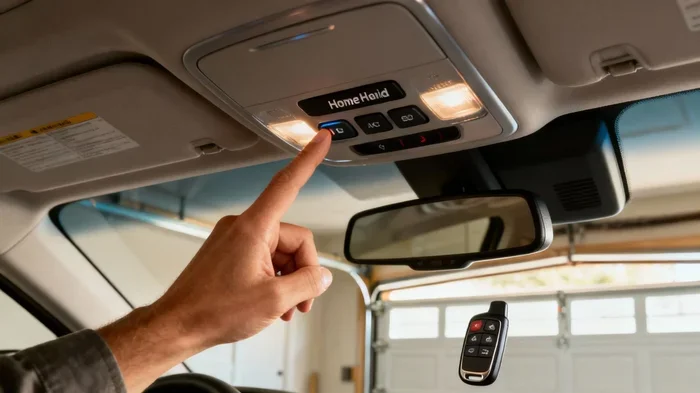
Before you buy anything, check your vehicle. Open the driver’s sun visor or look at the overhead console. You should see three buttons grouped together with the HomeLink logo. If your car has those buttons, then your vehicle is ready. The next question is simply whether your opener can talk to them.
Common Garage Door Opener Brands and Their HomeLink Status
Not all openers are created equal. Here is a quick look at popular brands and their HomeLink support.
Chamberlain and LiftMaster
Chamberlain and LiftMaster are the same company. Most of their openers are HomeLink compatible. The Chamberlain Group actually invented HomeLink back in the 1990s. So it makes sense that their units work seamlessly. Look for models like the Chamberlain B970 or LiftMaster 8550W. These openers have HomeLink built right into the logic board.
If you have an older Chamberlain unit from before 2011, it might still work but could need a universal bridge. The company offers the Chamberlain Universal Wi-Fi Garage Door Hub to add smart features and HomeLink support to older models.
Genie
Genie is another major player. Many of their Pro Series and SilentMax openers support HomeLink. Genie also offers its own smart system called Intellicode. This is a rolling code system that works with HomeLink. Check the Genie website and enter your model number to confirm.
Other Compatible Brands
Other brands like Craftsman, Ryobi, and Wayne Dalton also make HomeLink compatible garage door openers. Craftsman openers sold at Sears often use Chamberlain internals, so they usually support HomeLink. Ryobi openers are more budget-friendly but many newer models include HomeLink. Always double-check the product description before you buy.
| Brand | HomeLink Support | Smart System | Typical Price Range |
|---|---|---|---|
| Chamberlain | Yes (most models) | MyQ | $200 – $500 |
| LiftMaster | Yes (most models) | MyQ | $250 – $550 |
| Genie | Yes (many models) | Intellicode | $200 – $450 |
| Craftsman | Yes (most models) | MyQ | $180 – $400 |
| Overhead Door | Select models | MyQ | $250 – $500 |
| Ryobi | Some models | Ryobi Garage | $150 – $300 |
Use this table as a quick reference. If your brand and model are not listed, visit the manufacturer’s site and search for “HomeLink” in the specifications. A HomeLink compatible garage door opener will always list it as a feature.
Step-by-Step Programming Guide for HomeLink Compatible Openers
Once you confirm your opener is HomeLink compatible, you need to program it. The process takes about five minutes. You will need your car keys, your garage door opener remote, and a ladder.
Preparing Your Vehicle and Opener
First, park your car in the garage with the door fully closed. This ensures you are close enough to the motor head for a strong signal. Turn the ignition to the accessory position. Do not start the engine. Then, locate the HomeLink buttons on your visor or console. You will also need to find the learn button on your garage door opener motor. This button is usually near the antenna wire on the back of the motor unit.
Programming the HomeLink Button
Follow these steps to pair your opener with your car:
- Erase old codes: Press and hold the two outer HomeLink buttons until the indicator light blinks (about 20 seconds). This clears any previous settings.
- Put the opener in learn mode: Press and release the learn button on the motor head. The indicator light will stay on for about 30 seconds.
- Send the signal: Go back to your car. Press and hold the HomeLink button you want to use. Hold it for 20 seconds or until the indicator light changes from slow to fast blinking.
- Complete the pairing: Some openers require you to press the wall console button or the handheld remote once during this step. Check your manual for exact timing.
- Test it: Press the HomeLink button again. The garage door should respond. If it does not, repeat the process from step 2.
For rolling code openers, the process is almost the same. The key difference is that you must press the learn button only after you start the car pairing sequence. The opener will generate a new code each time, which keeps your system secure.
Troubleshooting Common Programming Issues
Sometimes the HomeLink button will not work right away. Do not panic. Try these fixes:
- Check the frequency: Most openers use 315 MHz or 390 MHz. Some older units use 303 MHz. Make sure your car’s HomeLink system matches the opener’s frequency. You can find this on the opener’s label.
- Replace the batteries: Weak batteries in your car’s HomeLink transmitter or in the handheld remote can cause failure.
- Move closer: Stand right next to the motor head when pressing the learn button. The signal needs to be strong.
- Wait 30 seconds: The learn mode light sometimes times out. Wait for it to turn off and try again.
- Use the MyQ app: If you have a Chamberlain or LiftMaster opener, the MyQ app can help you reset the system and confirm the pairing.
What If Your Opener Isn’t HomeLink Compatible?
Not every garage door opener supports HomeLink. Older units or budget models might not have the right receiver. But you still have options. You do not need to replace your entire opener just to get car integration.
Using a Universal Remote Bridge
A universal bridge module sits between your car’s HomeLink system and your opener. The bridge receives the HomeLink radio signal and converts it into a signal your opener understands. Chamberlain and LiftMaster sell a Universal Remote Control Bridge that works with most openers. You install it on the logic board of your opener. Then you program the bridge through your car’s HomeLink system.
This is the easiest and cheapest way to make an old opener HomeLink compatible. The bridge costs around $30 to $50. It is a simple plug-and-play device. You do not need any wiring skills. Just match the wires and mount the bridge near the motor head.
Upgrading to a Smart Garage Door Opener
If your opener is very old, you might want to upgrade. A new HomeLink compatible garage door opener costs between $200 and $500. You get better safety features, quieter operation, and smart phone control. Modern openers also have battery backup, which keeps them working during power outages.
Brands like Chamberlain, LiftMaster, and Genie offer openers with built-in Wi-Fi. You can control them from your phone using the MyQ app. The car integration works the same way. You just press the HomeLink button and the door opens. It is a great upgrade if your current opener is more than 10 years old.
The MyQ Alternative
Chamberlain’s MyQ system is not exactly HomeLink, but it achieves a similar goal. MyQ lets you open your garage door from your phone. Many newer cars now support Apple CarPlay and Android Auto. Some of these systems can integrate with MyQ. If your car does not have native HomeLink but has a smart phone connection, MyQ might be your best bet. You can also buy a MyQ-compatible garage door opener and get both phone and car control.
Quick Tips and Common Mistakes to Avoid
Quick Tips for Smooth Programming
- Read the manual first: Even if you think you know the steps, a quick read can save you 20 minutes of frustration.
- Keep your handheld remote handy: You may need it to trigger the learn mode on some openers.
- Use a fresh 9-volt battery: Some openers have a backup battery that helps the logic board remember settings during programming.
- Label your HomeLink buttons: Use small stickers to mark which button controls the garage door. This prevents confusion later.
- Test with the door fully closed: Always start the programming process with the door down to avoid any accidental movement.
Common Mistakes That Cause Failures
- Holding the HomeLink button too long: This can reset the system instead of pairing it. A firm press for 20 seconds is enough.
- Choosing the wrong frequency: If your opener uses 390 MHz and your HomeLink is set to 315 MHz, they will never connect.
- Ignoring the rolling code requirement: Fixed code openers do not need the rolling code sequence. Trying to use it on a fixed code unit will fail.
- Programming in a weak signal area: If your car is too far from the opener, the signal will not reach. Stay inside the garage.
- Forgetting to clear old codes: Old paired devices can interfere with new ones. Always erase first.
Expert Insight: When to Call a Professional
Most homeowners can program HomeLink on their own. But if you have tried everything and the door still does not respond, call a garage door technician. There could be a wiring issue inside the motor head. Or the logic board might be faulty. A professional can diagnose the problem in minutes and get your HomeLink compatible garage door opener working again.
Key Takeaways
- Check your opener model: Most modern openers from Chamberlain, LiftMaster, and Genie are HomeLink compatible.
- Identify rolling code vs fixed code: This determines the programming steps you need to follow.
- Use the learn button: This small button on the motor head is essential for pairing.
- Program in the garage with the door closed: This ensures a strong signal and safe operation.
- Use a universal bridge if needed: Older openers can become HomeLink compatible with a simple bridge module.
- MyQ offers a smart alternative: Chamberlain’s MyQ system works with many cars even if native HomeLink is missing.
- Avoid common mistakes: Holding the button too long, ignoring frequency mismatches, and skipping the erase step are the top reasons for failure.
Conclusion
Knowing if your garage door opener is HomeLink compatible is the first step toward a smarter, more convenient home. You do not need to be a tech expert. You just need to check your model, identify your code type, and follow the programming steps. Most modern openers work perfectly with HomeLink right out of the box. If yours does not, a universal bridge or a smart upgrade can bring your opener into the modern era.
Take a few minutes today to check your opener’s compatibility. Look up the model number, visit the manufacturer’s site, and confirm the HomeLink feature. Once you know your opener is HomeLink compatible, you can enjoy the simple pleasure of opening your garage door from your car. It is a small change that makes a big difference in your daily routine.
Do not let a simple compatibility question keep you from the convenience of smart garage door control. Follow the steps in this guide, and you will be up and running in no time. Your car and your garage will thank you.
Frequently Asked Questions
How do I know if my garage door opener is HomeLink compatible?
Check the manufacturer’s website or the product manual for “HomeLink” in the feature list. Most openers made after 2004 from brands like Chamberlain, LiftMaster, and Genie are HomeLink compatible. Look for the HomeLink logo on your car’s visor and the learn button on your opener motor.
Can I make an old garage door opener HomeLink compatible?
Yes, you can use a universal bridge module. These small devices plug into your opener’s logic board and convert the HomeLink radio signal into a signal your older opener can understand. They cost around $30 to $50 and are easy to install.
What is the difference between rolling code and fixed code openers?
Rolling code openers change the access code every time you use the remote. This makes them more secure. Fixed code openers use the same code every time. Both types can work with HomeLink, but you must follow the correct programming sequence for each.
Why does my HomeLink button not work after programming?
The most common reasons are weak batteries, wrong frequency, or not holding the button long enough during programming. Make sure your car’s HomeLink transmitter and opener remote have fresh batteries. Also confirm that your car’s HomeLink frequency matches the opener’s frequency listed on the motor label.
Is MyQ the same as HomeLink?
No, MyQ is Chamberlain’s smart garage door system. It lets you control your door from your phone. However, many Chamberlain and LiftMaster openers with MyQ also support HomeLink. You can use both the app and your car’s console to open the door.
Can I program multiple cars to the same HomeLink compatible garage door opener?
Yes, you can. Each car has its own set of HomeLink buttons. You just repeat the programming process for each vehicle. The opener can store multiple rolling codes, so each car will work independently. This is great for families with multiple drivers.