How Do I Delete Phone Info From My Car?
Deleting phone info from your car is essential for privacy and security, especially before selling or trading in your vehicle. This guide walks you through removing Bluetooth pairings, clearing call history, deleting contacts, and factory resetting your car’s infotainment system for all major brands. Follow these simple steps to ensure your personal data stays safe and your car is ready for its next owner.
Your car knows a lot about you. It remembers your phone number. It stores your call history. It even holds onto your favorite playlists and recent text notifications. Over time, your vehicle becomes a digital extension of your life. But what happens when you want to sell that car, trade it in, or simply start fresh? Knowing how to delete phone info from your car is more important than most people realize.
Whether you drive a Toyota, Honda, Ford, or a luxury BMW, every vehicle with a touchscreen or infotainment system stores personal data. This data can include paired phones, contacts, call logs, text message previews, and even saved Wi-Fi passwords. Leaving this information behind can put your privacy at serious risk. The good news is that removing phone data from your car is straightforward once you know the right steps.
In this guide, we will walk you through every method to erase phone data from car systems safely. We will cover Bluetooth unpairing, clearing call history, deleting synced contacts, and performing a full factory reset. By the end, you will feel confident that your personal information is completely removed from your vehicle.
Key Takeaways
- Bluetooth unpairing is the first step: Go to your car’s settings menu and remove each paired device to disconnect your phone.
- Clearing call history and contacts matters: Don’t just unpair — delete stored call logs, messages, and contact syncing from the infotainment screen.
- Factory resetting erases everything: A full factory reset wipes all personal data, saved Wi-Fi networks, and paired devices from your car’s system.
- Different brands have different steps: Toyota, Honda, Ford, BMW, and Chevy all have unique menus for deleting phone data — we cover them all.
- Always back up before deleting: Save any important contacts or paired data before you erase it from your car’s system.
- Privacy protection is critical when selling: Leaving phone info in a sold car can expose your personal data to strangers.
📑 Table of Contents
Why You Should Delete Phone Info From Your Car
Many people never think about the data their car stores. They pair their phone, use it for navigation and music, and forget about it. But that forgotten connection can become a real problem. Here is why you should take the time to remove phone information from your car.
Protecting Your Personal Privacy
Your phone contains some of your most sensitive information. When you pair your phone to your car, the system often syncs contacts, recent calls, and even text messages. If you sell or give away your car without clearing this data, the next person has access to your personal life. They could see your contacts, call you, or even access apps you have linked to your car’s system.
Think about it this way. You would not hand over your unlocked phone to a stranger. You should not hand over a car full of your personal data either. Deleting phone info from your car is one of the simplest and most effective ways to protect your privacy.
Preventing Data Theft When Selling or Trading In
Car dealerships and private buyers will often test the infotainment system during a purchase. If your phone is still paired, they can see your name, your number, and your recent activity. This is not just a privacy concern — it is a security risk. Identity thieves have been known to exploit leftover data in vehicles.
Before you hand over your keys, make sure you have fully unpaired and erased all phone data from the system. This simple step can save you from a lot of headaches later.
Improving Your Car’s Performance
Here is a bonus reason many people overlook. Old paired devices and stored data can slow down your car’s infotainment system. The more clutter stored in the system, the slower it can run. Clearing phone info from your car not only protects your privacy but can also help your touchscreen and Bluetooth connection work faster and smoother.
How to Delete Phone Info From My Car: Step-by-Step Guide
Now that you understand why this matters, let us get into the how. The process for deleting phone info from your car depends on your vehicle’s make and model. However, the general steps are very similar across most brands. We will break it down into clear, easy-to-follow stages.
Step 1: Start Your Car and Access the Infotainment Menu
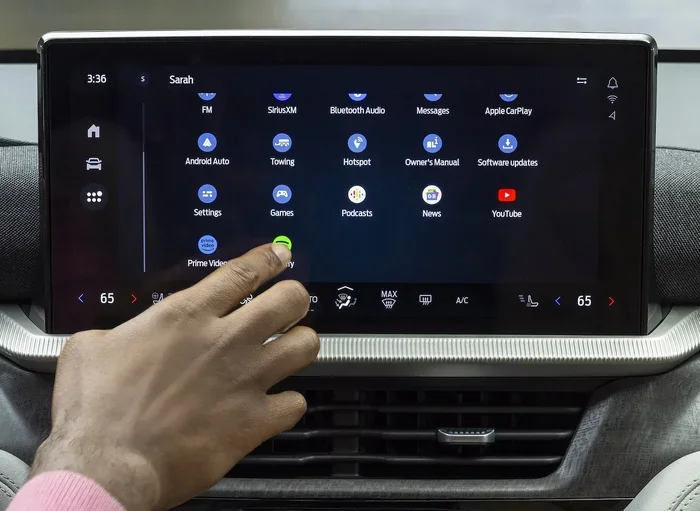
First, turn on your car. You do not need to start the engine — just power on the infotainment system. Once the screen is active, look for the Settings icon. It usually looks like a gear or a wrench. On some systems, you may need to press the Home button first to access the main menu.
If you are not sure where the Settings menu is, try pressing the “Phone” or “Connectivity” icon on the home screen. This will usually lead you to the Bluetooth and device management section.
Step 2: Go to Bluetooth Settings
Once you are in the Settings menu, find the Bluetooth or Connections option. Tap on it. You should see a list of all the devices that have ever been paired with your car. This list is where your phone info lives.
Look for your phone’s name in the list. It might show your phone model or a custom name you gave it. Tap on your device to open its settings within the car’s system.
Step 3: Unpair Your Phone
Now you will see an option to unpair or forget the device. Tap on it. The car will disconnect from your phone and remove the pairing information from its memory. Repeat this step for every phone or device that is listed.
Tip: If you have multiple phones that were paired — maybe a spouse’s phone or an old phone — make sure to unpair all of them. Do not leave any device connected to your car’s system.
Step 4: Clear Call History and Recent Calls
Unpairing your phone removes the Bluetooth connection, but it does not always delete your call history. Go back to the main infotainment menu and look for the Phone or Call Log option. Open it and find the “Clear Call History” or “Delete All Calls” button. Confirm the deletion when prompted.
This step is especially important because call logs often contain phone numbers, names, and timestamps that could identify you. Clearing your call history from the car is a simple but powerful privacy move.
Step 5: Delete Synced Contacts
Many car systems allow you to sync contacts from your phone. This means names and numbers are stored directly in the car’s memory. To remove them, go to the Contacts or Phone Book section in your infotainment menu. Look for an option like “Delete All Contacts” or “Clear Phone Book.”
If your car does not have a bulk delete option, you may need to go through each contact and remove them one by one. This takes more time, but it ensures no personal information is left behind.
Step 6: Delete Saved Wi-Fi Networks
Do not forget about Wi-Fi connections. Your car may have saved networks from your home, office, or favorite locations. These networks can sometimes be tied to your personal routine and habits. Go to the Wi-Fi or Network settings and forget or delete each saved network.
Step 7: Perform a Factory Reset (Optional but Recommended)
If you want to be absolutely sure that every piece of phone data is gone, a factory reset is the best option. This restores the car’s infotainment system to its original factory settings. All paired devices, call logs, contacts, Wi-Fi networks, and personalized settings will be erased.
To do this, go to Settings, then look for System, Reset, or Factory Reset. The exact path varies by brand. We will cover specific instructions for popular brands in the next section.
How to Delete Phone Info From Specific Car Brands
Every car brand organizes its infotainment system a little differently. Here are detailed instructions for the most popular brands on the road today. These steps will help you remove phone data from car systems no matter what you drive.
Toyota and Lexus
Toyota vehicles use the Entune or Multimedia system. To delete phone info, press the Setup or Settings button on the screen. Navigate to Bluetooth Settings. Select your phone and choose Delete or Unpair. Then go to the Phone Book section and select “Delete All” to remove synced contacts. For a full reset, go to Setup, then System, then Factory Reset.
Honda and Acura
Honda’s infotainment system is called Display Audio or HondaLink. Press the Setup button, then go to Bluetooth. Find your paired phone and select Delete Device. Clear the call log by pressing the Phone button, then selecting Clear Call History. To delete contacts, go to the Phone Book menu and remove them individually. Honda does not always offer a full factory reset through the screen, so you may need to disconnect the battery for a few minutes to clear all stored data.
Ford
Ford’s SYNC system is one of the most common in America. Press the Settings icon on the SYNC screen. Go to Bluetooth. Select your phone and choose Delete Device. To clear call history, go to the Phone app and select Clear Call Log. For contacts, open the Phone Book and delete them. To perform a factory reset, go to Settings, then System, then Factory Reset. SYNC 3 systems make this process very straightforward.
Chevrolet and GMC
Chevrolet vehicles use the Infotainment 3 or Infotainment System. Tap the Settings icon, then Bluetooth. Select your phone and tap Delete Device. Clear call history by opening the Phone app and choosing Clear History. For a full reset, go to Settings, then Vehicle, then Factory Reset. Chevrolet systems also allow you to delete individual contacts from the Phone Book section.
BMW and Mercedes-Benz
Luxury brands like BMW and Mercedes-Benz have more advanced systems. In BMW, go to Settings, then Bluetooth, and select your phone to unpair. In Mercedes-Benz, open the Media menu, then Bluetooth, and remove the device. Both brands allow you to clear call logs and contacts through their respective phone apps on the infotainment screen. For a complete reset, BMW uses the iDrive system’s “Reset to Factory Settings” option, while Mercedes-Benz offers a similar path through the System menu.
Common Mistakes People Make When Deleting Phone Info
Even when people try to erase phone data from car systems, they often make mistakes that leave data behind. Here are the most common errors and how to avoid them.
Only Unpairing but Not Clearing Data
The biggest mistake is simply unpairing the Bluetooth connection and thinking the job is done. Unpairing removes the connection, but it does not delete stored call logs, contacts, or messages. You must manually clear each type of data for a complete removal.
Forgetting Old or Secondary Devices
Many people have had multiple phones over the years. Old phones may still be listed in the car’s Bluetooth memory. Take the time to review every device on the paired list and remove all of them. Do not leave any traces behind.
Skipping the Factory Reset Before Selling
If you are selling or trading in your car, a factory reset is almost essential. Manual deletions can sometimes miss hidden data stored in the system’s background memory. A factory reset ensures that all personal information is completely wiped from the vehicle.
Not Checking Connected Apps
Modern cars connect to apps like Spotify, Apple CarPlay, Android Auto, and WhatsApp. These apps may store your login information, playlists, and message history. Go through each connected app and log out or disconnect them before parting with your car.
Expert Tips for Keeping Your Car’s System Clean
Deleting phone info is not a one-time task. It is something you should do regularly, especially if you frequently switch vehicles or share your car with others. Here are some expert tips to keep your car’s system clean and secure.
Make It a Habit Before Every Sale or Trade-In
Whenever you are about to sell, donate, or trade in your car, treat deleting phone info from your car as part of the preparation checklist. Do it a few days before the handover so you have time to double-check that everything is removed.
Use a Privacy Checkup Every Few Months
Set a reminder on your phone to review your car’s Bluetooth and connected devices every three to six months. This helps you catch any old pairings or stored data you may have forgotten about.
Read Your Car’s Owner Manual
Every car manual includes specific instructions for managing connected devices and performing resets. Even a quick glance at the relevant section can save you time and frustration. Many manufacturers also post these instructions on their websites.
Consider a Privacy-Focused Infotainment Reset Tool
Some third-party tools and apps are designed specifically to help you clear all personal data from your car’s system. These can be especially useful for older vehicles that do not have a straightforward factory reset option. Always use trusted and reputable tools to avoid any security risks.
Frequently Asked Questions
Can I delete phone info from my car without a factory reset?
Yes, you can. Unpairing your phone, clearing call history, deleting synced contacts, and removing saved Wi-Fi networks will remove most personal data. However, a factory reset ensures that every trace of your information is completely gone. If you are not selling the car, manual deletion is usually sufficient.
Will deleting phone info from my car affect my phone?
No, it will not. Removing your phone from the car’s Bluetooth list only affects the car’s memory. Your phone’s contacts, call history, and apps remain completely untouched. The only change is that your phone will no longer automatically connect to the car’s system.
How long does it take to delete phone info from a car?
For most vehicles, the entire process takes between five and fifteen minutes. This includes unpairing Bluetooth devices, clearing call logs, deleting contacts, and removing Wi-Fi networks. A factory reset may take a few additional minutes while the system reboots.
What happens if I cannot find the factory reset option on my car?
Some older or budget vehicles do not offer a software-based factory reset. In these cases, you can disconnect the car battery for about fifteen minutes. This clears the infotainment system’s temporary memory and resets most stored data. Refer to your owner’s manual for specific guidance.
Is it safe to sell my car if I have not deleted my phone info?
It is not recommended. Selling a car with your phone info still stored in the system exposes your personal data to the new owner. They could access your contacts, call you, or potentially use the information in ways you did not intend. Always delete phone info from your car before handing over the keys.
Can the next owner restore my deleted phone data?
In most cases, no. Once you have unpaired your device, cleared call logs, deleted contacts, and performed a factory reset, the data is gone for good. The car’s system overwrites the old information. However, if you only unpair without clearing data, a knowledgeable person might still be able to access some of it.
Conclusion
Deleting phone info from your car is one of the simplest yet most important things you can do for your privacy and security. Whether you are selling your vehicle, trading it in, or just want a fresh start, following the steps in this guide ensures that your personal data is completely removed. Start by unpairing your Bluetooth devices, then clear your call history, delete synced contacts, and remove saved Wi-Fi networks. For the most thorough cleanup, perform a factory reset on your car’s infotainment system.
Every car brand has its own menu layout, but the core process remains the same. Use the brand-specific instructions in this article to guide you through the exact steps for your vehicle. And remember, making this a regular habit — especially before any vehicle handover — keeps your personal information safe and your car running smoothly.
Take a few minutes today to clean up your car’s stored phone data. Your future self, and your privacy, will thank you for it.