How Do I Cancel My Toyota Remote Connect Subscription Today
Cancelling your Toyota Remote Connect subscription is simple once you know the right steps. Whether you signed up during a trial period or decided the connected features are not worth the monthly cost, this guide walks you through every option. You will learn how to cancel online, by phone, or through your dealer, and what to expect regarding refunds and access.
Cancelling a Toyota Remote Connect subscription can feel confusing if you have never done it before. Many Toyota owners sign up for the trial period and then forget to cancel before being charged. Others simply decide the connected features are not worth the monthly fee. Whatever your reason, this guide will show you exactly how to cancel your subscription without any hassle.
The Toyota Remote Connect service gives you features like remote start, lock and unlock, and vehicle location through the Toyota app. It sounds great on paper. But if you are not using these tools regularly, paying a monthly subscription may not make sense. This article covers every method to cancel, what happens after you cancel, and how to avoid common pitfalls.
Key Takeaways
- Multiple cancellation methods exist: You can cancel online, by phone, or in person at your Toyota dealer.
- Check your refund policy: Depending on when you cancel, you may qualify for a prorated refund.
- Access does not always end immediately: Some features may remain active until the end of your billing cycle.
- Avoid common mistakes: Forgetting to confirm cancellation or missing the renewal date can lead to unwanted charges.
- Remote Connect installation is flexible: If you are unsure about the service, you can explore Remote Connect installation in Toyota options before committing.
- Dealer assistance is available: You can take your Toyota to any dealership for service and ask them to handle the cancellation for you.
📑 Table of Contents
- Understanding Your Toyota Remote Connect Subscription
- Reasons You Might Want to Cancel
- How to Cancel Your Toyota Remote Connect Subscription
- What Happens After You Cancel
- Common Mistakes to Avoid When Canceling
- Alternatives to Toyota Remote Connect
- Expert Tips for Managing Toyota Connected Services
- Conclusion
Understanding Your Toyota Remote Connect Subscription
What Is Toyota Remote Connect?
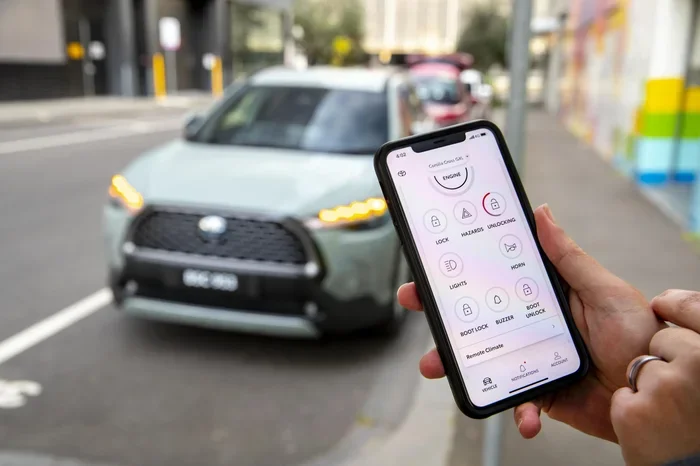
Toyota Remote Connect is a connected car service that lets you interact with your vehicle using a smartphone app. You can start the engine remotely, check fuel levels, locate your car, and even send destination addresses to the navigation system. The service works through a built-in modem in your Toyota vehicle that connects to cellular networks.
The subscription typically comes with a trial period. After the trial ends, you are billed monthly or annually depending on the plan you chose. Some Toyota models include a free trial period of one to three years. Once that period ends, the subscription auto-renews unless you cancel it.
What Does the Subscription Include?
The Toyota Remote Connect plan includes several useful features. Here is what you get with an active subscription:
- Remote Start: Start your vehicle from a distance to warm it up or cool it down.
- Lock and Unlock: Lock or unlock your doors using the Toyota app.
- Vehicle Finder: Locate your parked car on a map.
- Trip Logs: View your driving history and trip data.
- Weather Alerts: Get notifications about weather conditions near your vehicle.
- Destination Send: Send addresses from your phone to your car’s navigation system.
These features are convenient. But if you rarely use them, the monthly charge can feel like wasted money. That is why many owners decide to cancel their Toyota Remote Connect subscription and switch to a different approach for managing their vehicle.
Reasons You Might Want to Cancel
Cost Concerns
The most common reason people cancel is cost. A Toyota Remote Connect subscription typically costs between $80 and $150 per year depending on your plan and vehicle model. That might not sound like much, but if you are not actively using the features, it adds up over time. Some owners also find that the subscription price increases after the first year, which prompts them to look for alternatives.
You Are Not Using the Features
Let us be honest. Many Toyota owners sign up for the trial and never touch the app after that. If you are not using remote start, vehicle tracking, or the lock and unlock feature, the subscription is just sitting there taking money from your account every month. In that case, cancelling makes perfect financial sense.
Privacy Concerns
Some vehicle owners worry about data collection through connected services. The Toyota Remote Connect system tracks your location, driving habits, and vehicle usage. If privacy is important to you, cancelling the subscription stops this data flow. You can still use basic vehicle functions without connecting to Toyota’s servers.
How to Cancel Your Toyota Remote Connect Subscription
There are three main ways to cancel your Toyota Remote Connect subscription. Each method works well, and the right one depends on your comfort level with online accounts and phone support. Let us walk through each option.
Cancel Online Through Your Toyota Account
The fastest way to cancel is through your Toyota online account. Follow these steps:
- Go to the Toyota website and log into your account.
- Navigate to the “My Account” or “Connected Services” section.
- Find your Toyota Remote Connect subscription.
- Click on “Manage Subscription” or “Cancel Subscription.”
- Follow the prompts to confirm the cancellation.
- Save or screenshot the confirmation page for your records.
Make sure you are logged into the correct account. Sometimes the account tied to your vehicle is under a different email than your personal email. If you have trouble logging in, you may need to reset your password or contact Toyota support for help.
Cancel by Calling Toyota Customer Service
If you prefer speaking with a real person, calling Toyota customer service is a reliable option. The customer service number for Toyota connected services is usually listed in your owner’s manual or on the Toyota website. When you call, have your vehicle identification number (VIN) ready. The representative will verify your account and process the cancellation for you.
Here are a few tips for a smooth phone cancellation:
- Call during regular business hours to avoid long wait times.
- Have your VIN, account details, and vehicle information handy.
- Ask the representative to confirm the cancellation date.
- Request a confirmation email or reference number.
- Note the name of the representative you spoke with.
Some owners report that phone cancellations can take longer than online cancellations because of verification steps. However, it is still one of the most straightforward methods, especially if you are not comfortable navigating online accounts.
Cancel Through Your Toyota Dealer
Another option is to visit your local Toyota dealer and ask them to cancel the subscription for you. You can take your Toyota to any dealership for service and request the cancellation. The dealer can access your account and handle the process on your behalf.
This method is especially helpful if you already have an upcoming service appointment. You can combine the cancellation request with your regular maintenance visit. Just make sure to call ahead and let the service advisor know you need the subscription cancelled before you arrive.
What Happens After You Cancel
Will You Lose Access Immediately?
After you cancel your Toyota Remote Connect subscription, you do not lose access right away. Most subscriptions remain active until the end of the current billing cycle. This means if you cancel mid-month, you can still use the features for the rest of that month. The next month, the features will be disabled and you will not be charged again.
If you cancel during a trial period, access typically ends at the conclusion of that trial. You will not be charged if you cancel before the trial converts to a paid subscription. This is why it is important to keep track of your trial end date.
Refund Policies and Prorated Charges
Toyota’s refund policy for Remote Connect cancellations depends on when you cancel. If you cancel during the trial period, you generally do not owe anything. If you cancel after the trial has converted to a paid plan, you may or may not receive a prorated refund for the unused portion of the month.
Here is what to keep in mind about refunds:
- Annual plans are less likely to offer prorated refunds.
- Monthly plans sometimes allow partial refunds if you cancel early in the billing cycle.
- You should contact Toyota customer service to ask about your specific refund eligibility.
- Keep all cancellation confirmations in case you need to dispute a charge later.
It is also worth noting that if you use Google Maps in your Toyota or other connected navigation features, those may be tied to a separate subscription. Make sure you check whether cancelling Remote Connect affects any other connected services on your vehicle.
Common Mistakes to Avoid When Canceling
Canceling a subscription sounds simple, but many people make avoidable mistakes. Here are the most common ones:
- Forgetting to confirm the cancellation: Always get a confirmation email or reference number. Without proof, you might be charged again.
- Missing the renewal date: Set a reminder a few days before your subscription renews. This gives you time to decide if you want to keep it or cancel.
- Canceling the wrong account: Double-check that you are logged into the correct Toyota account. Cancelling the wrong account will not stop the charges.
- Ignoring auto-renewal terms: Read the terms before signing up. Some plans auto-renew at a higher rate after the first year.
- Not checking for bundled services: Remote Connect might be bundled with other services. Cancelling one might affect the others.
Avoiding these mistakes saves you time, money, and frustration. A little preparation goes a long way toward a clean cancellation experience.
Alternatives to Toyota Remote Connect
If you cancel your Toyota Remote Connect subscription, you might wonder what alternatives are available. The good news is that many vehicles offer built-in features that do not require a paid subscription. For example, basic keyless entry and manual remote start (if your vehicle supports it) work without any connected service.
Some third-party apps and devices also offer similar functionality at a lower cost or for free. These alternatives may require additional hardware installation, but they can provide the remote features you want without the ongoing monthly fee. If you are considering alternatives, it is worth researching what works best for your specific Toyota model and your budget.
Keep in mind that cancelling Remote Connect does not affect your vehicle warranty or basic functionality. Your Toyota will continue to work exactly the same way. You simply lose access to the connected app features that require the subscription.
Expert Tips for Managing Toyota Connected Services
Managing connected services on your Toyota does not have to be complicated. Here are some expert tips to keep things simple:
- Review your subscription annually: Even if you are not planning to cancel, review what you are paying for each year. You may find that you qualify for a better plan or a discount.
- Use the trial period wisely: If you are in a trial period, test all the features thoroughly. Decide which ones you actually use before committing to a paid plan.
- Set calendar reminders: Mark your subscription renewal date on your calendar. This gives you time to evaluate whether the service is still worth it.
- Keep records: Save all emails, confirmations, and receipts related to your subscription. These documents are invaluable if you ever need to dispute a charge.
- Ask about discounts: Some Toyota dealers offer discounts on connected services, especially when you purchase a new vehicle or schedule maintenance.
These tips help you stay in control of your Toyota Remote Connect subscription and avoid unwanted charges. Whether you decide to keep the service or cancel it, staying informed is the best approach.
Conclusion
Cancelling your Toyota Remote Connect subscription is a straightforward process once you know the steps. You can cancel online through your account, call Toyota customer service, or visit your dealer for assistance. Each method works well, and the key is to confirm the cancellation and keep your records safe.
Remember to check your refund eligibility and understand what happens to your access after cancellation. Avoid common mistakes like forgetting to confirm or cancelling the wrong account. Whether you are cutting costs, protecting your privacy, or simply not using the features, cancelling your subscription puts you back in control.
Take action today if you are ready to cancel. Follow the steps in this guide and you will have your Toyota Remote Connect subscription cancelled in no time. Your wallet will thank you for it.
Frequently Asked Questions
Can I cancel my Toyota Remote Connect subscription at any time?
Yes, you can cancel your Toyota Remote Connect subscription at any time. There is no long-term contract that locks you in. However, you should check your specific plan terms to understand whether a prorated refund is available for unused time.
Will I be charged if I cancel during my free trial?
No, you will not be charged if you cancel before your free trial period ends. Toyota does not charge your payment method until the trial converts to a paid subscription. Cancel early to avoid any charges.
How long does it take for the cancellation to take effect?
Most cancellations take effect immediately or at the end of the current billing cycle. If you cancel online, you should see the change reflected right away. If you call customer service, ask them to confirm the exact effective date of the cancellation.
Can I reactivate my Toyota Remote Connect subscription after cancelling?
Yes, you can reactivate your Toyota Remote Connect subscription after cancelling. Simply log into your Toyota account and resubscribe. However, any promotional pricing you received initially may not be available again.
Does cancelling Remote Connect affect my Toyota warranty?
No, cancelling your Remote Connect subscription does not affect your Toyota warranty. The connected services subscription is separate from your vehicle warranty. Your vehicle continues to be covered under the standard warranty terms regardless of your subscription status.
What if I do not see the cancel option in my online account?
If you do not see the cancel option in your online account, try logging out and back in. If the option still does not appear, call Toyota customer service for assistance. They can process the cancellation over the phone and provide you with a confirmation number.