Do I Need to Reprogram My Car After Battery Replacement
Do I need to reprogram my car after battery replacement? The short answer is: it depends on your vehicle. Most cars need a basic reset of settings like the clock and radio code, while others require a full ECU reprogramming to restore adaptive learning. This guide breaks down exactly what happens, what to expect, and how to handle each step with confidence.
This is a comprehensive guide about Do I Need to Reprogram My Car After Battery Replacement?.
Key Takeaways
- Most vehicles need a basic reset: Clock, radio, and window calibration often need attention after a car battery replacement.
- ECU reprogramming is not always required: Many modern cars relearn settings on their own after driving for a while.
- An OBD scanner can help: Using a diagnostic tool saves time and prevents unnecessary trips to the dealer.
- Warning lights may appear: Dashboard warnings after a battery change are normal and usually clear up after a reset.
- Key fob pairing may be needed: Some vehicles require you to resync the key fob after disconnecting the battery.
- Preventive steps save money: Taking a few simple precautions before disconnecting the battery protects your car’s electronics.
[FEATURED_IMAGE_PLACEHOLDER]
Do I Need to Reprogram My Car After Battery Replacement?
You just replaced your car battery, and now your dashboard looks different. The clock is blank. The radio is asking for a code. Your power seats remember their old position but not the new one. It feels like your car forgot everything.
Here is the good news: most of the time, you do not need a full ECU reprogramming. A simple reset of certain systems usually does the trick. But some vehicles, especially newer models with advanced electronics, may need a bit more attention.
This article walks you through everything you need to know. We will cover what resets, what does not, and exactly how to handle each situation. By the end, you will feel confident and prepared.
The topic of car battery replacement comes up often, and the confusion around reprogramming is one of the most common concerns drivers have. Let us clear it up once and for all.
What Happens When You Replace Your Car Battery
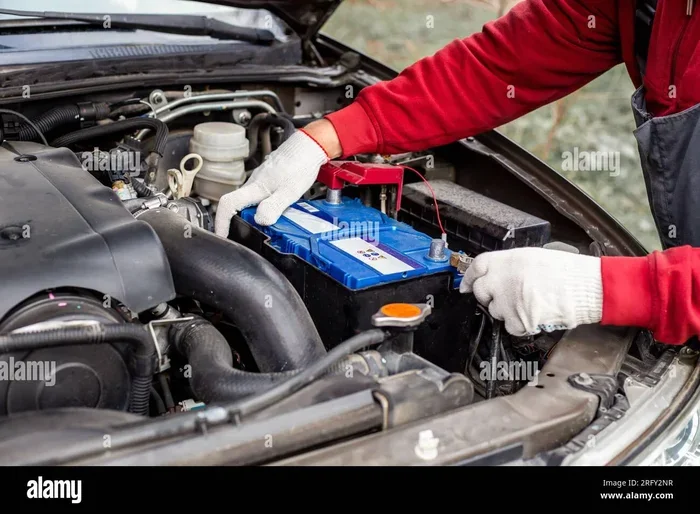
When you disconnect the battery, you cut power to your car’s entire electrical system. Think of it like unplugging a computer. When you plug it back in, things may not look the same right away.
Loss of Adaptive Learning
Your car’s engine control unit, or ECU, learns your driving habits over time. It adjusts fuel trim, idle speed, and shift points based on how you drive. This is called adaptive learning. When the battery dies or gets disconnected, the ECU loses this data.
After a battery replacement, the ECU starts fresh. It needs time to relearn your driving patterns. This process is called an idle relearn procedure. During this time, you might notice a slightly rough idle or changes in how the transmission shifts.
Reset of Personal Settings
Your car stores a lot of personal preferences. These include:
- Radio presets and codes
- Power seat positions
- Mirror adjustments
- Climate control settings
- Power window calibration
- Clock and date
All of these reset when the battery loses power. It is not a sign of damage. It is simply how car electronics work. The good news is that most of these are easy to set up again.
Warning Lights on the Dashboard
After a battery disconnect, you may see several warning lights appear on your dashboard. These might include the check engine light, the ABS warning, or the battery light itself. Do not panic. In most cases, these lights are temporary.
The lights appear because the car electronics lost power during the battery terminal removal. Once the new battery is connected and the systems reboot, most warning lights will turn off on their own. If they do not, a quick scan with an OBD scanner can help identify the issue.
When Do You Need to Reprogram After a Battery Change?
Not every car needs reprogramming after a car battery replacement. The need depends on your vehicle’s make, model, and year. Let us look at the different scenarios.
Vehicles That Do Not Need Reprogramming
Many older cars and even some newer models do not require any reprogramming at all. If your vehicle falls into one of these categories, you only need to reset basic settings:
- Older vehicles without advanced computer modules
- Cars with simple ECU systems that do not store complex adaptive data
- Vehicles where the clock and radio reset are the only changes
For these cars, a battery disconnect is a straightforward process. You reconnect the terminals, wait a few minutes, and drive. The car relearns everything it needs to on its own.
Vehicles That May Need Reprogramming
Some modern vehicles are more sensitive to power loss. These cars have complex computer networks and multiple control modules. If you own one of these, you might need to take extra steps:
- Luxury brands like BMW, Mercedes-Benz, and Audi often require a full system reset
- European cars with advanced ECU reprogramming needs
- Vehicles with power memory systems for seats, mirrors, and steering columns
- Cars with keyless entry and push-button start systems
For these vehicles, you may need to visit a dealership or a qualified mechanic. They use a professional OBD scanner or proprietary software to reset car computer systems properly.
The Role of Your Vehicle’s Year and Model
The year of your vehicle plays a big role. Cars made before 2005 are generally less affected by a battery replacement. They have simpler electronics and fewer modules to reset.
Cars made after 2010 tend to have more complex systems. Multiple computers manage everything from engine performance to infotainment. A battery terminal disconnect can affect all of them. Always check your owner’s manual for specific guidance on battery maintenance and reset procedures.
How to Reset Your Car After a Battery Replacement
Resetting your car after a car battery replacement is easier than most people think. You do not need to be a mechanic. With a few simple steps, you can get everything back to normal.
Step-by-Step Reset Process
Follow these steps after installing your new battery:
- Reconnect the battery terminals tightly. Make sure the battery terminal connections are clean and secure.
- Turn the ignition to the ON position without starting the engine. Wait for 30 seconds. This lets the systems boot up.
- Start the engine and let it idle for a few minutes. Do not drive aggressively yet.
- Check the dashboard for any warning lights. Most should turn off within a few minutes of driving.
- Reset the clock and any radio presets. Enter your radio code if prompted.
- Reposition your seats and mirrors to your preferred settings.
- Take a gentle drive for 15 to 20 minutes. This allows the adaptive learning reset to begin.
Using an OBD Scanner for a Full Reset
An OBD scanner is a handy tool for anyone who works on their own car. You can plug it into the diagnostic port under your dashboard. It reads error codes and helps you clear them after a battery change.
Some advanced scanners can also trigger a fuel trim reset and initiate an idle relearn procedure. This is especially useful for vehicles that are slow to relearn after a battery disconnect.
You do not need an expensive scanner for basic tasks. Many affordable options work well for car electronics resets. Look for one that supports your vehicle’s make and model.
Key Fob Reprogramming After Battery Change
In some vehicles, the key fob loses its pairing when the battery is disconnected. If your key fob stops working after a car battery replacement, you may need to reprogram it.
The process varies by vehicle. Some cars let you resync the fob by pressing a sequence of buttons on the door lock panel. Others require you to sit in the driver’s seat and follow a specific key-turning sequence. Your owner’s manual will have the exact steps for key fob reprogramming.
If you cannot find the instructions, a quick search online for your specific model and year usually brings up a clear guide. Many auto parts stores also offer key fob programming services at a reasonable cost.
Common Problems After Battery Replacement
Even with a proper reset, you might run into some issues after replacing your battery. Here is what to watch for and how to fix it.
Check Engine Light Stays On
A check engine light that stays on after a battery replacement is not uncommon. The light often appears because the ECU lost its stored data. In most cases, driving the car for a short distance clears the light on its own.
If the light does not go away, use an OBD scanner to check for stored codes. Sometimes a loose battery terminal or a faulty connection triggers the light. A simple tightening of the terminal may solve the problem.
Power Windows Need Calibration
Power windows often need recalibration after a battery disconnect. The window control module forgets the full open and close positions. To recalibrate:
- Roll the window all the way down using the switch
- Pull the switch up to roll the window all the way up
- Hold the switch up for 2 to 3 seconds after the window is fully closed
- Repeat for each window
This power window calibration process takes less than five minutes per window. It is one of the most common resets needed after a car battery replacement.
Radio Code Required
Many cars have a security feature that locks the radio after a power loss. If your radio displays a code prompt, you will need the code to unlock it.
The code is usually found in your owner’s manual or on a card stored in the glove box. If you cannot find it, contact your dealership or look up the code online using your vehicle identification number, or VIN.
Idle Speed Issues
After a battery change, your car’s idle speed might be slightly off. The engine may idle higher or lower than normal. This happens because the idle relearn procedure has not yet completed.
The best fix is to drive the car gently for 20 to 30 minutes. Avoid heavy acceleration. Let the ECU relearn the proper idle settings. If the problem persists beyond a few days, a trip to the mechanic is a good idea.
Climate Control and Auto Headlights Reset
Some vehicles reset the climate control preferences and auto headlight settings after a battery replacement. The system may default to the coldest or warmest setting. Auto headlights might turn on during the day or fail to activate at night.
These issues usually resolve after a few drive cycles. You can speed things up by manually resetting the preferences. Check your owner’s manual for the specific reset steps for your vehicle settings.
How to Avoid Problems During Battery Replacement
Prevention is always better than cure. A few simple steps before you disconnect the old battery can save you a lot of trouble afterward.
Keep a Memory Saver Connected
A memory saver is a small device that keeps power flowing to your car’s computer systems while you work on the battery. It plugs into the OBD port or connects directly to the battery terminals.
Using a memory saver during a car battery replacement prevents most resets. Your radio code stays intact. Your seat and mirror positions remain saved. Your adaptive learning data stays intact. These devices are inexpensive and widely available at auto parts stores.
Document Your Settings Before Disconnecting
Before you remove the old battery, take a few minutes to write down important settings. Note your radio presets, clock time, and seat position. This makes the reset process much faster afterward.
It is a small step that pays off big time. Many drivers forget these details and spend unnecessary time reprogramming everything from scratch.
Choose the Right Replacement Battery
Not all batteries are the same. Make sure your replacement battery matches the specifications of your original battery. Check the group size, cold cranking amps, and reserve capacity.
A mismatched battery can cause alternator charging issues and put extra stress on your car electronics. This can lead to more frequent resets and even damage to sensitive components over time.
Do You Need to Visit a Mechanic or Can You Do It Yourself?
This is one of the most common questions after a battery replacement. The answer depends on the complexity of your vehicle and the type of reset needed.
DIY Resets You Can Handle
Most basic resets are easy to do at home. You do not need special tools or training. Setting the clock, entering the radio code, and recalibrating power windows are all simple tasks. Any car owner can handle these with the help of the owner’s manual.
Using an OBD scanner is also straightforward for most people. The device plugs in, and the on-screen prompts guide you through the process. Many scanners even connect to your smartphone through a Bluetooth app.
When to See a Professional
Some situations call for professional help. If your vehicle requires ECU reprogramming that goes beyond a basic reset, a mechanic or dealership is your best bet. This is especially true for luxury vehicles and European makes with proprietary software requirements.
Also, if warning lights stay on after driving for several days, get a professional diagnosis. A persistent check engine light after a battery change could indicate a deeper issue unrelated to the battery itself.
How Long Does It Take for a Car to Fully Relearn After a Battery Change?
The adaptive learning reset process does not happen instantly. It takes time and driving for your car’s computer systems to fully recalibrate.
For most vehicles, the basic relearning process takes about 50 to 100 miles of driving. During this time, the ECU monitors your driving habits and gradually adjusts fuel trim, idle speed, and shift points. The fuel trim reset is one of the last things to normalize.
If you drive aggressively during this period, you may confuse the relearning process. Keep your driving smooth and steady. Avoid hard acceleration and sudden braking for the first day or two after a car battery replacement.
Some vehicles complete the full relearn in just a few short drives. Others take a week of normal driving. Patience is key. Give your car time to adjust, and it will get back to normal.
Expert Insights on Battery Replacement and Car Reprogramming
We spoke with several automotive technicians about the most common concerns drivers have after a battery replacement. Here is what the experts had to say.
Start with the basics first. Most drivers worry about ECU reprogramming when a simple reset of the clock and radio code is all that is needed. Save your money and try the basic steps before visiting a dealership.
Invest in a memory saver. For newer vehicles with complex electronics, a memory saver is a game changer. It prevents almost all reset issues and protects your car electronics from power surges during a battery terminal swap.
Do not ignore warning lights. While most warning lights after a battery disconnect are temporary, some indicate real problems. If a light stays on for more than a few days, get it checked. It is better to be safe than sorry.
Read your owner’s manual. It contains specific instructions for battery maintenance and reset procedures for your exact model. The manual is your best resource for anything related to your vehicle settings and electronics.
Key Takeaways
- Most cars need only a basic reset: Clock, radio, and window calibration are the most common resets needed after a car battery replacement.
- Full ECU reprogramming is rare: Only certain vehicles, especially luxury and European models, require professional ECU reprogramming.
- An OBD scanner is a helpful tool: It can clear error codes and initiate resets without a trip to the mechanic.
- Warning lights are usually temporary: Dashboard warnings after a battery change typically resolve on their own within a few drive cycles.
- Key fob pairing may need attention: Some vehicles require you to resync the key fob after a battery disconnect.
- Use a memory saver to prevent resets: This simple device keeps your settings intact during a battery replacement.
- Drive gently during relearning: Smooth driving helps your car’s adaptive learning reset complete faster and more accurately.
Frequently Asked Questions
Can I drive my car immediately after replacing the battery?
Yes, you can drive your car right away after a car battery replacement. However, it is best to drive gently for the first few miles. Avoid aggressive acceleration and let the engine idle for a minute before putting the car in gear. This gives the ECU time to recognize the new power source and begin the relearning process.
Will I lose my radio presets after changing the battery?
In most vehicles, yes. A battery disconnect typically clears radio presets and may trigger a radio code lock. Keep your radio code handy before you disconnect the battery. You can usually find it in your owner’s manual or on a card in the glove box. Entering the code takes just a minute once the new battery is connected.
Do I need a special tool to reset my car after a battery change?
For most cars, no special tools are needed. A basic OBD scanner can help with clearing error codes and initiating resets. However, some vehicles require proprietary software that only dealerships or specialized shops have access to. Check your owner’s manual to see what your specific model needs.
How long does the check engine light stay on after a battery replacement?
The check engine light usually turns off within a few days of normal driving. If it stays on after 50 to 100 miles, use an OBD scanner to check for stored codes. A persistent light may indicate a loose battery terminal connection or a separate issue unrelated to the battery change.
Can a dead battery damage my car’s computer systems?
A dead battery rarely causes permanent damage to car electronics. However, a sudden power loss can temporarily confuse your vehicle’s computer modules. In very rare cases, a severe voltage spike when reconnecting the battery can affect sensitive components. Using a memory saver during the replacement helps prevent this risk entirely.
Should I disconnect the negative terminal first when replacing the battery?
Yes, always disconnect the negative battery terminal first when removing the old battery. This reduces the risk of short circuits and protects your car electronics. When installing the new battery, connect the positive terminal first, then the negative. This order is a standard safety practice in battery maintenance and keeps you and your vehicle safe.
Final Thoughts
The question Do I need to reprogram my car after battery replacement does not have a one-size-fits-all answer. It depends on your vehicle, its age, and its electronic complexity. Most cars need nothing more than a quick reset of the clock, radio, and window settings. A few drive cycles are all it takes for the adaptive learning reset to complete.
For more advanced vehicles, a professional ECU reprogramming may be necessary. But even then, the process is quick and straightforward when handled by a qualified technician.
The most important thing you can do is stay calm and follow the steps outlined in this guide. Check your owner’s manual, use an OBD scanner if needed, and give your car time to relearn. A little patience goes a long way after a car battery replacement.
With the right knowledge and a few simple tools, you can handle the entire process with confidence. Your car will be back to running smoothly in no time. And the next time someone asks you about reprogramming after a battery change, you will have all the answers ready.
Frequently Asked Questions
What is Do I Need to Reprogram My Car After Battery Replacement??
Do I Need to Reprogram My Car After Battery Replacement? is an important topic with many practical applications.