Can You Upgrade Toyota Entune Everything You Should Know
Yes, you can upgrade Toyota Entune depending on your model year and system version. Toyota Entune is the automaker’s infotainment platform, and keeping it updated gives you better navigation, audio, and connected services. In this guide, we break down every option, cost, and step you need to take to get the latest Toyota Entune software running smoothly on your vehicle.
Toyota Entune is the infotainment system that lives inside your Toyota dashboard. It controls your radio, navigation, audio, and connected services. If you have ever sat in your Toyota and wondered whether you could get a better experience from your Toyota multimedia system, you are not alone. Many Toyota owners want to know if they can upgrade Toyota Entune to get newer features, better maps, and improved performance.
The short answer is yes. But the full answer depends on a few things. Your model year, your current system version, and the type of hardware in your vehicle all play a role. In this article, we will walk you through everything you need to know about upgrading your Toyota Entune system. We will cover what Entune is, the different versions, how to upgrade, costs, and what you can expect after the update.
Whether you drive a Toyota Camry, a Toyota RAV4, or a Toyota Tacoma, this guide will help you understand your options. We will also share practical tips, common mistakes to avoid, and expert insights that make the process easier. Let us dive in.
Key Takeaways
- Toyota Entune can be upgraded through dealer visits, software updates, and sometimes DIY methods depending on your system version.
- Entune 3.0 is the latest generation and offers the most features compared to older versions.
- Upgrade costs vary from free over-the-air updates to paid dealer installations costing between $100 and $500.
- Not all Toyota models support every Entune version, so compatibility matters before you upgrade.
- Regular updates improve navigation accuracy, audio quality, and Toyota connected services.
- You can check your current Entune version in the system settings menu on your touchscreen.
- Google Maps integration and Remote Connect are among the most sought-after features after an upgrade.
📑 Table of Contents
- What Is Toyota Entune?
- Can You Upgrade Toyota Entune?
- How To Upgrade Your Toyota Entune System
- Benefits of Upgrading Toyota Entune
- Common Problems with Toyota Entune
- How Much Does It Cost to Upgrade Toyota Entune?
- Expert Tips for a Smooth Entune Upgrade
- Can You Upgrade Toyota Entune to Match Newer Models?
- Conclusion
What Is Toyota Entune?
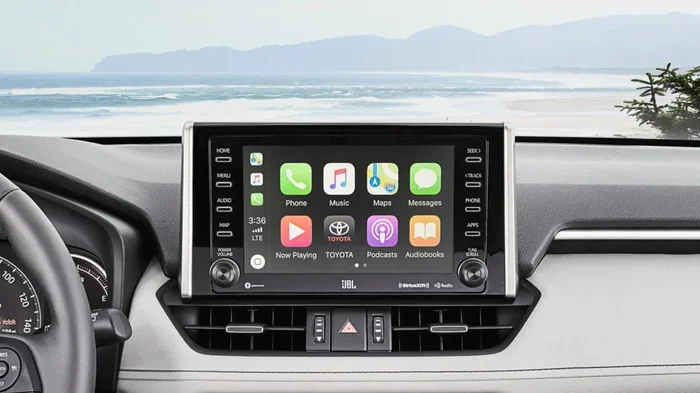
Toyota Entune is Toyota’s proprietary infotainment platform. It is the system that runs on the touchscreen in your Toyota vehicle. It handles radio, Bluetooth, navigation, backup cameras, audio controls, and smartphone integration. Think of it as the brain behind your Toyota dashboard technology.
The system has been around for many years. Over time, Toyota has released several versions of Entune. Each version brings better graphics, faster response times, and new features. The system connects to your Toyota connected services and allows you to access things like weather, news, and music apps right from your car.
Older versions of Entune relied on a built-in modem and subscription services. Newer versions, especially Entune 3.0, use your smartphone as a hotspot and offer a much more modern experience. Understanding which version you currently have is the first step toward upgrading.
Different Versions of Toyota Entune
Toyota has rolled out several versions of Entune over the years. Here is a quick breakdown of what you might find in different model years:
- Entune (Original): Found in older Toyotas from around 2011 to 2015. It offers basic radio, Bluetooth, and limited navigation features.
- Entune 2.0: Introduced around 2015 to 2017. It brought improved graphics, App Suite compatibility, and better connectivity.
- Entune 3.0: The latest version found in newer Toyotas from around 2018 onward. It features wireless smartphone integration, faster processors, and a more intuitive interface.
Each version has different hardware capabilities. This means not every Toyota can support every upgrade. But most modern Toyotas can receive software and firmware updates that improve performance and add new features.
Can You Upgrade Toyota Entune?
The big question is whether you can upgrade Toyota Entune. The answer depends on what you mean by “upgrade.” There are two main types of upgrades: software updates and hardware upgrades. Let us look at both.
Software Updates
Software updates are the most common way to upgrade your Entune system. These updates improve the user interface, fix bugs, and add new features. Toyota releases these updates periodically, and they can often be installed at your local dealer.
Some newer Toyotas support over-the-air updates. This means your car can receive updates wirelessly, just like your phone. If your Toyota does not support OTA updates, you will need to visit a Toyota dealership to get the latest software installed.
You can check for available updates by going to your system settings on the touchscreen. Look for a section called “Software Update” or “System Info.” If an update is available, you will see a prompt to download and install it.
Hardware Upgrades
Hardware upgrades are more involved. These involve replacing physical components in your vehicle. For example, if your older Toyota has a non-touchscreen radio, you might want to swap it for a newer unit that supports Entune 3.0 features. This type of upgrade requires more technical knowledge and sometimes professional installation.
Not all Toyotas are compatible with aftermarket head units. You need to make sure the new hardware fits your dashboard and wiring harness. Many owners choose to visit a Toyota dealership or a trusted car audio shop for this type of work. You can also take your Toyota to any dealership for service and ask about hardware upgrade options.
Can You Do It Yourself?
Some Toyota owners try to update their Entune system themselves using a USB drive. Toyota has occasionally released software update files that can be downloaded and installed via a USB port. However, this method is not always reliable and can void your warranty if done incorrectly.
For most owners, the safest route is to visit a Toyota dealership. Technicians there have the right tools and knowledge to perform updates without risking damage to your system. If you are unsure, ask the service advisor whether your vehicle qualifies for a free or discounted update.
How To Upgrade Your Toyota Entune System
If you have decided to upgrade, here is a step-by-step look at the process. Whether you are getting a software update or a full infotainment system upgrade, the steps are similar.
Step 1: Check Your Current Entune Version
Before anything else, find out what version of Entune you are running. Go to your system settings on the touchscreen. Look for “System Information” or “About.” You should see a version number listed there. Write it down or take a photo with your phone.
Step 2: Contact Your Toyota Dealership
Call your local Toyota dealership and ask about available Entune software updates. Let them know your model year and current version number. They can tell you whether an update is available and whether there is a cost involved.
Many dealerships offer free software updates for eligible vehicles. This is a great way to keep your system current without spending money. You can also take your Toyota to any dealership for warranty work or service, and they can often handle the update during a routine visit.
Step 3: Schedule the Update
If an update is available, schedule an appointment. The process usually takes between 30 minutes and two hours. Your vehicle will need to be plugged in during the update to ensure the system does not lose power mid-installation.
While you wait, you might want to ask the service advisor about other updates or Toyota connected services that could enhance your driving experience. Things like Remote Connect and navigation updates are often bundled with software upgrades.
Step 4: Verify the Update
Once the update is complete, check your system settings again to confirm the new version number. Test all features including navigation, Bluetooth, audio, and any new apps. If something is not working correctly, let the service advisor know right away.
Benefits of Upgrading Toyota Entune
Upgrading your Toyota Entune system comes with several real benefits. Here is what you can expect after the upgrade:
- Better Navigation: Updated maps and improved routing make getting to your destination easier and faster. Google Maps integration is one of the most popular features in newer Entune versions.
- Improved Audio Quality: Software updates can enhance your Toyota audio system and fix any buzzing, static, or connectivity issues you may have experienced.
- New Features: Each update can add new apps, better smartphone integration, and improved voice commands. Some updates even add wireless Apple CarPlay and Android Auto support.
- Bug Fixes: Updates address known issues like system freezing, slow response times, and Bluetooth pairing problems.
- Better Fuel Economy Data: Updated telematics and monitoring features give you more accurate readings on fuel consumption and driving habits.
- Enhanced Safety: Some updates improve the performance of backup cameras, blind spot monitoring, and other safety features tied to the infotainment system.
Common Problems with Toyota Entune
Even without an upgrade, many Toyota owners experience issues with their Entune system. Understanding these problems can help you decide whether an upgrade is right for you.
Slow Performance
Older Entune systems can feel sluggish. Menus take a long time to load, and touch responses can be delayed. A software update can often speed things up significantly. If your system is several years old, the processor may simply be too slow to handle newer apps and features smoothly.
Bluetooth Connectivity Issues
Bluetooth problems are one of the most common complaints among Toyota Entune users. Phones may not pair correctly, audio may cut out, or the system may not recognize your device. Firmware updates often fix these issues and improve overall Bluetooth stability.
Navigation Out of Date
If your Toyota has a built-in navigation system, the maps can become outdated over time. Entune software updates often include the latest map data, new points of interest, and improved routing algorithms. Without updates, you may find that your Toyota navigation system sends you down roads that have changed or no longer exist.
Screen Freezing or Rebooting
A frozen or restarting screen is frustrating. This problem is more common in older Entune versions. A software update can resolve these issues by patching bugs and improving system stability. If the problem persists after an update, there may be a hardware issue that needs professional attention.
How Much Does It Cost to Upgrade Toyota Entune?
The cost of upgrading your Toyota Entune system depends on the type of upgrade and your vehicle’s eligibility. Here is a general breakdown:
- Software Updates: Often free at authorized Toyota dealerships. Some updates may cost a small labor fee if you are not visiting for other service work.
- Entune App Suite Updates: These may require a subscription. The Entune App Suite offers access to apps like iHeartRadio, Pandora, and Yelp. Subscription costs vary but typically range from $10 to $50 per year.
- Hardware Upgrades: Replacing the entire infotainment unit can cost anywhere from $500 to $2,000 depending on the model and features you want. This includes the cost of parts and professional installation.
- Remote Connect Installation: If you want to add Remote Connect features like remote start, lock/unlock, and vehicle tracking, installation can cost between $100 and $300.
Before spending money, always check with your dealership. Many Toyota software updates are complimentary for a certain period after purchase. You may also qualify for free updates if your vehicle is still under warranty.
Expert Tips for a Smooth Entune Upgrade
Here are some expert tips to help you get the most out of your Toyota Entune upgrade:
- Back up your settings: Before any update, note your preferred radio stations, Bluetooth pairings, and navigation home address. Some updates may reset these settings.
- Keep your phone charged: The upgrade process can take a while. Make sure your phone is charged in case you need to use it during the process.
- Do not turn off your car: During a software update, never turn off the ignition. This can corrupt the software and cause serious problems.
- Ask about bundled services: When you visit a dealership for an upgrade, ask about any bundled services like Remote Connect or navigation updates that may be included at no extra charge.
- Check compatibility first: Not every Toyota model supports every Entune feature. Confirm compatibility before paying for any hardware or software upgrade.
- Use genuine Toyota parts: If you are upgrading hardware, always use genuine Toyota parts or certified aftermarket components. This ensures compatibility and preserves your warranty.
Can You Upgrade Toyota Entune to Match Newer Models?
Many Toyota owners wonder if they can make their older vehicle’s infotainment system match what they see in newer Toyotas. The honest answer is: it depends.
Software updates can bring your system closer to the latest version, but they cannot add hardware that was not originally installed. For example, if your older Toyota does not have a touchscreen display, a software update will not add one. Similarly, if your vehicle lacks the hardware for wireless CarPlay, no update will enable it.
However, some owners choose to install aftermarket head units that support modern features while keeping the original Toyota look and feel. This is a more expensive route but can dramatically improve your Toyota infotainment experience. Just make sure the new unit is compatible with your vehicle’s wiring and dashboard layout.
You can also explore Toyota connected services and smartphone-based solutions. For example, using Google Maps on your phone with Android Auto or Apple CarPlay can give you navigation that feels just as good as a built-in system. This is a great option if upgrading the hardware is not in your budget.
Conclusion
Upgrading Toyota Entune is absolutely possible and can breathe new life into your Toyota’s infotainment system. Whether you choose a simple software update at your dealership or invest in a full hardware upgrade, the benefits are clear. You get better navigation, improved audio, new features, and a smoother overall experience.
Start by checking your current Entune version and contacting your local Toyota dealership to see what updates are available. Most software updates are free or low-cost and can make a noticeable difference in how your system performs. If you want more advanced features, consider hardware upgrades or smartphone-based solutions that complement your existing system.
Taking care of your Toyota Entune system ensures you get the most out of your vehicle. Keep your software updated, stay informed about new features, and do not hesitate to ask your dealer about the latest options. Your Toyota is a significant investment, and keeping its technology current is one of the best ways to protect that investment.
Frequently Asked Questions
Can I upgrade Toyota Entune myself using a USB drive?
Some Toyota owners have successfully updated their Entune system using a USB drive with the update file. However, this method is not officially supported for all models and can carry risks. If the update fails mid-process, it could cause system issues. For most owners, visiting a Toyota dealership is the safest and most reliable option.
How much does it cost to upgrade Toyota Entune?
Software updates are often free at Toyota dealerships, while hardware upgrades can range from $500 to $2,000 depending on the scope of the work. Additional services like Remote Connect installation may cost between $100 and $300. Always check with your dealer for the most accurate pricing.
Can I use Google Maps with my Toyota Entune after an upgrade?
Yes, newer versions of Entune support Google Maps integration, especially with Entune 3.0 and later. If your current system does not support it, a software or hardware upgrade may enable this feature. You can also use Google Maps on your phone through Apple CarPlay or Android Auto as an alternative.
How often should I update my Toyota Entune system?
Toyota recommends checking for updates at least once a year. Major software updates are typically released alongside new model years or seasonal changes. Keeping your system updated ensures you have the latest maps, features, and bug fixes available.
Will upgrading Entune void my Toyota warranty?
Software updates performed by an authorized Toyota dealership will not void your warranty. However, installing unofficial software or performing hardware modifications yourself could potentially affect your warranty coverage. Always consult with your dealer before making any changes to your vehicle’s system.
What is the difference between Entune 2.0 and Entune 3.0?
Entune 3.0 offers a faster processor, wireless smartphone integration, improved graphics, and a more user-friendly interface compared to Entune 2.0. Entune 3.0 also supports modern features like wireless Apple CarPlay and Android Auto, which older versions may not have. The difference is noticeable in speed, responsiveness, and overall user experience.