How Do I Turn Off Toyota Maintenance Required Message
The Toyota maintenance required message is a common dashboard alert that reminds owners when it is time for scheduled service. Turning it off is a simple process that involves using your trip meter or dashboard buttons, and it only takes a few minutes. This guide walks you through the exact steps for every Toyota model, explains why the light comes on, and shares expert tips to keep your vehicle running smoothly between services.
There is nothing more annoying than glancing at your dashboard and seeing that stubborn Toyota maintenance required message staring back at you. You know the one. It pops up right when you are running late for work or halfway through a road trip. The good news is that turning it off is usually quick and straightforward. Whether you drive a Toyota Camry, RAV4, Corolla, or Tacoma, this guide will walk you through the exact steps to clear that message and keep your dashboard clean.
The Toyota maintenance required message is not a sign that something is broken. It is simply a maintenance reminder that tells you it is time for your next scheduled service. Toyota programs these reminders based on mileage intervals, and they are designed to help you stay on top of routine care like oil changes, tire rotations, and fluid checks. However, once you have completed the service, you will want to reset that light so it does not keep nagging you. This article covers everything you need to know about how to turn off the Toyota maintenance required message for any model year.
Before we dive into the step-by-step reset process, let us take a quick look at why this light comes on in the first place. Understanding the Toyota maintenance schedule and what triggers the alert will help you stay ahead of your next service appointment. It will also help you avoid some common mistakes that car owners make when trying to reset the light themselves.
Key Takeaways
- Easy Reset Process: You can turn off the Toyota maintenance required message in just a few simple steps using your trip meter or steering wheel buttons.
- Model-Specific Steps: Different Toyota models may require slightly different procedures, so always check your owner’s manual for the exact method.
- Regular Maintenance Matters: Ignoring the maintenance schedule can lead to costly repairs, so use the reset as a reminder to stay on top of service.
- Common Mistakes Exist: Holding the wrong button or resetting at the wrong time can cause the message to return quickly.
- Warning Lights Are Different: The maintenance required light is not the same as the check engine light, and each requires a different approach.
- Professional Help Is Available: If you cannot reset the light yourself, a Toyota dealership or trusted mechanic can handle it for you.
📑 Table of Contents
- What Is the Toyota Maintenance Required Message?
- Why Does the Maintenance Required Light Come On?
- How to Turn Off the Toyota Maintenance Required Message
- Common Mistakes When Resetting the Maintenance Light
- When Should You Actually Service Your Toyota?
- Quick Tips for a Smooth Reset Experience
- Can You Drive With the Maintenance Required Light On?
- Final Thoughts
What Is the Toyota Maintenance Required Message?
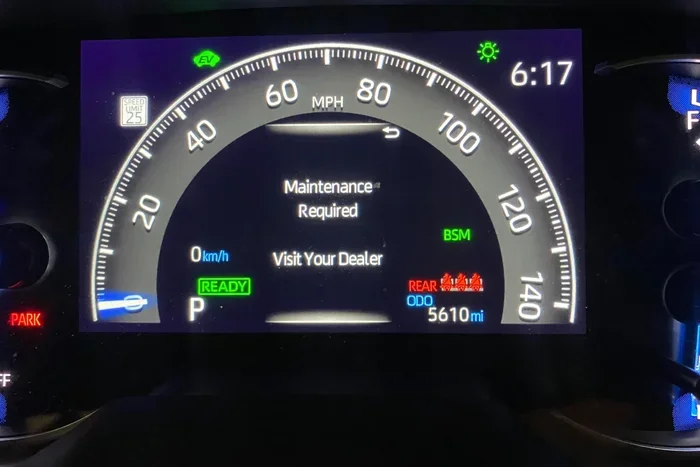
The Toyota maintenance required message is a dashboard indicator that appears on the instrument cluster or multi-information display. It typically shows the text “Maintenance Required” or a small wrench icon. This light is part of Toyota’s built-in maintenance reminder system, and it activates based on mileage intervals set by the manufacturer.
Most Toyota vehicles are programmed to display this message every 5,000 miles or 6,000 miles, depending on the model and year. The purpose is to remind the owner that the vehicle is due for routine maintenance. This is not an error code or a warning about a mechanical problem. It is simply a nudge to keep up with the recommended service interval Toyota schedule.
How the Maintenance Reminder System Works
Toyota’s maintenance reminder system tracks your mileage and triggers the alert when you reach the preset interval. The system does not monitor your actual driving conditions or engine health. It simply counts miles. When the mileage threshold is reached, the dashboard displays the Toyota service light to prompt you to schedule an appointment.
Some newer Toyota models have more advanced systems that take into account driving habits and conditions. These smart systems can adjust the maintenance interval slightly. However, the basic principle remains the same. Once the service is completed, the owner or technician needs to manually reset the system. This is where many people get stuck, which is exactly why this guide exists.
Why Does the Maintenance Required Light Come On?
The Toyota maintenance required message comes on for one primary reason: your vehicle has reached a preset mileage interval that signals it is time for routine maintenance. There are a few specific scenarios where this light will activate.
- Standard Oil Change Interval: Most Toyota models trigger the maintenance light every 5,000 to 6,000 miles, which aligns with the recommended oil change frequency.
- Scheduled Service Due: The light may also come on when other routine services are due, such as tire rotations, brake inspections, or fluid replacements.
- After a Recent Service: If you had your vehicle serviced but the technician did not reset the maintenance system, the light will remain on.
- Battery Disconnection: Disconnecting the car battery can sometimes reset the mileage counter and cause the light to reappear.
- New Ownership: When you purchase a used Toyota, the previous owner may not have reset the maintenance system, so the light could already be on.
It is important to note that the Toyota maintenance required message is different from other dashboard warnings. For example, if your check engine light turns on, that indicates a specific problem with the engine or emissions system. The maintenance required light is purely a service reminder and does not indicate a mechanical issue. However, if both lights are on at the same time, you should address the check engine light first.
How to Turn Off the Toyota Maintenance Required Message
Now for the part you have been waiting for. Turning off the Toyota maintenance required message is a process that varies slightly depending on your Toyota model and year. Below, we cover the most common methods used across the Toyota lineup.
Method 1: Using the Trip Meter Reset Button
This is the most common method for older Toyota models and many newer ones as well. Here is how to do it step by step:
- Turn the ignition to the “ON” position without starting the engine. You can do this by pressing the start button without pressing the brake pedal, or by turning the key to the accessory position.
- Locate the trip meter reset button on the dashboard or steering wheel. On most Toyota models, this is a small button near the instrument cluster or on the right side of the steering column.
- Press and hold the trip meter reset button. Keep holding it for about 10 to 15 seconds.
- While still holding the button, turn the ignition to the “OFF” position and then back to “ON.”
- Continue holding the button for another 3 to 5 seconds after turning back to “ON.”
- Release the button. The Toyota maintenance light should now be off, and the message should no longer appear on the display.
If the light does not turn off after the first attempt, try repeating the process. Sometimes it takes two or three tries, especially if the system is a bit slow to respond. Be patient and make sure you are holding the button long enough.
Method 2: Using the Steering Wheel Controls
Many newer Toyota models, especially those from 2015 and newer, use steering wheel controls to navigate the dashboard menu. Here is how to reset the maintenance light on these vehicles:
- Press the “Menu” or “Settings” button on the steering wheel to access the vehicle information screen.
- Use the arrow buttons to scroll through the options until you find “Vehicle Settings” or “Maintenance.”
- Select the maintenance reset option by pressing the “OK” or “Enter” button.
- Confirm the reset when prompted. The system will clear the maintenance reminder and turn off the Toyota maintenance required message.
- Exit the menu and start the engine to verify that the light is off.
Method 3: Using the Multi-Information Display
Toyota vehicles equipped with a multi-information display (MID) may have a slightly different reset process:
- Press the “TRIP” button on the dashboard to access the trip meter display.
- Press and hold the “TRIP” button for approximately 10 seconds.
- The maintenance reminder should reset, and the wrench icon or “Maintenance Required” text should disappear from the screen.
- Start the engine and confirm that the light is no longer active.
Method 4: Visit a Toyota Dealership or Mechanic
If none of the above methods work for your specific Toyota model, do not worry. You can always visit a Toyota dealership or a trusted independent mechanic. They have diagnostic tools that can reset the maintenance system quickly and accurately. Many dealerships will perform this reset for free as part of a routine service visit. This is also a great opportunity to ask about your 60,000-mile service schedule and whether any additional maintenance is due.
Common Mistakes When Resetting the Maintenance Light
Resetting the Toyota maintenance required message seems simple, but there are a few mistakes that car owners frequently make. Avoiding these errors will save you time and frustration.
- Not Holding the Button Long Enough: This is the most common mistake. If you release the trip meter button too early, the system will not register the reset command. Hold it for a full 10 to 15 seconds.
- Starting the Engine During the Reset: You should not start the engine while holding the reset button. Keep the ignition in the “ON” position without starting the car during the reset process.
- Resetting Before Service Is Complete: Never reset the maintenance light before you have actually completed the service. The light exists to remind you to get your vehicle serviced, and resetting it prematurely defeats the purpose.
- Confusing the Maintenance Light with the Check Engine Light: These are two different indicators with different meanings. The maintenance light is a service reminder, while the check engine light signals a potential mechanical problem. Do not assume they can be reset the same way.
- Not Consulting the Owner’s Manual: Every Toyota model has a slightly different reset procedure. Your owner’s manual is the best resource for the exact steps specific to your vehicle.
Expert Insight: Many Toyota owners try to reset the maintenance light by disconnecting the battery. While this sometimes works, it is not recommended. Disconnecting the battery can erase other important settings, including radio presets, clock settings, and in some cases, adaptive learning parameters for the transmission and engine. Always try the proper reset procedure first.
When Should You Actually Service Your Toyota?
Resetting the Toyota maintenance required message is easy, but the real goal is to keep your vehicle properly maintained. Simply turning off the light without completing the necessary service will not make your car last longer or run better. Here is what you need to know about when to actually take your Toyota in for service.
Understanding the Toyota Maintenance Schedule
Toyota provides a detailed maintenance schedule in the owner’s manual for every model. This schedule outlines what services are needed at specific mileage intervals. The most common service intervals include:
- Every 5,000 Miles: Oil change, tire rotation, and general inspection. This is the interval that most commonly triggers the maintenance required light.
- Every 15,000 Miles: Air filter replacement, cabin filter replacement, and brake inspection.
- Every 30,000 Miles: Transmission fluid change, spark plug replacement, and thorough brake system check.
- Every 60,000 Miles: Major service including coolant flush, drive belt inspection, and suspension component check.
- Every 100,000 Miles: Comprehensive service including timing belt inspection (if applicable) and all fluid replacements.
Following this schedule ensures that your Toyota stays reliable and performs well for years to come. If you are unsure about your specific model’s maintenance needs, check with a Toyota service advisor. They can review your vehicle’s history and recommend exactly what is due next.
The Importance of Regular Maintenance
Some Toyota owners are tempted to ignore the maintenance required message and push their next service further and further down the road. While modern Toyotas are built to last, skipping regular maintenance can lead to serious problems down the road. Regular oil changes keep the engine lubricated and cool. Tire rotations promote even wear and improve fuel efficiency. Brake inspections catch worn pads before they damage rotors. All of these small investments add up to major savings over the life of your vehicle.
If you are unsure whether your Toyota actually needs service right now, you can always call your local dealership and ask. They can look up your vehicle by VIN and tell you exactly what maintenance is due. This is a free service and can give you peace of mind.
Quick Tips for a Smooth Reset Experience
Here are some quick tips to make the reset process as smooth as possible for your Toyota maintenance light reset:
- Have your owner’s manual handy before you start. It will confirm the exact reset procedure for your specific model.
- Make sure the vehicle is parked in a safe, stationary location before beginning the reset process.
- Turn off all accessories like the radio, air conditioning, and lights before starting the reset.
- Complete your actual maintenance before resetting the light. If you have just had an oil change, now is the perfect time to reset the reminder.
- If the light persists after multiple reset attempts, have a professional diagnose the issue. There may be an underlying problem that needs attention.
- Write down the date and mileage when you reset the light so you know when the next service is due.
Can You Drive With the Maintenance Required Light On?
Yes, you can safely drive your Toyota with the maintenance required light on. The light is not an indication of a mechanical problem or a safety issue. It is simply a reminder that routine service is due. However, it is a good idea not to ignore it for too long. Pushing too many miles past the recommended service interval can affect your vehicle’s performance and longevity.
If the light comes on while you are far from a service center, you do not need to pull over immediately. Finish your trip and schedule a service appointment as soon as possible. The Toyota maintenance required message is designed to be a helpful reminder, not an urgent warning.
Final Thoughts
The Toyota maintenance required message is a helpful feature that keeps you on track with your vehicle’s routine care. Turning it off after completing service is a simple process that most Toyota owners can do in just a few minutes. Whether you use the trip meter button method, the steering wheel controls, or the multi-information display, the key is to follow the correct procedure for your specific model.
Remember that resetting the light is only half the battle. The real goal is to stay current with your Toyota’s maintenance schedule. Regular oil changes, fluid checks, and inspections will keep your vehicle running smoothly and help you avoid expensive repairs in the future. If you ever feel unsure about the reset process or your maintenance schedule, do not hesitate to reach out to a Toyota professional. They are there to help you get the most out of your vehicle.
Now that you know exactly how to handle the Toyota maintenance required message, you can tackle it confidently the next time it appears on your dashboard. Keep this guide bookmarked for future reference, and share it with fellow Toyota owners who might find it helpful.
Frequently Asked Questions
How do I reset the Toyota maintenance required message after an oil change?
After your oil change is complete, you can reset the Toyota maintenance required message by turning the ignition to the “ON” position and holding the trip meter reset button for 10 to 15 seconds. For newer Toyota models with steering wheel controls, navigate to the maintenance reset option in the vehicle settings menu. If you are unsure about the exact steps, check your owner’s manual or ask the service technician to reset it for you.
Will disconnecting the battery turn off the Toyota maintenance required message?
Disconnecting the battery may sometimes reset the maintenance light, but this is not a recommended method. It can erase important vehicle settings and does not always work reliably. The proper reset procedure using the trip meter button or dashboard menu is safer and more effective. If the light persists after a proper reset, visit a Toyota dealership for professional assistance.
Why does my Toyota maintenance required light keep coming back after I reset it?
If the maintenance required light keeps coming back, it usually means the reset was not completed properly. Make sure you are holding the reset button long enough and following the correct sequence for your specific model. It could also mean that the maintenance system detected that the service was not actually completed. If the problem persists, have a professional check the system.
Is it safe to drive with the Toyota maintenance required message on?
Yes, it is safe to drive with the maintenance required message on. This light is a service reminder and does not indicate a mechanical problem or safety hazard. However, you should not ignore it for extended periods. Schedule your next service appointment soon to keep your Toyota running at its best and to prevent potential issues from developing.
Can I turn off the Toyota maintenance required message myself, or do I need a mechanic?
In most cases, you can turn off the Toyota maintenance required message yourself using the trip meter reset button or the dashboard menu. The process is simple and does not require any special tools. However, if you are uncomfortable doing it yourself or if the light will not turn off, a mechanic or Toyota dealership can handle the reset quickly and at minimal cost.
How often does the Toyota maintenance required light come on?
The Toyota maintenance required light typically comes on every 5,000 to 6,000 miles, depending on your specific model and year. This interval aligns with the recommended oil change frequency for most Toyota vehicles. Some newer models with advanced maintenance systems may adjust this interval based on driving conditions. Always refer to your owner’s manual for the exact maintenance schedule for your vehicle.