How Do I Know If My Toyota Needs a Software Update
Knowing when your Toyota needs a software update keeps your vehicle running smoothly, safely, and with the latest features. Common signs include warning lights, slow infotainment response, and connectivity issues. This guide shows you exactly how to check for updates and what to do next.
Your Toyota is more than just a car. It is a rolling computer with hundreds of lines of code running everything from the infotainment system to the safety features you rely on every day. Just like your phone or laptop, your vehicle’s software needs regular updates to stay sharp, safe, and current.
But here is the thing most Toyota owners miss. There is no friendly notification that pops up every time an update is available. Instead, your car gives you subtle hints. A laggy screen, a strange warning light, or even a connectivity glitch could all mean your Toyota software is overdue for a refresh. In this guide, we walk you through exactly how to know if your Toyota needs a software update, what to do about it, and why staying current matters more than you think.
Whether you drive a brand-new 2024 model or a trusty older Camry, this article covers it all. We will break down the signs, the methods, and the common mistakes people make when dealing with vehicle software updates. By the end, you will feel confident about keeping your Toyota running at its best.
Key Takeaways
- Warning lights and slow performance are the top signs your Toyota software may need updating.
- You can check for updates through the vehicle infotainment system or the Toyota app.
- Dealer visits are sometimes necessary for certain software and firmware updates.
- Keeping software current improves safety features like Toyota Safety Sense and Toyota TSS.
- OTA updates are becoming more common in newer Toyota models.
- Ignoring update notices can lead to poor performance and missed safety patches.
📑 Table of Contents
- How Do I Know If My Toyota Needs a Software Update
- How To Check For Toyota Software Updates
- What Happens When You Update Your Toyota Software
- Can You Update Toyota Software At Home
- When To Visit A Toyota Dealer For Updates
- Common Mistakes People Make With Toyota Software Updates
- Expert Insights On Toyota Software Maintenance
- Key Takeaways
How Do I Know If My Toyota Needs a Software Update
The answer is simpler than most people think. Your Toyota gives you clues. The trick is knowing what to look for. Below are the most common signs that your vehicle’s software is due for an update.
Slow or Laggy Infotainment System
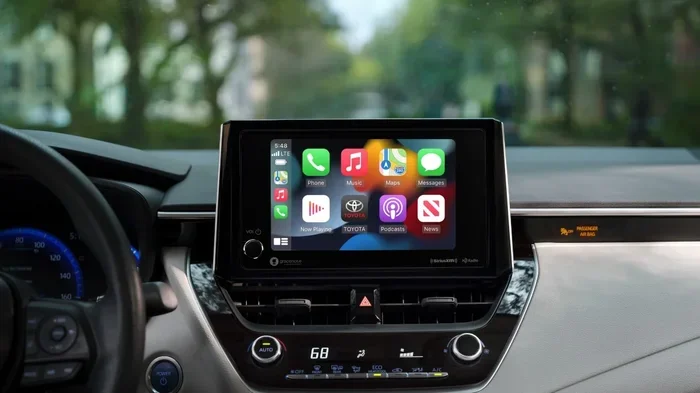
Your Toyota’s touchscreen is the brain of the multimedia system. When it starts lagging, freezing, or taking forever to respond, that is a red flag. Modern Toyota models come with Toyota Entune and Toyota Safety Sense technology. These systems rely on up-to-date software to function properly.
If your radio takes forever to start, the GPS stutters, or the Bluetooth connection drops frequently, the software might be outdated. A quick update often fixes all of these issues without any cost.
Warning Lights on the Dashboard
Dashboard warning lights exist for a reason. Some lights are directly tied to the vehicle diagnostics system. If you see a software-related warning, it could mean your system needs attention. Common lights to watch for include:
- Check Engine Light – sometimes triggered by software glitches
- ABS Warning Light – may indicate outdated safety software
- TRAC Off Light – can signal a need for a Toyota TSS update
- Battery/Charging Warning – may relate to software controlling hybrid systems
Not every warning light means you need a software update. But if the light stays on and nothing seems physically wrong, a software check is a smart first step.
Connectivity and Bluetooth Issues
Do you struggle to connect your phone to your Toyota? Does Google Maps or Apple CarPlay keep disconnecting? Outdated software is often the culprit. Your Toyota’s connected services depend on current firmware to work seamlessly.
If you notice your Toyota app not syncing properly or remote features not working, the software may need a refresh. These small frustrations are usually easy fixes with a simple update.
Recalls and Technical Service Bulletins
Toyota issues recalls and Technical Service Bulletins (TSBs) when software problems are discovered after production. These are not optional. They are critical fixes that address safety concerns, performance issues, and bugs. Checking for recalls is one of the best ways to know if your Toyota needs a software update.
You can check for open recalls by visiting your local Toyota dealer or using the Toyota recall lookup tool online. Even if your car seems fine, an unaddressed recall could mean your software is outdated.
How To Check For Toyota Software Updates
Now that you know the signs, let us talk about how to actually check for updates. There are a few methods depending on your Toyota model and year.
Method 1: Through the Infotainment System
Most newer Toyota models let you check for updates directly from the touchscreen. Here is how:
- Start your Toyota and let it warm up.
- Go to the Settings menu on the infotainment screen.
- Look for a section called Software Update or System Update.
- Select Check for Updates and wait for the system to respond.
- If an update is available, follow the on-screen prompts to install it.
This method works well for over-the-air (OTA) updates on newer models. Older Toyotas may not have this capability and will need a dealer visit instead.
Method 2: Using the Toyota App
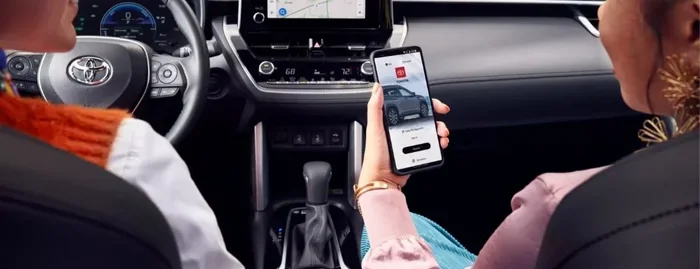
The Toyota app is a great tool for staying on top of your vehicle’s health. The app connects to your Toyota through Toyota connected services and can notify you when updates are available. It also lets you schedule service appointments and check for recalls right from your phone.
Simply download the app, pair it with your vehicle, and check the notifications tab regularly. This is one of the easiest ways to stay ahead of software update needs without visiting a dealer.
Method 3: Visiting a Toyota Dealer
For older models or updates that require physical connection, a trip to the dealer is the way to go. When you visit, the technician connects a diagnostic tool to your Toyota’s OBD-II port. This tool checks the current software version and downloads any available updates.
Many owners ask, “Can I take my Toyota to any dealership for service?” The answer is yes. You are not locked into your original dealership. Any Toyota dealer can perform software updates, check for recalls, and handle warranty work. This is a huge convenience for Toyota owners who have moved or are traveling.
What Happens When You Update Your Toyota Software
Understanding what a software update does helps you appreciate why it matters. Toyota software updates can range from minor bug fixes to major feature additions. Here is what typically happens during and after an update.
Improved Safety Features
Toyota constantly refines its Toyota Safety Sense suite. Updates can improve lane departure warnings, adaptive cruise control, automatic emergency braking, and pre-collision systems. These are not just convenience features. They are life-saving technologies that work better with current software.
Better Infotainment Performance
Updates often bring smoother navigation, faster response times, and new features to your Toyota multimedia system. Some updates even add support for new phone models or streaming services. The result is a more enjoyable and less frustrating driving experience.
Enhanced Fuel Efficiency
Believe it or not, software plays a role in fuel economy. Updates to the engine control module (ECM) or hybrid system software can optimize how your Toyota burns fuel. This means better miles per gallon and lower emissions over time.
Bug Fixes and Stability Improvements
Every software release comes with fixes for known issues. Toyota addresses problems like screen freezing, audio glitches, sensor errors, and connectivity drops through regular updates. These fixes keep your vehicle running the way it was designed to.
Can You Update Toyota Software At Home
The short answer is: it depends on your model. Newer Toyotas with connected services and OTA capabilities allow you to download and install updates from home. You simply connect to Wi-Fi, go to the settings menu, and follow the prompts.
However, older models and certain critical updates require a dealer visit. You cannot perform these updates yourself. The good news is that most Toyota dealerships offer free software checks during routine maintenance visits. This makes it easy to stay current without any extra effort.
If you are wondering about how much do most mechanics make an hour for this type of service, the answer is that many Toyota dealers include software updates in routine maintenance at no extra charge. Always call ahead and ask if your specific update is covered.
When To Visit A Toyota Dealer For Updates
Not every software update can be done at home. Here are the situations where a dealer visit is the best or only option.
After a Recall Is Issued
Toyota recalls that involve software must be handled at a dealership. The technician will flash the new software directly to your vehicle’s computer. This ensures the update is applied correctly and safely. You can find open recalls by searching your Vehicle Identification Number (VIN) on Toyota’s website.
Major System Overhauls
Some updates are too large or too complex for OTA delivery. These might include updates to the hybrid battery management system, the transmission control module, or the engine control unit. These require specialized equipment only found at a dealership.
When Self-Update Attempts Fail
If you tried updating through the infotainment system and it failed or got stuck, do not try again on your own. Visit a dealer instead. They have the tools to diagnose the issue and complete the update safely. Trying to force an update can sometimes cause more problems than it solves.
Common Mistakes People Make With Toyota Software Updates
Avoid these common pitfalls to keep your Toyota running smoothly and your software current.
- Ignoring update notifications – Even small updates matter. They often contain important security patches and bug fixes.
- Updating during a long drive – Always update when the car is parked and turned off. Interrupting an update can corrupt the software.
- Skipping dealer visits – Some updates simply cannot be done at home. Skipping them leaves your Toyota vulnerable to known issues.
- Not checking for recalls – Recalls are free and often fix serious problems. Not checking means you could be driving with a known issue.
- Assuming older Toyotas do not need updates – Even older models benefit from software updates. Toyota supports many models with updates for years after purchase.
One mistake that trips up many owners is not knowing how to check if a vehicle is stolen for free before purchasing a used Toyota. While not directly related to software updates, it is a smart practice for any used car buyer. A clean history report ensures the vehicle has not been through undisclosed damage or software tampering.
Expert Insights On Toyota Software Maintenance
Keeping your Toyota’s software current is one of the simplest and most overlooked forms of vehicle maintenance. Think of it like changing your oil. You do not wait until the engine knocks. You stay ahead of it. The same mindset applies to software.
Experienced Toyota technicians recommend checking for software updates at least once every six months. This is especially true for owners of newer models with Toyota connected services and remote connect features. These systems are constantly evolving, and staying current ensures you get the full benefit of every feature you are paying for.
Another expert tip is to always have your VIN ready when visiting a dealer. The VIN tells the technician exactly which software version your vehicle is running and which updates are available. This saves time and ensures you get the right update the first time.
Key Takeaways
- Watch for slow infotainment performance – it is the most common sign of outdated software.
- Check dashboard warning lights – they can point to software-related issues.
- Use the Toyota app to monitor updates and recalls from your phone.
- Visit a Toyota dealer for updates that cannot be done at home or after a recall.
- Update at least twice a year to keep safety and performance features running at their best.
- Do not ignore recalls – they are free and often fix critical software problems.
Staying on top of your Toyota’s software updates is one of the easiest ways to protect your investment and keep your car running safely. Whether you handle it yourself through the infotainment system or visit a dealer, the effort is small compared to the payoff. A well-maintained Toyota with current software drives better, feels safer, and lasts longer. Make it a habit. Your Toyota will thank you for it.
For more information on related Toyota topics, check out our guide on how to remove a car wrap if you are thinking about changing your vehicle’s appearance, or learn how to use Google Maps in your Toyota to get the most out of your navigation system. Also, if you are considering a newer model, our article on how much you can sell your car for helps you understand your trade-in value.
Frequently Asked Questions
How often should I update my Toyota software?
Toyota recommends checking for software updates at least every six months. Newer models with connected services may notify you automatically when an update is available. Staying on a regular schedule helps keep your safety features and infotainment system running smoothly.
Are Toyota software updates free?
Most software updates are free, especially those related to recalls and Technical Service Bulletins. However, some dealerships may charge a labor fee if the update requires extensive work or a lengthy connection time. Always ask about any costs before the service begins.
Can I drive my Toyota while a software update is installing?
No. You should never drive your Toyota while a software update is in progress. Updates must be done with the engine off and the vehicle parked. Interrupting an update can cause serious software problems that may require a dealer visit to fix.
What happens if I skip a Toyota software update?
Skipping updates means you miss out on bug fixes, safety improvements, and new features. In some cases, ignoring updates can cause your Toyota TSS or infotainment system to malfunction. It is always better to stay current.
Do all Toyota models support over-the-air updates?
No. OTA updates are available on newer Toyota models with connected services. Older models typically require a visit to a Toyota dealer for software updates. Check your owner’s manual or contact your dealer to confirm your model’s capabilities.
How long does a Toyota software update take?
Simple updates can take as little as 10 to 15 minutes. More complex updates, especially those involving the engine or hybrid systems, can take an hour or more. The time depends on the size of the update and your specific Toyota model.