How Do I Connect My Toyota to Remote Connect Easily
Connecting your Toyota to Remote Connect is easier than you think. This guide walks you through every step, from creating your account to using all the smart features. You will learn how to lock doors, start the engine, and track your vehicle from your phone. Toyota Remote Connect gives you real-time control and peace of mind.
Have you ever wished you could start your car from across the parking lot? Or lock your doors after you have already walked away? Toyota Remote Connect makes all of this possible. It is a smart feature that puts your vehicle at your fingertips. You can control many functions right from your phone.
Many Toyota owners do not even know what Toyota Remote Connect can do. They miss out on convenience and security features that come built into their vehicle. This guide will change that. We will walk you through everything you need to know about setting up and using Toyota Remote Connect with ease.
Whether you just bought a new Toyota or have been driving one for years, this article has something for you. We will cover setup steps, key features, troubleshooting tips, and much more. By the end, you will be fully confident in using your connected Toyota services. Let us get started.
Key Takeaways
- Toyota Remote Connect lets you control your vehicle remotely using the Toyota app on your smartphone.
- Setting up Remote Connect requires a subscription and a compatible Toyota model with the right hardware.
- Key features include remote start, lock/unlock, and vehicle location tracking that work through a secure cloud connection.
- You can install Remote Connect through a Toyota dealer or check if your vehicle already has the needed hardware.
- The Toyota app works with both Apple and Android devices, making it accessible for most users.
- Troubleshooting connection issues is straightforward and often involves resetting the app or checking your Wi-Fi.
📑 Table of Contents
- What Is Toyota Remote Connect?
- Which Toyota Models Support Remote Connect?
- How to Set Up Toyota Remote Connect
- Key Features of Toyota Remote Connect
- Common Issues and How to Fix Them
- Tips for Getting the Most Out of Toyota Remote Connect
- Is Toyota Remote Connect Worth It?
- Final Thoughts on Connecting Your Toyota
What Is Toyota Remote Connect?
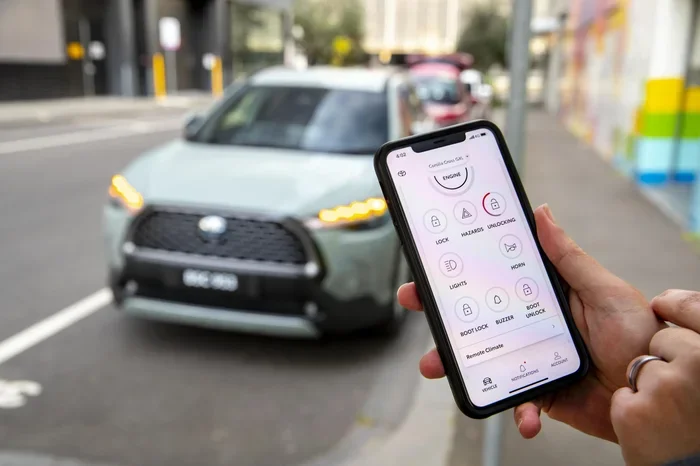
Toyota Remote Connect is a telematics service that lets you interact with your vehicle from a distance. It uses wireless connectivity to send commands between your phone and your car. Think of it as a remote control for your Toyota. You can do things like start the engine, lock the doors, or find your car on a map. All of this happens through the Toyota mobile app.
The service works through a built-in modem in your vehicle. This modem connects to the internet using a cellular network. When you open the app and send a command, it travels to Toyota servers and then back to your car. This whole process takes just a few seconds. It feels almost like magic.
How Remote Connect Differs From Other Toyota Connected Services
Toyota offers several connected services. Toyota Safety Connect focuses on emergency assistance and roadside help. Toyota Entune is mainly about entertainment and navigation. Toyota Remote Connect is different because it gives you direct control over your vehicle. You can lock doors, start the engine, and check fuel levels from anywhere.
Some people confuse Remote Connect with Toyota Smart Key systems. While both involve remote access, they serve different purposes. Smart Key lets you unlock and start the car when you are near it. Remote Connect works even when you are miles away from your vehicle.
Which Toyota Models Support Remote Connect?
Not every Toyota comes with Toyota Remote Connect built in. The feature is available on many newer models, but it depends on the trim level and year. Here is a general overview of compatibility:
- Toyota Camry – Available on most models from 2019 onward
- Toyota RAV4 – Supported on 2019 and newer trims
- Toyota Corolla – Available on select 2020 and newer models
- Toyota Highlander – Supported on 2020 and newer versions
- Toyota Tacoma – Available on select 2021 and newer trims
- Toyota Tundra – Supported on 2022 and newer models
If you are not sure whether your Toyota has the hardware needed, you can ask your dealer. They can check your Vehicle Identification Number and confirm compatibility. You can also look for a Remote Connect button on your key fob or check your owner manual for the telematics section.
Keep in mind that vehicle connectivity features may vary by region. Some features might not be available in all areas. Always check with your local Toyota dealer for the most accurate information.
How to Set Up Toyota Remote Connect
Setting up Toyota Remote Connect is a straightforward process. It does take a few steps, but none of them are difficult. Here is everything you need to do to get started.
Step 1: Check Your Vehicle Compatibility
Before you do anything else, make sure your Toyota supports Remote Connect. Look for the telematics icon on your dashboard or check your owner manual. If your vehicle was built with the right modem, you are good to go. If not, you may need to visit a dealer for installation.
Step 2: Download the Toyota App
Go to the Apple App Store or Google Play Store and download the Toyota mobile app. The app is free to download. Once installed, open it and create an account. You will need your email address, a password, and your vehicle information. Make sure you have your VIN ready. This is the 17-digit number found on your dashboard or driver side door frame.
Step 3: Pair Your Vehicle to the App
After creating your account, you need to pair your vehicle. Go to the settings menu in the app and select “Add Vehicle.” Enter your VIN and follow the on-screen prompts. The app will search for your vehicle on the Toyota network. Once it finds it, you will see a confirmation screen. This pairing process usually takes less than two minutes.
Step 4: Activate Your Subscription
Toyota Remote Connect requires a subscription to work. The subscription cost varies depending on the plan you choose. Some new Toyota vehicles come with a free trial period, usually one year. After that, you will need to pay to keep the service active. You can manage your subscription directly through the app. If you need help with installation, you can also check whether you can get Remote Connect installed in your Toyota at a dealer near you.
Step 5: Test Your Connection
Once everything is set up, test your connection. Try locking your doors or checking your fuel level from the app. If the commands go through, you are all set. If not, check your Wi-Fi or cellular data connection on your phone and try again.
Key Features of Toyota Remote Connect
Toyota Remote Connect offers a range of useful features. Here are the most popular ones that owners use every day.
Remote Start
One of the most loved features is remote start. You can start your engine from inside your home on a cold morning. Just open the app, tap “Start Engine,” and your Toyota will begin warming up. This feature works within a certain range, usually around 50 feet to a few miles depending on your setup. It is a game changer during winter months.
Lock and Unlock Doors
With Toyota Remote Connect, you can lock and unlock your doors remotely. Did you leave the house and wonder if you locked your car? Just open the app and check. If you did not lock it, tap the lock button. This feature gives you peace of mind every single day.
Vehicle Location Tracking
Ever parked in a huge lot and forgotten where you left your car? Remote Connect shows your vehicle location on a map. Open the app and tap “Locate Vehicle.” It will drop a pin on the map showing exactly where your Toyota is. This is especially helpful in large parking areas like malls or stadiums.
Remote Climate Control
Some Toyota models let you control the climate system remotely. You can turn on the air conditioning or heater before you get in the car. This feature is perfect for hot summer days or chilly mornings. Your car will be comfortable the moment you step inside.
Fuel Level and Maintenance Alerts
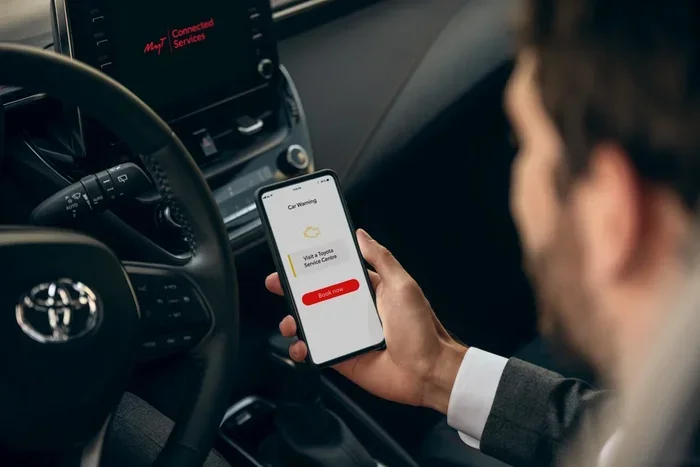
The app also sends you notifications about your fuel level and maintenance needs. You can check how much gas is left without walking up to the vehicle. You will also receive alerts when it is time for an oil change or other service. This helps you stay on top of your Toyota maintenance schedule without any guesswork.
Honk and Flash Lights
This might sound like a small feature, but it is incredibly useful. If you are in a crowded parking lot and cannot find your car, you can make it honk and flash its lights. Just tap the button in the app, and your Toyota will announce itself.
Common Issues and How to Fix Them
Like any technology, Toyota Remote Connect can sometimes have issues. Here are the most common problems and how to solve them.
App Won’t Connect to Vehicle
If the app cannot find your vehicle, the first thing to check is your internet connection. Make sure your phone has a strong Wi-Fi or cellular signal. Also, make sure your vehicle is in an area with cellular coverage. If both are fine, try logging out of the app and logging back in. This often resets the connection.
Commands Are Not Going Through
Sometimes you might tap a button in the app and nothing happens. This is usually a temporary issue. Wait a few seconds and try again. If the problem persists, check your subscription status. An expired subscription will prevent commands from working. You can also try restarting the app or your phone.
GPS Location Is Inaccurate
If the map shows your car in the wrong spot, give it a moment. GPS signals can take time to update, especially in parking garages or dense urban areas. Move to a location with a clearer sky view and refresh the map. If the location is still wrong, try closing and reopening the app.
Subscription Not Working
If your subscription has expired, you will lose access to most Remote Connect features. Renew your subscription through the app or contact Toyota customer service. They can help you choose the right plan for your needs. You might also want to check if you can get Remote Connect installed in your Toyota as part of a service package if you are having trouble with activation.
Tips for Getting the Most Out of Toyota Remote Connect
To get the best experience with Toyota Remote Connect, keep these tips in mind.
- Keep your app updated. Toyota releases updates regularly. These updates fix bugs and add new features. Check for updates in your app store at least once a month.
- Use a strong password for your Toyota account. Since you are controlling your vehicle remotely, security is important. Use a unique password and enable two-factor authentication if available.
- Check your subscription status often. Set a reminder a few days before your subscription expires so you do not lose access to features unexpectedly.
- Explore all the features. Many owners only use remote start and lock/unlock. But features like climate control and location tracking can be incredibly helpful once you start using them.
- Keep your phone charged. If your phone dies, you cannot use Remote Connect. Make sure you have enough battery, especially when you are away from home.
Another great tip is to familiarize yourself with how to pair your phone with your Toyota for Bluetooth connectivity. This works hand in hand with Remote Connect and makes your overall experience smoother. If you also use keyless entry, you might want to learn about how to drive your Toyota without the key fob as a backup option. These small steps will make you a power user of your Toyota’s connected features.
Is Toyota Remote Connect Worth It?
The answer depends on your lifestyle and how you use your vehicle. If you commute daily, Remote Connect can save you time. You can warm up or cool down your car before leaving the house. If you travel often, the location tracking and remote lock features add a layer of security that is hard to put a price on.
The subscription cost is also a factor to consider. Most plans range from $80 to $150 per year depending on the features included. For many Toyota owners, the convenience and peace of mind make this cost well worth it. You also get value from the maintenance alerts and fuel tracking, which help you stay on top of your vehicle’s health.
If you are still deciding, consider this: once you start using Toyota Remote Connect, it is hard to go back to life without it. The convenience becomes part of your daily routine. You will wonder how you ever managed without it.
Final Thoughts on Connecting Your Toyota
Toyota Remote Connect is one of the most useful features available in modern Toyotas. It gives you control over your vehicle from anywhere with an internet connection. The setup process is simple, the features are practical, and the subscription keeps everything running smoothly.
We hope this guide has helped you understand how to connect your Toyota to Remote Connect. From the initial setup to daily use and troubleshooting, you now have everything you need. Start with the basics, explore the advanced features, and enjoy the convenience that comes with a connected Toyota. Your vehicle is smarter than you think, and Remote Connect is the key to unlocking its full potential.
Take a few minutes today to download the app and set up your account. You will be glad you did. The future of driving is connected, and Toyota Remote Connect puts that future right in your pocket.
Frequently Asked Questions
Do I need a special key fob to use Toyota Remote Connect?
No, you do not need a special key fob. Toyota Remote Connect works through the Toyota mobile app on your smartphone. However, your Toyota does need to have the built-in telematics modem that supports Remote Connect features. If your vehicle has the right hardware, you can use the app instead of a special key fob.
Can I install Toyota Remote Connect myself?
In most cases, the hardware is already installed in newer Toyota models. You just need to download the app and activate the service. If your vehicle does not have the modem, you will need to visit a Toyota dealer for installation. They can check your vehicle and add the necessary equipment if it is compatible.
How much does Toyota Remote Connect cost per month?
The cost varies depending on the subscription plan you choose. Most plans range from about $80 to $150 per year, which breaks down to roughly $7 to $12.50 per month. Some newer Toyotas come with a free trial period of one year. You can check current pricing through the Toyota app or by contacting your local dealer.
Will Toyota Remote Connect work if I am far away from my car?
Yes, that is the main benefit of the service. Remote Connect works over cellular networks, so you can control your vehicle from miles away. As long as your phone has internet access and your Toyota has cellular coverage, you can send commands to your vehicle from anywhere.
What should I do if the app keeps disconnecting from my Toyota?
First, check your phone’s internet connection and make sure it is stable. Then try logging out of the app and logging back in. If that does not work, restart the app or your phone. You should also check if your subscription is still active. An expired subscription will prevent the app from connecting to your vehicle.
Can I use Toyota Remote Connect on more than one phone?
Yes, you can. Toyota allows you to add multiple users to your Remote Connect account. Each person can download the app, create a profile, and link it to the same vehicle. This is great for families who share a Toyota. Each user can control the vehicle features from their own phone.
=== CONCLUSION ===
Toyota Remote Connect is a powerful and convenient feature that every Toyota owner should take advantage of. With just a few simple steps, you can set up remote start, lock and unlock your doors, track your vehicle, and much more. The service is easy to use, works reliably, and adds real value to your daily driving experience.
Remember to keep your app updated, your subscription active, and your account secure. If you run into any issues, the troubleshooting tips in this guide should help you resolve them quickly. Now that you know how to connect and use Toyota Remote Connect, you are ready to enjoy all the benefits of a smart, connected vehicle. Get started today and experience the future of driving.