How Do I Get My Remote Start Working Again on Toyota
Getting your Toyota remote start working again is easier than you think. Most issues come down to a dead key fob battery, a weak signal, or a simple reset. This guide walks you through every step to bring your Toyota remote start back to life.
There is nothing worse than standing in the cold or heat, pressing the button on your key fob, and nothing happens. Your Toyota remote start just sits there silently, and you are left wondering what went wrong. Whether you drive a Toyota Camry, a Toyota RAV4, or a Tacoma, the remote start system is a feature you rely on every single day.
The good news is that most Toyota remote start problems are easy to fix. You do not need to be a mechanic. You do not need expensive tools. In most cases, a few simple steps will bring your Toyota push button start and remote functions back to life. This guide covers every common issue and shows you exactly how to solve it.
We will walk through troubleshooting steps, explain why your Toyota key fob might fail, and tell you when it is time to visit a Toyota dealer. By the end, you will know exactly what to do to get your remote start working again.
Key Takeaways
- Dead Key Fob Battery: The most common reason your Toyota remote start stops working is a depleted key fob battery.
- Simple Reset Steps: Many remote start issues can be fixed with a quick reset of the system and key fob.
- Check for Signal Interference: Physical barriers and electronic devices can block your key fob signal and stop remote start.
- Know When to See a Pro: Some problems require a Toyota dealer or certified technician to diagnose and fix.
- Prevent Future Issues: Regular maintenance and battery replacement can keep your Toyota remote start working reliably.
📑 Table of Contents
- Why Your Toyota Remote Start May Have Stopped Working
- How to Troubleshoot Your Toyota Remote Start
- Common Reasons Toyota Remote Start Won’t Activate
- When to See a Professional for Remote Start Repair
- Preventing Future Remote Start Problems on Your Toyota
- Final Thoughts on Getting Your Toyota Remote Start Back
Why Your Toyota Remote Start May Have Stopped Working
Before you start fixing anything, it helps to understand why your Toyota remote start stopped working in the first place. Remote start systems are surprisingly simple, but they depend on several components working together. When one part fails, the whole system goes down.
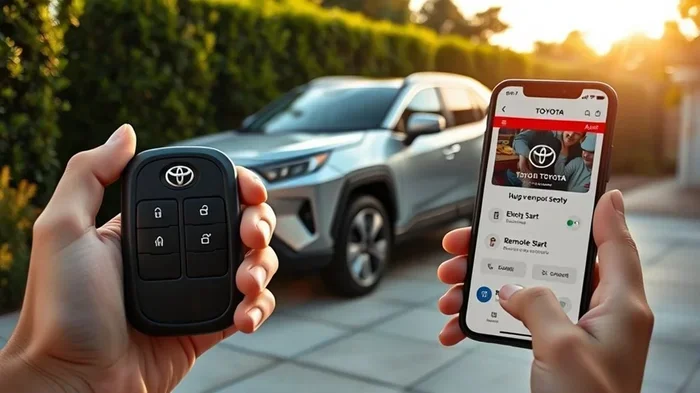
The Toyota smart key system uses a small transmitter inside your key fob to communicate with your car. When you press the remote start button, the fob sends a signal to the car’s computer. The computer then checks several conditions before allowing the engine to start. If any of those conditions are not met, the system will not activate.
Here are the main reasons your Toyota remote start might not be responding:
- Dead or weak key fob battery — This is the number one cause of remote start failure.
- Signal interference — Other electronic devices or physical barriers can block the signal.
- Low vehicle battery voltage — Your car’s battery may not have enough charge to support remote start.
- System needs a reset — Sometimes the system simply needs to be rebooted.
- Faulty remote start module — The module that controls remote start can wear out over time.
- Safety feature triggered — Your car may have a safety lockout that prevents remote start under certain conditions.
Each of these issues has a clear solution. Let us walk through them one by one so you can get back to using your Toyota remote start without frustration.
How to Troubleshoot Your Toyota Remote Start
Now let us get into the actual troubleshooting. These steps are designed to be simple and straightforward. You do not need any special tools or technical knowledge. Just follow along in order.
Step 1: Check Your Key Fob Battery
The Toyota key fob battery is the first thing you should check. Most Toyota key fobs use a small CR2032 coin battery. These batteries last about one to two years, but cold weather and heavy use can drain them faster.
Here is how to replace it:
- Flip open your key fob and carefully pry the two halves apart using a small flathead screwdriver or a coin.
- Remove the old battery and note which side is facing up.
- Insert a new CR2032 battery with the positive side facing up.
- Snap the two halves of the fob back together.
After replacing the battery, try pressing the remote start button again. In many cases, this single fix solves the entire problem. If you have ever started your Prius without the key, you already know how important a working key fob battery is for Toyota systems.
Step 2: Check Your Signal Range
Sometimes the problem is not your fob at all. It is about distance and signal strength. Toyota remote start systems have a limited range, typically around 200 to 400 feet. If you are too far from your vehicle, the signal may not reach.
Try standing closer to your car and pressing the button again. Also, check for any physical barriers between you and the car. Thick walls, large vehicles, or even metal structures can block the key fob signal.
Electronic interference is another common culprit. If you are standing near a cell tower, a large radio antenna, or even a group of other cars with key fobs, their signals can interfere with yours. Move to a different location and try again.
Step 3: Reset the Remote Start System
A system reset often fixes Toyota remote start issues that are caused by software glitches or temporary errors. Here is how to do it:
- Get inside your Toyota and close all doors.
- Turn the ignition to the “On” position without starting the engine.
- Press and hold the remote start button on the key fob for about 10 seconds.
- Release the button and turn the ignition off.
- Wait 30 seconds, then try remote start again.
This simple reset clears any temporary error codes in the system. Think of it like restarting your phone when it acts up. It does not fix everything, but it solves a surprising number of issues.
Step 4: Check Your Vehicle Battery
Your Toyota needs a healthy 12-volt battery to support remote start. If your vehicle battery is weak or old, the remote start system may refuse to work. This is a safety feature designed to prevent you from being stranded.
Check your dashboard lights when you open the door. If they look dim or flicker, your vehicle battery may need attention. You can also use a multimeter to check the voltage. A healthy battery should read 12.6 volts or higher when the car is off.
If your battery is more than three to five years old, consider replacing it. A new battery is a small cost that can save you a lot of trouble with your Toyota push button start system.
Common Reasons Toyota Remote Start Won’t Activate
Beyond the basic troubleshooting steps, there are several specific reasons your Toyota remote start might fail to activate. Understanding these can help you pinpoint the problem faster.
The Door or Hood Is Not Fully Closed
This sounds obvious, but it happens more often than you would think. Your Toyota has sensors on all doors and the hood. If any of them are not fully closed, the system will not allow remote start. Walk around your vehicle and make sure every door and the hood are completely shut. Listen for the latch to click into place.
The Brake Pedal Is Not Depressed
Modern Toyotas require the brake pedal to be pressed before the engine can start, even with remote start. If your brake light switch is faulty or the system does not detect that the brake is pressed, remote start will not work. Press the brake pedal firmly and try again.
The Transmission Is Not in Park
Your Toyota’s remote start system requires the transmission to be in Park. If the shifter is in Neutral or any other position, the system will block remote start. Move the gear selector to Park and try again.
The Check Engine Light Is On
If your check engine light is illuminated, your Toyota may disable remote start as a safety precaution. The car’s computer detects a problem and prevents the engine from being started remotely. If you see this light, it is important to address the underlying issue first. You can check what the light means by reading the error code with an OBD-II scanner.
Extreme Temperatures
Both extreme cold and extreme heat can affect your Toyota remote start performance. In very cold weather, the system may delay starting or refuse to start to protect the engine. In extreme heat, the system may also have issues. If you live in an area with harsh weather, keep this in mind and plan accordingly.
When to See a Professional for Remote Start Repair
Most Toyota remote start issues can be fixed at home with the steps we have covered. But some problems require professional help. Knowing when to visit a technician can save you time and prevent further damage.
You should see a professional if:
- You have replaced the key fob battery and the remote start still does not work.
- The check engine light is on and you cannot identify the problem.
- Your vehicle battery is healthy but the remote start system still fails.
- You hear clicking sounds from the key fob but the car does not respond.
- The remote start worked before but now it fails consistently.
A certified Toyota technician has the tools and software to diagnose issues that are not visible to the naked eye. They can read error codes from your car’s computer and check the remote start module for faults. If your Toyota remote start module needs replacement, a professional can handle that quickly and correctly.
It is also worth noting that if you installed an aftermarket remote start system, the installer may need to adjust or reprogram it. Factory Toyota remote start systems are generally more reliable, but aftermarket systems can have their own quirks. If you are unsure whether your system is factory or aftermarket, check your owner’s manual or contact your Toyota dealer.
Preventing Future Remote Start Problems on Your Toyota
Once you have your Toyota remote start working again, you want to keep it that way. Prevention is always easier than repair. Here are some simple habits that will keep your system running smoothly for years to come.
Replace Your Key Fob Battery Regularly
Do not wait for the battery to die completely. Replace it every 12 to 18 months. This small habit prevents the inconvenience of a dead fob when you need it most. Keep a spare CR2032 battery in your glove box so you are always prepared.
Keep Your Key Fob Clean and Dry
Moisture can damage the electronics inside your key fob. If your fob gets wet, dry it thoroughly before using it. Avoid dropping your fob or exposing it to extreme heat, such as leaving it on the dashboard in direct sunlight.
Store Your Fob Properly
Keep your key fob away from other electronic devices that emit strong signals. Items like wireless chargers, large power banks, or even other key fobs can cause interference. A dedicated spot in your pocket or bag works best.
Have Your Toyota Serviced Regularly
Regular maintenance at your Toyota dealership or a trusted mechanic keeps your entire vehicle in good shape. During service appointments, ask the technician to check your remote start system and key fob functionality. A quick check can catch small problems before they become big ones.
If you are curious about other Toyota features and how they work, you might find it interesting to learn how to roll down your Toyota windows with the key fob or explore what it takes to add remote start to a Toyota Tundra. These topics share many of the same underlying systems.
Final Thoughts on Getting Your Toyota Remote Start Back
Your Toyota remote start is one of the most convenient features you have. When it stops working, it can feel like a major inconvenience. But the truth is, most problems are simple and fixable. A new battery, a quick reset, or a check of your vehicle’s systems can bring everything back to normal.
Start with the basics. Replace the key fob battery. Check your signal range. Reset the system. Make sure all doors are closed and the car is in Park. If those steps do not work, it is time to see a professional. A Toyota technician can diagnose deeper issues and get your remote start running again quickly.
Taking care of your Toyota key fob and remote start system with regular maintenance will keep you out of trouble. Stay proactive, keep spare batteries on hand, and your Toyota push button start system will serve you well for many years to come.
The next time your remote start fails, do not panic. You now have the knowledge and the steps to fix it yourself. Grab that spare battery, follow the troubleshooting guide, and get back to enjoying the comfort of your Toyota remote start system.
Frequently Asked Questions
Why did my Toyota remote start suddenly stop working?
The most common reason is a dead key fob battery. Other causes include signal interference, a low vehicle battery, or a system that needs resetting. Try replacing the fob battery first, as this solves the problem in most cases.
How do I reset my Toyota remote start system?
Turn the ignition to “On” without starting the engine, press and hold the remote start button on the key fob for 10 seconds, release it, turn the ignition off, wait 30 seconds, and try remote start again. This clears temporary errors in the system.
Can a weak car battery cause remote start to fail?
Yes, absolutely. Your Toyota needs a healthy 12-volt battery to support remote start. If the vehicle battery voltage is too low, the system will not activate as a safety precaution. Check your battery voltage with a multimeter to confirm.
How often should I replace my Toyota key fob battery?
Replace your key fob battery every 12 to 18 months. If you notice reduced range or delayed response from your fob, it is a sign the battery is weakening and should be replaced soon.
Is it normal for Toyota remote start not to work in extreme cold?
Yes, some delay or refusal to start in extreme cold is normal. The system protects your engine from starting in conditions that could cause damage. Wait for slightly warmer temperatures or try starting the car manually.
Should I visit a Toyota dealer for remote start problems?
You should visit a dealer if basic troubleshooting does not fix the issue, if the check engine light is on, or if you suspect the remote start module is faulty. A professional has the diagnostic tools needed to identify and repair complex problems.