How Do I Deactivate Toyota Connected Services Right Now
Want to deactivate Toyota Connected Services? This guide shows you exactly how to turn off your subscription and stop connected features. You’ll save money and protect your privacy in just a few steps.
You bought a Toyota because it’s reliable. Then you noticed a subscription called Toyota Connected Services. It promises smart features, remote start, and live traffic updates. But maybe you never use them. Or you worry about your data. Whatever the reason, you want to know how to deactivate Toyota Connected Services right now.
This guide walks you through every step. We’ll explain what these services are, why you might want to cancel, and exactly how to turn them off. You’ll learn what stops working and what stays the same. By the end, you’ll feel confident making the change.
Let’s get started. No fluff. No confusing jargon. Just clear steps you can follow today.
Key Takeaways
- You can turn off Toyota Connected Services through the vehicle’s infotainment system or by contacting your dealer.
- Deactivating stops monthly subscription fees and removes data sharing with Toyota.
- Some features like Remote Connect and Google Maps will stop working after you deactivate.
- You can reactivate services later if you change your mind.
- Always check your contract to avoid early termination fees.
- Deactivation does not affect your vehicle’s warranty or basic safety systems.
📑 Table of Contents
- What Are Toyota Connected Services?
- Why Would You Want to Deactivate Toyota Connected Services?
- How to Deactivate Toyota Connected Services Step by Step
- What Happens When You Turn Off Toyota Connected Services?
- Common Mistakes to Avoid When Deactivating Connected Services
- Expert Tips for Managing Toyota Connected Services
- Final Thoughts on Deactivating Toyota Connected Services
What Are Toyota Connected Services?
Toyota Connected Services is a package of digital features. It uses your car’s internet connection to offer things like remote start, vehicle tracking, and emergency assistance. The system talks to Toyota’s servers. It sends and receives data. This keeps your car linked to the cloud.
Some models come with a free trial. After that, you pay a monthly or annual fee. The services include:
- Remote Connect for starting the car from your phone
- Google Maps integration for live navigation
- Safety Connect for automatic crash notifications
- Wi-Fi hotspot capability
- Vehicle health reports and maintenance alerts
If you ever wondered about Remote Connect installation, that’s part of this connected ecosystem. It’s designed to make your car smarter. But not everyone needs all those features.
Do You Really Need Connected Services?
Many drivers use basic features every day. They never touch the remote start or the Wi-Fi. If you only drive locally, you might not need live traffic updates. Toyota Connected Services can feel like extra cost for little benefit. That’s a valid reason to deactivate.
Why Would You Want to Deactivate Toyota Connected Services?
There are many good reasons to turn off these services. Let’s look at the most common ones.
Saving Money on Subscriptions
Monthly fees add up fast. A Toyota Connected Services plan can cost $50 to $150 per year. If you’re not using the features, that’s wasted money. Deactivating stops the charges immediately. You keep your hard-earned cash.
Protecting Your Privacy
Connected services collect data. They track your driving habits, location, and vehicle usage. Some people feel uncomfortable with that level of monitoring. Turning off the connection reduces the data Toyota receives. It gives you more control over your privacy.
Simplifying Your Driving Experience
Too many notifications can distract you. Alerts about vehicle health, traffic, and Wi-Fi usage can pop up often. Deactivating removes those interruptions. You get a cleaner, simpler dashboard. Many drivers prefer a distraction-free environment.
Some owners also ask if they can drive their Toyota without the key fob after disconnecting services. The answer is usually yes, because key fob functions rely on the car’s internal system, not the cloud subscription. But you should double-check your specific model.
How to Deactivate Toyota Connected Services Step by Step
Here is the exact process. Follow these steps in your vehicle.
Step 1: Park the Car and Turn On the Infotainment System
Make sure your Toyota is parked safely. Press the power button to start the infotainment screen. You don’t need to drive. Just have the screen on.
Step 2: Go to the Settings Menu
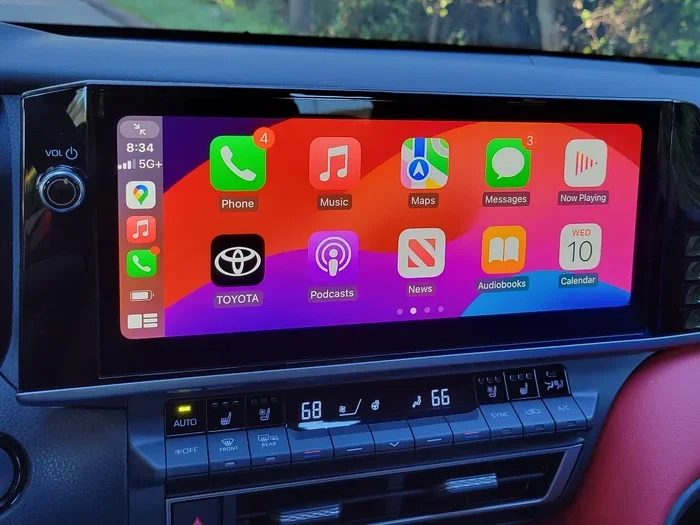
Tap the Settings icon. It usually looks like a gear. Scroll down to find the Connectivity or Network settings. The exact name varies by model year.
Step 3: Locate Toyota Connected Services
Look for a menu item called “Connected Services,” “MyToyota,” or “Toyota App.” Tap on it. You should see a list of active features.
Step 4: Turn Off Each Service
You will see toggles for Remote Connect, Safety Connect, and other features. Tap each toggle to turn it off. Confirm the action when prompted. Some models require you to enter your PIN for security.
Step 5: Contact Toyota to Cancel the Subscription (If Needed)
Turning off features in the car stops the data flow. But you may still be billed if you have an active paid plan. Call Toyota customer service or visit your dealer. Ask them to cancel the subscription. They can process the cancellation right away.
Quick Tip: Keep your Vehicle Identification Number (VIN) handy. The dealer will need it to find your account.
Alternative Method: Visit a Toyota Dealership
If you prefer not to use the screen, you can visit a dealer. They can deactivate Toyota Connected Services for you. This is a good option if you’re not comfortable with the settings menu. The dealer can also check if you have any early termination fees.
Another option is to call Toyota’s support line. They can walk you through the process over the phone. This works well if you’re not near your car.
What Happens When You Turn Off Toyota Connected Services?
Deactivating changes what your car can do. Here’s a clear look at the before and after.
| Feature | Before Deactivation | After Deactivation |
|---|---|---|
| Remote Start via Phone | Works anywhere with signal | Stops working |
| Google Maps Live Traffic | Real-time updates and routing | Basic maps only (no live traffic) |
| Wi-Fi Hotspot | Active and usable | Turns off |
| Safety Connect Alerts | Automatic crash and roadside assistance | Manual calls only |
| Vehicle Health Reports | Sent to your phone | No longer sent |
| Key Fob Functions | Remote lock/unlock, panic alarm | Still works locally (if supported) |
You’ll lose access to Google Maps integration and live navigation features. The car’s basic functions like driving, braking, and turning remain fully operational. Safety systems like airbags and ABS are not affected.
Some drivers worry about their key fob. You can still drive your Toyota without the key fob using the physical key or push-button start, depending on your model. Deactivation does not lock you out of your vehicle.
Does Deactivation Affect My Warranty?
No. Turning off Toyota Connected Services does not void your warranty. Your powertrain, brakes, and safety systems remain covered. Toyota cannot deny a claim just because you canceled a subscription. However, if a connected feature causes a problem, that specific feature might not be serviced under warranty after deactivation.
Common Mistakes to Avoid When Deactivating Connected Services
Many people make avoidable errors. Here’s what to watch out for.
Mistake 1: Forgetting to Cancel the Billing
Turning off features in the car doesn’t stop the monthly charge. You must cancel the subscription separately. Otherwise, you’ll keep paying for services you no longer use.
Mistake 2: Not Checking Your Contract
Some Toyota leases or purchases include a multi-year connected services package. Early cancellation might trigger a fee. Read your contract carefully before you deactivate.
Mistake 3: Ignoring the PIN Requirement
The system may ask for a PIN to confirm deactivation. If you don’t know it, you can’t proceed. The default PIN is often 1234 or your last four digits of the phone number on file. Change it if you need to.
Mistake 4: Assuming All Features Stop Immediately
Some features like stored navigation maps remain available offline. Only cloud-based features stop working right away. The car’s internal systems still function normally.
Expert Tips for Managing Toyota Connected Services
Even if you deactivate now, you might want to reactivate later. Here’s how to keep things flexible.
Tip 1: Pause Instead of Cancel
If you’re unsure, you can pause the subscription for a few months. Toyota sometimes offers a grace period. This lets you test life without the services before fully canceling.
Tip 2: Use a Physical Map App
Without live Google Maps, you can load offline maps on your phone. Use Apple Maps or Google Maps in offline mode. This keeps you navigating without a paid subscription.
Tip 3: Keep Your Dealer’s Contact Info
You may need to reactivate services later. Having your dealer’s phone number makes the process faster. They can re-enable Toyota Connected Services in minutes.
Tip 4: Review Data Settings Regularly
Even with services off, your car may still collect some basic data. Go to the privacy settings and review what’s shared. You can limit data collection further if you want extra privacy.
Expert Insight: “Many owners don’t realize that deactivating connected services doesn’t mean losing the ability to use their car’s core technology. The infotainment system, Bluetooth, and USB connections remain fully functional. You’re simply opting out of the cloud-based subscription layer,” says a Toyota service advisor.
Final Thoughts on Deactivating Toyota Connected Services
Turning off Toyota Connected Services is a straightforward process. You can do it yourself through the car’s screen or with help from a dealer. The key is to cancel both the features and the billing subscription. This stops the fees and protects your privacy.
You’ll lose some convenient features like remote start and live traffic. But you gain control over your data and your budget. If you ever change your mind, reactivation is simple. Just contact Toyota or visit your dealer.
Take a few minutes today. Follow the steps in this guide. You’ll deactivate Toyota Connected Services quickly and confidently. Your wallet and your privacy will thank you.
Frequently Asked Questions
Can I deactivate Toyota Connected Services myself?
Yes, you can turn off the features through your car’s infotainment system. However, you must also cancel the subscription with Toyota to stop billing. You can do this by phone or online.
Will I lose my navigation maps after deactivation?
No. Offline maps stored in the system remain available. You just won’t get live traffic updates or cloud-based routing. You can still use basic navigation without an active subscription.
Does deactivating connected services affect my car’s safety systems?
Absolutely not. Safety features like airbags, ABS, and stability control continue to work normally. The connected services are separate from the vehicle’s core safety systems.
Can I reactivate Toyota Connected Services later?
Yes, you can reactivate at any time. Contact Toyota customer service or visit a dealer. They can restore the services and features quickly. You may need to start a new subscription plan.
Are there any fees for canceling Toyota Connected Services?
It depends on your contract. Some plans have early termination fees if you cancel before the subscription period ends. Check your agreement or ask your dealer before canceling.
How long does it take to deactivate Toyota Connected Services?
The process takes about 5 to 10 minutes if you do it yourself through the car’s screen. Canceling the subscription with Toyota may take a few business days to process fully. Keep your VIN ready for faster service.