How Do I Activate Remote Start in the Toyota App Guide
Activating remote start in the Toyota App lets you start your engine from your phone. You need a compatible Toyota vehicle, an active Toyota Connected Services plan, and the Toyota App installed. This guide walks you through every step from download to first successful remote start.
Have you ever wished you could start your Toyota from across the parking lot? Maybe you want to warm up the engine on a cold morning or cool down the cabin before you get in. Toyota Remote Start makes all of this possible, and the Toyota App puts this power right at your fingertips.
In this guide, we will walk you through everything you need to know about activating remote start in the Toyota App. From checking compatibility to troubleshooting common issues, we have you covered. Whether you drive a Camry, a RAV4, or a Tundra, this article will help you get started.
Remote start is no longer a luxury reserved for high-end trims. Many Toyota models now offer this feature through the Toyota Connected Services platform. But activating it involves more than just pressing a button. You need the right app, the right subscription, and a few minutes of your time. Let us dive in.
## Understanding Toyota Remote Start and the Toyota App
Before you jump into activation, it helps to understand what you are working with. Toyota Remote Start is a feature that lets you start your engine remotely using a smartphone. The Toyota App serves as the bridge between you and your vehicle.
### What Is Toyota Remote Connect?
Toyota Remote Connect is the subscription service that powers remote start and other connected features. It is part of the broader Toyota Connected Services ecosystem. Through this service, you can do things like lock doors, check fuel levels, and yes, start your engine from a distance.
Not every Toyota comes with Remote Connect built in. Some models require a dealer installation or a compatible key fob system. You will want to confirm your vehicle supports this feature before proceeding. If you are unsure, check your owner’s manual or visit your local dealer.
### What the Toyota App Can Do
The Toyota App is more than just a remote start tool. It gives you access to a suite of vehicle controls. Here are some of the key features you can expect:
- Remote engine start and stop
- Climate control pre-conditioning
- Vehicle location tracking
- Lock and unlock doors remotely
- Fuel level and maintenance alerts
- Trip history and driving stats
The app works with both Apple and Android devices. You simply download it from the App Store or Google Play, create an account, and link your vehicle. The entire process is designed to be user-friendly, even if you are not tech-savvy.
## How to Check if Your Toyota Is Compatible
Not every Toyota model supports remote start through the app. Compatibility depends on your model year, trim level, and whether you have the right hardware installed.
### Model Year Requirements
Most Toyotas that support Toyota Remote Connect are from 2017 and newer. However, some older models may still have remote start capability through a different system. Here is a quick breakdown:
- 2017 and newer: Most models come with Remote Connect support
- 2012 to 2016: Some models may support it with dealer-installed hardware
- Older than 2012: Remote start through the app is generally not available
If you are not sure about your specific model, you can always contact a Toyota dealer. They can look up your Vehicle Identification Number and confirm what features are available.
### Trim Level Considerations
Even within a single model, trim levels matter. Higher trims often come with advanced connectivity packages that include remote start as a standard feature. Lower trims might require an aftermarket add-on or a subscription upgrade.
For example, if you are wondering about a specific truck, check out whether you can add remote start to a Toyota Tundra. That article covers Tundra-specific options in detail.
### The Role of the Key Fob
Your key fob plays an important role in the remote start process. The fob communicates with your vehicle’s immobilizer system to confirm that the person starting the car is authorized. Without a compatible fob, remote start will not work.
If you have lost your key fob or need a replacement, you should address that first. The system will not allow remote starts from an unrecognized device. This is a safety feature designed to protect your vehicle from theft.
## Step-by-Step Guide to Activating Remote Start
Now for the part you have been waiting for. Here is the full process to activate remote start in the Toyota App. Follow these steps carefully, and you will be up and running in no time.
### Step 1: Download the Toyota App
Go to the Apple App Store or Google Play Store and search for the Toyota App. Download and install it on your smartphone. Make sure your phone has a stable internet connection before you begin.
The app is free to download. However, you will need an active Toyota Remote Connect subscription to use remote start features. More on subscriptions in a moment.
### Step 2: Create Your Toyota Account
Open the app and tap “Create Account.” You will need the following:
- Your Toyota vehicle’s 17-digit VIN
- Your email address
- A valid phone number
- A payment method for the subscription
The VIN is usually found on your dashboard near the windshield or on your driver’s side door jamb. Have it ready before you start.
### Step 3: Link Your Vehicle
Once your account is created, go to the “My Vehicles” section. Tap “Add Vehicle” and enter your VIN. The app will verify your vehicle and check for Remote Connect compatibility.
If your vehicle is compatible, you will see a confirmation screen. If not, the app will let you know what options are available. In some cases, a dealer visit may be needed to install the necessary hardware.
### Step 4: Subscribe to Toyota Remote Connect
Remote start is not a free feature. You need an active Toyota Remote Connect subscription. Plans vary by region and dealer, but most start around $10 to $20 per month. Some dealers offer annual plans at a discounted rate.
To subscribe, go to the “Services” section in the app and select “Remote Connect.” Follow the prompts to choose your plan and enter payment details. Once subscribed, the remote start feature will activate on your account.
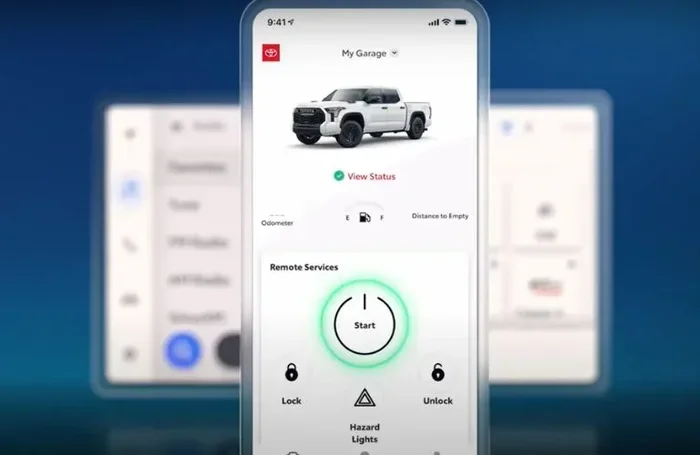
### Step 5: Activate Remote Start
With your vehicle linked and subscription active, you are ready to go. Here is how to start your engine remotely:
- Open the Toyota App on your phone
- Select your vehicle from the “My Vehicles” list
- Tap the “Remote Start” button
- Confirm your action when prompted
- Wait for the confirmation message that your engine has started
The engine should start within 30 seconds. You can also set a timer so the engine turns off after a set period, usually 10 to 15 minutes. This is a great safety feature that prevents your vehicle from running indefinitely.
### Step 6: Test and Adjust Settings
Before you rely on remote start in an emergency, test it in a safe environment. Try starting your vehicle from a short distance first. Make sure the climate controls respond as expected.
You can also customize your preferences in the app settings. Adjust things like the default run time, climate temperature, and notification alerts. The more you explore, the more useful the feature becomes.
## Troubleshooting Common Remote Start Issues
Even with a smooth setup, you may run into issues from time to time. Remote start depends on several systems working together, and sometimes things go wrong. Here are the most common problems and how to fix them.
### The App Won’t Connect to Your Vehicle
This is the most common complaint. If the app cannot reach your vehicle, try these steps:
- Check your internet connection: Both your phone and your vehicle need a data connection
- Restart the app: Close it completely and reopen it
- Update the app: Make sure you have the latest version installed
- Restart your phone: A simple reboot often resolves connection issues
- Check your subscription status: An expired subscription will block all remote features
If none of these work, contact Toyota Customer Support. They can check your account and vehicle status from their end.
### Remote Start Does Not Respond
If you tap the remote start button and nothing happens, the issue could be with your vehicle. Check the following:
- Is the hood closed? Most systems will not start remotely if the hood is open
- Is the parking brake engaged? This is a safety requirement for remote start
- Are the doors locked? Remote start typically requires all doors to be locked
- Is the fuel level sufficient? Some systems will not start if the tank is nearly empty
Also, keep in mind that extreme temperatures can affect remote start performance. In very cold weather, the system may delay the start to protect the engine.
### Subscription and Billing Problems
If your remote start suddenly stops working, check your subscription first. An expired or failed payment will disable all connected features. You can view your subscription status in the app under “Account” and “Subscription.”
To renew or update your payment method, go to the same section. If you are having billing issues, contact Toyota support or your dealer. They can help resolve payment problems quickly.
## Safety Features and Best Practices
Toyota takes remote start safety seriously. The system includes multiple safeguards to protect both you and your vehicle. Understanding these features will help you use remote start with confidence.
### Built-In Safety Protections
When you activate remote start, several safety measures kick in automatically:
- The vehicle must be in Park for remote start to engage
- All doors must be locked before the engine starts remotely
- The engine automatically shuts off after the preset time limit
- The system will not start if the hood is open or the parking brake is not set
- Alerts notify you if the vehicle detects any unusual activity
These protections ensure that your vehicle remains secure even when started remotely. You can start your engine from hundreds of feet away and know that your Toyota is safe.
### Best Practices for Remote Start Use
To get the most out of remote start, follow these simple tips:
- Always lock your doors before starting remotely
- Set a reasonable run time — 10 to 15 minutes is usually enough
- Never leave your vehicle unattended while it is running remotely in an enclosed space
- Keep your phone charged so you can receive alerts and notifications
- Update the app regularly to benefit from the latest security patches
- Use the app’s vehicle status feature to confirm your remote commands were received
If you are curious about how remote start compares to other keyless features, you might find it helpful to read about how to start a keyless car without a key. It covers the broader landscape of keyless vehicle operation.
## Comparing Remote Start Options for Toyota Owners
Toyota offers a few different ways to start your vehicle remotely. Understanding your options helps you choose the best one for your needs.
### Toyota Remote Connect vs. Aftermarket Remote Start Systems
| Feature | Toyota Remote Connect | Aftermarket Remote Start |
|—|—|—|
| Integration | Factory-built, seamless | Requires professional installation |
| App Control | Full Toyota App integration | Varies by brand |
| Subscription | Required monthly or annually | Usually one-time cost |
| Climate Control | Yes, through the app | Limited or none |
| Security | Factory-level encryption | Varies widely |
| Warranty Impact | No impact on factory warranty | May void certain warranties |
| Vehicle Tracking | Yes | Usually not available |
Toyota Remote Connect is the more integrated and secure option. Aftermarket systems can work well, but they may not offer the same level of polish or safety integration.
### Remote Start on Different Toyota Models
Different Toyota models handle remote start slightly differently. Here are a few examples:
- Toyota Camry: Full Remote Connect support on most 2018+ models. Remote start works reliably through the app.
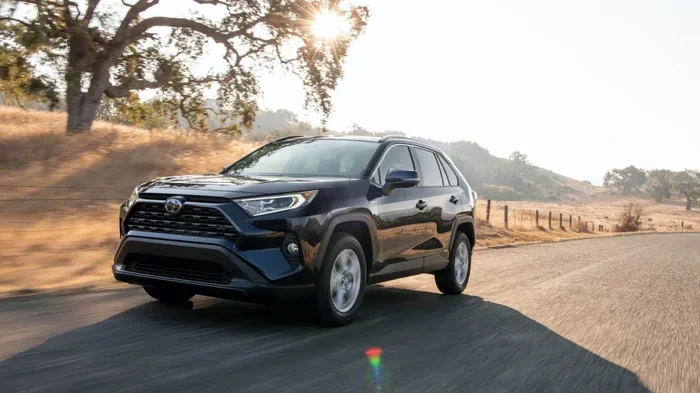
- Toyota RAV4: Available on higher trims with the Entune system. Check your specific model year.
- Toyota Prius: Some Prius models support remote start. If you are curious about starting your Prius without the key, check out this guide for more details.
- Toyota Tundra: Remote start availability depends on the package. Learn more about Tundra remote start options here.
- Toyota Corolla: Available on newer models with the Toyota Connected Services package.
Each model has its own quirks. Always check your specific vehicle’s documentation or ask your dealer for confirmation.
## Frequently Asked Questions
Can I activate remote start in the Toyota App for free?
The Toyota App itself is free to download, but remote start requires an active Toyota Remote Connect subscription. This subscription typically costs between $10 and $20 per month depending on your location and dealer. Some new Toyota vehicles come with a complimentary trial period, so check with your dealer to see if you qualify.
How far away can I start my Toyota remotely?
You can start your Toyota from a significant distance using the Toyota App. The system works over cellular networks, so as long as your phone has a signal and your vehicle has a data connection, you can start it from virtually anywhere. Most users report successful starts from several hundred feet to several miles away.
What should I do if my Toyota App remote start is not working?
First, check that your subscription is active and your phone has a stable internet connection. Restart the app and try again. If the problem persists, verify that your vehicle is in Park, all doors are locked, and the hood is closed. If none of these steps work, contact Toyota Customer Support for assistance.
Can I use remote start if I do not have the key fob inside the vehicle?
Yes, remote start works independently of the key fob being inside the vehicle. The system communicates through the cloud and your phone. However, you do need a compatible key fob registered to your account. Without a recognized fob, the system will not allow the engine to start remotely for security reasons.
Is remote start safe to use in winter or summer?
Absolutely. Remote start is designed to work in all weather conditions. In winter, it warms up your engine and cabin before you get in. In summer, it cools down the interior. The system includes built-in safety features that prevent overheating or overcooling and automatically shuts off the engine after the preset time.
Will using remote start drain my Toyota battery?
Using remote start occasionally will not noticeably drain your battery. Toyota designs the system to be energy-efficient. However, if you leave the engine running remotely for extended periods repeatedly, it could put a strain on the battery. The automatic shutoff timer helps prevent this by turning the engine off after 10 to 15 minutes.
## Conclusion
Activating remote start in the Toyota App is a straightforward process that adds real convenience to your daily driving routine. With the right vehicle compatibility, an active Toyota Remote Connect subscription, and the Toyota App installed on your phone, you can start your engine from almost anywhere.
The key steps are simple: download the app, create your account, link your vehicle, subscribe to Remote Connect, and activate remote start. From there, you can enjoy climate pre-conditioning, engine start, and all the other connected features Toyota offers.
If you run into issues, the troubleshooting steps in this guide should help you resolve most problems quickly. And remember, safety features are built into every remote start command, so you can use the system with confidence.
Take a few minutes today to set up remote start in your Toyota App. Once you experience the convenience of walking into a warm or cool vehicle on demand, you will wonder how you ever lived without it. Toyota Remote Start is one of those features that truly makes life easier, and now you have everything you need to get it working.
Key Takeaways
- Toyota Remote Connect is required: Not all Toyotas come with remote start. You need the Toyota Remote Connect feature enabled.
- The Toyota App is your control center: You can start, stop, and monitor your vehicle right from your smartphone.
- Compatibility matters: Check your model year and trim level before trying to activate remote start.
- Setup is simple: Download the app, create an account, link your vehicle, and follow the activation prompts.
- Troubleshooting is straightforward: Most issues resolve with a simple app update, phone restart, or service resubscription.
- Safety features protect you: The system prevents unauthorized starts and includes built-in safeguards.
- You can control climate settings: Remote start also pre-conditions your cabin temperature.
Frequently Asked Questions
What is How Do I Activate Remote Start in the Toyota App??
How Do I Activate Remote Start in the Toyota App? is an important topic with many practical applications.