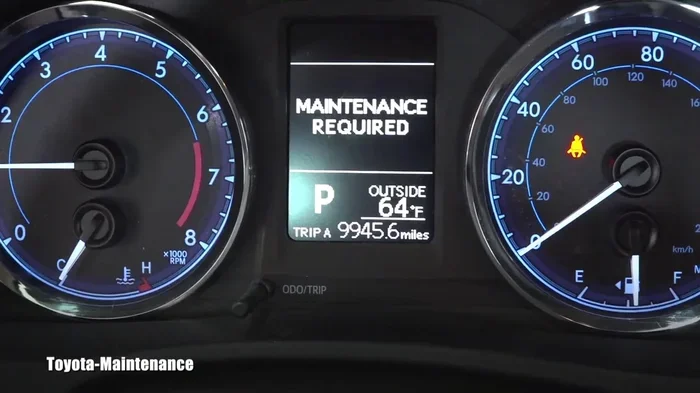
How Do I Reset a Toyota Maintenance Light Step by Step
Resetting a Toyota maintenance light is a quick DIY task you can do at home in under five minutes. Whether you own a Toyota Camry, RAV4, or Corolla, this step-by-step guide walks you through the exact process for your model. You will learn the button combinations, menu navigation, and troubleshooting tips to clear the maintenance reminder once and for all.
That little yellow or orange light on your dashboard keeps blinking, and it is driving you nuts. You just got your oil changed, so why is the Toyota maintenance light still on? It is a frustrating experience, but here is the good news. You can fix this yourself without visiting a dealer or paying a mechanic.
Resetting a Toyota maintenance light is one of the simplest things you can do as a car owner. It takes just a few minutes, and you probably already have everything you need. Whether you drive a Toyota Camry, RAV4, Corolla, or Highlander, this guide has you covered. We will walk you through every single step with clear instructions and real-world tips.
Many people panic when they see that maintenance light pop up. They think something is seriously wrong with their vehicle. In most cases, it is simply a reminder that your car is due for routine service. The maintenance light is not a warning of engine failure. It is more like your car tapping you on the shoulder and saying, “Hey, I need some attention.” Understanding this difference can save you a lot of unnecessary stress.
Now, let us get into the actual process. We will cover the reset method for most Toyota models, and then we will address specific variations for different years and trims. By the end of this article, you will feel confident enough to handle this on your own.
Key Takeaways
- Quick Reset Process: Most Toyota models let you reset the maintenance light using the steering wheel buttons and the trip meter in under five minutes.
- No Special Tools Needed: You do not need any expensive equipment or a dealership visit to clear the maintenance reminder.
- Model-Specific Steps: Different Toyota years and models have slightly different reset procedures, so always confirm your specific method.
- Oil Life System Matters: The maintenance light is tied to the oil life monitoring system, which tracks driving conditions and intervals.
- Common Mistakes Happen: Holding the wrong button or skipping a step can cause the reset to fail, so follow each step carefully.
- When to Seek Help: If the light persists after resetting, it may signal a deeper issue that needs professional attention.
📑 Table of Contents
- Why Does the Toyota Maintenance Light Come On?
- How to Reset a Toyota Maintenance Light: Step by Step
- Toyota Maintenance Light Reset by Model
- Common Mistakes When Resetting the Maintenance Light
- What If the Maintenance Light Will Not Turn Off?
- How Often Should You Reset the Toyota Maintenance Light?
- Tips to Keep Your Toyota Maintenance System in Top Shape
- Final Thoughts
Why Does the Toyota Maintenance Light Come On?
The maintenance light is part of your Toyota’s oil life monitoring system. This smart system tracks how you drive and estimates when your oil needs replacing. It is not just about mileage. The system also considers driving habits, temperature, and road conditions.
What Triggers the Maintenance Light?
Several factors can cause the maintenance light to activate. Here are the most common reasons:
- Oil change interval reached: Your vehicle has tracked enough miles or driving cycles to trigger the reminder.
- Hard driving conditions: Frequent short trips, towing, or driving in extreme heat can shorten the oil life.
- Reset not completed after service: If the light was not cleared after your last oil change, it stays on.
- Battery disconnect: Disconnecting your battery can sometimes reset the system unexpectedly.
- Faulty sensor: In rare cases, a malfunctioning oil life sensor causes the light to stay on.
Understanding why the light comes on helps you know when to take action. If you just had an oil change and the light is still on, it simply means the maintenance counter was not reset. That is an easy fix.
How to Reset a Toyota Maintenance Light: Step by Step
This is the section you have been waiting for. Below, we break down the reset process for most Toyota models. The steps are simple and work for vehicles from the early 2010s through recent models. Always make sure your car is running or in accessory mode before starting.
Method 1: Using the Steering Wheel Controls (Most Toyota Models)
Most modern Toyotas use the steering wheel buttons to navigate the instrument cluster menu. Here is how to reset the maintenance light using this method:
- Turn the ignition to ON. Do not start the engine. Just press the start button without pressing the brake pedal, or turn the key to the ON position.
- Locate the trip meter button. This is usually on the left side of the steering wheel. It may be labeled “TRIP” or have a symbol that looks like a small odometer.
- Press and hold the trip meter button. Hold it down for about five seconds. The maintenance light should start flashing.
- Release the button. Wait a moment, then press and hold the same button again for another five seconds.
- Check the display. The maintenance reminder should now be cleared, and the light should turn off completely.
This method works on most Toyota Camry, RAV4, Corolla, and Highlander models from 2010 and newer. If you own an older Toyota, the process may differ slightly. We will cover that below.
Method 2: Using the Odometer Button (Older Toyota Models)
For older Toyota models, particularly those from 2005 to 2010, the reset process uses the odometer button instead of steering wheel controls. Here is what to do:
- Turn the ignition to ON. Same as before. Do not start the engine.
- Press the odometer button repeatedly. Cycle through the display modes until you see the trip meter A or B reading.
- Turn the ignition OFF. Then turn it back to ON while holding the odometer button.
- Hold the button for about 10 seconds. The maintenance light should blink and then turn off.
- Release the button and turn the ignition OFF, then back ON. Check that the light is gone.
If the light does not turn off after this, try repeating the process. Sometimes it takes two attempts, especially if the oil life system was very far past due.
Method 3: Using the Multi-Information Display (Higher Trim Models)
Some Toyota models, especially higher trims, have a multi-information display screen on the dashboard. The reset process through this screen is slightly different:
- Press the menu button on the steering wheel. Navigate to the vehicle settings.
- Scroll to the maintenance or service menu. This may be labeled “Maintenance Required” or “Service Interval.”
- Select the option to reset the maintenance light. Confirm your selection.
- The screen should display a confirmation message. The maintenance light on the dashboard will turn off.
This method is common on Toyota Camry XLE and XSE trims, RAV4 Limited trims, and other higher-end models. If you are unsure which method applies to your car, check your Toyota owner manual. It will have the exact reset procedure listed for your specific year and model.
Toyota Maintenance Light Reset by Model
Toyota makes many different models, and each one can have a slightly different reset process. Below are the most common models and the specific method that works best for each.
Toyota Camry Maintenance Light Reset
The Toyota Camry is one of the most popular sedans on the road, and resetting its maintenance light is straightforward. For Camry models from 2012 and newer, use the steering wheel trip meter method. For older Camrys from 2007 to 2011, try the odometer button method. The Camry’s maintenance light typically comes on every 5,000 to 10,000 miles depending on your driving conditions and the oil life system settings.
Toyota RAV4 Maintenance Light Reset
The Toyota RAV4 uses the same steering wheel button method as the Camry for most model years. Turn the ignition to ON, press and hold the trip meter button, and the maintenance light will reset. For RAV4 models from 2019 and newer with the updated infotainment system, you may also be able to reset through the vehicle settings menu on the display screen.
Toyota Corolla Maintenance Light Reset
The Toyota Corolla is a compact sedan that follows the standard reset process. For Corollas from 2014 and newer, use the trip meter button method. Older models may require the odometer button approach. The Corolla’s maintenance light is tied to the same oil life monitoring system found across the Toyota lineup.
Toyota Highlander Maintenance Light Reset
The Toyota Highlander SUV uses the steering wheel trip meter method for most years. The process is identical to the Camry and RAV4. If your Highlander has the multi-information display, you can also reset through the on-screen menu. The Highlander’s larger engine and heavier frame mean it may hit the maintenance interval sooner than smaller Toyota models.
Common Mistakes When Resetting the Maintenance Light
Even though the reset process is simple, people still make mistakes. Here are the most common errors and how to avoid them:
- Holding the button too briefly: You need to hold the trip meter or odometer button for at least five to ten seconds. A quick tap will not work.
- Turning the ignition to START instead of ON: The ignition ON position powers the electronics without starting the engine. START cranks the engine, which can interrupt the reset process.
- Not turning the ignition OFF between attempts: Some Toyota models require you to cycle the ignition OFF and then back ON to complete the reset.
- Confusing the trip meter and the odometer: The odometer shows your total mileage. The trip meter shows a single trip’s distance. You need to use the trip meter for the reset.
- Assuming the reset worked: Always turn the ignition off, wait a few seconds, and turn it back on to confirm the light is off.
Avoiding these mistakes saves you time and frustration. If your first attempt does not work, do not give up. Try again, making sure you follow each step precisely.
What If the Maintenance Light Will Not Turn Off?
Sometimes, despite your best efforts, the maintenance light stays on. This can be frustrating, but there are several things you can try before calling a mechanic.
Check Your Oil Level First
A low oil level can trigger the maintenance light even after a reset. Pop the hood and check your oil dipstick. If the oil is low, top it off and try the reset again. Your Toyota’s oil life system monitors oil level as part of its calculations, so low oil can keep the light active.
Try Disconnecting the Battery
Disconnecting the battery for about 15 minutes can reset the entire electrical system, including the maintenance light. Here is how to do it safely:
- Turn the ignition OFF and remove the key.
- Open the hood and locate the battery.
- Disconnect the negative terminal first. Use a wrench to loosen the cable clamp.
- Wait 15 minutes. This allows the vehicle’s computer to fully reset.
- Reconnect the negative terminal and tighten it.
- Turn the ignition ON and check if the light is off.
Note that disconnecting the battery may also reset other settings like your radio presets and clock. You will need to reprogram those after reconnecting.
When to See a Professional
If you have tried all the reset methods and the light still will not go off, it is time to see a professional. A persistent maintenance light can indicate a deeper issue with the oil life sensor or the vehicle’s computer system. You can also visit your local Toyota dealership for a diagnostic check. Most dealerships will check the maintenance light at no cost if you are already in for service.
Also, keep in mind that the maintenance light is different from the check engine light. If your check engine light is on, that signals a more serious problem that requires immediate attention. You can learn more about check engine lights in our article on whether a check engine light can turn off on its own. Understanding the difference between these two lights is important for every Toyota owner.
How Often Should You Reset the Toyota Maintenance Light?
The maintenance light should be reset every time you complete an oil change or scheduled service. This keeps the system accurate and ensures you stay on track with your Toyota maintenance schedule. Most Toyota vehicles recommend an oil change every 5,000 to 10,000 miles, but this can vary based on your driving conditions.
Toyota’s oil life system is more advanced than simple mileage-based reminders. It uses algorithms to analyze your driving patterns. If you frequently drive in stop-and-go traffic, tow heavy loads, or drive in extreme temperatures, the system may recommend more frequent service. Resetting the light after each service keeps this system calibrated and accurate.
Some Toyota owners wonder if they really need to follow the maintenance light at all. The answer is yes. Regular maintenance keeps your vehicle running smoothly and prevents costly repairs down the road. For more information on Toyota maintenance schedules, check out our article on whether you really need a 60000 mile service.
Tips to Keep Your Toyota Maintenance System in Top Shape
Keeping your Toyota’s maintenance system working properly is easy with a few good habits. Here are some practical tips:
- Reset the light immediately after every oil change. Do not let it slide. The sooner you reset it, the more accurate the system stays.
- Keep a maintenance log. Write down every oil change, tire rotation, and service appointment. This helps you track your vehicle’s health.
- Use genuine Toyota parts. Aftermarket parts can sometimes trigger the maintenance light or cause the oil life system to misread.
- Check your oil level monthly. A simple check can prevent low oil situations that trigger the maintenance light.
- Read your owner manual. It contains the exact reset procedure for your specific Toyota model and year.
- Do not ignore the light. Even if you just had service, a light that stays on could indicate a real problem that needs attention.
Following these tips not only keeps your maintenance light working correctly but also extends the life of your Toyota. Regular maintenance is the best way to avoid expensive repairs and keep your car running strong for years to come.
Final Thoughts
Resetting a Toyota maintenance light is one of those simple car tasks that everyone should know how to do. It takes just a few minutes, requires no special tools, and saves you a trip to the dealership. Whether you use the steering wheel buttons, the odometer method, or the on-screen menu, the process is straightforward and easy to master.
Remember, the maintenance light is your car’s way of reminding you about routine service. It is not something to fear or ignore. When you see it, take action. Reset it after your oil change, and your Toyota will keep running smoothly. If the light persists after resetting, do not hesitate to seek professional help. Your Toyota is a reliable machine, and with proper care, it will serve you well for many miles to come.
Now that you know exactly how to reset a Toyota maintenance light, you can handle this task confidently the next time it comes on. Keep this guide bookmarked for future reference, and share it with fellow Toyota owners who might need a hand. Happy driving!
Frequently Asked Questions
How do I reset the maintenance light on a Toyota Camry?
Turn the ignition to ON without starting the engine. Press and hold the trip meter button on the steering wheel for five to ten seconds. The maintenance light will blink and then turn off. For Camry models with a multi-information display, you can also reset through the vehicle settings menu on the screen.
Can I drive my Toyota with the maintenance light on?
Yes, you can drive your Toyota with the maintenance light on. The light is a reminder for scheduled service, not an emergency warning. However, you should get your oil changed soon to keep your engine properly lubricated and avoid potential damage.
What is the difference between the maintenance light and the check engine light?
The maintenance light is a routine service reminder that comes on at scheduled intervals. The check engine light signals a potential problem with the engine or emissions system. If your check engine light is on, you should address it promptly. You can learn more about check engine lights in our guide on whether they can turn off on their own.
Why does my Toyota maintenance light keep coming back after resetting?
If the maintenance light keeps returning, it usually means the oil life system has detected that the service interval has been reached again. This can happen if the oil was not changed or if the reset was not performed correctly. Check your oil level and try the reset process again following the steps in this guide.
Do I need to reset the maintenance light after every oil change?
Yes, you should reset the maintenance light every time you complete an oil change. This keeps the oil life monitoring system accurate and ensures you receive timely reminders for future service. It is a quick process that only takes a few minutes.
Can I reset the Toyota maintenance light without starting the engine?
Yes, the reset process does not require starting the engine. You only need to turn the ignition to the ON position, which powers the dashboard electronics without cranking the engine. This applies to all Toyota reset methods described in this article.