How Do I Link My Toyota Key Fob to My Profile Easily
Linking your Toyota key fob to your profile is simple and unlocks smart features like remote start, vehicle tracking, and personalized settings. You can do it through the Toyota app or at your dealer with just a few easy steps. This guide walks you through every method, common issues, and pro tips to get your key fob synced fast.
Have you ever wanted your Toyota to know you the moment you walk up to it? Linking your Toyota key fob to your profile makes that happen. It opens the door to personalized settings, remote features, and a smoother driving experience. Whether you just bought a new Toyota or want to add a spare fob, this guide has you covered.
Many Toyota owners skip this step because it seems complicated. But the truth is, it is much easier than most people think. In this article, we break down every method, share real-world tips, and help you avoid common mistakes. By the end, you will know exactly how to get your Toyota key fob paired and ready to go.
Let us start with the basics. Your Toyota key fob is more than just a remote for locking doors. It is a smart device that communicates with your vehicle’s computer system. When you link it to your profile, the car remembers your seat position, mirror settings, climate preferences, and more. It is like giving your Toyota its own memory of you.
Key Takeaways
- Toyota Smart Key system: lets you pair your fob with your vehicle profile for seamless access
- Toyota app method: the easiest way to link your key fob to your personal profile remotely
- Dealer method: visiting a Toyota dealer ensures professional key fob programming and registration
- Troubleshooting tips: simple fixes for most key fob pairing and sync issues
- Maintenance matters: knowing how to tell if your car key is worn out helps prevent linking problems
- Multiple fobs: you can link more than one key fob to a single Toyota profile
📑 Table of Contents
- What Does It Mean to Link Your Toyota Key Fob to Your Profile?
- Method 1: Link Your Key Fob Through the Toyota App
- Method 2: Visit a Toyota Dealer for Professional Pairing
- Method 3: Manual Pairing Through Your Vehicle’s Settings
- Troubleshooting Common Key Fob Linking Issues
- Benefits of Linking Your Toyota Key Fob to Your Profile
- Common Mistakes to Avoid When Linking Your Key Fob
- Final Thoughts
What Does It Mean to Link Your Toyota Key Fob to Your Profile?
Linking your key fob means connecting the physical remote to your personal Toyota account or vehicle profile. Think of it as introducing your fob to your car. Once linked, the car recognizes the fob and loads your saved preferences automatically.
Here is what happens when your fob is properly linked:
- Your seat and mirrors adjust to your saved position when you enter the vehicle
- Your preferred climate settings kick in automatically
- Remote start works through the Toyota app or the fob itself
- Security features recognize your fob as an authorized device
- Push-button start responds instantly when you press the button
Without linking, your fob can still lock and unlock doors. But you miss out on all the smart features that make driving a Toyota feel personal. It is like having a smartphone without syncing your accounts. Everything works, but it does not feel like it is truly yours yet.
If you have ever wondered how to roll down your Toyota windows with the key fob, that is another feature tied to your profile settings. Once your fob is linked, you can customize these small but handy functions through the Toyota app or vehicle settings menu.
Method 1: Link Your Key Fob Through the Toyota App
The Toyota app is the most convenient way to link your key fob. It works with both Apple and Android phones. You do not even need to visit a dealer for basic pairing. Here is how to do it step by step.
Step-by-Step Guide
- Download the Toyota app from the App Store or Google Play Store
- Create your Toyota account or sign in if you already have one
- Add your vehicle by entering your VIN or scanning the barcode on your registration
- Go to the Key Fob section in the app menu
- Select “Pair New Fob” and follow the on-screen prompts
- Place your fob near the car and press the buttons as instructed
- Confirm the pairing when the app shows a success message
The entire process usually takes about five to ten minutes. Make sure your key fob battery is fresh before you start. A weak battery can cause the pairing to fail, and you will have to start over. If you are unsure about your battery, check out our guide on how to tell if your car key is worn out for tips on spotting battery and wear issues early.
What You Need Before Starting
- A working smartphone with the Toyota app installed
- Your Toyota key fob with a good battery
- Your vehicle within Bluetooth range (about 30 feet)
- Your VIN number handy for vehicle registration in the app
- A stable Wi-Fi or cellular connection
One thing many people overlook is making sure your phone’s Bluetooth is turned on. The app uses Bluetooth to communicate with your vehicle during the pairing process. Without it, the link will not form. Also, keep your phone close to the car during pairing for the strongest signal.
Once paired, you can manage your fob settings right from the app. You can rename fobs, set permissions, and even check battery levels remotely. This is especially helpful if you have multiple drivers in your household.
Method 2: Visit a Toyota Dealer for Professional Pairing
If you prefer hands-on help or run into issues with the app, visiting a Toyota dealer is a great option. A trained technician can pair your Toyota key fob quickly and make sure everything works perfectly.
What to Expect at the Dealer
When you arrive, the service advisor will ask for your vehicle and your fob. They will connect your car to their diagnostic computer and walk through the pairing process. Most dealerships can complete this in under 30 minutes.
Here are some things to keep in mind:
- Bring both your fob and your vehicle registration
- Call ahead to schedule an appointment and avoid waiting
- Ask about any service specials that might cover key fob services
- Know your VIN to speed up the process
You might wonder whether you can go to any dealership for this. The good news is that Toyota dealerships share the same systems, so any authorized dealer can help you. If you also need to check on warranty work or regular service, you can visit any Toyota location. Learn more about taking your Toyota to any dealership for service in our detailed guide.
Dealers can also help if you need a replacement fob. They can program a brand-new fob and link it to your profile on the spot. This is especially useful if your fob is lost or damaged. If you are curious about costs, check out our article on how much do I charge for labor to understand typical service pricing.
When to Choose the Dealer Method
The dealer method is best when:
- You are not comfortable using the Toyota app
- The app pairing fails and you need expert help
- You need a replacement fob programmed
- You want the dealer to check your vehicle’s overall key fob health
Many Toyota owners choose the dealer route for their first-time setup. Once it is done, they handle future fob additions through the app. It gives you the best of both worlds.
Method 3: Manual Pairing Through Your Vehicle’s Settings
Toyota vehicles also allow manual key fob pairing directly through the car’s onboard system. This method works without a phone or dealer visit. It is perfect for adding a second fob or replacing a lost one on the go.
How to Do It
The exact steps vary slightly by Toyota model, but the general process is similar across most vehicles. Here is the typical procedure:
- Sit in your Toyota and close all doors
- Turn the ignition to the “On” position without starting the engine
- Go to the Settings menu on your touchscreen
- Select “Key Fob Settings” or “Smart Key System”
- Choose “Register New Fob”
- Press and hold the lock and unlock buttons on the new fob simultaneously
- Wait for the confirmation beep or light on the dashboard
- Test the fob by locking and unlocking the doors
This method works well for most Toyota models including the Camry, RAV4, and Highlander. However, some newer models may require the app for initial setup. Always check your owner’s manual for model-specific instructions.
One advantage of manual pairing is that it does not rely on Bluetooth or Wi-Fi. If you are in an area with poor connectivity, this method still works. Just make sure your key fob battery is in good condition before you begin.
Quick Tips for Manual Pairing Success
- Work in a quiet environment so you can hear the confirmation beep
- Hold the fob close to the driver’s side door handle during pairing
- Replace the fob battery if you notice any delay in button response
- Be patient — hold the buttons for at least five seconds
- Try again from the beginning if the first attempt does not work
Manual pairing is a handy skill every Toyota owner should know. It saves time and gives you independence from apps or dealer visits. Once you have done it once, it becomes second nature.
Troubleshooting Common Key Fob Linking Issues
Even with clear instructions, things can go wrong. Key fob linking issues are more common than you might think. The good news is that most problems have simple fixes.
Fob Not Responding During Pairing
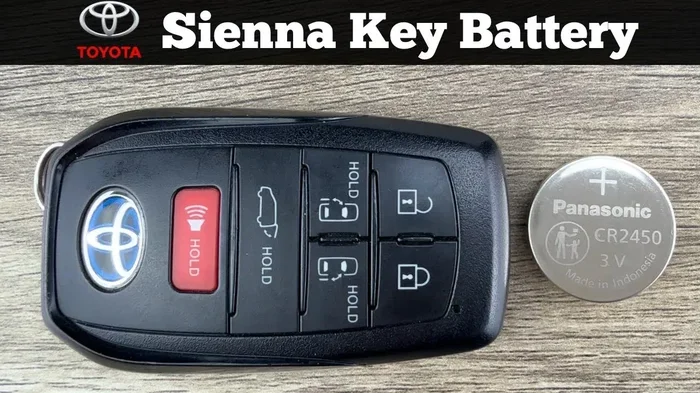
If your fob does not respond during pairing, the first thing to check is the battery. A low battery is the number one cause of pairing failures. Replace the battery with a fresh CR2025 or CR2032 cell, depending on your fob model.
Next, make sure you are within range. Move closer to the vehicle and try again. Interference from other electronic devices can also cause issues. Try stepping away from your phone or other Bluetooth devices during pairing.
Also, make sure no other fobs are too close. If you have multiple fobs in your pocket or bag, they can interfere with the pairing signal. Remove all other fobs and try with just the one you want to link.
Toyota App Shows Error Messages
If the app shows an error, try these steps:
- Restart the app and try again
- Check for app updates in your app store
- Clear the app cache in your phone settings
- Log out and log back in to your Toyota account
- Restart your phone to refresh Bluetooth and network connections
Sometimes the issue is on Toyota’s server side. If the app is down for maintenance, you will need to wait and try again later. Check Toyota’s official website or social media for service outage updates.
Vehicle Does Not Recognize the New Fob
If your Toyota does not recognize the newly paired fob, try resetting the system. Turn the ignition off, remove the key, wait 30 seconds, and start the process again. This clears any temporary glitches in the system.
Also check your owner’s manual for the correct pairing procedure. Some Toyota models have slightly different steps. Following the exact procedure for your model makes a big difference.
If none of these fixes work, it might be time to visit a dealer. They have professional diagnostic tools that can identify deeper issues. You can also learn about whether you can drive your Toyota without the key fob in our helpful article, which covers backup options when your fob is not working.
When to Seek Professional Help
Some issues need expert attention. If you notice any of the following, it is time to see a professional:
- The fob works intermittently even after replacing the battery
- Your Toyota will not start with the fob present
- Multiple fobs fail to pair despite trying different methods
- You see warning lights on your dashboard related to the smart key system
- The fob was exposed to water or physical damage
A dealer or qualified technician can diagnose whether the fob itself needs replacement or if there is a vehicle-side issue. Most of the time, a simple fob replacement solves the problem. And if you are worried about costs, remember that dealerships can help with warranty-covered fob replacements in many cases.
Benefits of Linking Your Toyota Key Fob to Your Profile
Once your key fob is linked, you unlock a whole range of benefits that make owning a Toyota even better. Here are the top advantages:
Personalized Driving Experience
Your Toyota remembers you. Seat position, mirror angles, climate settings, and even radio presets all adjust automatically when your linked fob unlocks the car. This means every driver in your household can have their own profile loaded with their preferences.
Remote Access and Control
With your fob linked to your profile, you can use the Toyota app to remotely start your engine, lock or unlock doors, and even locate your vehicle. These features work because your fob and profile are connected through Toyota’s cloud services.
Enhanced Security
Linked fobs are tied to your vehicle’s security system. If an unrecognized fob tries to access your car, the system alerts you through the app. This adds an extra layer of protection that unlinked fobs simply cannot provide.
Easier Maintenance Tracking
When your fob is linked, Toyota can track your vehicle usage and remind you about service needs. You might receive alerts for oil changes, tire rotations, or scheduled maintenance based on your driving patterns.
Future-Proofing Your Setup
Toyota continues to update its connected services. A linked fob ensures you receive all future software updates and new features as they become available. You stay current without any extra effort.
These benefits add up over time. What starts as a simple pairing process becomes the foundation of a smarter, more connected driving experience. It is one of those things that you do not realize you need until you have it.
Common Mistakes to Avoid When Linking Your Key Fob
To save you time and frustration, here are the most common mistakes people make when linking their Toyota key fob to their profile — and how to avoid them.
- Skipping the battery check: A weak fob battery causes most pairing failures. Always start with a fresh battery.
- Not updating the Toyota app: Running an outdated app version can cause compatibility issues. Always use the latest version.
- Pairing too far from the vehicle: Stay within 30 feet of your car during the initial pairing process.
- Ignoring the owner’s manual: Your specific Toyota model may have unique pairing steps. Always check the manual first.
- Rushing the process: Hold buttons for the full recommended time. Patience leads to success.
- Not testing after pairing: Always test all fob functions — lock, unlock, trunk, and panic — before walking away.
Avoiding these simple mistakes keeps the process smooth and stress-free. Most failed pairings come from one of these small oversights. Take your time, follow the steps, and you will be done in minutes.
One more thing worth mentioning: if your fob has been through a lot of wear and tear, it might be time for a replacement. Knowing the signs of a worn-out fob helps you stay ahead of problems. Check out our article on how to tell if your car key is worn out for a handy checklist of warning signs.
Final Thoughts
Linking your Toyota key fob to your profile is one of the best things you can do for your driving experience. It takes just a few minutes and opens up a world of convenience, personalization, and security. Whether you use the Toyota app, visit a dealer, or pair manually through your vehicle’s settings, the process is straightforward and well worth the effort.
Start with the method that feels most comfortable to you. The app is great for tech-savvy owners. The dealer method works well for those who want hands-on help. And manual pairing gives you independence from both. You really cannot go wrong with any of these options.
Remember to keep your fob battery fresh, test all functions after pairing, and update your Toyota app regularly. These small habits keep everything running smoothly for years to come. Your Toyota is designed to work seamlessly with your key fob. All it takes is a few minutes of setup to make that connection happen.
Now that you know how easy it is to link your Toyota key fob to your profile, there is no reason to wait. Grab your fob, your phone, or head to your local dealer and get it done today. Your Toyota is ready to know you better than ever before.
Frequently Asked Questions
How long does it take to link a Toyota key fob to my profile?
Most people complete the process in five to fifteen minutes using the Toyota app. Manual pairing through the vehicle settings takes about the same time. Visiting a dealer usually takes under 30 minutes including check-in time.
Can I link more than one key fob to my Toyota profile?
Yes, you can link multiple key fobs to a single Toyota profile. This is great for households with more than one driver. Each fob can be customized with its own settings and permissions through the Toyota app.
Do I need a special key fob to link to my Toyota profile?
You need a compatible Toyota smart key fob. Most Toyota vehicles from 2010 onward use smart key fobs that support profile linking. Check your owner’s manual or ask your dealer if you are unsure about your fob model.
What should I do if my key fob battery dies after linking?
If your fob battery dies, simply replace it with a fresh CR2025 or CR2032 battery. Your profile settings remain saved in the vehicle’s computer, so you will not need to re-link the fob after a battery swap.
Is it safe to link my key fob through the Toyota app?
Yes, the Toyota app uses secure encryption to protect your data. Your fob pairing information is stored safely in Toyota’s cloud system. Always use a strong password for your Toyota account and keep your phone’s software up to date for added security.
Can I link my Toyota key fob if I bought the car used?
Absolutely. You can link a key fob to a used Toyota just as easily as a new one. If previous owners have fobs linked to their profiles, you may want to reset the system first. A quick visit to the dealer can clear old profiles and set up your own.