Does Maserati Have Apple CarPlay Here Is Your Answer
Yes, most modern Maserati models come with Apple CarPlay built in. Whether you drive a Ghibli, GranTurismo, Levante, or Quattroporte, you can connect your iPhone for navigation, music, and hands-free calling. This guide covers every Maserati model, setup steps, and tips to get the most out of your infotainment system.
Does Maserati have Apple CarPlay? This is one of the most common questions car buyers ask when considering a luxury Italian SUV or sports car. The answer is yes — but with some important details you should know before you buy or upgrade.
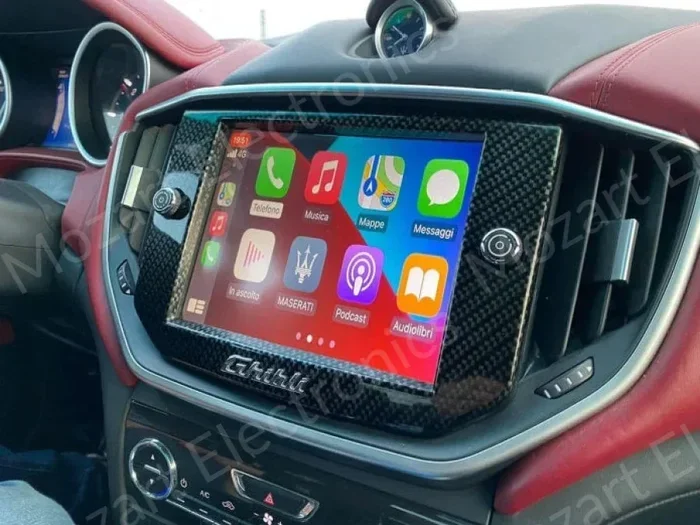
Maserati has made big strides in its technology offerings over the past few years. The brand now offers Apple CarPlay on most of its current lineup. This means you can mirror your iPhone on the Maserati infotainment screen. You get access to Maps, Apple Music, Messages, Phone, and many other apps right from your dashboard.
However, not every Maserati model or every model year supports CarPlay. Some older trims lack the feature entirely. And even among newer models, the type of CarPlay connection — wired or wireless — can vary. This guide will walk you through everything you need to know about Maserati Apple CarPlay compatibility, setup, and features.
Whether you are shopping for a new Maserati or already own one, this article has you covered. Let us dive in and explore how car connectivity works in Maserati vehicles.
Key Takeaways
- Apple CarPlay is available on most recent Maserati models, including the Ghibli, Quattroporte, Levante, and GranTurismo.
- Both wired and wireless CarPlay options are available depending on the model year and trim level.
- Setting up CarPlay is simple — just plug in your iPhone or connect wirelessly and follow the prompts.
- Not all Maserati models support CarPlay, especially older or base trims from earlier years.
- You can use Siri for voice commands, making driving safer and more convenient.
- CarPlay gives you access to Apple Music, Maps, Messages, Phone, and many third-party apps.
- Check your specific model year because CarPlay availability varies across Maserati trim levels and production years.
📑 Table of Contents
- What Is Apple CarPlay and Why Does It Matter?
- Which Maserati Models Support Apple CarPlay?
- How to Set Up Apple CarPlay in Your Maserati
- Maserati Infotainment System: What You Need to Know
- Wired vs Wireless Apple CarPlay in Maserati
- Common Issues with Apple CarPlay in Maserati and How to Fix Them
- Can You Add Apple CarPlay to an Older Maserati?
- Apple CarPlay vs Other Connectivity Options in Maserati
- Final Thoughts on Maserati Apple CarPlay
- Frequently Asked Questions
What Is Apple CarPlay and Why Does It Matter?
Apple CarPlay is a smart feature that connects your iPhone to your car’s display. Once connected, you can use your favorite apps right on the dashboard screen. It is designed to keep you safe and connected without taking your eyes off the road.
With CarPlay integration, you can make calls, send messages, get directions, and stream music. The system uses a simple and clean interface that is easy to read while driving. It also supports Siri voice control, so you can keep your hands on the wheel.
How Does CarPlay Work in Luxury Cars?
In luxury cars like Maserati, CarPlay works through the vehicle’s built-in infotainment system. The car’s screen acts as a mirror for your iPhone. You can navigate using Apple Maps or Google Maps, play music from Apple Music or Spotify, and make calls through the Phone app.
Most modern luxury cars now offer CarPlay as a standard or optional feature. Maserati is no exception. The brand understands that buyers of premium vehicles expect seamless smartphone integration. That is why Apple CarPlay has become a key part of the Maserati technology package.
Key Features of Apple CarPlay
- Navigation apps — Get turn-by-turn directions with Apple Maps or Waze.
- Music streaming — Access Apple Music, Spotify, Pandora, and more.
- Hands-free calling — Make and receive calls through the car’s speakers.
- Messaging — Send and receive texts using Siri voice commands.
- Podcasts and audiobooks — Stream your favorite audio content.
- Third-party apps — Support for apps like WhatsApp, Google Maps, and Waze.
Which Maserati Models Support Apple CarPlay?
Now that you know what CarPlay is, let us look at which Maserati models offer this feature. The availability depends on the model, the model year, and the trim level.
Here is a breakdown of the main Maserati vehicles and their Apple CarPlay compatibility:
Maserati Ghibli
The Maserati Ghibli is a sleek sedan that has been part of the brand’s lineup for several years. Starting from the 2018 model year and newer, the Ghibli offers Apple CarPlay as part of its infotainment system. Both the base Ghibli and the Ghibli S trims support CarPlay. The system is accessed through the Maserati touchscreen display in the center console.
Newer Ghibli models from 2022 and beyond may also offer wireless Apple CarPlay, which is a big convenience. You do not need to plug in your iPhone. The connection happens automatically when you get in the car.
Maserati Quattroporte
The Quattroporte is Maserati’s flagship luxury sedan. It has offered Apple CarPlay on models from the 2018 model year onward. The Quattroporte comes with a larger and more advanced infotainment screen compared to the Ghibli. This makes the CarPlay experience even more enjoyable.
The Quattroporte S and Trofeo trims come with the latest Maserati Multimedia System. This system supports both wired and wireless CarPlay. The screen is bright and responsive, making it easy to navigate apps while driving.
Maserati Levante
The Levante is Maserati’s luxury SUV. It has been on the market since 2016 and has gone through several updates. Starting from around the 2018 model year, the Levante began offering Apple CarPlay as a standard or available feature.
The latest Levante models from 2022 and newer come with the updated infotainment system. This system includes wireless Apple CarPlay support. The SUV also features a larger touchscreen, making it one of the best Maserati models for car connectivity.
Maserati GranTurismo
The GranTurismo is a stunning sports car that combines style with performance. The latest generation GranTurismo, introduced in 2023, comes with modern technology features. This includes Apple CarPlay support as part of the infotainment package.
The GranTurismo’s interior is more focused on driving dynamics, but it still delivers a solid smartphone integration experience. The CarPlay connection is clean and easy to use, even in this sporty package.
Maserati MC20
The MC20 is Maserati’s mid-engine supercar. It is the brand’s most performance-focused model. The MC20 features a modern infotainment system that supports Apple CarPlay. Even in a car built for speed, you can stay connected with your iPhone.
The MC20’s infotainment system is compact but functional. It includes wireless CarPlay support, which is a nice touch for such a high-performance machine.
How to Set Up Apple CarPlay in Your Maserati
Setting up Apple CarPlay in a Maserati is straightforward. The process is similar across most Maserati models. Here is a step-by-step guide to get you connected.
For Wired Apple CarPlay
Wired CarPlay uses a USB cable to connect your iPhone to the car. Follow these steps:
- Start your Maserati and turn on the infotainment system.
- Locate the USB port in the center console or glove box.
- Plug one end of a Lightning or USB-C cable into your iPhone.
- Plug the other end into the car’s USB port.
- Your iPhone should detect the CarPlay connection automatically.
- Tap the CarPlay icon on the Maserati screen to start using it.
For Wireless Apple CarPlay
Wireless CarPlay is even more convenient. You do not need any cables. Here is how it works:
- Make sure your iPhone is running iOS 13 or later.
- Go to your iPhone Settings and select General, then CarPlay.
- Go to your Maserati infotainment system settings.
- Select Wireless CarPlay and pair your iPhone.
- The connection will happen automatically every time you start the car.
Quick Tips for the Best CarPlay Experience
- Use a high-quality USB cable for wired connections to avoid dropouts.
- Keep your iPhone updated to the latest iOS version for the best compatibility.
- Restart your iPhone if CarPlay does not connect on the first try.
- Clear your Maserati infotainment cache by restarting the system if you experience lag.
- Enable Siri for hands-free access to all CarPlay features.
Maserati Infotainment System: What You Need to Know
The Maserati infotainment system is the brain behind the dashboard experience. It controls the audio, navigation, phone, and smartphone integration features. Understanding how this system works helps you get the most out of Apple CarPlay in your Maserati.
The Maserati Multimedia System
Maserati uses its own Multimedia System across its lineup. The system features a central touchscreen display that controls all car functions. It handles audio, climate, navigation, and CarPlay connectivity.
Newer Maserati models use an updated version of this system. The latest infotainment platform is faster, more responsive, and offers better screen resolution. This makes the CarPlay experience smoother and more enjoyable.
Screen Size and Display Quality
The size of the Maserati infotainment screen varies by model. The Ghibli and Quattroporte typically have screens around 8 to 10 inches. The Levante SUV also features a large display. The GranTurismo and MC20 have smaller screens due to their sporty design, but they are still sharp and clear.
A good display makes a big difference when using Apple CarPlay. You want to be able to read navigation directions and app icons easily while driving. Maserati’s screens deliver on this front.
Audio System Integration
Maserati vehicles come with premium audio systems, often from Bowers Wilkins or similar brands. When you connect Apple CarPlay, the audio routes through the car’s speakers. This means you get high-quality sound whether you are listening to Apple Music, podcasts, or phone calls.
The integration between CarPlay and the Maserati audio system is seamless. You can adjust volume from the steering wheel controls or the touchscreen. The sound quality remains excellent throughout.
Wired vs Wireless Apple CarPlay in Maserati
One of the biggest decisions when it comes to Maserati Apple CarPlay is whether to go with wired or wireless. Both options have their pros and cons. Let us compare them side by side.
| Feature | Wired CarPlay | Wireless CarPlay |
|---|---|---|
| Connection Method | USB cable | Bluetooth and Wi-Fi |
| Setup | Plug in cable every time | Automatic pairing |
| Connection Stability | Very stable | Stable but can occasionally disconnect |
| Convenience | Less convenient | Very convenient |
| Charging | Charges your iPhone | Does not charge your iPhone |
| Availability in Maserati | Available on all CarPlay models | Available on newer models and higher trims |
| Cost | Included | May require a higher trim level |
Most Maserati owners prefer wireless Apple CarPlay for its convenience. You do not have to worry about cables or finding the right USB port. The connection is automatic and seamless. However, wired CarPlay is still a solid option, especially if you also want your phone charged during the drive.
Which Should You Choose?
If you buy a newer Maserati with the latest infotainment system, wireless CarPlay is the way to go. It is more convenient and keeps your dashboard clean. If you have an older Maserati model, wired CarPlay is the standard option and works perfectly fine.
Pro tip: If you go with wireless CarPlay, make sure your iPhone has enough battery. Since wireless CarPlay does not charge your phone, long drives can drain your battery faster. Keep a charger handy for very long trips.
Common Issues with Apple CarPlay in Maserati and How to Fix Them
Even though Apple CarPlay works well in Maserati vehicles, you may run into occasional issues. Here are the most common problems and how to solve them.
CarPlay Will Not Connect
If your CarPlay connection fails, start by checking the USB cable. A damaged or low-quality cable is the most common cause. Try a different cable and a different USB port in your Maserati. Also, restart your iPhone and the car’s infotainment system.
For wireless CarPlay, make sure Bluetooth and Wi-Fi are enabled on your iPhone. Go to iPhone Settings, select General, then CarPlay, and choose your Maserati. Remove and re-pair the connection if needed.
CarPlay Is Slow or Laggy
A slow CarPlay experience can be frustrating. This is often caused by an outdated iOS version or a full iPhone memory. Make sure your iPhone is running the latest iOS update. Close background apps and free up storage space if your phone is nearly full.
Restarting the Maserati infotainment system can also help. Simply turn off the car, wait a few seconds, and restart it. This clears the system cache and can improve performance.
Audio Cuts Out During CarPlay
If your audio drops out while using CarPlay, check your connection. For wired connections, unplug and replug the USB cable. Make sure the cable is fully inserted. For wireless connections, move closer to the car’s antenna or restart the Bluetooth connection.
Sometimes, other Bluetooth devices connected to your iPhone can interfere with CarPlay audio. Turn off Bluetooth on other devices or disconnect them temporarily.
Siri Voice Commands Not Working
Siri is a key part of the Apple CarPlay experience. If Siri is not responding, check that Siri is enabled on your iPhone. Go to Settings, then Siri & Search, and make sure all options are turned on. Also, check that your Maserati’s microphone is not blocked or damaged.
Can You Add Apple CarPlay to an Older Maserati?
If you own an older Maserati that does not have Apple CarPlay, you might wonder if you can add it. The short answer is yes, in some cases. There are aftermarket solutions that can bring CarPlay to older vehicles.
Aftermarket CarPlay Units
Several companies offer aftermarket infotainment units that support Apple CarPlay. These units replace the factory radio or infotainment system. They come with their own touchscreen and support CarPlay, Android Auto, and other features.
Popular brands include Pioneer, Kenwood, and Sony. These units are designed to fit into the factory dash of many vehicles, including some Maserati models. Installation requires some technical skill, or you can have it done professionally.
Maserati-Specific Upgrade Options
Some Maserati owners have had success with Maserati-specific infotainment upgrades. These upgrades replace the existing system with a newer one that supports CarPlay. However, compatibility varies by model and year, so check with a Maserati dealer or specialist before purchasing.
Keep in mind that aftermarket upgrades may not look or function exactly like the factory system. There can be minor compatibility issues with steering wheel controls or the car’s camera systems. Always research thoroughly before making a purchase.
Apple CarPlay vs Other Connectivity Options in Maserati
Apple CarPlay is not the only way to connect your phone in a Maserati. The brand also supports Android Auto for Android users. Some models also offer built-in navigation and Bluetooth connectivity without needing a smartphone.
Apple CarPlay vs Android Auto
If you are an iPhone user, Apple CarPlay is the natural choice. It offers a smooth and polished experience. If you use an Android phone, Android Auto is the equivalent. Both systems offer similar features — navigation, music, messaging, and hands-free calling.
Maserati supports both systems on most current models. This gives buyers the flexibility to choose their preferred smartphone ecosystem. The infotainment experience is excellent regardless of which platform you use.
Built-In Navigation vs CarPlay Navigation
Maserati offers built-in navigation on higher-end models. This system uses its own maps and GPS. However, many drivers prefer using Apple Maps or Google Maps through CarPlay. These apps often have more up-to-date map data and better traffic information.
The choice between built-in navigation and CarPlay navigation comes down to personal preference. Both work well in a Maserati. Some drivers like having both options available and switch between them as needed.
Final Thoughts on Maserati Apple CarPlay
So, does Maserati have Apple CarPlay? The answer is a clear yes for most current models. Whether you choose the Ghibli, Quattroporte, Levante, GranTurismo, or MC20, you can expect solid Apple CarPlay support. The feature brings your iPhone right to the dashboard, making driving safer and more connected.
Maserati has done a great job of keeping up with modern car connectivity expectations. The infotainment system is responsive, the screens are clear, and the CarPlay experience is smooth. Whether you use wired or wireless CarPlay, you will find it easy to stay connected on the road.
If you are shopping for a Maserati, make sure to confirm the Apple CarPlay availability for the specific model and year you are considering. Check with a Maserati dealer or look at the vehicle specifications online. This small step can save you from disappointment later.
Overall, Maserati owners can enjoy one of the best smartphone integration experiences in the luxury car segment. The combination of Italian style, powerful performance, and modern technology makes Maserati a compelling choice for anyone who wants both luxury and connectivity.
Frequently Asked Questions
Does every Maserati model have Apple CarPlay?
No, not every Maserati model has Apple CarPlay. Most current models from 2018 onward support CarPlay, but older models and some base trims may not. Always check the specific model year and trim before purchasing.
Is wireless Apple CarPlay available on all Maserati models?
Wireless Apple CarPlay is available on newer Maserati models and higher trim levels. Older models and base trims typically only offer wired CarPlay. Check your specific model for wireless support.
Can I use Apple CarPlay and the built-in navigation at the same time?
Yes, you can use Apple CarPlay navigation alongside the Maserati’s built-in systems. However, CarPlay takes over the main screen when connected. You can switch between CarPlay and the factory system as needed.
Does Apple CarPlay work with Android phones?
No, Apple CarPlay is designed exclusively for iPhones. Android users can use Android Auto, which offers a similar experience. Maserati supports both systems on most current models.
How do I update Apple CarPlay on my Maserati?
CarPlay updates come through your iPhone’s iOS update. Make sure your iPhone is running the latest version of iOS for the best CarPlay experience. The Maserati infotainment system may also receive updates through the dealer.
Is Apple CarPlay safe to use while driving?
Yes, Apple CarPlay is designed to be safe. It limits distractions by using a simplified interface and supporting Siri voice commands. You can make calls, send messages, and get directions without taking your hands off the wheel.