How Do I Reset My TPMS on the 2022 Toyota 4Runner
Resetting the TPMS on a 2022 Toyota 4Runner is a simple process you can do at home. The tire pressure monitoring system keeps you safe by alerting you to low air levels. This guide walks you through every step, from understanding the system to fixing common problems. You will learn the exact button sequence, what to do if the light stays on, and how to prevent future issues.
Owning a 2022 Toyota 4Runner means you have a tough, reliable SUV built for adventure. But even the best trucks and SUVs need regular maintenance to keep running smoothly. One small light on your dashboard can cause big worry: the TPMS warning. The tire pressure monitoring system is designed to protect you, but it can be confusing when it pops on unexpectedly.
If you have been searching for how to reset TPMS 2022 4Runner, you are in the right place. This guide gives you everything you need to know. We will walk you through the reset process step by step. You will also learn why the light comes on, how to fix common problems, and when to seek help from a professional. By the end, you will feel confident handling this simple maintenance task on your own.
The good news is that resetting the TPMS on a Toyota 4Runner does not require expensive shop visits or complicated equipment. Most owners can complete the process in under fifteen minutes. Whether the light came on after a temperature drop, a tire rotation, or a slow leak, this article covers it all. Let us dive in and get your dashboard looking clean again.
Key Takeaways
- Easy DIY Reset: The TPMS reset on a 2022 4Runner takes just a few minutes and requires no special tools.
- Multiple Methods: You can reset using the steering wheel controls, the vehicle settings menu, or a TPMS reset tool.
- Common Causes: Temperature changes, slow leaks, and sensor battery death are the top reasons the TPMS light comes on.
- Prevention Matters: Regular tire pressure checks and proper maintenance keep the system working reliably.
- Know When to Call a Pro: Persistent lights or flashing warnings may need professional diagnostics.
- Safety First: Never ignore the TPMS light, as it directly affects driving safety and tire longevity.
📑 Table of Contents
Understanding the TPMS on the 2022 Toyota 4Runner
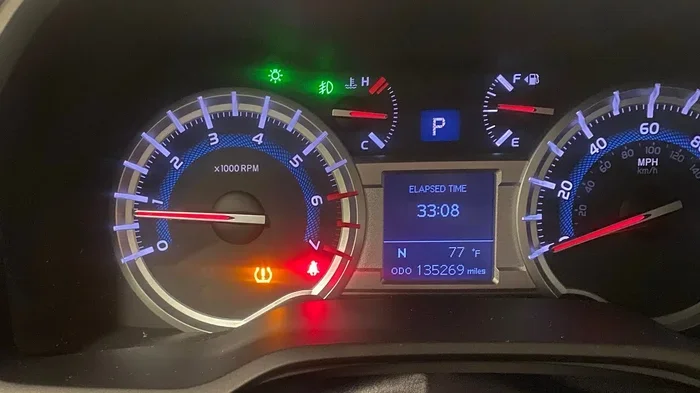
The tire pressure monitoring system is a smart safety feature. It uses sensors inside each tire to measure air pressure in real time. When pressure drops below the recommended level, the system sends a warning to your dashboard. On the 2022 4Runner, this appears as a horseshoe-shaped light with an exclamation mark in the center.
How the TPMS Sensors Work
Each tire has a small sensor mounted inside the valve stem or attached to the wheel. These sensors transmit pressure data to the vehicle’s computer. The computer then displays the information on your dashboard or information screen. There are two types of systems used in Toyota vehicles. Direct TPMS uses physical sensors inside each wheel. Indirect TPMS uses the anti-lock brake system to detect differences in wheel rotation speed caused by low pressure.
The 2022 4Runner uses a direct TPMS system. This means each wheel has its own dedicated sensor. These sensors run on small batteries that typically last between five and ten years. When a battery dies, the sensor needs replacement. The system will also alert you if a sensor is damaged or missing.
Why TPMS Warnings Matter
Driving with incorrect tire pressure is dangerous. Underinflated tires reduce fuel efficiency and wear out faster. Overinflated tires create a harsh ride and reduce traction. The TPMS helps you maintain the right pressure for safety, comfort, and savings. Ignoring the warning can lead to blowouts, poor handling, and costly tire replacements.
Keep in mind that temperature changes can trigger the light. Cold weather causes air inside tires to contract, lowering pressure. This is why many drivers see the TPMS warning in winter months. A simple top-off of air often resolves the issue. But you should always check the actual pressure with a gauge before assuming it is just the cold.
Why Does the TPMS Light Come On?
Several factors can cause the TPMS light to illuminate on your 2022 4Runner. Understanding these causes helps you address the root problem, not just the warning light. Here are the most common reasons the tire pressure monitoring system activates.
Low Tire Pressure
The most obvious cause is actually low air in one or more tires. A puncture, faulty valve stem, or slow leak can all reduce pressure over time. Even a small loss of a few PSI can trigger the warning. Regularly checking your tire pressure with a reliable gauge helps you catch leaks early.
Temperature Changes
As mentioned above, cold weather is a frequent culprit. When temperatures drop significantly, the air inside your tires contracts. This can lower pressure by one or more PSI for every ten-degree drop. If you notice the light comes on more in winter, this is likely the reason. Simply adding air to the recommended level usually fixes it.
TPMS Sensor Battery Failure
Each sensor has a small battery that powers it. These batteries do not recharge and eventually die. When a battery fails, the sensor stops communicating with the vehicle’s computer. The TPMS light will then illuminate. Sensor battery replacement requires a special tool and is best handled by a qualified technician.
After a Tire Change or Rotation
When you get new tires, rotate your tires, or replace a sensor, the system needs to recalibrate. The TPMS light often stays on after these services until you complete a reset. This is normal and expected. It is simply the system telling you it needs to relearn the tire positions and pressure readings.
System Malfunction
Sometimes the TPMS itself has a technical issue. A faulty control module, wiring problem, or software glitch can cause a false warning. If you have confirmed that all tires are at the correct pressure and the light remains on, a system malfunction may be to blame.
How to Reset TPMS on the 2022 Toyota 4Runner
Now for the main event: the actual TPMS reset 2022 4Runner procedure. There are a few different methods you can use. We will cover each one in detail so you can choose the method that works best for your situation.
Method 1: Using the Steering Wheel Controls
This is the most common and straightforward method for the 2022 4Runner. Follow these steps carefully:
- Start the engine and let the vehicle sit in Park.
- Locate the steering wheel controls on the left side.
- Press and hold the menu button until the settings screen appears.
- Navigate to the Vehicle Settings option using the arrow buttons.
- Scroll down to find the TPMS reset option.
- Select it and confirm your choice.
- The system will begin recalibrating. This takes a few minutes.
- Drive the vehicle at speeds above 20 mph for a few miles. The system will relearn the tire positions.
After completing these steps, the TPMS light should turn off. If it does not, try the next method or check your tire pressure first.
Method 2: Using the Vehicle Information Screen
The 2022 4Runner also allows you to access TPMS settings through the touchscreen display. Here is how:
- Press the Home button on the infotainment system.
- Go to Settings and then select Vehicle.
- Look for the Tire Pressure Monitoring option.
- Choose Initialize TPMS or Reset TPMS.
- Follow the on-screen prompts to complete the process.
This method works well if you prefer using the touchscreen over the steering wheel buttons. Both methods achieve the same result, so use whichever feels more comfortable.
Method 3: Using a TPMS Reset Tool
An aftermarket TPMS reset tool is another option. These devices are inexpensive and widely available at auto parts stores. You simply plug the tool into the OBD-II port under the dashboard. The tool communicates with the vehicle’s computer and initiates the reset sequence. This method is especially useful if the steering wheel or screen methods do not work.
Some advanced TPMS tools can also read sensor IDs and check battery health. This gives you more diagnostic information beyond a simple reset. If you frequently work on your own vehicle, a quality TPMS tool is a worthwhile investment.
What to Do After the Reset
After completing the reset, drive the vehicle for at least ten minutes at highway speeds. The system needs this time to relearn the tire sensor IDs. You may notice the TPMS light flicker for the first few miles. This is normal. It should stay off after the system completes its relearning process.
If the light returns immediately or within a few days, there is an underlying issue. Check all tire pressures again and inspect each tire for damage. A persistent light after a reset almost always indicates a real problem that needs attention.
Common TPMS Problems and How to Fix Them
Even after a successful reset, TPMS issues can return. Understanding common problems helps you troubleshoot effectively and avoid unnecessary trips to the shop.
TPMS Light Flashes Then Stays On
A flashing TPMS light followed by a steady glow usually indicates a sensor malfunction. One or more sensors may have failed or lost communication. Check each tire visually and with a pressure gauge first. If all tires are fine, the issue is likely a sensor problem that requires replacement.
TPMS Light Comes Back After a Few Days
If the light returns shortly after a reset, you probably have a slow leak. Even a tiny puncture can cause enough air loss over a few days to trigger the warning. Apply soapy water to each tire and look for bubbles. This simple trick reveals the location of most slow leaks. You can then patch or replace the tire as needed.
TPMS Light After Temperature Changes
Cold weather is the number one seasonal trigger for TPMS warnings. When the temperature drops ten degrees or more overnight, tire pressure decreases accordingly. This is especially common in fall and winter. Simply adding air to the recommended PSI level and then performing a reset usually resolves the issue quickly.
Some drivers notice the light comes on in the morning but disappears after driving for a while. This happens because the air inside the tire warms up and expands as you drive. While this can be normal, you should still check the pressure regularly. Driving on underinflated tires, even temporarily, causes uneven wear and reduces safety.
TPMS Light After Tire Rotation
Rotating your tires moves the sensors to different wheel positions. The vehicle’s computer needs time to recognize the new positions. Always perform a TPMS reset after a tire rotation. This tells the system to relearn the sensor locations and prevents false warnings.
One Sensor Shows Zero or Erratic Readings
If the vehicle information screen shows one tire at zero PSI or gives fluctuating readings, that sensor likely has a dead battery or is damaged. You will need to replace the sensor to restore accurate readings. Most tire shops can replace TPMS sensors quickly and at a reasonable cost.
Preventing TPMS Issues on Your 4Runner
Prevention is always better than cure. Taking a few simple steps can keep your TPMS functioning properly and reduce the need for frequent resets.
Check Tire Pressure Monthly
Make it a habit to check all four tires plus the spare every month. Use a quality tire pressure gauge and compare readings to the recommended PSI listed on the driver’s door jamb. Catching a slow leak early prevents the TPMS light from coming on unexpectedly.
Keep Valves Caps On
valve stem caps are small but important. They prevent moisture and dirt from entering the valve, which can cause slow leaks. Replace any missing caps immediately. This is one of the cheapest and easiest maintenance tasks you can do.
Replace Sensors on Schedule
TPMS sensor batteries typically last five to ten years. If your 4Runner is getting older, consider having the sensors checked during routine maintenance. Proactively replacing sensors before they fail prevents unexpected TPMS warnings.
Avoid Mixing Tire Types
Using different tire brands, sizes, or tread patterns on the same vehicle can confuse the TPMS system. Stick with matching tires on all four positions whenever possible. If you must mix tires, ensure they are as similar as possible in size and construction.
Reset After Every Tire Service
Whenever you get new tires, rotate tires, or have sensors replaced, always perform a TPMS reset afterward. This ensures the system recalibrates correctly and continues to provide accurate warnings. Skipping this step is a common mistake that leads to persistent TPMS lights.
When to See a Professional
Most TPMS resets are simple and can be done at home. However, there are situations where professional help is the right choice. Understanding these scenarios saves you time and prevents costly mistakes.
If you have tried all reset methods and the light refuses to turn off, a professional diagnostic is warranted. A certified Toyota technician can use specialized tools to read sensor data and pinpoint the exact problem. This is especially important if the light is flashing, as a flashing TPMS light often signals a more serious sensor or system fault.
Similarly, if you discover a damaged sensor during inspection, leave the replacement to an experienced shop. TPMS sensors require proper programming and calibration to work with the vehicle’s computer. Incorrect installation can lead to recurring warnings and even system errors.
Also keep in mind that if you have ever dealt with the check engine light on your Toyota, the diagnostic process is similar. A professional scan tool can read both systems and identify underlying issues that are not immediately visible.
Finally, if you are uncomfortable working with your vehicle’s systems or the TPMS issue follows you after multiple resets, do not hesitate to visit a trusted mechanic. Sometimes the simplest explanation is the correct one, and a professional eye can spot what you might miss.
Key Takeaways
- Simple DIY Process: Resetting the TPMS on your 2022 Toyota 4Runner is quick and easy using the steering wheel controls or touchscreen menu.
- Three Reset Methods: You can use the steering wheel buttons, the vehicle information screen, or an aftermarket TPMS reset tool.
- Check Tire Pressure First: Always verify actual tire pressure before resetting. A real leak will cause the light to return.
- Drive After Reset: The system needs 10 to 15 minutes of driving above 20 mph to relearn sensor positions.
- Preventive Maintenance: Monthly pressure checks, valve cap replacements, and timely sensor changes prevent most TPMS issues.
- Know When to Get Help: Flashing lights, persistent warnings, and sensor damage warrant professional diagnosis and service.
- Reset After Services: Always perform a TPMS reset after tire rotations, new tire installations, or sensor replacements.
Conclusion
Resetting the TPMS on your 2022 Toyota 4Runner is one of the easiest maintenance tasks you can handle yourself. With just a few minutes and the right steps, you can clear that annoying dashboard warning and get back to enjoying your ride with confidence. Remember to always check your actual tire pressure before resetting, drive the vehicle after the reset to let the system relearn, and address any underlying issues promptly.
Regular maintenance keeps your TPMS working reliably and your 4Runner performing at its best. The tire pressure monitoring system is there to protect you and your passengers. Taking care of it ensures it can do its job for years to come. Whether you use the steering wheel method, the touchscreen, or a dedicated reset tool, the process is straightforward and well worth the effort.
Stay proactive with your tire care, and the TPMS light will hopefully stay off. But if it does come back, you now have the knowledge to handle it like a pro. Your Toyota 4Runner is built to go anywhere, and a properly functioning TPMS is part of what keeps it safe on every journey.
Similar to how you would reset your vehicle after an oil change, the TPMS reset is just one of many simple maintenance routines that keep your Toyota running smoothly. Once you have done it a few times, it becomes second nature. Happy trails, and here is to many more miles in your 4Runner.
Frequently Asked Questions
Can I drive my 2022 4Runner with the TPMS light on?
You can drive short distances, but it is not recommended. The TPMS light means your tire pressure is likely incorrect, which affects handling and safety. Check your tire pressure immediately and add air if needed before driving longer distances.
How long does a TPMS reset take on the 2022 Toyota 4Runner?
The actual reset process takes about two to three minutes. However, you need to drive the vehicle for ten to fifteen minutes afterward so the system can relearn the tire sensors. Total time from start to finish is usually around twenty minutes.
Why does my TPMS light keep coming back after I reset it?
A recurring TPMS light usually means there is a real tire pressure problem. Check all tires for slow leaks, damaged valve stems, or temperature-related pressure drops. If the tires are fine, a faulty sensor may need replacement.
Do I need a special tool to reset the TPMS on a 2022 4Runner?
No, you do not need a special tool for the basic reset. The 2022 4Runner allows you to reset through the steering wheel controls or the touchscreen menu. However, an aftermarket TPMS reset tool can be helpful for diagnosing sensor issues.
How much does it cost to replace a TPMS sensor on a 2022 4Runner?
TPMS sensor replacement typically costs between 50 and 100 dollars per sensor, including parts and labor. Some aftermarket sensors are less expensive, but OEM Toyota sensors offer the best compatibility and reliability.
Can cold weather cause the TPMS light to come on?
Yes, cold weather is one of the most common reasons for TPMS warnings. When temperatures drop, the air inside your tires contracts and pressure decreases. This is normal and usually resolves after you add air and perform a reset.