How Do I Activate Toyota Remote Start Guide and Tips
Activating your Toyota Remote Start system is simpler than you think. This guide walks you through every step, from using your key fob to setting up the Toyota Remote Connect app. You will learn compatibility requirements, expert tips, and common fixes to get your Toyota engine running from a distance.
There is something deeply satisfying about stepping into a warm or cool Toyota on a harsh weather day. The Toyota Remote Start system makes this possible with the push of a button or a tap on your phone. Whether you own a brand new Toyota Camry or a rugged Tacoma, activating your remote start system is a game changer.
Many Toyota owners buy vehicles with remote start capability but never actually set it up. The process is straightforward once you know where to look. This guide covers everything you need to activate Toyota Remote Start properly. From key fob instructions to app-based controls, you will find clear steps for every method. We also share troubleshooting tips so you can fix common problems fast.
Let us dive into the world of Toyota remote functions and get your vehicle ready for hands-free engine start. By the end of this guide, you will feel confident using your Toyota key fob and app to control your vehicle from anywhere within range.
Key Takeaways
- Multiple Activation Methods: You can activate Toyota Remote Start using your key fob, the Toyota Remote Connect app, or through your vehicle’s settings panel.
- Wide Model Compatibility: Most Toyota models from 2017 onward support remote start, but always verify your specific Toyota model compatibility first.
- Safety Features Built In: Toyota’s remote start system includes automatic shut-off, door lock engagement, and climate control presets for safe operation.
- Common Issues Are Fixable: Most activation problems stem from key fob battery issues, incorrect settings, or software updates that are easy to resolve.
- Dealer Assistance Available: If you cannot activate remote start yourself, your local Toyota dealer can help with programming and setup.
📑 Table of Contents
- What Is Toyota Remote Start?
- How to Activate Toyota Remote Start Using Your Key Fob
- Using the Toyota Remote Connect App
- Toyota Remote Start Compatibility by Model
- Troubleshooting Toyota Remote Start Problems
- Expert Tips for Getting the Most From Toyota Remote Start
- Frequently Asked Questions About Toyota Remote Start
- Final Thoughts on Activating Your Toyota Remote Start
What Is Toyota Remote Start?
The Toyota Remote Start system lets you start your engine without being inside the vehicle. It works through your Toyota key fob or a smartphone app. Once activated, the engine runs while the doors remain locked. You can also preset your climate control so the cabin is comfortable when you arrive.
This feature is part of Toyota’s broader suite of Toyota Remote Connect services. It uses wireless signals between your fob and the vehicle’s computer. The system is designed with multiple safety layers. For example, the engine automatically shuts off if you shift the vehicle into gear or open a door.
Remote start is especially useful in extreme weather. In winter, you can warm up the engine and defrost the windshield before you walk outside. In summer, you can cool down a hot interior before you sit behind the wheel. It is a convenience feature that adds real value to daily driving.
How Remote Start Works Technically
When you press the remote start button on your fob, a coded signal travels to your Toyota’s onboard computer. The computer verifies the signal is authentic and then engages the starter motor. The engine starts and the climate system activates based on your last settings.
The vehicle remains in a locked state during this process. The keyless entry system keeps the doors secure. If someone tries to open a door, the engine shuts off immediately. This built-in safety mechanism is why Toyota’s remote start system is trusted by millions of owners.
How to Activate Toyota Remote Start Using Your Key Fob
Using your Toyota key fob is the most common way to activate remote start. The process varies slightly depending on your model year and trim level. Below we cover the standard methods for most Toyota vehicles.
Step-by-Step Key Fob Activation
Follow these steps to start your Toyota engine remotely using the fob:
- Make sure you have your Toyota key fob within range (typically 300 to 500 feet).
- Press the lock button on your fob to secure all doors.
- Within a few seconds, press and hold the remote start button (often marked with a curved arrow icon).
- Hold the button for about two seconds until the headlights flash or the taillights blink.
- The engine should start. You will see a green indicator light on the instrument cluster.
That is it. Your Toyota is now running remotely. The climate control will activate based on your last settings. Most Toyota models allow the engine to run for 10 to 15 minutes before automatically shutting off. You can repeat the process to extend the run time.
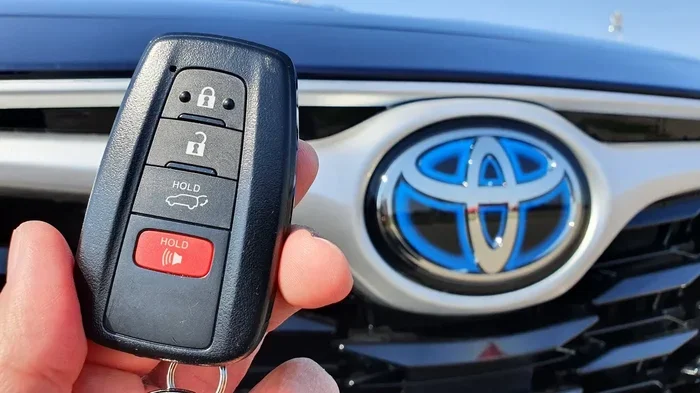
Key Fob Buttons Explained
Not all Toyota fobs look the same. Older models may have a dedicated remote start button. Newer models often use a combination of buttons. Here is a quick reference:
- Lock Button: Used first to arm the vehicle before remote start.
- Remote Start Button: The curved arrow or engine icon button that triggers the engine start.
- Trunk Release: Not used for remote start but good to know its location.
- Panic Button: Activates the alarm system, not related to remote start.
If you are unsure which button to press, check your Toyota owner’s manual. It contains a diagram of your specific fob layout. You can also visit your Toyota dealer for a quick walkthrough.
Using the Toyota Remote Connect App
For newer Toyota models, the Toyota Remote Connect app adds even more control. This smartphone application lets you start your engine from anywhere with cellular service. It is a huge upgrade over traditional fob-only remote start.
Setting Up the Toyota Remote Connect App
Before you can use the app, you need to set it up properly:
- Download the Toyota Remote Connect app from the Apple App Store or Google Play Store.
- Create a Toyota account or sign in with your existing credentials.
- Register your vehicle by entering your VIN and pairing it with your account.
- Follow the on-screen prompts to link your Toyota key fob to the app.
- Once paired, you can start the engine, lock doors, and check vehicle status from your phone.
The app works through Toyota’s cloud-based connectivity system. This means your vehicle needs a compatible Toyota Safety Connect subscription. Most new Toyotas come with a trial period. After that, you may need to purchase a subscription plan.
App Features Beyond Remote Start
The Toyota Remote Connect app does much more than start your engine. You can also:
- Lock and unlock your doors remotely.
- Honk the horn or flash the lights to locate your vehicle.
- Check fuel level and tire pressure in real time.
- Set climate control presets for different seasons.
- Receive maintenance alerts and service reminders.
These features work together to create a seamless Toyota remote functions experience. The app is especially useful for fleet owners or families managing multiple vehicles.
Toyota Remote Start Compatibility by Model
Not every Toyota comes equipped with factory remote start. Compatibility depends on your Toyota model, trim level, and model year. Here is a breakdown of what to expect.
Models With Factory Remote Start Support
Most Toyota models from 2017 onward include remote start as either standard or available equipment. Popular models that support Toyota Remote Start include:
- Toyota Camry: Available on most trims, especially XLE and XSE.
- Toyota RAV4: Standard on higher trims like XLE and Limited.
- Toyota Tacoma: Available on TRD and higher trims.
- Toyota Tundra: Supported on most trims with the push-button start system.
- Toyota Highlander: Available on XLE and above.
- Toyota Corolla: Included on select trims with the push button start feature.
If you are unsure whether your specific vehicle has remote start, check the Toyota owner’s manual or look for the remote start button on your fob. You can also contact your local Toyota dealer with your VIN to confirm.
Aftermarket Remote Start Options
If your Toyota does not have factory remote start, you can still add it. Aftermarket remote start systems are widely available and professionally installable. Many owners choose this route for older Toyota models or base trims that lack the feature. However, you should always have a professional handle the installation to avoid wiring issues or warranty concerns.
For those considering adding remote start, you might find our guide on Can You Add Remote Start To A Toyota Tundra helpful for understanding the installation process and compatibility considerations.
Troubleshooting Toyota Remote Start Problems
Sometimes the Toyota Remote Start system does not work as expected. This is frustrating but usually easy to fix. Here are the most common issues and their solutions.
Remote Start Does Not Respond
If pressing the remote start button does nothing, try these steps:
- Check the Toyota key fob battery. A weak battery is the number one cause of remote start failure. Replace it with a fresh CR2032 or CR2025 battery depending on your fob model.
- Make sure you are within range. Obstacles like buildings and walls can weaken the signal.
- Verify the vehicle is in Park and the parking brake is engaged.
- Check if the hood is fully closed. Most Toyotas will not remote start with the hood ajar.
Engine Starts But Shuts Off Immediately
This issue often points to a safety override. The system may have detected an anomaly. Common causes include:
- A door was not fully locked before activation.
- The transmission was not in Park.
- The vehicle detected a fault in the remote start system sensors.
- The key fob is too far from the vehicle or the battery is too low.
Try locking the doors manually first, then attempt remote start again. If the problem persists, a visit to the Toyota dealer for a diagnostic check is recommended.
App-Based Remote Start Not Working
If the Toyota Remote Connect app fails to start your engine, check these items:
- Ensure your phone has a stable internet connection (Wi-Fi or cellular).
- Verify your Toyota Safety Connect subscription is active.
- Check for app updates in your device’s app store.
- Log out and log back into your Toyota account.
- Restart the app and try again.
Sometimes a simple software update resolves connectivity issues. Toyota frequently pushes updates to improve app performance and Toyota remote functions reliability.
Expert Tips for Getting the Most From Toyota Remote Start
Once you have your Toyota Remote Start system working, a few smart habits will help you get the most from it.
Set Climate Control Before You Need It
Use remote start a few minutes before you walk outside. This gives the engine time to warm up and the cabin to reach a comfortable temperature. In cold climates, remote start can defrost your windshield in under five minutes.
Keep Your Fob Battery Fresh
Replace your Toyota key fob battery once or twice a year. A fresh battery ensures strong signal strength and reliable remote start performance. Most Toyotas will warn you with a low battery indicator on the instrument cluster.
Use Remote Start Safely
Always remember that your vehicle is unlocked when you first press the lock button before remote start. The system relocks automatically when the engine starts. Never leave your vehicle unattended with the engine running for extended periods beyond the automatic shut-off timer.
Understand Range Limitations
The Toyota key fob remote start range is typically 300 to 500 feet. The app-based range depends on your cellular connection and can work from virtually anywhere. However, extremely cold or hot weather can reduce fob range slightly.
For more tips on using your Toyota’s remote features, check out our guide on Can I Roll Down My Toyota Windows With The Key Fob to learn about other convenient remote functions.
Frequently Asked Questions About Toyota Remote Start
Here are answers to the most common questions Toyota owners ask about remote start activation and use.
Can I Activate Toyota Remote Start Without a Key Fob?
Yes, if your Toyota supports the Toyota Remote Connect app, you can start your engine using your smartphone. The app replaces the key fob for remote start functions. You will still need the physical fob for other operations like unlocking the doors manually. The app-based method requires an active Toyota Safety Connect subscription and a compatible vehicle.
How Far Can I Start My Toyota Remotely?
With a Toyota key fob, the range is typically 300 to 500 feet depending on your model and environmental conditions. Using the Toyota Remote Connect app, the range is virtually unlimited as long as you have a cellular connection. Keep in mind that the vehicle must be within a reasonable distance for the system to function safely.
Is Toyota Remote Start Safe to Use?
Absolutely. Toyota designed the remote start system with multiple safety features. The engine automatically shuts off if a door is opened or the vehicle is shifted into gear. The doors remain locked during remote operation. The parking brake must be engaged, and the transmission must be in Park for the system to activate.
Does Remote Start Drain My Toyota Battery?
Normal use of Toyota Remote Start does not significantly drain your battery. The system is engineered to manage power draw efficiently. However, if you use remote start excessively or leave the engine running for extended periods, it can put a strain on the battery. The automatic shut-off timer (usually 10 to 15 minutes) prevents excessive drain.
Can I Add Remote Start to an Older Toyota Model?
Yes, aftermarket remote start systems can be installed on most older Toyota models. Professional installation is recommended to ensure proper wiring and compatibility with your vehicle’s electrical system. Always check with your Toyota dealer first, as some aftermarket installations may affect your warranty coverage.
Why Does My Toyota Remote Start Keep Turning Off?
This usually happens because of a safety trigger. Common causes include the hood not being fully closed, a door ajar, or the transmission not being in Park. Low fob battery can also cause intermittent shutdowns. Try replacing the fob battery first, then check all doors and the hood. If the issue continues, a diagnostic at the Toyota dealer can identify the problem.
Final Thoughts on Activating Your Toyota Remote Start
Activating your Toyota Remote Start system opens up a new level of convenience in your daily driving routine. Whether you use the key fob method or the smartphone app, the process is straightforward and well worth the few minutes of setup time. You now know how to start your Toyota engine from a distance, troubleshoot common issues, and maximize the feature’s potential.
Take a moment to explore your vehicle’s settings and experiment with the different Toyota remote functions. Familiarize yourself with the app if your model supports it. Keep your Toyota key fob battery fresh and your subscription active for the best experience.
The Toyota Remote Start feature is more than a luxury. It is a practical tool that saves time, improves comfort, and adds value to your ownership experience. With this guide, you are fully equipped to use it confidently every day.
For additional resources on your Toyota, you might also find our article on Can I Drive My Toyota Without The Key Fob helpful for understanding how keyless systems work across the Toyota lineup.