How Do I Factory Reset My Start Screen The Easy Way
Factory resetting your start screen is simpler than you think. Whether your car display is frozen, glitchy, or just acting up, a quick reset can bring everything back to normal. This guide walks you through every method so you can get back on the road without a trip to the dealer.
Your car’s start screen is the first thing you see when you turn the key or press the push-to-start button. It’s your gateway to navigation, music, climate controls, and all the tech that makes modern driving easier. But what happens when that screen freezes, lags, or just refuses to cooperate?
The answer is often simpler than you think. A factory reset my start screen can fix most of these annoying problems in just a few minutes. You don’t need to be a tech expert, and you definitely don’t need to visit a dealership. In this guide, we’ll show you exactly how to do it the easy way.
Whether you’re dealing with a blank screen, unresponsive touch controls, or strange error messages, this article covers everything you need to know. We’ll walk you through the step-by-step process for different car brands, share tips to prevent future issues, and answer the most common questions drivers ask about start screen resets.
Key Takeaways
- A factory reset restores your start screen to its original default settings and clears most common glitches.
- You can usually perform a reset yourself without needing a mechanic or dealership visit.
- Different car brands use different reset methods, so knowing your specific system matters.
- Backing up your settings first saves you time and frustration after the reset.
- Regular resets can prevent buildup of software issues that slow down your car display.
- Contact a professional if the reset doesn’t work, as it may indicate a deeper hardware problem.
📑 Table of Contents
What Is a Start Screen and Why Would You Reset It?
The start screen is the main home page of your car’s infotainment system. When you unlock your car or turn the ignition, this is the first display that greets you. It typically shows the time, audio controls, navigation shortcuts, and vehicle status icons.
Over time, this screen can develop problems. Software glitches build up. Cached data slows things down. A settings mismatch can cause the display to freeze or behave unpredictably. That’s where a factory reset comes in handy.
Signs You Need to Reset Your Start Screen
Not sure if a reset is the right move? Here are the most common signs that your start screen needs a fresh start:
- The screen freezes or becomes unresponsive when you touch it.
- Your car display shows error messages that won’t go away.
- Navigation and audio settings keep resetting on their own.
- The home screen takes a long time to load after startup.
- Touch controls respond slowly or not at all.
- The screen shows a black or blank display intermittently.
If you’re experiencing any of these issues, don’t worry. A factory reset my start screen procedure can often solve them without any special tools or expertise.
How to Factory Reset Your Start Screen Step by Step
The exact steps vary depending on your car’s make and model. But the general process is similar across most vehicles. Here’s how to do it the easy way.
Method 1: The Soft Reset
A soft reset is the quickest and easiest option. It restarts the system without erasing any of your personal data or settings.
- Turn off your car and remove the key or press the push-to-start button to shut down.
- Open the driver’s door and wait about 30 seconds.
- Close the door and turn the car back on.
- The start screen should reload with default settings.
This method works for most infotainment system issues. Think of it like restarting your phone when it gets glitchy. It clears temporary bugs without touching your saved data.
Method 2: The Settings Menu Reset
If a soft reset doesn’t fix the problem, try the settings menu. Most modern cars let you access reset options directly from the display.
- Start your car and go to the main home screen.
- Look for the “Settings” or “System” icon on the touchscreen.
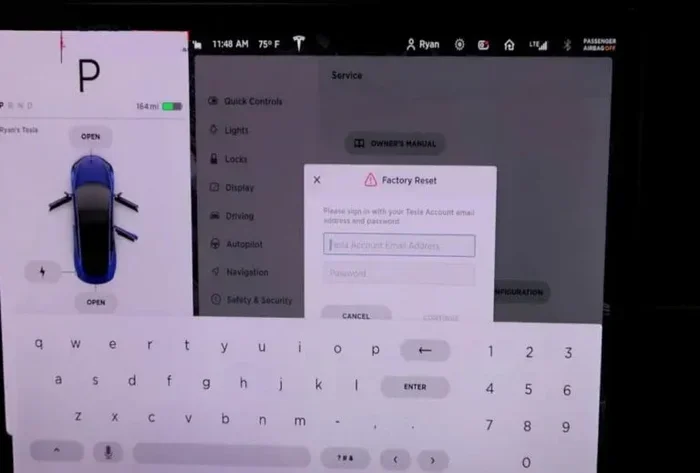
- Scroll down to find “Reset” or “Factory Reset.”
- Select the option and confirm your choice.
- Wait for the system to reboot. This can take 2 to 5 minutes.
Important: Before you do this, note down any important settings like your favorite radio stations or navigation presets. A reset through the settings menu may clear some of your personal preferences.
For Toyota owners, checking your infotainment features beforehand can help you understand what settings might be affected by a reset.
Method 3: The Battery Disconnect Method
This is the most thorough method and works when the other two don’t. It essentially cuts all power to the car’s electronic systems.
- Turn off the car and make sure it’s parked safely.
- Open the hood and locate the car battery.
- Use a wrench to disconnect the negative terminal first.
- Wait at least 5 minutes to let the system fully power down.
- Reconnect the negative terminal and start the car.
- The start screen should now display factory default settings.
This method is safe for most vehicles. However, some cars may need a code to unlock the radio after a battery disconnect. Check your owner’s manual before trying this approach.
Common Problems That Need a Start Screen Reset
Understanding what causes start screen issues can help you prevent them in the future. Here are the most common culprits:
Software Glitches After Updates
Car manufacturers release software updates to improve performance and add new features. Sometimes these updates don’t install properly. The result? A start screen that acts strange or won’t load at all. A factory reset clears the incomplete update data and lets the system start fresh.
Too Much Cached Data
Your car’s display stores temporary files to speed up common tasks. Over time, these cached files can pile up and slow things down. A reset wipes this cache and gives the system a clean slate. Think of it like clearing your browser history to make your computer faster.
Settings Conflicts
Sometimes you or someone else changes a setting that conflicts with another part of the system. This can cause the start screen to freeze or display incorrectly. Resetting everything to factory defaults removes these conflicts entirely.
Unresponsive Touchscreen After a Car Wash
This one surprises people. Moisture can get under the touchscreen and cause temporary unresponsiveness. A reset often fixes this by recalibrating the touch sensors. If the problem persists after a reset, you may need to let the system dry out completely first.
For Rav4 owners experiencing display issues, our guide on unlocking your Rav4 with your phone covers related troubleshooting for common tech issues.
Tips to Keep Your Start Screen Running Smoothly
Prevention is always better than cure. Here are some simple habits that keep your start screen and car display in great shape.
Restart Your System Regularly
Just like your phone or laptop, your car’s infotainment system benefits from regular restarts. Once a month, turn the car off completely and wait a minute before starting again. This clears out temporary files and keeps everything running smoothly.
Keep Your Software Updated
Car manufacturers push updates that fix bugs and improve performance. Check for updates regularly, especially after you notice any issues. Many newer vehicles let you download updates over Wi-Fi directly to the car.
Avoid Overloading the System
Your car display has limited memory. Installing too many apps or storing large files on the system can slow it down. Keep only what you need and regularly delete unused data.
Use a Screen Protector
A good screen protector prevents scratches and moisture damage. This is especially helpful if you frequently wash your car or drive in rainy conditions. Protecting the hardware protects the software experience too.
Be Careful With Third-Party Apps
Third-party apps can introduce bugs or conflicts with your car’s native system. Stick to manufacturer-approved apps whenever possible. If you do install third-party apps, remove them if you notice any display issues.
Remote Connect features and other tech add-ons can sometimes interfere with your start screen. Make sure all connected services are compatible with your vehicle’s system.
When to Seek Professional Help
Most start screen issues resolve with a simple reset. But sometimes the problem goes deeper than software. Here are signs you should take your car to a professional:
- The screen stays blank even after a full battery disconnect reset.
- You see physical damage like cracks or water damage on the display.
- Error codes appear on the dashboard along with the screen problem.
- The reset fixes the issue temporarily, but it keeps coming back.
- Multiple electronic systems in your car are malfunctioning at once.
These symptoms could point to a hardware failure or a wiring issue that a simple reset can’t fix. A certified technician can run diagnostic tests to identify the root cause.
For push-to-start vehicles specifically, understanding your push-to-start system can help you determine whether the issue is with the start screen or the ignition system itself.
Also, if your car is still under warranty, check with your dealer before performing a deep reset. Some manufacturers require dealership service for warranty coverage to remain valid. You can also learn more about taking your Toyota to any dealership for service to understand your warranty options.
Final Thoughts
A factory reset my start screen is one of the most useful skills every car owner should know. It saves time, money, and the hassle of visiting a dealership for what is often a simple fix. With the three methods we covered, you can handle most start screen issues from your driveway.
Remember to start with the soft reset. It’s quick, easy, and won’t erase your settings. If that doesn’t work, move to the settings menu reset. And as a last resort, try the battery disconnect method. Always back up your preferences before doing a full reset.
Keep your system updated, restart regularly, and be mindful of how much data you store on the display. These simple habits go a long way in preventing future problems. Your car’s start screen works hard every day. A little maintenance goes a long way in keeping it running smoothly for years to come.
Now that you know how easy it is to reset your start screen, you can tackle the problem confidently the next time it comes up. No stress, no dealer visits, and no expensive repair bills. Just a quick fix that gets you back on the road in minutes.
Frequently Asked Questions
How long does it take to factory reset a start screen?
A soft reset takes less than a minute. A settings menu reset usually takes 2 to 5 minutes. The battery disconnect method can take up to 10 minutes including wait time. The actual reset process is fast, but you may need to reconfigure some preferences afterward.
Will a factory reset erase my saved navigation addresses?
It depends on the reset method. A soft reset keeps all your data. A settings menu reset may clear some preferences. The battery disconnect method typically erases all saved data including navigation addresses. Write down important addresses before doing a deep reset.
Can I undo a factory reset on my start screen?
You can’t undo it directly, but you can manually restore your settings. Reconnect to Wi-Fi, re-enter your navigation home address, and re-sync your media playlists. Most systems also restore some settings automatically after reconnecting to your phone.
Why does my start screen keep freezing even after a reset?
If the problem persists after a reset, it could be a hardware issue or a deeper software conflict. Moisture damage, a failing motherboard, or incompatible software updates can cause recurring freezes. In these cases, a professional diagnostic is the best next step.
Is it safe to factory reset my start screen while driving?
No. Always perform a reset only when the car is completely parked and turned off. Resetting while driving can cause the display to go blank temporarily, which is dangerous. Pull over safely and complete the reset before driving again.
Do I need special tools to factory reset my start screen?
No special tools are needed for any of the three methods we covered. You only need your car key or push-to-start button. For the battery disconnect method, a basic wrench is helpful. Everything else is done through the car’s built-in touchscreen or controls.
=== CONCLUSION ===
A factory reset my start screen is a simple, effective fix for most car display problems. Whether you choose the soft reset, the settings menu method, or the battery disconnect approach, you now have the knowledge to handle it yourself. Keep the tips and prevention habits from this guide in mind, and your start screen will stay responsive and reliable. Don’t let a frozen screen ruin your day. Take action quickly and get back to enjoying the drive.