What Does the HomeLink Button Look Like Discover Now
The HomeLink button is a small, square or rectangular button typically found in the overhead console or driver’s sun visor of a vehicle. It usually features a simple icon or the word “HomeLink” printed on it, and many cars have three programmable buttons arranged in a row. Knowing how to identify and use the HomeLink button can transform the way you control your garage door, gates, and other automated home systems directly from your car.
Have you ever sat in your car and wondered about that little button on the ceiling or the sun visor? You are not alone. Many drivers see it every day but never really pay attention to it. That small, often overlooked button is the HomeLink button. It is one of the most convenient features in modern vehicles. It lets you open your garage door, gate, or other automated systems without digging through your console for a remote. In this guide, we will show you exactly what the HomeLink button looks like, where to find it, and how to get the most out of it.
The HomeLink wireless control system has been around for decades. It was first introduced in luxury vehicles and has since become a standard feature in many cars, trucks, and SUVs. Whether you drive a new model or an older vehicle, understanding your HomeLink button can save you time and frustration. You will learn how to spot it, what it does, and how to program it in just a few minutes. Let us dive in and explore everything you need to know about this handy car feature.
Key Takeaways
- The HomeLink button is small and square-shaped, often found in the overhead console or sun visor.
- Most vehicles have three HomeLink buttons arranged side by side, each programmable to a different device.
- The button may display the HomeLink logo or simply have a small house icon on it.
- HomeLink works with garage doors, gates, and home automation systems, replacing the need for multiple remotes.
- Programming the HomeLink button is straightforward and can be done in a few simple steps.
- The button is integrated into the vehicle’s electrical system, making it a permanent and reliable solution.
- Not all vehicles come with HomeLink, but universal aftermarket options are widely available.
📑 Table of Contents
- What Does the HomeLink Button Look Like?
- How Does the HomeLink System Work?
- Programming Your HomeLink Button
- Common Uses for the HomeLink Button
- HomeLink vs. Traditional Remote Controls
- Troubleshooting Common HomeLink Issues
- Quick Tips for Using HomeLink
- Is HomeLink Available in All Vehicles?
- Expert Insights on HomeLink
- HomeLink Button Appearance by Vehicle Brand
- Safety Considerations for HomeLink
- Key Takeaways
- Frequently Asked Questions
- Conclusion
What Does the HomeLink Button Look Like?
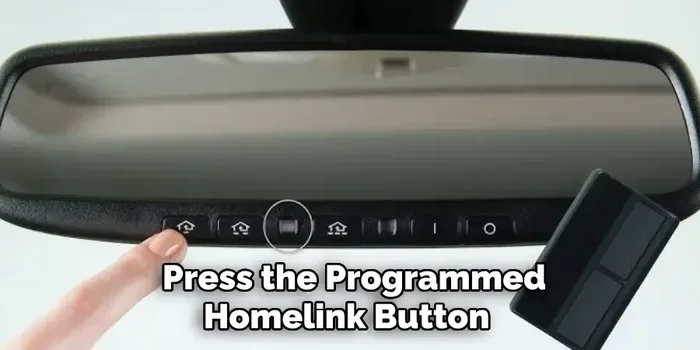
The HomeLink button is easy to spot once you know what you are looking for. It is typically a small, square or rectangular button with a clean, simple design. The button is usually black or dark gray, blending seamlessly with the interior of your vehicle. Some models feature the HomeLink logo, which looks like a small house icon with a signal wave. Others simply have the word “HomeLink” printed nearby. The design is intentionally minimal so it does not distract from the overall look of your car’s interior.
Most vehicles that come equipped with HomeLink have three buttons arranged in a horizontal row. Each button is about the size of a small coin, roughly half an inch to three-quarters of an inch wide. They sit flush with the surface they are mounted on, so they do not protrude much. This sleek design keeps the overhead console looking tidy and modern.
Where Is the HomeLink Button Located?
The most common location for the HomeLink button is in the overhead console, right between the front seats. You will find it on the ceiling of the car, near the rearview mirror area. Some vehicles place the buttons on the driver’s sun visor instead. Others mount them on the dashboard near the steering column. The exact placement depends on the make and model of your vehicle.
Here are some common HomeLink button locations you might encounter:
- Overhead console between the front seats
- Driver’s sun visor, usually on the side facing the windshield
- Dashboard near the steering column
- Center console in some luxury models
If you are having trouble finding yours, check your vehicle’s owner manual. The manual will show you the exact location and provide a picture of the HomeLink button for your specific model.
How Does the HomeLink System Work?
The HomeLink system uses radio frequency signals to communicate with your garage door opener or other automated device. When you press the HomeLink button, it sends a signal to the receiver on your garage door opener. The opener then activates, and your door opens or closes. It works just like a handheld remote, but the control is built right into your car.
One of the biggest advantages of HomeLink is that it is integrated into the vehicle’s electrical system. You do not need batteries, and you do not need to carry a separate remote. The system is always ready to go. Once you program the HomeLink button, it stays paired with your device until you choose to reprogram it.
The HomeLink universal transmitter works with a wide range of garage door openers and automated systems. It is compatible with most major brands, including Chamberlain, LiftMaster, Genie, and Craftsman. This universal compatibility is one of the reasons HomeLink has become so popular among car owners.
Programming Your HomeLink Button
Programming your HomeLink button is simpler than most people think. You can usually complete the process in under five minutes. The exact steps may vary slightly depending on your vehicle and garage door opener model, but the general process is very similar across the board.
Step-by-Step Programming Guide
Follow these steps to program your HomeLink button:
- Locate the HomeLink buttons in your vehicle. They are usually in the overhead console.
- Press and hold the button you want to program. Keep holding it until the indicator light starts blinking. This usually takes about 20 seconds.
- Release the button once the light begins to flash.
- Go to your garage door opener and press the “Learn” or “Smart” button. This is usually found on the back or side of the motor unit.
- Return to your vehicle and press and hold the same HomeLink button again. Hold it for about two seconds, then release.
- Test the button by pressing it once. Your garage door should respond.
If your garage door opener does not have a “Learn” button, you may need to use a different method. Some openers require you to use a ladder or a long wire to complete the pairing. Check your opener’s manual for specific instructions.
Common Uses for the HomeLink Button
The HomeLink button is not just for garage doors. While that is its most popular use, you can program it to control a variety of other devices. This makes it a versatile tool for managing your home from your vehicle.
Here are some common HomeLink uses:
- Garage door openers – the most common use
- Gates and entry gates for driveways or properties
- Automated lighting systems in your home
- Pool and spa covers
- Motorized awnings or blinds
- Home security systems that support remote activation
Each of these uses makes your daily routine more convenient. Imagine pulling into your driveway and opening the gate with a single button press. Or turning on your porch lights before you even step out of the car. The HomeLink system makes all of this possible.
HomeLink vs. Traditional Remote Controls
You might be wondering how HomeLink compares to a traditional handheld remote. There are several key differences that make HomeLink a better option for most drivers.
| Feature | HomeLink Button | Traditional Remote |
|---|---|---|
| Location | Built into the vehicle | Separate device you carry |
| Battery Required | No | Yes |
| Number of Devices | Up to three per vehicle | One per remote |
| Durability | Very high, built into car | Can be lost or damaged |
| Universal Compatibility | Works with most openers | Brand-specific |
As you can see from the table, HomeLink offers clear advantages. It eliminates the need to carry multiple remotes. It never runs out of batteries. And it is always there when you need it. If you have ever lost a garage door remote or had one stop working, you know how frustrating that can be. HomeLink solves that problem entirely.
Troubleshooting Common HomeLink Issues
Even though the HomeLink system is reliable, you may occasionally run into issues. Most problems are easy to fix with a few simple steps.
Here are some common issues and how to resolve them:
HomeLink Button Does Not Respond
If your HomeLink button does not respond when you press it, try clearing the memory and reprogramming it. To do this, press and hold all three HomeLink buttons simultaneously for about 10 seconds. The indicator light should turn off, which means the memory has been cleared. Then reprogram the button using the steps we covered earlier.
Signal Does Not Reach the Garage Door Opener
Sometimes the signal from your HomeLink system may not reach the garage door opener. This can happen if your car is parked too far away. Try parking closer to the garage door and try again. Also, make sure there are no large metal objects blocking the signal between your car and the opener.
Indicator Light Flashes but Door Does Not Open
If the indicator light flashes but nothing happens, the HomeLink button may not be properly paired with the opener. Repeat the programming process and make sure you press the “Learn” button on the opener within 30 seconds of pressing the HomeLink button in your car.
Interference from Other Devices
Other electronic devices can sometimes interfere with the HomeLink signal. If you live in a neighborhood with many homes using similar frequencies, you may experience occasional interference. Moving your car slightly can often resolve this issue.
Quick Tips for Using HomeLink
Here are some practical tips to get the most out of your HomeLink button:
- Label your buttons with small stickers or tape so you know which one controls which device.
- Test your HomeLink regularly to make sure it is still working properly.
- Keep your garage door opener manual handy in case you need to reprogram.
- Use the rolling code feature if your opener supports it for added security.
- Clean the HomeLink button area occasionally to prevent dust buildup that could affect performance.
Is HomeLink Available in All Vehicles?
HomeLink is not standard in every vehicle. Many newer cars and trucks come with it as part of the factory package. However, older models or lower trim levels may not include it. If your vehicle does not have a HomeLink button, you have options.
You can install an aftermarket HomeLink universal transmitter. These devices are widely available and relatively affordable. They plug into your vehicle’s cigarette lighter or OBD-II port and provide the same functionality as a factory-installed system. Some aftermarket options even offer smartphone connectivity, allowing you to control your garage door from your phone.
Before purchasing an aftermarket system, check if your vehicle already has a HomeLink-compatible system. Many cars have a built-in module that simply needs to be activated. Your dealer or a qualified mechanic can help you determine this.
Expert Insights on HomeLink
Automotive experts agree that HomeLink is one of the most underappreciated features in modern cars. Many drivers do not even realize their vehicle has it until someone points it out. Once you start using it, though, it becomes an essential part of your daily routine.
“The HomeLink system is a game-changer for convenience,” says automotive technology reviewer Mark Stevens. “It eliminates the clutter of multiple remotes and makes your vehicle feel smarter and more connected to your home.”
Another expert tip from auto technicians: always program your HomeLink buttons when you first get a new vehicle. It takes only a few minutes and saves you from scrambling later when you need it most. Also, if you buy a used car, ask the previous owner whether the HomeLink system has been programmed and to which devices.
HomeLink Button Appearance by Vehicle Brand
The look of the HomeLink button can vary slightly depending on the vehicle manufacturer. Here is a quick overview of what to expect from some popular brands:
- Toyota – The HomeLink button is usually a small square button with the HomeLink logo. It is typically located in the overhead console.
- Ford – Ford vehicles often feature three HomeLink buttons with a small house icon above them. The buttons are dark gray or black.
- Chevrolet – Chevy models typically have the HomeLink buttons on the sun visor or overhead console. The buttons are small and flush with the surface.
- BMW – BMW integrates HomeLink into the iDrive system in some models, using a digital interface instead of physical buttons.
- Honda – Honda vehicles usually have a single HomeLink button on the sun visor, often labeled “HomeLink” in small text.
Despite these slight differences, the core function remains the same across all brands. The HomeLink button gives you wireless control of your home devices from inside your vehicle.
Safety Considerations for HomeLink
While the HomeLink system is incredibly convenient, it is important to use it safely. Always make sure your garage door is fully open or closed before driving away. Teach children that the HomeLink button is not a toy and should not be pressed unnecessarily. Keep your garage door opener’s safety sensors clean and functioning properly, as HomeLink uses the same safety features as your handheld remote.
Key Takeaways
- The HomeLink button is a small, square button typically found in the overhead console or sun visor of your vehicle.
- Most vehicles with HomeLink have three buttons arranged in a row, each programmable to a different device.
- The button often features the HomeLink house logo or a simple house icon.
- HomeLink works with garage doors, gates, lights, and other automated systems, making it a universal home control solution.
- Programming is quick and easy, usually taking less than five minutes.
- HomeLink eliminates the need for multiple remotes and never requires batteries.
- Aftermarket options are available if your vehicle does not have factory-installed HomeLink.
Frequently Asked Questions
What Does the HomeLink Button Look Like on a Sun Visor?
When the HomeLink button is on the sun visor, it is usually a small, flat button mounted on the side of the visor that faces the windshield. It may have the HomeLink house logo printed on it or nearby. The button is typically black or dark gray and blends in with the visor’s design. It is about the size of a small coin and sits flush with the visor surface.
Can I Add HomeLink to My Vehicle if It Does Not Have It?
Yes, you can. Aftermarket HomeLink universal transmitters are widely available and easy to install. These devices plug into your vehicle’s power outlet or OBD-II port and provide the same functionality as a factory-installed system. They are a great option if your car does not come with a built-in HomeLink button.
How Many Devices Can I Program to the HomeLink Buttons?
Most vehicles have three HomeLink buttons, and each one can be programmed to control a different device. This means you can set up your garage door, a gate, and a lighting system all from your car. If you need to control more than three devices, you may need to use a multi-function HomeLink transmitter or a rolling code setup.
Is HomeLink the Same as a Universal Remote?
HomeLink is similar to a universal remote, but it is built directly into your vehicle. Unlike a handheld universal remote, HomeLink does not require batteries and is always available. It uses your car’s electrical system and communicates via radio frequency, just like a traditional remote. The main difference is convenience and integration.
What Should I Do if My HomeLink Button Stops Working?
First, try clearing the memory by pressing and holding all three HomeLink buttons for 10 seconds. Then reprogram the button. If that does not work, check your garage door opener to make sure it is functioning properly. You may also want to consult your vehicle’s owner manual or contact a dealer for assistance with HomeLink troubleshooting.
Does HomeLink Work with All Garage Door Openers?
HomeLink is compatible with the vast majority of garage door openers on the market. It works with most major brands including Chamberlain, LiftMaster, Genie, and Craftsman. Some older or specialty openers may require a HomeLink universal bridge or adapter to ensure compatibility. Always check the specifications of both your opener and your vehicle before attempting to pair them.
Conclusion
The HomeLink button is one of those small car features that makes a big difference in your daily life. It is compact, convenient, and incredibly useful. Now that you know what the HomeLink button looks like, you can find it in your vehicle and start using it to its full potential. Whether you use it for your garage door, gate, or home automation system, HomeLink simplifies your routine and keeps your hands free.
Take a moment today to locate your HomeLink button and make sure it is programmed correctly. If it is not, follow the programming steps we shared and you will be up and running in minutes. Once you experience the convenience of controlling your home devices from your car, you will wonder how you ever lived without it. The HomeLink wireless control system is a perfect example of how small technology can make a big impact on your everyday life.