Do I Need Subaru Starlink to Use Apple CarPlay Now
You do not always need Subaru Starlink to use Apple CarPlay. Many Subaru models support Apple CarPlay through a direct USB connection or wireless setup, regardless of whether you have the Starlink subscription. The answer depends on your Subaru model year, trim level, and infotainment system. This guide breaks down everything you need to know.
Have you ever slid into your Subaru and wondered whether you need that fancy Starlink subscription just to get Apple CarPlay working? You are not alone. This question pops up in forums, dealership visits, and Google searches every single day. The short answer is no, you do not always need Subaru Starlink to use Apple CarPlay. But the full answer is a bit more nuanced, and that is exactly what we are going to walk through together.
In this article, we will break down everything you need to know about Subaru Starlink and Apple CarPlay compatibility. We will look at which Subaru models support it, how to set it up, and whether paying for Starlink is actually worth it. By the end, you will have a clear picture and zero confusion.
Whether you drive a Subaru Forester, a Subaru Outback, or something else entirely, this guide has you covered. Let us dive right in.
Key Takeaways
- Starlink is not mandatory: Many Subaru vehicles offer Apple CarPlay without a Starlink subscription.
- Model year matters: Newer Subaru models from 2017 onward are more likely to support Apple CarPlay natively.
- Wired and wireless options exist: Some Subarus use a USB cable while others offer wireless Apple CarPlay.
- Aftermarket adapters work: You can add Apple CarPlay to older Subaru models using an aftermarket device.
- Check your specific model: Not every Subaru trim includes Apple CarPlay, so verify before buying.
- Starlink adds extras: The Starlink subscription offers features beyond Apple CarPlay, like remote start and GPS navigation.
- Setup is simple: Connecting your iPhone to a Subaru takes just a few minutes.
📑 Table of Contents
- What Is Subaru Starlink and How Does It Work?
- What Is Apple CarPlay and Why Does It Matter?
- Do You Need Subaru Starlink for Apple CarPlay?
- Which Subaru Models Support Apple CarPlay?
- Wireless vs Wired Apple CarPlay in Subaru Vehicles
- How to Set Up Apple CarPlay in Your Subaru
- Common Problems and Troubleshooting Tips
- Is Starlink Worth It for Subaru Owners?
- Final Thoughts on Subaru Starlink and Apple CarPlay
What Is Subaru Starlink and How Does It Work?
Subaru Starlink is a connected services platform built into many newer Subaru vehicles. It uses a built-in modem and cellular connection to offer a range of features. Think of it as a smart connectivity system that keeps your car linked to the internet and your phone.
Starlink offers several tiers of service. The basic package often includes features like remote start, vehicle diagnostics, and emergency roadside assistance. Higher tiers add things like real-time traffic updates, weather alerts, and enhanced navigation. But here is the key point many people miss: Starlink is not the same as Apple CarPlay. They are two separate systems that happen to coexist in many Subaru models.
What Starlink Does Offer
- Remote vehicle start through the Starlink app
- GPS navigation with live traffic updates
- Emergency assistance and roadside aid
- Vehicle health monitoring and maintenance alerts
- Weather and news updates delivered to your dashboard
So while Starlink is a powerful tool, it is not a gatekeeper for Apple CarPlay. You can have one without the other in many cases.
What Is Apple CarPlay and Why Does It Matter?
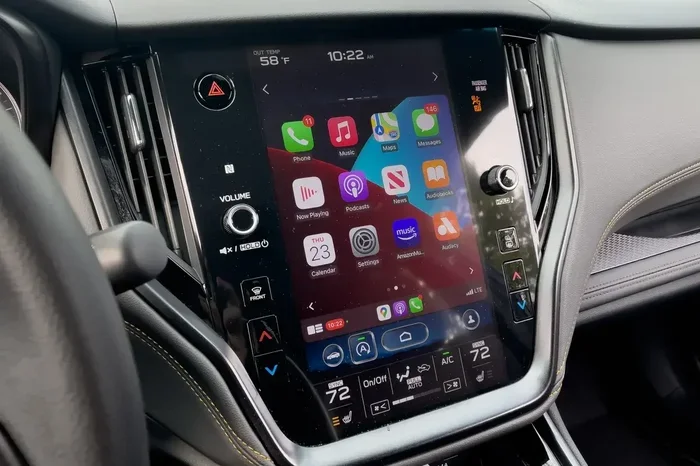
Apple CarPlay is Apple’s smartphone integration system for cars. It mirrors key functions from your iPhone onto your vehicle’s infotainment screen. This means you can access your maps, messages, music, and podcasts right from your dashboard.
For Subaru owners, Apple CarPlay brings a familiar and intuitive interface to the car. Instead of squinting at a tiny screen or fumbling with buttons, you get a clean, phone-like display. It also supports Siri voice commands, so you can keep your hands on the wheel and eyes on the road.
Key Apple CarPlay Features
- Navigation with Apple Maps and third-party apps like Google Maps and Waze
- Hands-free calling and messaging
- Music streaming from Spotify, Apple Music, and podcasts
- Voice control through Siri
- Battery-friendly connection that does not drain your iPhone
Apple CarPlay has become a must-have feature for many car buyers. If you are shopping for a Subaru, chances are you want to know whether it plays nice with your iPhone. And that brings us to the big question.
Do You Need Subaru Starlink for Apple CarPlay?
This is the million-dollar question, and the answer is: it depends. In most cases, you do not need a Starlink subscription to use Apple CarPlay. Many Subaru models come with Apple CarPlay built into the factory infotainment system, no Starlink required.
However, there are some exceptions and details worth knowing. Let us break this down clearly.
When Apple CarPlay Works Without Starlink
Most Subaru models from 2017 onward support Apple CarPlay without needing Starlink. Here are some common scenarios where Apple CarPlay works on its own:
- Subaru models with the standard infotainment system that includes Apple CarPlay as a native feature
- Wired Apple CarPlay connections using a simple USB cable
- Base trim levels that include the infotainment package but not the Starlink package
- Older Subaru models that received Apple CarPlay through a firmware update
In these cases, you simply plug in your iPhone or connect wirelessly, and Apple CarPlay springs to life. No Starlink subscription needed. No extra fees. No fuss.
When Starlink Might Be Involved
There are some situations where Starlink and Apple CarPlay overlap or interact:
- Wireless Apple CarPlay on certain Subaru models may rely on the Starlink connectivity module
- Newer Subaru models bundle Starlink and Apple CarPlay together in a single tech package
- Some dealership setups may require Starlink activation before enabling certain features
Even in these cases, Apple CarPlay itself typically still works. The Starlink connection might just enhance the wireless experience or add extra features on top. But the core Apple CarPlay functionality remains available without a Starlink subscription.
Quick Tip: If you are unsure whether your Subaru needs Starlink for Apple CarPlay, check your owner’s manual or ask your dealer. The model year and trim level are the biggest factors.
Which Subaru Models Support Apple CarPlay?
Apple CarPlay availability varies across the Subaru lineup. Not every model or trim includes it, and the way it connects can differ. Let us go through the main Subaru models and their Apple CarPlay support.
Subaru Forester
The Subaru Forester has supported Apple CarPlay for several model years now. Most Foresters from 2017 onward offer Apple CarPlay, either through a wired USB connection or wirelessly on higher trims. You do not need Starlink to get it working.
Subaru Outback
The Subaru Outback is one of the most popular models for Apple CarPlay. Almost all Outbacks from 2017 and newer include it as a standard or available feature. The 2020 and newer Outbacks are especially good, with wireless Apple CarPlay becoming more common on upper trims.
Subaru Crosstrek
The Subaru Crosstrek also supports Apple CarPlay on most recent model years. It is a great compact SUV for Apple CarPlay users who want a fun, adventurous ride with full smartphone integration.
Subaru Legacy and Subaru Impreza
Both the Subaru Legacy and Subaru Impreza offer Apple CarPlay on models from recent years. The Legacy, being a larger sedan, often includes it more readily, while the Impreza may have it as part of a tech package.
Subaru WRX and Subaru BRZ
The Subaru WRX and Subaru BRZ are more performance-focused, but they still offer Apple CarPlay on many model years. Check the specific trim and year, as sportier trims sometimes have fewer tech features.
Apple CarPlay Availability by Model Year
| Model | 2015-2016 | 2017-2019 | 2020-2022 | 2023+ |
|---|---|---|---|---|
| Forester | Not Available | Available (Wired) | Available (Wired/Wireless) | Available (Wireless) |
| Outback | Not Available | Available (Wired) | Available (Wired/Wireless) | Available (Wireless) |
| Crosstrek | Not Available | Available (Wired) | Available (Wired/Wireless) | Available (Wireless) |
| Legacy | Not Available | Available (Wired) | Available (Wired/Wireless) | Available (Wireless) |
| Impreza | Not Available | Available (Wired) | Available (Wired/Wireless) | Available (Wireless) |
| WRX | Not Available | Available (Wired) | Available (Wired/Wireless) | Available (Wireless) |
Note: This table is a general guide. Always check your specific model and trim for exact compatibility.
Wireless vs Wired Apple CarPlay in Subaru Vehicles
One of the biggest decisions you will face is whether to use wired or wireless Apple CarPlay in your Subaru. Both options work, but they have different pros and cons.
Wired Apple CarPlay
Wired Apple CarPlay uses a USB cable to connect your iPhone to the Subaru’s infotainment system. This is the most common and reliable method.
- Pros: Stable connection, no extra cost, works on almost all Subaru models with Apple CarPlay
- Cons: Cable can be messy, you need to plug in your phone every time
Wireless Apple CarPlay
Wireless Apple CarPlay connects through Bluetooth or Wi-Fi, eliminating the need for a cable. This is the more convenient option but may require a Starlink module on some Subaru models.
- Pros: No cables, seamless connection, more convenient for daily use
- Cons: May require Starlink on certain models, can be slightly less stable than wired
Which Should You Choose?
If your Subaru supports wireless Apple CarPlay without Starlink, go for it. The convenience is hard to beat. If you only have wired Apple CarPlay, that works perfectly fine too. A USB cable is a small price to pay for a great connection.
Expert Insight: Wireless Apple CarPlay is becoming the standard on newer Subaru models. If you are buying a used Subaru, check whether it has wireless capability. It makes a noticeable difference in daily usability.
How to Set Up Apple CarPlay in Your Subaru
Setting up Apple CarPlay in a Subaru is straightforward. Whether you have a wired or wireless setup, the process is similar. Here is a step-by-step guide.
For Wired Apple CarPlay
- Park your Subaru and turn off the engine
- Locate the USB port in the center console or glove box
- Plug in your iPhone using a Lightning or USB-C cable
- Wait for the Apple CarPlay icon to appear on the infotainment screen
- Tap the icon and follow the on-screen prompts
- Allow permissions for notifications, maps, and music
For Wireless Apple CarPlay
- Make sure Bluetooth is turned on on your iPhone
- Go to your Subaru infotainment settings and select Apple CarPlay
- Choose the wireless option if prompted
- Your iPhone should connect automatically the next time you get in the car
- Verify the connection by checking if Apple CarPlay appears on screen
Quick Tips for a Smooth Setup
- Use an Apple-certified USB cable to avoid connection issues
- Restart your iPhone if Apple CarPlay does not appear
- Update your Subaru infotainment software through a dealer or online
- Keep your iPhone updated to the latest iOS version
- Disable other Bluetooth devices temporarily if you have connection problems
Common Problems and Troubleshooting Tips
Even with a straightforward setup, you might run into issues now and then. Apple CarPlay in a Subaru is generally reliable, but it is not perfect. Here are some common problems and how to fix them.
Apple CarPlay Not Showing Up on Screen
This is the most common complaint. If Apple CarPlay does not appear, try these steps:
- Unplug and replug the USB cable
- Try a different USB port in your Subaru
- Restart your iPhone
- Check that Apple CarPlay is enabled in iPhone settings under General
- Make sure your Subaru infotainment system is up to date
Connection Drops Frequently
A dropping connection can be frustrating. This often happens with wireless Apple CarPlay. Try these fixes:
- Forget the Bluetooth connection on both your iPhone and Subaru, then reconnect
- Move your iPhone closer to the infotainment system
- Check for software updates on both your phone and your car
- Reduce the number of connected Bluetooth devices
Audio or Maps Not Working Properly
If you can make calls but music or maps do not work, try this:
- Check which app is set as the active Apple CarPlay app
- Close and reopen the problematic app on your iPhone
- Reset the infotainment system by holding the power button for 10 seconds
Common Mistakes to Avoid
- Using a non-Apple or damaged cable: This is the number one cause of Apple CarPlay problems. Always use a quality cable.
- Ignoring software updates: Both your iPhone and your Subaru need to be updated for the best compatibility.
- Assuming all trims include Apple CarPlay: Always verify before purchasing a Subaru.
- Confusing Starlink with Apple CarPlay: They are separate systems. One does not replace the other.
Quick Tip: If your Subaru did not come with Apple CarPlay from the factory, you can still add it. Aftermarket Apple CarPlay adapters are available that plug into your existing infotainment system. They are a great budget-friendly option for older Subaru models.
Is Starlink Worth It for Subaru Owners?
Now that you know Apple CarPlay does not require Starlink, you might be wondering if Starlink is worth paying for at all. The answer depends on what you value in your driving experience.
If you love the idea of remote start, real-time navigation, and vehicle health monitoring, Starlink adds real value. It is especially useful if you live in an area with harsh weather or if you frequently travel long distances.
But if you are mainly interested in smartphone integration, music, and navigation, Apple CarPlay alone covers most of those needs. You can use Google Maps or Waze instead of the built-in Starlink navigation. You can stream music through Apple Music or Spotify. And you can make hands-free calls through your phone.
The bottom line: Starlink is a nice-to-have, not a must-have. It enhances your Subaru experience but is not required for the features most drivers use every day.
Final Thoughts on Subaru Starlink and Apple CarPlay
So, do you need Subaru Starlink to use Apple CarPlay? The clear answer is no. Most Subaru models support Apple CarPlay through the factory infotainment system, with or without a Starlink subscription. Whether you use a wired USB connection or enjoy the convenience of wireless Apple CarPlay, your iPhone and your Subaru can work together beautifully.
Starlink adds extra convenience and features, but it is not a requirement for Apple CarPlay. Before you pay for any subscription, make sure you understand what your Subaru already includes. Check your model year, your trim level, and your infotainment system to see what you are working with.
If you have an older Subaru that does not support Apple CarPlay natively, do not worry. Aftermarket adapters can bring this feature to almost any vehicle. The world of smartphone integration in cars has come a long way, and there is a solution for nearly every situation.
Take a few minutes to explore your Subaru’s infotainment settings. Connect your iPhone. Try out Apple CarPlay. You might be surprised at how seamlessly it all works. And if you ever run into issues, the troubleshooting tips in this guide should help you get back on track quickly.
Your Subaru and your iPhone were made to work together. Now you know exactly how to make that connection happen, with or without Starlink.